

How to tag video on the Xiaomi 14T?
The video tagging function on the Xiaomi 14T can help you mark key moments in the video during recording, so that you can jump directly to important clips when playing back. This feature is especially suitable for recording important events or videos with dense content, allowing you to view marked periods more efficiently.
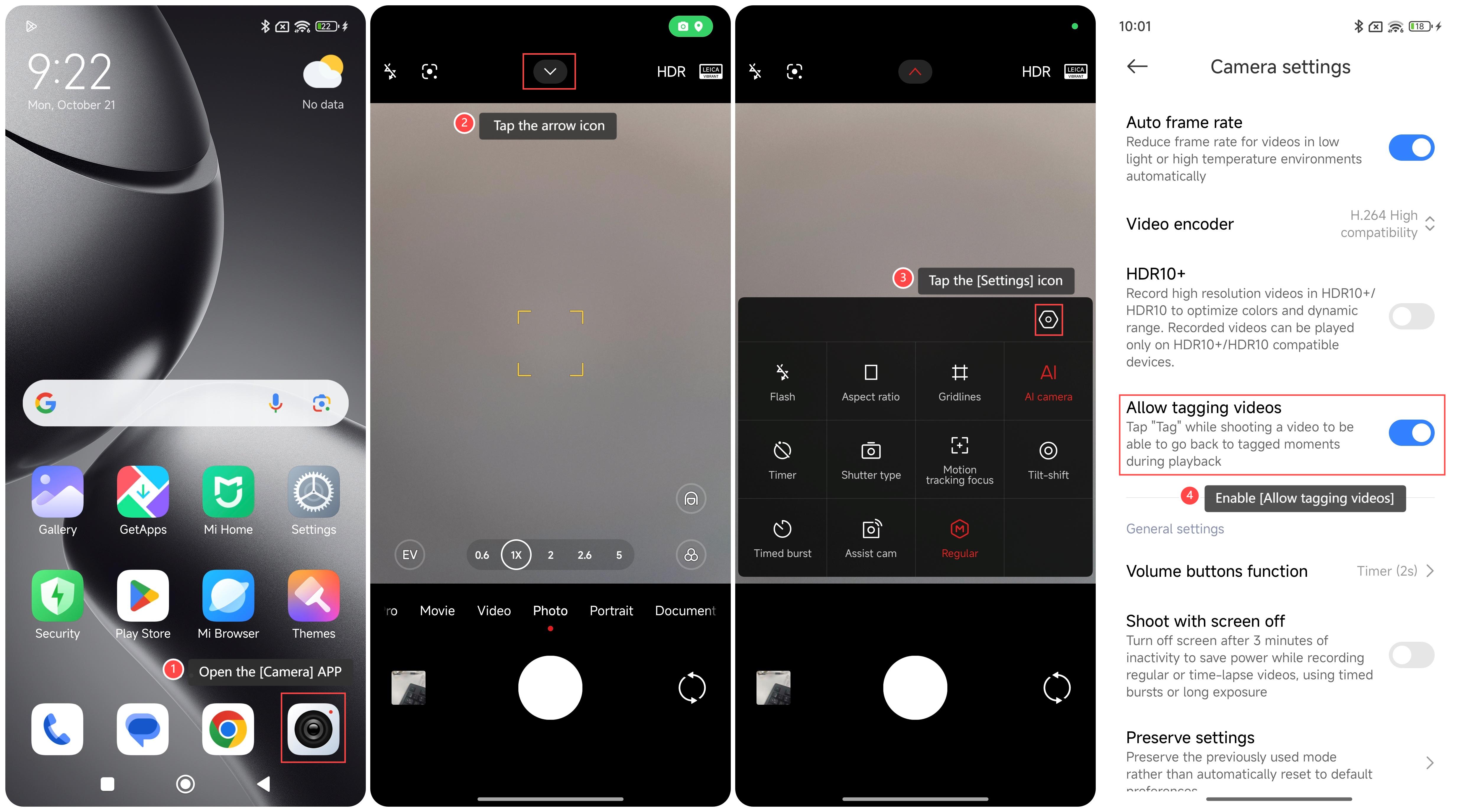
To tag video on your phone, please refer to the following steps:
1. Open the [Camera] APP on your phone;
2. Tap the arrow icon on the top of the screen;
3. Tap the [Settings] icon;
4. Scroll down and enable [Allow tagging videos].
Note:
The number of tags during recording will be limited to avoid too many tags affecting the video playback experience.
To tag video on your phone, please refer to the following steps:
1. Open the [Camera] APP on your phone;
2. Tap the arrow icon on the top of the screen;
3. Tap the [Settings] icon;
4. Scroll down and enable [Allow tagging videos].
Note:
The number of tags during recording will be limited to avoid too many tags affecting the video playback experience.
Does it help?
Yes
No