

How to update the firmware of the Xiaomi Outdoor Camera CW500 Dual?
The firmware of the Xiaomi Outdoor Camera CW500 Dual refers to the software that controls the camera's hardware and provides its features and functionality. Firmware is the operating system embedded in the device that ensures it operates correctly and communicates with other devices or applications.
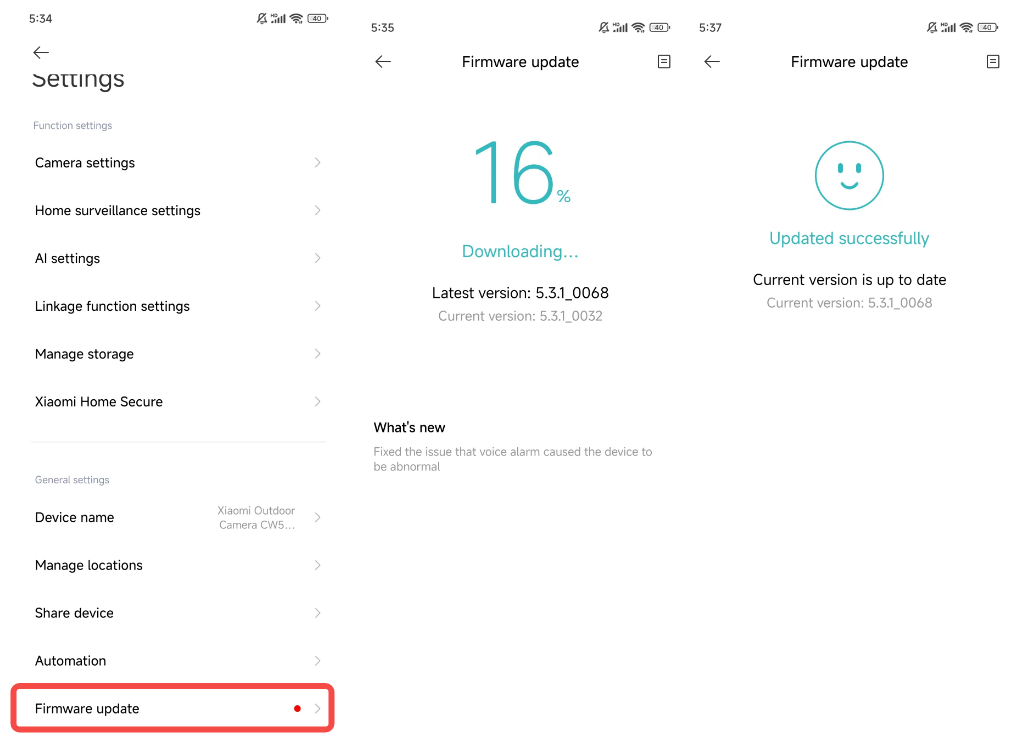
To update the firmware of the Xiaomi Outdoor Camera CW500 Dual, please refer to the following steps:
1. Open the Mi Home/Xiaomi Home APP on your phone;
2. Select the Xiaomi Outdoor Camera CW500 Dual;
3. Tap the three-dot icon at the upper right corner of the screen;
4. Tap [Firmware update];
5. Follow the instructions to upgrade the firmware.
To update the firmware of the Xiaomi Outdoor Camera CW500 Dual, please refer to the following steps:
1. Open the Mi Home/Xiaomi Home APP on your phone;
2. Select the Xiaomi Outdoor Camera CW500 Dual;
3. Tap the three-dot icon at the upper right corner of the screen;
4. Tap [Firmware update];
5. Follow the instructions to upgrade the firmware.
Does it help?
Yes
No