

Xiaomi Robot Vacuum X20 FAQ
Overview
1.Q: What is Xiaomi Robot Vacuum X20?
A: Xiaomi Robot Vacuum X20 is an intelligent planned path cleaning and vacuum robot. It can autonomously sweep and mop in the home and return to the cleaning station to clean the cloths when it is done, which greatly helps you to reduce the burden of cleaning the floor in the home.
2.Q: What are the features of Xiaomi Robot Vacuum X20?
A:
1.430mL independent large Dustbin +No washing pad, automatic rechargeable cleaning, no hands can complete the cleaning, can hold more rubbish, no need to frequently dump Dustbin, cleaning more efficient.
2.5200mAh large capacity battery, long life.
3.Maximum 5000Pa fan, APP control options (i.e. quiet, standard, powerful, super powerful). More suction power, cleaner sweeping.
4.Mechanical crash plate + two points TOF + laser range sensor obstacle avoidance design effectively reduces shoes and furniture collision.
3.Q: How do I use the on button on the Xiaomi Robot Vacuum X20?
A: Switch on/off
Press and hold the "Power" button of Main unit for 3 seconds, the indicator light will be on, and the Main unit will be switched on. When the Main unit is not charging and is paused, press and hold the "Power" button for 3 seconds to switch off the unit.
Pause
When the Main unit is in running state, press the Main unit "On" key briefly to pause cleaning, and press the "On" key briefly again to continue cleaning.
Tips: Main unit can't be switched off while charging; press any key to pause when cleaning, returning to charge, partial cleaning.
4.Q: How to use the Returning to charge button on Xiaomi Robot Vacuum X20?
A:1:Returning to charge, in pause, short press "Returning to charge" key to start returning to charge; in cleaning, short press "Returning to charge" key to pause cleaning, press "Returning to charge" key again to pause cleaning, press "Returning to charge" key again to pause cleaning, press "Returning to charge" key again to start returning to charge. During cleaning, short press "Returning to charge" key to pause cleaning, press "Returning to charge" key again, Main unit will start Returning to charge, and judge whether to clean mop according to cleaning mode.
2: Child lock, long press "Returning to charge" key for 3 seconds, you can turn on or off the child lock function, after turning on the child lock, the Main unit key is invalid, to avoid misoperation. Short press any key to pause, then long press "Returning to charge" key for 3 seconds to close the child lock.
Tips: Press any key to pause when sweeping, returning to charge, partial sweeping.
5.Q: What are the meanings of the indicator lights on the Xiaomi Robot Vacuum X20?
A:Main unit
White-Working normally
Yellow-Wi-Fi disconnected
Slowly blinking white-In charging
Blinking yellow-Error
Blinking white-Returning to charge/Firmware is upgrading
Slowly blinking white-In charging
Base
White-Base status normal
Blinking yellow-Base status abnormal
Off-full power/power off/do not disturb mode
6.Q: Does the Main unit of Xiaomi Robot Vacuum X20 have a WiFi indicator?
A: The Main unit does not have a separate WiFi indicator light. The WiFi indicator light is an orange flash twice for the Main unit.
Product introduction and use
1.Q:What are the Package contents of Xiaomi Robot Vacuum X20?
A:
Package contents:
Robot Vacuum x1
Mop-cleaning Station x1
Pre-installed on the Robot Vacuum:
Dust Compartment x1,Filter x1(Pre-installed on Dust Compartment), Main brush x1,Main brush cover x1,Mop frame x2,Mop x2,Pad(Pre-installed on Mop frame),Side brush x1
Pre-installed on the Mop-cleaning Station:
clean water tank x1,dirty water tank x1, washboard x1,Power adapter x1
Other:
User manual x1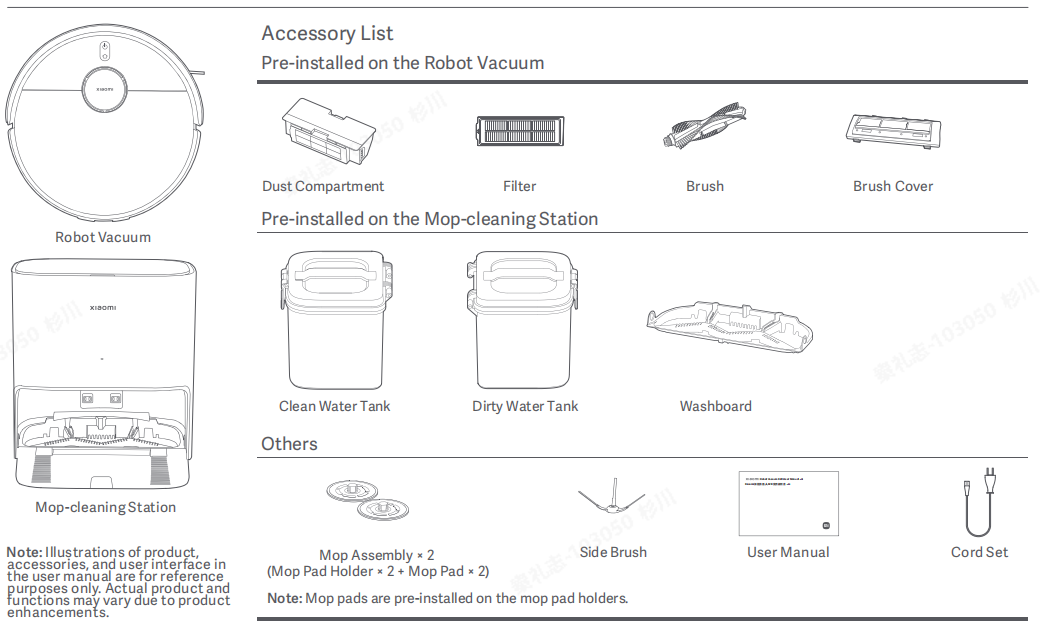
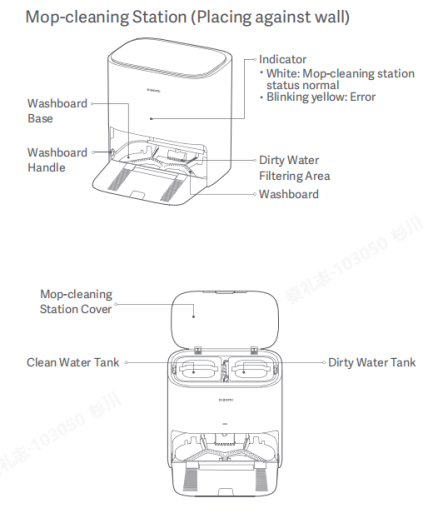
2.Q: What is cleaning base?
A: Cleaning Base is developed from Cleaning Station, which not only supports charging but also integrates more and more complex functions, such as supporting the functions of cleaning mop, collecting the waste water and so on, thus making the cleaning function of Robot Vacuum more and more powerful.
3.Q: How to view SN of Xiaomi Robot Vacuum X20?
A:Check the bottom label of Main unit to see the SN information, and check the bottom label of cleaning station to see the device SN information.
4.Q: Can Xiaomi Robot Vacuum X20 be used directly after unpacking?
A: It can be used directly. After unpacking, please make sure the package contents are not missing, and then turn on the machine to learn how to use it by connecting it to Mi Home.
Tip: For first time use, please follow the User Manual to plan the Base position, and manually lean the Main unit up against the cleaning station to align the charging cartridge. Let the Robot Vacuum fully charged first and then start from the cleaning station to clean and build a map or quickly build a map and then use it, the full charge time is about 4-5 hours.
5.Q: What mode should I choose for the first time using the Xiaomi Robot Vacuum X20?
A: Give priority to the sweeping mode. For scenes with a lot of dust and debris, use the standard mode. Don't use the mopping function for the first time, select the sweeping mode to complete Cleaning up all areas, and then install the pallet wipe to select the sweeping and mopping mode.
Tip: the first time you use it, we recommend that you organise the inner objects to avoid entanglement and jamming. Priority to build a map to do map planning, and then use.
6.Q: Why to clean Xiaomi Robot Vacuum X20 regularly?
A:The Robot Vacuum belongs to the cleaning category of appliances, with cleaning functions such as sweeping, mopping and collecting rubbish. Regular dumping of rubbish and cleaning of the Pad and Roller Brush can restore the Robot Vacuum's cleaning ability.
Robot Vacuum is covered with various sensors, need to explore the surrounding environment, build maps and avoid Cross obstacles obstacles, so when the device is dirty, please promptly use a wet rag with wrung out water to clean the surrounding dust, eliminate the intermingled foreign objects, can restore the Robot Vacuum's Cross obstacles and recognition ability.
Caution:
Please do not use detergents or sprays and other chemicals to clean.
7. Q: How do I standby the Xiaomi Robot Vacuum X20 after completing a task?
A: After the cleaning task is completed, it is recommended to let the device return to the cleaning station to charge and standby, to ensure that the device has sufficient battery power.
8.Q: What should I do if the side brush of Xiaomi Robot Vacuum X20 gets tangled?
A: When the side brush gets tangled, please clean up the tangled objects in time and check whether the side brush bristles are damaged. When cleaning again, you can first clean the ground of easily entangled items, such as wool, thin rope, etc.
9.Q: Xiaomi Robot Vacuum X20 can't be switched off on the base?
A: The Robot Vacuum will always be in charging or fully charged when charging on the base. Stay away from the base and press and hold the power on button for 3 seconds to switch off the device.
10.Q: What kind of life scenarios can Xiaomi Robot Vacuum X20 be used for?
A: This product is designed for floor cleaning in a household environment only. Please do not use it in outdoor, non-floor, commercial or industrial environments, which may result in equipment failure, loss, etc.
11.Q: How to use the Do Not Disturb mode of Xiaomi Robot Vacuum X20?
A: Do Not Disturb mode is off by default, and the time period is 22:00-08:00, you can switch the Do Not Disturb mode on/off or change the Do Not Disturb time period in the app.
During the Do Not Disturb time period, the Main unit will not automatically renew sweeping, active voice broadcasting, and the indicator light is off.
12.Q: How to use Xiaomi Robot Vacuum X20 timed cleaning?
A: You can set the timed cleaning in the APP, after the timed cleaning is set, the Main unit will start to clean automatically at the specified time, and return to the base to charge automatically after the cleaning is finished.
13.Q: How to save the complete map in Xiaomi Robot Vacuum X20?
A: Click start cleaning in Mi Home App or Main unit, Main unit starts from the base and returns to the base autonomously, it will generate a complete partition map, and it will automatically learn the home environment and build a complete map during the cleaning process. (When cleaning, please open the door of the area to be cleaned to ensure the integrity of the map.)
14.Q: How does Xiaomi Robot Vacuum X20 sweep the whole house?
A:When starting up for the first time, the Main unit will clean along the edge of the 6*6m area, and then clean in the shape of a bow until all areas are covered. cleaning up all areas will be cleaned by the Main unit according to the room, first along the edge, and then in the shape of a bow, in order to complete the cleaning. After cleaning up all areas, Main unit will clean up by room, first along the edges, then bow cleaning, in order to complete cleaning, after cleaning up Main unit will automatically return to the base.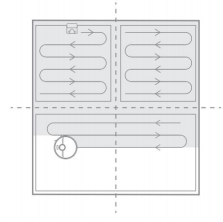
15.Q: Can Xiaomi Robot Vacuum X20 be charged all the time?
A: Xiaomi Robot Vacuum X20 supports over-charging protection, and will automatically adjust to low-current charging when the power is full.
16.Q: Does Xiaomi Robot Vacuum X20 have motor overload protection?
A: All motors on the machine have overload protection, including the main brush motor, side brush motor, main wheel motor, and mopping motor, which will be automatically activated when foreign objects are entered and blockage is serious resulting in overload.
17.Q: Are there any consumables on the Xiaomi Robot Vacuum X20 that need to be replaced regularly?
A:Xiaomi Robot Vacuum X20 consumables include Main brush, Side brush, Main brush cover, Cleaning brush, Filter, Pad, etc., which need to be replaced regularly to ensure the normal functioning and cleaning ability of the device.
| Component | Maintenance Recommendations |
| Main brush | It is recommended to clean weekly and replace the main brushes every 6-12 months to ensure effective sweeping. |
| Filter | It is recommended to clean weekly and replace the filter element every 3-6 months. |
| Side brush | It is recommended to clean it once a month and replace the side brushes every 3-6 months to ensure the cleaning effect. |
| Pad | It is recommended to replace the mop cloth every 3 months to ensure the sweeping effect. |
18.Q: How to use the base of Xiaomi Robot Vacuum X20?
A: Place the base against the wall on a level surface, make sure there is more than 0.5 metres of space on both sides of the base, and connect the plug to a power outlet. In order to get a better experience of using the mobile client, please put the base in the Wi-Fi coverage areA:
1、Install the base in the open location with good Wi-Fi signal as much as possible.
2、Install the Power Adapter to the base and connect the power.
3、Before using, place the Main unit to the base, the Main unit will automatically turn on and charge.
4、After it is fully charged, the Main unit indicator light will be on for 10 seconds and then turn off.
Tip: First time charging, in order to protect the battery, please use it after full charge. When the battery is not fully charged, it may not be able to switch on, please place the Main unit in the base to charge it. the Main unit will switch on automatically after connecting to the base, and it cannot be switched off during the charging process.
19.Q: How to charge Xiaomi Robot Vacuum X20?
A: Press and hold the on/off button, wait for the power indicator to light up and then put the Main unit against the base to charge.
Tips: When the power is low, the device may not be able to switch on, please put the Main unit directly against the base.
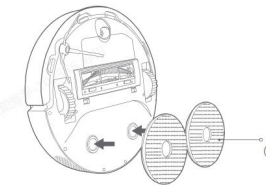
20.Q: How to install the mop on Xiaomi Robot Vacuum X20?
A:According to the illustration, install the mop assembly to the snap position as shown in the illustration, when you hear a "click" sound, it means it is installed in place.
21.Q: How do I fill water into the water tank of Xiaomi Robot Vacuum X20?
A: Open the clean water tank cover, fill the tank with water to the highest level, and then fasten the cover.
Tip:
Please check the dirty water tank regularly, if there is any sewage, please pour it out promptly to make sure there is no water in the dirty water tank.
It is normal to see residual water leakage in the base after lifting the tank.
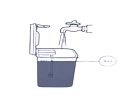
Install the clean water tank and dirty water tank into the base and fasten the base cover when finished.
Caution:
Do not inject hot water into the clean water tank to avoid deformation of the clean water tank.
When mopping the floor, please set up a virtual wall or exclusion zone in the carpeted areA:
Prohibit the use of cleaning products such as detergents, disinfectants, solid cleaning fluids, etc. to avoid corrosion and damage to the equipment.
In waterlogged environment, please clean up the water before using the cleaning or mopping function. After mopping, please take out and clean the dirty water tank, clean the cleaning brush, cleaning tank and sewage net in time to avoid odour and mould.
22.Q: How to start cleaning on Xiaomi Robot Vacuum X20?
A: Short press the on/off button to start cleaning, and press any key to pause when cleaning. After networking, you can start cleaning through mobile phone app.
Tips: Before cleaning, please fully charge and let the Main unit start from the base, please don't move the base during cleaning, please don't move the robot to avoid the map error and unable to Returning to charge.
If the battery is too low, it will not be able to start cleaning, please charge it first before starting cleaning.
23.Q: How does Xiaomi Robot Vacuum X20 return to charging?
A:Main unit will automatically return to charge when the power is too low during cleaning, and will automatically return to continue cleaning when the power is sufficient; in standby, short press "Returning to charge" key to start Returning to charge; in cleaning, short press "Returning to charge" key to pause cleaning; in standby, short press "Returning to charge" key to pause cleaning. In cleaning, press "Returning to charge" button briefly to pause cleaning, press "Returning to charge" button briefly again, the Main unit will start. Returning to charge and judge whether to clean the mop according to the working mode.
Tips: If the Main unit does not find the base, please manually put the Main unit back to the base for charging, when putting it back, please make sure you hear the voice prompt of "start charging" before leaving.
24.Q: How does Xiaomi Robot Vacuum X20 clean the pad automatically?
A:Returning to wash in the middle: When Main unit enters the mode of sweeping and mopping or mopping only, when the default cleaning area accumulates to 10m2 (APP can choose 10m2 or 5m2), it will automatically return to the base for pad cleaning, and return to the previous position after the cleaning is completed to continue the unfinished work;
End the task to start self-cleaning: after the Main unit finishes the mopping task and Returning to charge, the base will start to clean the pad and air-dry it.
25.Q: How to maintain main brush on Xiaomi Robot Vacuum X20?
A:
1.Flip the Main unit over and hold down both release buttons to remove the MAIN BRUSH cover.
2. Remove the main brush upwards.
3, Install back the main brush and main brush cover and press the main brush cover to install in place.
Tip: It is recommended to replace the main brush every 6-12 months to ensure effective cleaning.
26.Q: How do I maintain the Dustbin and Filter on the Xiaomi Robot Vacuum X20?
A:
1. Lift the cover of Main unit, press and hold the Dustbin release button to take out the Dustbin upwards.
2. As shown in the picture, open the Dustbin cover and pour out the rubbish.
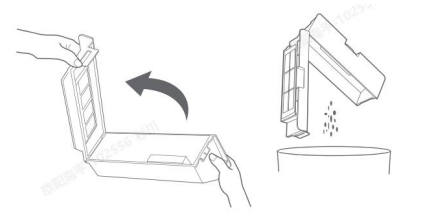
Tips: To avoid Filter clogging, gently knock Dustbin when dumping rubbish.
Remove Filter as shown in the picture, use cleaning brush to clean Dustbin and Filter, then clean it with water, dry it and put it back.
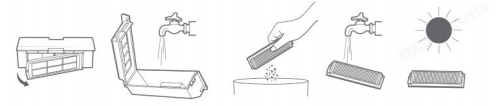
Tip: It is recommended that Dustbin is thoroughly cleaned at least once a week, please be sure to dry Dustbin and Filter before use. Do not use directly after washing to avoid damage to the product.
27.Q: How do I maintain the universal caster on the Xiaomi Robot Vacuum X20?
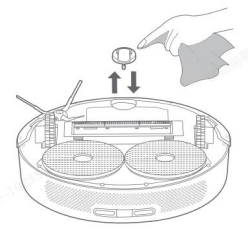
A:1、Flip over the Robot Vacuum and pull out the universal caster upwards.
2、Clean the hair and dirt on the caster.
3, Reinstall the caster and press it firmly.
28.Q: How to maintain the side brush on Xiaomi Robot Vacuum X20?
A:
1、Flip over the Main unit and pull out the side brush upwards.
2、Clean the hair and dirt on the side brush.
3、Reinstall the side brush.
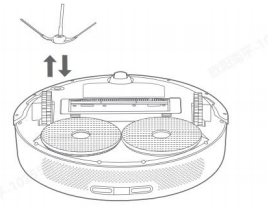
Tip: It is recommended to clean it once a month and replace the side brush every 3-6 months.
29.Q: How to clean the dirty water tank and cleaning holder of Xiaomi Robot Vacuum X20?
A: Take out the dirty water tank and dump the sewage: Lift the base cover upwards and take out the dirty water tank.
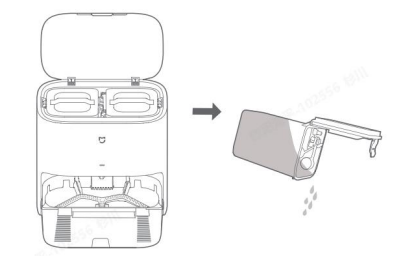
After cleaning the pad, remove the cleaning holder and the cleaning plate. After cleaning, please put back the cleaning holder in time.
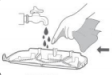
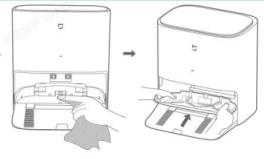
Tips: 1, new products will be factory water test, may remain a small amount of water stains, this is a normal phenomenon.
2、After mopping the floor, please take out and clean the dirty water tank in time to avoid odour and mould.
3, cleaning plate has residual water is a normal phenomenon.
30.Q: Does the yellowing of the Xiaomi Robot Vacuum X20 charging pole piece affect its use?
A: Xiaomi Robot Vacuum X20 charging pole piece is exposed in the complex environment, with the use of time growth, there may be different degrees of oxidation, yellowing and other normal phenomena, it will not affect the Returning to charge function, but you need to regularly wipe with a dry pad to avoid dirty contact poor.
31.Q: How to maintain the battery of Xiaomi Robot Vacuum X20?
A: Xiaomi Robot Vacuum X20 has a built-in high-performance lithium-ion rechargeable battery pack. To maintain battery performance, please keep the Main unit charged for daily use.
Tips: If the unit is not used for a long time, please switch it off and store it, and recharge it at least once every three months to avoid damage to the battery due to over-discharge.
32.Q: Does Xiaomi Robot Vacuum X20 support child lock? How to set it?
A: Xiaomi Robot Vacuum X20 supports child lock function, Returning to charge button or APP child lock, when locking, operate the Main unit button orange flashing, Returning to charge button long press 3S to open/close the child lock.
33.Q: Does Xiaomi Robot Vacuum X20 support UV light?
A: Xiaomi Robot Vacuum X20 does not support UV light.
34.Q: Does Xiaomi Robot Vacuum X20 support water electrolysis?
A: Xiaomi Robot Vacuum X20 does not support water electrolysis.
35.Q: Why does Xiaomi Robot Vacuum X20 clean the pad frequently?
A: The Main unit washes and dampens the pads before each sweeping or mopping task;
Midway back to wash: Throughout the mopping task, it will automatically return to the self-cleaning base to wash back according to the mopping area to keep it relatively clean and mop the floor better. Defaultcleaning area accumulated to 10 square metres (APP can choose 10 square metres or 5 square metres), automatically return to cleaning, cleaning is completed to return to the previous position, continue the unfinished work;
End the task to start self-cleaning: after the Main unit completes the mopping task and Returning to charge, the self-cleaning base will start to thoroughly clean the pad and air dry.
36.Q: How to deal with clean(dirty) water tank abnormality when cleaning pad in Xiaomi Robot Vacuum X20?
A: When the clean water tank is not enough, or the clean water tank is not installed, or the dirty water tank is full, or the dirty water tank is not installed, the cleaning will be paused and an exception will be prompted. After filling enough clean water, dumping the sewage and putting the dirty water tank, you can tap the start button of APP to start the cleaning and continue to finish the current task.
37.Q: How to reset the system of Xiaomi Robot Vacuum X20?
A:Remove the Dustbin from the Main unit, stand the Main unit upright, or open the Xiaomi Robot Vacuum X20 cover to do the following:
To reset the system, press and hold the reset button with a pin for 3 seconds, you will hear "Reset System Successfully", the Main unit will restart automatically, and the scheduled cleaning and WiFi settings will be restored to the default state.
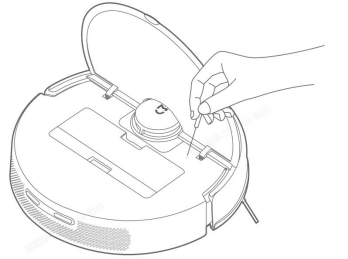
38.Q: How to recover the system of Xiaomi Robot Vacuum X20?
A:Open Xiaomi Robot Vacuum X20 cover can be operated as follows: Recover the system using a pin and long press the reset button for 10 seconds, you will hear "Recover System Successfully", Main unit will restart automatically, scheduled cleaning and WiFi and other related settings will be restored to the factory state. The Main unit will restart automatically, scheduled cleaning, WiFi and other related settings will be restored to the default state.
39.Q: Does Xiaomi Robot Vacuum X20 have Dustbin full reminder?
A: Xiaomi Robot Vacuum X20 does not support Dustbin full reminder.
40.Q: Can I use sticker on Xiaomi Robot Vacuum X20?
A: It is recommended not to use the sticker, which will cover the LIDAR, obstacle avoidance sensor and infrared sensor and affect the operation of Xiaomi Robot Vacuum X20.
41.Q: Why doesn't Xiaomi Robot Vacuum X20 go backward or turn when running radar container?
A:Xiaomi Robot Vacuum X20 has no radar sensor. The obstacle departure relies on the mechanical crash plate + two points TOF, 90-103.5mm area is recommended to set up a virtual wall.
42.Q: How to use Xiaomi Robot Vacuum X20 to achieve better mopping effect?
A: It is recommended to build a complete map through APP and set the rotating pallet of Main unit, so that the mopping is more even, cleaner and more efficient.
43.Q: How to create a map on Xiaomi Robot Vacuum X20?
A:
1、First time use, follow the APP prompts to choose Quick Build Map or Cleaning up all areas, APP will automatically save the map when finished.
2、When using in a new environment (such as different floors), create a new map in Settings>Map List>Create Map of APP plug-in, and the maps of different environments can be distinguished by different naming.
Pay attention to the following situations when creating maps:
A: Main unit is triggered from the base, please don't change the position of the base in map building;
B. Main unit will save the new map after automatically returning to charge, please don't interrupt or move Main unit during map building; the presence of highly reflective objects in the environment, such as mirrors, windows and bright metal, etc., will affect the effect of map building.
44.Q: Does Xiaomi Robot Vacuum X20 support cleaning with water?
A: No. Directly rinsing with water will cause water ingress into the Xiaomi Robot Vacuum X20, causing damage to the internal electronic components. It is recommended to clean the main brush cover, main brush, side brush, dustbin, and pad separately, and the main unit should be cleaned with a damp pad.
45.Q: How much area does Xiaomi Robot Vacuum X20 clean before it automatically cleans the pad?
A: Xiaomi Robot Vacuum X20 will automatically return to the base to clean the pad after every 10 square metres of mopping (you can choose 10 square metres or 5 square metres by APP).
46.Q: Can Xiaomi Robot Vacuum X20 add water to clean the pad halfway?
A: If the Main unit needs to add water during the cleaning process, you can press any key to pause, take out the clean water tank and add water, and then press the start key to continue the work. pads do not need to be cleaned manually, the Main unit will automatically return to the base to clean the pads after a period of time.
47.Q: Xiaomi Robot Vacuum X20 Why is the cleaning sound louder?
A: We use a multi-bump mechanical cleaning pad, there will be sound during the cleaning process, when pumping the water vacuum will have a short break in the sound, is a normal phenomenon.
48.Q: How is the Xiaomi Robot Vacuum X20's ability to clean stubborn stains?
A: Mopping with rotating lifting pallet (more close to the ground) for cleaning, for stubborn stains, it is recommended to add water in advance to soften and then clean.
49.Q: What small objects can Xiaomi Robot Vacuum X20 recognise?
A: Xiaomi Robot Vacuum X20 adopts dual-line laser TOF obstacle avoidance, small objects higher than 3cm can be recognised, and those lower than 3cm are recommended to be put away before mopping, e.g. weighing scales, sockets.
50.Q: What should I pay attention to when using Xiaomi Robot Vacuum X20 for the first time?
A: 1. Xiaomi Robot Vacuum X20 is equipped with a 5200ma battery, and the Robot Vacuum has about 30% of power before delivery, so it is recommended to use it for the first time after opening the box with a full charge.
2.Fill the clean water tank with water to the Max water level line.
3.Connect the APP to the network, put the Main unit in the base and start to build.
51.Q: Will the Xiaomi Robot Vacuum X20 bypass tables and chairs?
A: Xiaomi Robot Vacuum X20 uses radar + mechanical collision Cross obstacles, encountering tables and chairs will effectively avoid cleaning along the edge.
52.Q: How long does it take for Xiaomi Robot Vacuum X20 to clean a room?
A: In order to ensure the cleaning power of the Robot Vacuum, Xiaomi Robot Vacuum X20 travels at a speed of 0.3m/s. The cleaning time fluctuates according to the complexity of the user's home environment.
53.Q: Why can't Xiaomi Robot Vacuum X20 avoid the scale blocks at home?
A: Xiaomi Robot Vacuum X20 is equipped with dual-line laser TOFCross obstacles, objects higher than 3cm can be recognised as Cross obstacles, and objects lower than 3cm are recommended to be put away before use, such as weighing scales, sockets, coils, children's toys and so on.
54.Q: Is it normal for the water tank of the Xiaomi Robot Vacuum X20 to have water stains after removing it from the base station?
A:
1. It is normal to have a small amount of water stains.
2. When Xiaomi Robot Vacuum X20 is running, there is negative pressure in the water pipe of the water tank, and it is normal that a small amount of water will flow out every time the water tank is taken out of the base.
3. The bottom of the base is equipped with drainage holes, and water will be discharged through the drainage holes.
55.Q: Does Xiaomi Robot Vacuum X20 clean the pad when it comes back from the station?
A:
1. Xiaomi Robot Vacuum X20 will confirm whether the pad needs to be cleaned or not based on the cleaning mode before entering the station.
2.If there is a mopping task to be performed when going out, the pad will be cleaned when returning to the station.
3.If APP selects cleaning mode and return to base after completing the task, then no cleaning task will be executed.
56.Q: Is it normal for the Xiaomi Robot Vacuum X20 to have water damage in the tank?
A:1. Xiaomi Robot Vacuum X20 has to go through sampling before delivery, and fresh water will be added to the water tank for tank test.
2. After the tank test is completed, the water will be poured out, and water stains remain in the tank is a normal phenomenon.
57.Q: Why does Xiaomi Robot Vacuum X20 go back to charging midway and continue cleaning?
A: Xiaomi Robot Vacuum X20 has 5200ma battery:
1.Xiaomi Robot Vacuum X20 has 5200ma battery, super long life.
2.When the battery is low during mopping, Main unit will go back to charging midway and at the same time, when the battery is above 60%, it will go out to charging midway and continue the unfinished task.
Note: If the Main unit is in the process of charging, manipulate the Robot Vacuum people to perform other commands, or open the Do Not Disturb mode, the subsequent will not perform the renewed sweeping function.
58.Q: Can Xiaomi Robot Vacuum X20 lift the pad?
A: Xiaomi Robot Vacuum X20 can lift the pad. 7mm (lifting mechanism).
59.Q: What is the capacity of Xiaomi Robot Vacuum X20 baseclean water tank and dirty water tank?
A: The capacity of Xiaomi Robot Vacuum X20’s clean water tank and dirty water tank is 4L clean water tank+4L dirty water tank separately.
60.Q: How many times can the Xiaomi Robot Vacuum X20 baseclean water tank clean pads when it is full?
A: Xiaomi Robot Vacuum X20 base can clean pads up to 32 times. base logic first cleaning out of water (180ml), halfway back to cleaning out of water (daily: 120ml)
61.Q: How long is the cleaning range of Xiaomi Robot Vacuum X20?
A: Xiaomi Robot Vacuum X20 cleaning life time: cleaning life (standard gear about 150 minutes (standard mode)), mopping life (standard gear about 150 minutes (standard mode))
Mi Home App Related
1.Q: How to connect Xiaomi Robot Vacuum X20 to Mi Home App?
A: This product has been connected to Mi Home, and can be controlled and interconnected with other products through Mi Home App.
Scan the QR code to download and install the Mi Home App. If you have installed the Mi Home App, enter the Xiaomi Robot Vacuum X20 connection page. Or search for "Mi Home" in the app shop, download and install the Mi Home App, open the Mi Home App homepage, click on "+" in the upper right corner of the page, and add the Xiaomi Robot Vacuum X20 according to the prompts of the app. Vacuum X20.
Tips: Due to the upgrading and updating of Mi Home App, the actual operation may be slightly different from the above description, please follow the instructions in the current app.
2.Q: How to reset wifi on Xiaomi Robot Vacuum X20?
A: When the router changes the configuration, forgets the password or other reasons that the mobile phone can not connect to the Main unit, press and hold the Start button and Returning to charge button (7 seconds) until the voice prompts "Reset Wi-Fi, enter network configuration", and the button indicator flashes orange twice.
3.Q: How to upgrade the firmware of Xiaomi Robot Vacuum X20?
A: You can upgrade the firmware of Main unit by using Mi Home App, please make sure the Main unit is on the base and the battery level is more than 30% before upgrading. The buttons are blinking when upgrading the firmware.
Path: In App - Settings - General Settings - Firmware Upgrade
4.Q: How to connect the App for Xiaomi Robot Vacuum X20?
A:Click to enter Mi Home App, you can pair the network via Bluetooth or Wifi.
5.Q: How to build a map quickly in Xiaomi Robot Vacuum X20?
A:First time you switch on the machine, there is no map in APP. Place the Main unit on the base and select Quick Map Building in APP, the Main unit will only build the map without cleaning, the Main unit will automatically return to the base, the map building will be completed and the map will be saved automatically.
Tips: Please don't move the Main unit or the base during the map building process, and avoid people and pets to follow the Main unit.
6.Q: Xiaomi Robot Vacuum X20 quick map building is not complete due to obstacles?
A:Remove the obstacles and rebuild the map.

7.Q: How many maps does Xiaomi Robot Vacuum X20 support to save?
A: Currently it only supports saving 5 maps.
8.Q: What is Do Not Disturb mode?
A: During the Do Not Disturb time, the Main unit will not respond to Resume cleanup, scheduled cleaning and active voice announcement. Do Not Disturb mode is enabled by factory default from 22:00 p.m. to 8:00 A:m. Do Not Disturb mode can be turned off through Mi Home App.
Tip: During the Do Not Disturb time period, the Main unit charges for 10 seconds and the indicator light goes off.
9.Q:What is Cleaning up all areas?
A:When the map is not saved, select Cleaning up all areas, Main unit will clean the 6m×6m square area area by area; after the map is saved in APP, select Cleaning up all areas, Main unit will automatically plan the path to clean room by room, and return to charging base after the cleaning is finished. Returning to charge.
10.Q:Q: What is the Saving maps function?
A:After the vacuum-mop quickly creates a map or returns to the charging dock to charge after completing a cleaning task, the updated map will be automatically saved in the Mi Home/Xiaomi Home app. Once a map has been created, you can use the app to split or merge areas, or customize room names.
11.Q:What is the Zoned cleanup function?
A:You can set up a zoned cleanup in the app, and the vacuum-mop will clean the areas you select.
Note: Zoned cleanup cannot completely keep the vacuum-mop inside the selected areas during cleaning. Remove any obstacles around the areas prior to cleaning increase the vacuum-mop goes out of the selected areas.
12.Q:What is the Sleep function?
A:The vacuum-mop will automatically enter the sleep mode if it does notwork or be operated for more than 10 minutes in the non-charging state.Press any button or use the app to wake it up. The vacuum-mop will automatically turn off if it is in sleep mode for more than 6 hours.
Note: The vacuum-mop will not enter sleep mode while on the charging dock.
13.Q:What is Scheduled cleanup function?
A:You can schedule cleaning times in the app. The vacuum-mop will automatically start cleaning at the scheduled times, and return to the charging dock after the cleaning is completed.
Note: If the DND mode is enabled, the vacuum-mop will not perform the scheduled cleanups during the do-not-disturb periods.
14.Q:What is the Virtual walls/restricted areas function?
A: Using Mi Home App, you can set Virtual walls/restricted areas to prohibit the Main unit from entering areas that do not need to be cleaned.
Tips:
1, Before using this function, you need to save the map in the App.
2, Moving the Main unit or significant changes in the home environment may cause the original map to become invalid and Virtual walls/restricted areas to be lost.
Virtual walls, add virtual walls so that the sweeper can not pass through.
Path: In App - Top Right Settings - Virtual walls/restricted areas
Add: In Virtual walls/restricted areas setting page - click Virtual walls/restricted areas - move the virtual wall line/restricted area to the right area (you can enlarge or reduce the length of Virtual walls/restricted areas) - click the tick mark in the upper right corner-Save
Delete - On the Exclusion Zone/Virtual Wall Setup page - click on the Virtual walls/restricted areas to be deleted - click on the top right corner of the Virtual walls/restricted areas (X symbol) to delete - click on the tick mark in the top right corner to save.
Sweeping Restricted Areas, add sweeping restricted areas, the sweeper will not enter the area when sweeping.
Mopping restricted areas, add mopping restricted areas, sweeper will not enter the area when mopping.
15.Q: Does Xiaomi Robot Vacuum X20 support carpet pressurisation mode?
A: Xiaomi Robot Vacuum X20 does not support carpet pressurisation
16.Q: How to edit the area in Xiaomi Robot Vacuum X20?
A:Merge:In APP-upper right corner settings-exclusion zone and map editing-click on two neighbouring areas-click below to merge,
Split:In APP-upper right corner settings-exclusion zone and map editing-select an area to be split-select an area to be split-when splitting, you need to pay attention to the two endpoints of splitting point need to be on the boundary of splitting of the area-confirm it and then click on the tick mark rename, select an area to be renamed.
17.Q: How to delete the map in Xiaomi Robot Vacuum X20?
A:Restoring the factory settings will delete the map and settings that have been saved, you can also select the map to delete the current map.
18.Q: How to use custom cleaning on Xiaomi Robot Vacuum X20?
A:Before using the custom cleaning function, you need to save the map, after the map is saved, the room partition will be formed automatically, then APP plug-in main interface select custom cleaning.
In custom cleaning, select the room, you can set the cleaning times, modes and times for different rooms.
19.Q: How many scheduled cleaning does Xiaomi Robot Vacuum X20 support?
A: Scheduled cleaning supports up to 10 tasks. When setting up scheduled cleaning, it is recommended to set an interval of more than 2 hours to ensure that the last cleaning can be executed successfully; if the interval is too close, the last cleaning may be terminated.
20.Q: How to rename the map of Xiaomi Robot Vacuum X20?
A: Map renaming is supported. In More Settings > Map List > select the map you want to rename and rename it.
21.Q: Can Xiaomi Robot Vacuum X20 pause the air drying process?
A: 1. Xiaomi Robot Vacuum X20 air drying process can not be paused;
2. Xiaomi Robot Vacuum X20 connects to the APP, enters the APP homepage, clicks into the docking station, and you can choose to switch off air drying/on air drying.
22.Q: Why can't the map be displayed on the shared family account?
A: Software bug, reproduction method A account shared family group to B account administrator rights, B account accepts the use of shared family group to add binding Xiaomi Robot Vacuum X20, map encryption using the B account, decryption with matching need A account, resulting in the map can not be decrypted.
Solution: Use your own Xiaomi account to connect to the APP.
FAQ & Troubleshooting
1.Q: What should I do if my Xiaomi Robot Vacuum X20 cannot connect to the internet?
A: 1. Make sure the WiFi password entered when connecting is correct, WiFi user name cannot be with Chinese characters or the password setting contains special characters such as @¥%, if so, please reset the account and password to English or with numbers and letters and then try again;
2、Check whether the router is connected to the external network normally, you can try to open the web browsing through mobile phones or computers connected to WiFi to see whether it is smooth;
3、Check whether the distance between the router and Robot Vacuum is too far (beyond 5 metres or there is a wall in the middle), you can try to move the Robot Vacuum to 1~2 metres away from the router to try to reconnect;
4, connect the mobile phone WiFi hotspot to try;
5、Check if the router is connected to more Xiaomi Robot Vacuum X20 causing the network to slow down or the router is not responding, you can try after restarting the router;
6, currently does not support the company's EAP802.1x authentication network, 5G signal network or public WiFi networks that require web authentication, such as: CMCC, ChinaUnicom, etc., you need to re-switch the network and try to connect;
7、After the network is turned off, such as Xiaomi Robot Vacuum X20 has not been networked for more than 1 hour, the WiFi module will turn off the network connection function, while the WiFi indicator light turns to blinking, and the connection can be resumed only after restarting Xiaomi Robot Vacuum X20;
8、Check whether the mobile phone restricts the permissions of the app, such as networking, positioning, etc., please allow the permission and try again;
9, the connection failure may also be related to the mobile phone model, you can try to use other different models of mobile phones to try to connect.
10, long press the reset button for 3 seconds, "reset system successfully".
2.Q: What should I do if my Xiaomi Robot Vacuum X20 is charging abnormally?
A: 1. Please check whether the base is powered on and whether the charging pads of the Main unit and the base are dusty, as charging abnormality occurs when dust is stained, please wipe it off and use it.
2.Check whether the Power Adapter is plugged in place and whether the base indicator light is on.
3.Q: What should I do if there is a high water level alarm in the wash tray of Xiaomi Robot Vacuum X20?
A:
1、Please take out the cleaning rack and pour out the residual water in the disc to confirm whether the filter port of the cleaning rack is blocked;
2、Wipe the inside of the base with a dry pad;
3、Put the cleaning rack back to the base and press it into place;
4. Make sure the sealing strip of clean water tank/dirty water tank is not broken or deformed, if it is broken, please contact the after-sales service.
4.Q: What precautions should I take before cleaning the Xiaomi Robot Vacuum X20?
A: Please fully charge the Main unit and start cleaning from the base.
Before cleaning, please tidy up your home furniture and environment, and put away fragile products and sundries on the floor of your home in advance.
5.Q: Will the cleaning efficiency of Xiaomi Robot Vacuum X20 be reduced in a complicated environment?
A: In order to ensure cleaning coverage, the Main unit will clean all corners of the house. In complex environments, there will be more turning and movement along the edges, and the cleaning efficiency may be reduced.
6.Q: Xiaomi Robot Vacuum X20 is loud when cleaning?
A: 1, you need to confirm whether the brush is wrapped in foreign objects, making a noise, you need to clean the brush in time, otherwise it will cause damage to the brush. 2, in order to ensure the cleaning effect, the Main unit uses a larger suction fan.
2, in order to ensure the cleaning effect, the Main unit adopts the fan with more suction power, the dust suction effect is stronger, and the sound is relatively bigger. cleaning can use the quiet gear with less sound to do the work.
7.Q: Does the Xiaomi Robot Vacuum X20 make a noise when cleaning?
A: When the Main unit is working on smooth tiles and wooden floors, a slight sound may be produced when the bottom scraper rubs against the floor, and when the Main unit passes through the joints of the tiles and floors, it will touch and clean the joints of the floors, which may produce a slight "clacking" sound. These sounds do not affect the normal use of the Robot Vacuum.
8.Q: How to deal with Xiaomi Robot Vacuum X20 when it is stuck during cleaning?
A: When cleaning, the Main unit may get stuck on slippers, plastic bags and other debris at home, please try to put the Main unit in a nearby cleaning area to continue cleaning after dealing with the jamming problem.
Please try to tidy up the clutter at home before cleaning to avoid the Main unit getting stuck during cleaning.
9.Q: What should I do if the upper surface of the Xiaomi Robot Vacuum X20 gets stuck during cleaning?
A: When the Main unit meets the bottom of the furniture which is similar to the height of the unit during cleaning, the upper surface of the unit may get stuck. Please set Virtual walls/restricted areas to prevent the Main unit from re-entering.
10.Q: How to deal with the side brush and main brush entanglement when cleaning the Xiaomi Robot Vacuum X20?
A: When cleaning the Main unit, the side brushes and roller brushes may get tangled with the Power Adapter and charging cables at home, please try to put the Main unit in a nearby cleaning area to continue cleaning after dealing with the tangled problem.
Please try to tidy up the clutter in your home before cleaning to avoid the Main unit from getting tangled during cleaning.
11.Q: What is the reason for repositioning failure of Xiaomi Robot Vacuum X20?
A: Don't move the Main unit manually when the Main unit is running, the Robot Vacuum runs from base out. try to make sure that you don't stand next to the Main unit when repositioning it.
12.Q: What is the reason that Xiaomi Robot Vacuum X20 does not slow down and collide with obstacles when cleaning?
A: The Main unit has LDS laser sensor and edge sensor, which can detect obstacles and slow down in advance. However, for some darker colours, smaller tables and chairs and some shorter obstacles, it may not be detected and collision will trigger the mechanical collision sensor, which is a normal situation.
13.Q: What is the reason that Xiaomi Robot Vacuum X20 collides with the wall when cleaning along the edge?
A: The Main unit itself has a mechanical impact plate + two TOF points, when cleaning along the edge, it will collide with the skirting line or dark coloured wall and keep a certain distance, which is a normal phenomenon.
14.Q: What should I do if my Xiaomi Robot Vacuum X20 cannot be switched on?
A: Battery power is low, please charge it on the base before use. The ambient temperature is too low (below 0℃) or too high (above 40℃), please use it in 0-40℃ environment. Confirm that the base is powered on normally, the charging pole piece is not dirty and oxidised, the base is not collapsed after charging but still can not be switched on, please contact the after-sales service in time.
15.Q: What should I do if I can't charge my Xiaomi Robot Vacuum X20?
A:
1、If Robot Vacuum can not be charged, disconnect the base, wait for 1~2 minutes after the base indicator light is off, re-power on the base, and put Robot Vacuum back to the base after switching off to confirm whether Robot Vacuum can be charged or not; if Robot Vacuum prompts that it is charging, wait for 2-3 hours to confirm whether If the Robot Vacuum indicates that it is charging, wait for 2-3 hours to confirm whether the Robot Vacuum can be charged normally.
2、The base is not powered on, please make sure both ends of the base Power Adapter are plugged in. If there is poor contact, please clean the base shrapnel and Main unit charging contact. Please clean the base in time if there is any foreign matter inside the base;
3、If the Robot Vacuum can not be charged, disconnect the base, wait for 1~2 minutes after the base indicator light is off, re-power on, and put the Robot Vacuum back to the base to confirm whether the Robot Vacuum can be charged or not; if the Robot Vacuum prompts charging, wait for 2-3 hours to confirm that If the Robot Vacuum indicates that it is charging, wait for 2-3 hours to confirm whether the Robot Vacuum can be charged normally.
16.Q: Why does Xiaomi Robot Vacuum X20 consume power quickly when cleaning?
A:After the Main unit has been charged and left for a long time, the power may drop quickly in the first few minutes of cleaning, which is a normal phenomenon, and after a few minutes, the power consumption will return to the normal state. The Main unit will consume power faster when cleaning with the Power Gear.
17.Q: What may be the reason for the failure of Xiaomi Robot Vacuum X20 Returning to charge?
A:There are too many obstacles near the base, please put the base into the open area, make sure there are no obstacles within 0.5m on both sides of the base and 1.5m in front of the base.
The Main unit did not start from the base before cleaning, and the base was not found during cleaning, please try to make the Main unit start from the base for cleaning.
If the Main unit has been moved during cleaning, the repositioning of the Main unit fails when cleaning continues, please put it back to the base before starting a new task.
18.Q: Why is the Xiaomi Robot Vacuum X20 charging docked repeatedly?
A: Please check whether the base and Main unit charging pads are dusty, as dusty charging pads can cause repeated docking, please wipe them and use them.
19.Q: What should I do if I can't remove stubborn stains when mopping the floor with Xiaomi Robot Vacuum X20?
A: Some stubborn stains can not be removed when mopping the floor, add water in advance to moisten and need to manually assist in cleaning.
20.Q: What should I do if the floor of Xiaomi Robot Vacuum X20 gets dirtier and dirtier?
A: 1. The ground is too dirty, mopping the floor, please regularly back to the base cleaning padpad wear and tear, please replace in a timely manner.
2. When Robot Vacuum is in the pioneer stage, the ground is more dusty, so it is recommended to sweep before mopping, and when you finish sweeping, remove the dirt on the side brush before mopping;
3.It is recommended to clean the side brush regularly to prevent the side brush from being dirty and affecting the mopping effect.
21.Q: Xiaomi Robot Vacuum X20 pad air dry and time consuming?
A: 1. Pad cleaning and wet state to pad air-drying state, there will be close to 6 hours of cold air blowing dry (dryness > 85%).
2. The power supply of the air-drying fan is provided by the base adapter, and the power consumption of the pad air-drying is about 0.02 degree.
3.Xiaomi Robot Vacuum X20 will perform the air drying task after cleaning task and pad cleaning is completed, if you need to turn off the pad air drying task, you can open the APP and click on the base of Xiaomi Robot Vacuum X20. Choose to turn on and off the pad drying task.
22.Q: Why does the Xiaomi Robot Vacuum X20 make a louder cleaning sound?
A:
1. The Robot Vacuum uses multiple bumps to mechanically clean the pads, in order to enhance the pad cleaning effect.
2. The cleaning brush plate will scrape and clean the pad, which will make sound during the cleaning process.
3. pad cleaning process when pumping water vacuum pumping will have a short broken sound, is a normal phenomenon.
23.Q: What should I do if the Xiaomi Robot Vacuum X20 map is skewed and overlaid?
A:
1、Confirm that the map has been saved successfully (there is a partition icon on the region page and you can use the region function normally)
2、Turn off the power switch, reboot and then manually place the Robot Vacuum to charge and try to recover the map. Recovery failed, replace the cleaning location to rebuild the map
Suggestions for use:
1, the base against the wall correctly placed (ensure that the base left and right reserved 0.5m, 1.5m in front of no obstacles)
2, Robot Vacuum robot in the process of work, do not arbitrarily move, artificial help Robot Vacuum robot.
3、If there is direct light and mirror reflection at home, it will lead to messy construction.
Direct light: We suggest you to pull the curtains or change the time to build the map.
Mirror reflection: It is recommended to cover the bottom 15cm.
Regularly check whether the side of the navigation scanning component is dirty or not, can be wiped with a clean pad or paper towel.
24.Q:What should I do if the Xiaomi Robot Vacuum X20 moves backwards?
A:1.We suggest check whether the drive wheel is entangled with foreign objects.
2、Check if the LDS of Robot Vacuum is rotating normally, please try to lightly radar the top cover of the sensor to check if the rebound is normal.
3、Please check whether there is any foreign matter or hair on the rotating part of LDS, which may cause the rotation to be unsmooth or stop rotating, if there is any, please try to take it out;
4、Please check whether there is any uneven or upturned sticker or large objects on the surface of the Robot Vacuum and the impact plate and Robot Vacuum.
5、Please try to tap the plate to make sure that the plate is in a reboundable state.
6、Please try to restart the Main unit and try again.
25.Q:Xiaomi Robot Vacuum X20 report abnormal crash plate?
A:1. Please try to tap the plate to make sure it can bounce back;
2.Please make sure the Robot Vacuum wheelset is not slippery or stuck with foreign objects, please move to a new ground to check and retry.
26.Q:Xiaomi Robot Vacuum X20 report side brush abnormality?
A:
1.Please try to remove the side brush and make sure the side brush and its components are not stuck with foreign objects or tangled hairs.
2. Please try to restart the Main unit and try again;
27.Q:Does Xiaomi Robot Vacuum X20 support multiple connections?
A:Robot Vacuum does not support multi-person connection. You can share the Robot Vacuum to others, you can share it in APP - Settings - General Settings - Xiaomi Robot Vacuum X20 Sharing, and the person being shared can perform basic Robot Vacuum operations and settings (start, pause, end cleaning, adjust suction and pad cleaning preferences) on Robot Vacuum. )
28.Q:Why is Xiaomi Robot Vacuum X20 offline?
A:1. WiFi signal is not good, please make sure the Main unit is in a good WiFi signal coverage areA:
2、Abnormal WiFi connection, reset WiFi and download the latest APP to try to connect again or change another mobile phone to reconnect.
3、Please make sure the Main unit is in power on state, it is offline in power off state.
29.Q:What should I do if the Xiaomi Robot Vacuum X20 carpet is not recognised?
A: Main unit recognition for mechanical crash plate + two points TOF no ultrasonic carpet recognition, can be identified through the map of the virtual wall, restricted areas set areA:
30.Q:Why dirty water tank does not pump water?
A:1、Please check whether dirty water tank is fastened or not
2、Please check if dirty water tank is placed in place
3、Please check if the pumping pipe at the bottom of the tank is clogged, after unclogging, you can pump water normally.
31.Q:Why does Xiaomi Robot Vacuum X20 consume power quickly when mopping?
A:1.When you receive the Robot Vacuum for the first time, it is recommended to do the following steps, Xiaomi Robot Vacuum X20 contains 5200ma battery, it is recommended to use it after it is fully charged for the first time out of the box.
2、Check whether Robot Vacuum has turned on the professional mopping mode during the cleaning process, if this mode is turned on, Robot Vacuum mops the floor with a Y-shaped path, which has more mopping effect and faster power consumption at the same time. It is recommended to choose different mopping modes according to the floor cleaning situation.
32.Q:Why is the base indicator light of Xiaomi Robot Vacuum X20 flashing orange?
A:You can try the following steps to self-check:
1.Check the base, clean water tank is filled with water.
2. Check if the dirty water tank is full, pour out the waste water and try again.
3. check the base cleaning tank is full, remove the cleaning rack to clean and retry.
4. clean water tank is not installed in place, re-install and retry.
5. dirty water tank is not installed in place, reinstall and retry.
6. Child lock is locked
33.Q:Is the Xiaomi Robot Vacuum X20 pad noisy when lifting and lowering?
A:The motor needs to run to lift up the pad holder when the pad is lifted, which is a normal phenomenon.
34.Q:Why does Xiaomi Robot Vacuum X20 indicate that the sewage tank is full? How to solve the problem?
A:1 When the water level of the base cleaning tank reaches the water level detection film, the Robot Vacuum can not recover the sewage when the Robot Vacuum triggers a fault prompt, "Cleaning tank full of water, please clean up in time". At this time, remove the Main unit, take out the cleaning rack, cleaning tank has sewage foreign matter, please clean up in time, no sewage, please wipe the Main unit sewage detection film, put back to the Main unit to re-open.
2 Please check whether the dirty water tank is full of water, please clean up the water in time.
3 Please check whether the sealing silicone gasket between dirty water tank and base is well installed.
4 Check if the dirty water tank is sealed, check if the sealing ring is installed properly.
5 If the Main unit has not finished the last cleaning, please clean it and turn on the cleaning again to see if it can work properly.
35.Q:What should I do if water does not come out of Xiaomi Robot Vacuum X20?
A:1.If the water does not come out of the base, power off the base, wait for 1~2 minutes after the light of the base goes out, re-power on the base and put the Robot Vacuum back to the base after switching off the power, try to start the cleaning pad several times on the top of the APP after the Robot Vacuum is switched on and check whether the Robot Vacuum comes out of the water normally or not.
Does it help?