

How to turn on the Xiaomi Smart Camera C500 Dual?
To turn on the Xiaomi Smart Camera C500 Dual, please refer to the following steps:
1. Plug the power adapter cable into the power port on the camera, and the camera will automatically turn on;
2. When the indicator keeps in orange and a voice notification is heard, the camera is successfully turned on. If the indicator does not keep in orange, please press and hold the reset button for 7 seconds to restart the camera.
Note:
1. Please make sure to use the original power adapter cable provided to charge the camera to avoid the camera not working properly;
2. When the camera is turned on, do not turn the lens of the camera nor force it to rotate;
3. When the camera is turned on, do not turn the lens of the camera nor force it to rotate. If the positioning of the lens is inaccurate, please calibrate it in the Mi Home/Xiaomi Home APP.
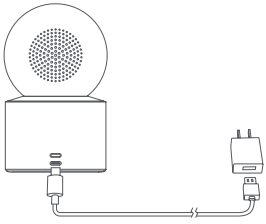
1. Plug the power adapter cable into the power port on the camera, and the camera will automatically turn on;
2. When the indicator keeps in orange and a voice notification is heard, the camera is successfully turned on. If the indicator does not keep in orange, please press and hold the reset button for 7 seconds to restart the camera.
Note:
1. Please make sure to use the original power adapter cable provided to charge the camera to avoid the camera not working properly;
2. When the camera is turned on, do not turn the lens of the camera nor force it to rotate;
3. When the camera is turned on, do not turn the lens of the camera nor force it to rotate. If the positioning of the lens is inaccurate, please calibrate it in the Mi Home/Xiaomi Home APP.
Does it help?
Yes
No