

How to use Parental controls on the Xiaomi 14T?
The Xiaomi 14T offers parental controls to help manage screen time and set content restrictions, allowing you to choose age-appropriate content ratings, privacy settings, and screen time rules for your child's Google Account and device.
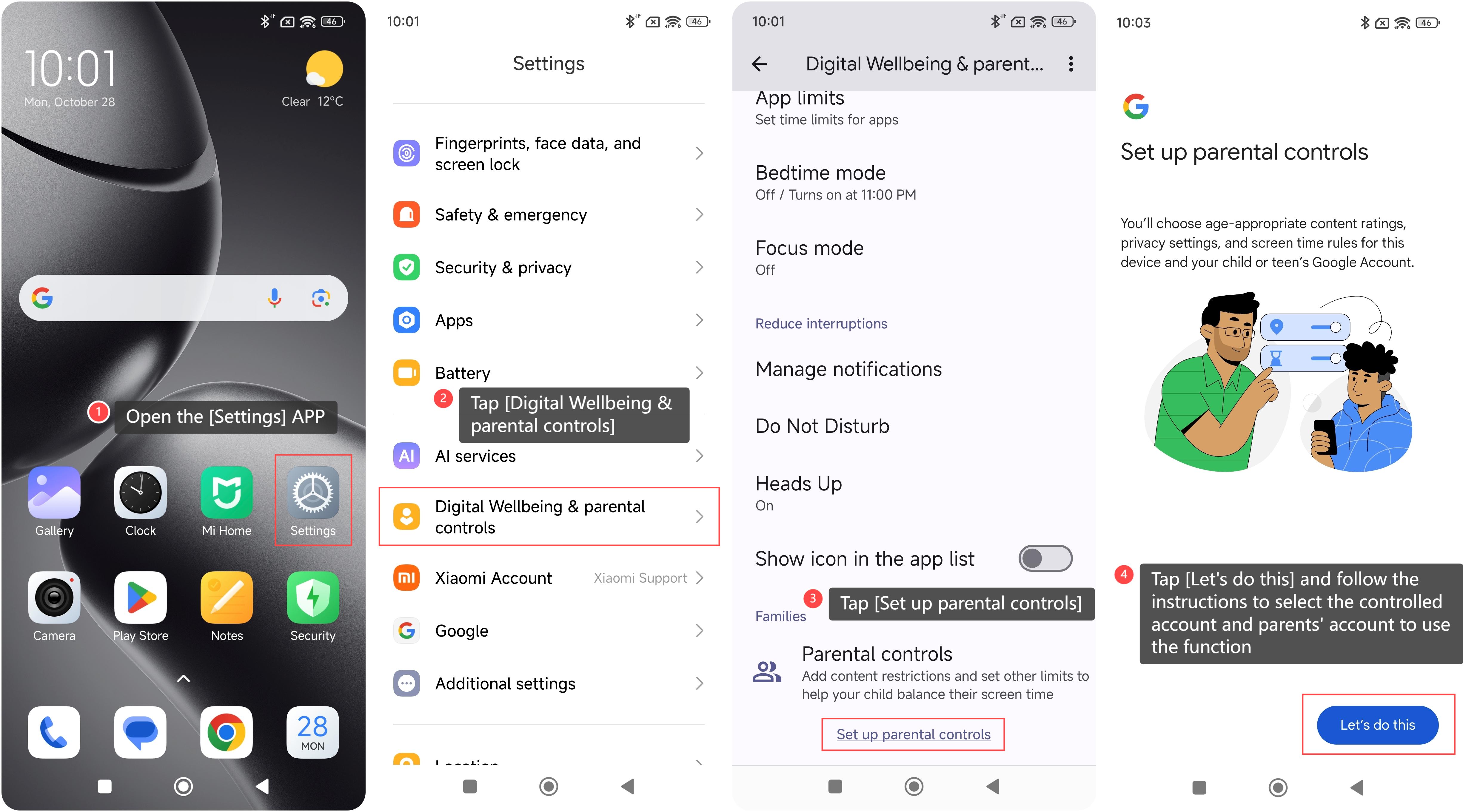
To use the Parental controls on your phone, please refer to the following steps:
1. Open the [Settings] APP on your phone;
2. Swipe down to find and tap [Digital Wellbeing & parental controls];
3. Swipe down to find and tap [Set up parental controls];
4. Tap [Let’s do this] and follow the instructions to select the controlled account and parents’ account to use the function.
To use the Parental controls on your phone, please refer to the following steps:
1. Open the [Settings] APP on your phone;
2. Swipe down to find and tap [Digital Wellbeing & parental controls];
3. Swipe down to find and tap [Set up parental controls];
4. Tap [Let’s do this] and follow the instructions to select the controlled account and parents’ account to use the function.
Does it help?
Yes
No