

Redmi Buds 6 FAQ
1. Q: Why does the APP show a large difference in battery levels between the left and right earbuds of the Redmi Buds 6?
A: This issue occurs after using one earbud for an extended period. When there is a battery difference of more than 10% between the two earbuds, and both are then worn, the earbud with more battery remains the main earbud and does not update the battery status to the APP.
The development team is already addressing this issue, and a new firmware version will be released to you in November 2024. After using a single earbud for an extended period, it is recommended that you place it in the charging case with the other earbud until the battery difference is less than 10%.
2. Q: What to do if there is an audio cut-off at the start of playback in video, music, or novel APPs (e.g., the beginning of a word does not play when clicking on it)?
A: This audio cut-off occurs in non-noise-canceling mode. Switching to noise-canceling or transparency mode is recommended to resolve it. This issue is currently being fixed by the development team, and a new firmware version will be released to you in November 2024.
3. Q: Why is there an electric sound when wearing the Redmi Buds 6?
A: The hardware static sound is a faint “hissing” noise that can be heard only in very quiet environments when the earbuds are playing silent audio. This sound is a fixed characteristic. In typical office environments, occasional noticeable background noise (such as buzzing, popping, or static) can appear during certain operations with the earbuds or phone, then disappear.
This is a type of incidental noise from the earbuds and is not related to the hardware static sound. Please take note of this distinction.
4. Q: Why is the noise cancellation effect of the Redmi Buds 6 poor?
A: The noise-canceling frequency range is from 20Hz to 2kHz, so not all sounds can be canceled out, as it depends on the frequency of the sound. The deepest noise cancellation occurs between 100Hz and 200Hz, which is more effective for low-frequency sounds. This is why noise-canceling works better on sounds like those in subways or buses. Human voices are around 800Hz to 1kHz, where noise cancellation depth is lower, making voice cancellation less effective. To improve noise cancellation, it is recommended to choose ear tips that match your ear canal size, as a snug fit enhances noise-canceling performance.
5. Q: Why is the sound quality of the Redmi Buds 6 poor?
A: If the call quality is poor, it will be improved based on the specific situation. If the default sound effect quality is unsatisfactory, it is recommended to upgrade to the latest firmware version. You can also switch the sound effect setting to Enhance treble mode in the Xiaomi Earbuds APP for a better experience.
6. Q: Why is there an echo when wearing the Redmi Buds 6 and making a call?
A: This could be due to one of the following reasons:
1. The other party’s phone can not be effectively canceling echo. You can ask them to try calling you from a different phone to see if your Redmi Buds 6 still have an echo;
2. The other parties have their speaker volume too high or are in an environment that causes echo, which can result in an echo on your Redmi Buds 6 as well.
7. Q: Why is the volume of the Redmi Buds 6 low?
A: It could be an issue with the phone's absolute volume.
Follow these steps to see if it resolves the issue:
Go to the [Settings] APP on the phone >> select [Bluetooth] >> [Audio] >> enable [Absolute volume].
8. Q: Why is the sound uneven between the left and right earbuds of the Redmi Buds 6, and why is there sound leakage?
A: This could be due to an improper fit of the ear tips on the left or right earbud. Try using larger ear tips for a better fit.
Overview
1. Q: What are the features of the Redmi Buds 6?
A: The Redmi Buds 6 offers the following features:
1. Comfortable in-ear noise cancellation: The earbuds can adjust noise cancellation depth in real-time based on current wearing conditions, balancing ear pressure to combine comfort and noise reduction;
2. Sound quality: Supports AAC codec for lossless audio transmission;
3. Spatial audio: Enjoy immersive sound across devices with spatial audio;
4. Call noise cancellation: Each earbud has two built-in microphones with ENC algorithm support for AI wind noise reduction during calls;
5. Extended battery endurance: Provides 10 hours of playback per charge, and up to 42 hours with the charging case. A 10-minute charge supports 4 hours of playback;
Note:
Battery endurance tests are based on music playback with Bluetooth AAC connection, 50% volume, noise cancellation off, and other settings in default mode. Data is from Xiaomi labs, actual battery endurance will vary slightly depending on the environment, software version, and device model.
6. Earbud recording: Earbud recording is not supported
7. Additional features: Includes seamless audio switching between devices, IP54 dust and water resistance, and personalized settings through the Xiaomi Earbuds APP.
2. Q: What is the appearance of the Redmi Buds 6?
A: The Redmi Buds 6 is compact and exquisite in design.
1. The appearance of the Redmi Buds 6 is as follows:
Charging case, Function button, Indicator, Type-C charging port, Earbud, Touch Control Area, Charging PAD, Talk mic hole;
2. When the earbuds are in the charging case and the lid is opened, the function button has the following actions:
(1). Press and hold for 2 seconds to trigger pairing;
(2). Press and hold for 10 seconds to reset (clear pairing records);
3. Both the earbuds and the charging case are made of PC (polycarbonate) material.
3. Q: What is the name displayed for the Redmi Buds 6 in the phone's Bluetooth list?
A: The corresponding English name for the Redmi Buds 6 in the Bluetooth list is “Redmi Buds 6”.
Note:
The pop-up will display different images for different colored earbuds. The example shown is for the white earbuds (see image below).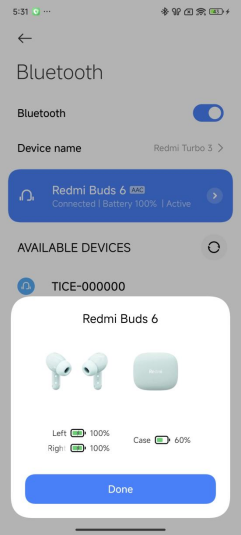
4. Q: What is the Bluetooth version of the Redmi Buds 6?
A: The Redmi Buds 6 utilizes Bluetooth 5.4 technology.
5. Q: What do the lighting effects on the Redmi Buds 6 charging case mean?
A: For the Redmi Buds 6, the charging case features only a white light strip, with different lighting effects for various scenarios.
1. (1). Power on (USB plugged in): The indicator strip gradually illuminates from left to right (one cycle);
(2). Charging: The indicator strip continuously cycles from left to right (steady illumination);
(3). Fully charged: The light strip stays on continuously.
2. Connection status: After opening the lid, press and hold the function button for 2 seconds, and the indicator will enter a slow flashing white state (1 flash per second) until successfully paired with the phone. When pairing is successful, the white light will stay on for 5 seconds. If there is no connection for 1 minute, the earbuds will enter sleep mode, and the indicator will turn off;
3. In-case detection light effect: After the earbuds are placed in the case, the indicator will stay on for 2 seconds before turning off;
4. Battery check: The white indicator strip on the charging case can display the battery level of the case. 
1. Battery level: 0-25%, 2. Battery level: 26%-50%, 3. Battery level: 51%-75%, 4. Battery level: 76%-100%.
6. Q: What is the battery endurance of the Redmi Buds 6?
A: With Active Noise Cancellation (ANC) turned off, the earbuds can provide up to 10 hours of playback time on a single charge, and up to 42 hours when used with the charging case.
Battery endurance testing conditions: The testing was conducted with fully charged earbuds, with ANC off, head tracking disabled, at 50% volume, and using AAC format. Under these conditions, the earbuds can last approximately 10 hours of music playback. When both the earbuds and the charging case are fully charged, the total playback time can reach around 42 hours.
Tips:
1. The above data are from laboratory tests. The actual battery endurance will vary due to factors such as volume, audio source, environmental interference, product features, and usage habits;
2. Different phones will show variations in battery endurance. If noise cancellation or head tracking features are enabled, the battery endurance of the earbuds will be reduced.
7. Q: Are the charging cases of the Redmi Buds 6 compatible with other wireless Bluetooth earbuds?
A: No, they are not compatible.
8. Q: Is the battery of the Redmi Buds 6 replaceable?
A: No, the battery is non-removable and cannot be replaced.
9. Q: Does the Redmi Buds 6 support single earbud replacement or reconfiguration of the left and right earbuds?
A: Yes, it supports this feature.
The steps are as follows:
1. After replacing a single earbud, place both earbuds in the charging case and close the lid;
2. Open the lid, and while keeping the earbuds in the case, press and hold the function button on the charging case for 20 seconds. The earbuds will automatically reconfigure and pair with each other.
10. Q: Are the Redmi Buds 6 dustproof and waterproof?
A: Yes, the earbuds have an IP54 rating for dust and water resistance, while the charging case does not support this feature.
The Redmi Buds 6 are designed with an IP54 rating, which protects against splashes of water from all directions. They can function during intense workouts (such as gym sessions) or light rain while walking or cycling. It is recommended to wipe the earbuds after sweating.
Note:
1. The splash-proof, water-resistant, and dustproof features are not permanent and will degrade over time due to regular wear and tear. Do not charge the earbuds when they are wet, and do not wear them while swimming. Damage caused by immersion in liquid is not covered by warranty;
2. They are not resistant to hot water and should not be worn while showering. It is advised to avoid vigorous exercise to prevent sweat from penetrating and causing damage.
11. Q: How is the noise cancellation performance of the Redmi Buds 6?
A: The earbuds feature an in-ear design, and in normal use, the Active Noise Cancellation (ANC) depth reaches up to 49dB. The effectiveness of in-ear noise cancellation will vary depending on the shape and size of the wearer's ear canal, how tightly the earbuds are worn, and the angle of wear.
Note:
1. For safety reasons, it is advised not to wear the earbuds while biking or crossing the street, as you need to be aware of your surroundings;
2. The earbuds support three levels of noise cancellation (light, balanced, and deep), which you can switch manually according to your needs.
12. Q: What functions does the fast connect pop-up window of the Redmi Buds 6 support?
A: The fast connect pop-up window for the Redmi Buds 6 displays the current battery levels of the earbuds and the charging case, as well as their charging status and enables quick connections.
13. Q: What colors are available for the Redmi Buds 6?
A: The Redmi Buds 6 are available in three colors: White, Black, and Green.
14. Q: What are the hardware specifications of the Redmi Buds 6?
A: For detailed specifications, please refer to the Xiaomi official website's specifications page.
Key information includes:
1. Platform: Bestechnic BES2700IHC;
2. Battery capacity: Earbud battery 54mAh;
3. Charging case battery 475mAh.
15. Q: What are the package contents of the Redmi Buds 6?
A: Redmi Buds 6 × 1, Charging case × 1, Type-C charging cable × 1, User manual × 1, ear cap × 3 (with size M pre-installed).
FAQ
Settings
1. Q: How to wear the Redmi Buds 6 correctly?
A: Take the earbuds out of the charging case and wear them according to the left (L) and right (R) markings. Gently rotate them until they are securely and comfortably positioned in your ears.
Note:
After using the earbuds, please return them to the charging case promptly to extend their lifespan and prevent loss.
2. Q: How to turn on/off the Redmi Buds 6?
A: The procedure is as follows:
1. Turning on: When the earbuds are in the case, simply open the charging case, and the earbuds will automatically power on;
2. Sleep (Power off): When the earbuds are placed back in the charging case and the lid is closed, they will automatically disconnect and start charging. Once fully charged, they will enter sleep mode.
3. Q: How to operate and control the Redmi Buds 6?
A: The earbuds use a tapping method to control functions. After properly wearing the earbuds, apply a slight force to tap the flat area at the top of the earbud stem, as shown in the image below. You will hear a sound indicating the button operation, and you can follow the instructions in the user manual for various functions. If there is no response after tapping, try adjusting the fit of the earbuds or repositioning them.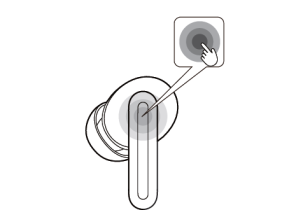
The default functions for the touch control area of the earbuds are as follows:
1. Double-tap to answer/hang up the calls. Triple-tap to reject the calls;
2. Double-tap to play/pause the music. Triple-tap to play the next track;
3. Press and hold for 2 seconds to switch from Transparency, Noise Canceling and Off modes.
Note:
You can customize the touch gesture functions for the left and right earbuds through the Xiaomi Earbuds APP. After resetting the earbuds, the left and right functions will revert to their default settings.
4. Q: How to upgrade the firmware of the Redmi Buds 6?
A: Active upgrade:
Method 1: Upgrade via the Xiaomi Earbuds APP.
Upgrade steps:
1. Ensure the earbuds are connected to your phone;
2. Open the Xiaomi Earbuds APP. If a new version is available, a firmware update prompt will appear;
3. Tap the update prompt to enter the upgrade page, then tap [Update];
4. Wait patiently for the upgrade progress to reach 100%. The firmware of the earbuds will automatically complete the update.
Note:
If the firmware upgrade for the Xiaomi Earbuds APP fails, please try the following methods:
(1). The firmware package could have failed to download. Ensure that the network is stable, or switch to a different network, and then try upgrading again;
(2). The connection between your phone and earbuds is unstable. Please try reconnecting, or try again in a location with less wireless interference.
Method 2: The settings page automatically upgrades.
Upgrade steps:
1. Ensure that the earbuds are connected to your phone;
2. Open the phone's system settings, navigate to the Bluetooth setting;
3. Tap [Additional settings] then select [Firmware update];
4. Follow the prompts to enter the upgrade process and patiently wait until the upgrade progress reaches 100%. The earbuds’ firmware will update automatically.
Silent upgrade:
Method 3:
1. Ensure that the earbuds are connected to your phone;
2. Open the phone's system settings, navigate to the Bluetooth setting;
3. Tap the connected earbuds to enter the earbuds interface;
4. Tap [Additional settings] and turn on [Download automatically]. Switch to allow future upgrades to trigger automatically when new versions are available.
Note:
The following situations can affect the OTA upgrade:
1. Upgrades cannot be completed if the battery level is below 20%;
2. Actions such as taking the earbuds out of the case, closing the lid, or pressing buttons will pause the upgrade.
Connection
5. Q: How to connect the Redmi Buds 6 to the phone?
A: Here are the connection steps for the Redmi Buds 6:
1. Open the charging case of the new earbuds, the indicator will flash, and the earbuds will enter pairing mode. Open the Bluetooth settings on your phone to connect.
2. Connecting to a new device:
(1). Place the earbuds back in the charging case, open the lid, and press and hold the function button for 2 seconds. The indicator on the charging case will flash white, and the earbuds will be waiting to connect (they will enter sleep mode and the indicator will turn off if there’s no connection within 1 minute);
(2). Turn on Bluetooth on your phone, search for and connect to the Redmi Buds 6. (If a password is required, enter "0000").
Tip:
If the connection fails, place the earbuds back in the charging case and repeat the above steps.
3. Quickly connect using a Xiaomi phone:
Put the earbuds in the charging case, close the lid and place it close to an unlocked Xiaomi phone with Bluetooth turned on, open the charging case lid, and follow the instructions on the phone interface to connect the earbuds.
Note:
To use the quick connection function, you need to update your phone system to the latest stable version. Only some Xiaomi phones support it.
You need to set the function on your phone:
Go to the [Settings] APP on the phone >> select [Bluetooth] >> [Additional settings] >> enable [Pair compatible devices].
4. Connection interruption:
When the device turns off Bluetooth or moves out of the earbuds' connection range, the Bluetooth connection will be lost, and the earbuds will emit a disconnection prompt sound. They will then automatically enter waiting mode. If no device is connected within 10 minutes, the earbuds will enter passive reconnection mode and go into sleep mode after 10 minutes. They can be awakened by wearing them again, returning to waiting mode.
Note:
Passive reconnection means that the earbuds cannot actively reconnect to a device, you should manually select the earbuds Bluetooth device name in the device’s Bluetooth setting for reconnection (if there is a previous connection record).
5. Automatic reconnection:
When the earbuds are in the charging case, open the case, and the earbuds will automatically reconnect to the most recently connected Bluetooth device. If they cannot successfully reconnect to any Bluetooth device, they will enter a non-discoverable but connected state after 1 minute.
Note:
If the earbuds cannot automatically reconnect to a device, you need to connect manually from the device’s Bluetooth setting.
If the problem persists, you can try resetting the earbuds to factory settings:
Place both earbuds in the charging case and open the lid, then press and hold the function button for 10 seconds. The indicator will flash continuously, indicating that the factory reset is complete. After the reset, please pair the earbuds again.
6. Q: How to connect the Redmi Buds 6 to the Xiaomi Earbuds APP?
A: The connection steps are as follows:
1. Scan the QR code to download and install the Xiaomi Earbuds APP;
2. Follow the prompts in the app to connect the earbuds.
Note:
Please ensure that the Bluetooth on your phone is turned on. During the connection process, place the earbuds in the charging case, open the lid, and bring it close to your phone.
The Xiaomi Earbuds APP supports phones with Android 6.0 or above and iOS 14.0 or above. Make sure to update the APP to the latest version.
7. Q: What basic functions can be achieved by binding the Redmi Buds 6 to the Xiaomi Earbuds APP?
A: By binding the Redmi Buds 6 to the Xiaomi Earbuds APP, you can customize earbud settings and access related resources.
Here are some of the functions available:
1. You can check for and update the earbud firmware version. The APP allows for online firmware upgrades. Note that you can only upgrade from a lower version to a higher version, downgrading from a higher version to a lower version is not supported;
2. On the homepage of the Xiaomi Earbuds APP, you can set the noise cancellation switch and toggle between noise cancellation modes;
3. In the APP's gesture settings, you can customize the gesture functions for the left and right earbuds;
4. Under the audio settings in the APP, you can configure spatial audio, adaptive sound perception, and sound effect modes;
5. In the APP's additional settings, you can set up in-ear detection, dual connection, and answer calls automatically;
6. The APP allows you to find your earbuds if they are misplaced;
7. Additionally, you can view the battery information for both the earbuds and the charging case, as well as check the earbud firmware version.
8. Q: How to clear the pairing records between the Redmi Buds 6 and devices, and how to reset the earbuds?
A: The method to clear the phone pairing record and reset is as follows:
1. You can delete the Bluetooth records on the mobile phone:
Android phone: Go to the [Settings] APP on the phone >> select [Bluetooth] >> Redmi Buds 6 >> tap [Unpair] (take the Xiaomi mobile phone as an example);
iOS phone: Go to the [Settings] APP on the phone >> select [Bluetooth] >> Redmi Buds 6 >> tap [i] >> Ignore this device (take iPhone 15 as an example).
2. You can reset the earbuds by referring to the method as follows:
1. Place the earbuds in the charging case;
2. Open the lid of the charging case and press and hold the function button for more than 10 seconds. The white indicator on the charging case will flash continuously. Release the button, and the earbuds will be reset, clearing any old connection records and re-entering pairing mode.
9. Q: What is the effective usage distance of the Redmi Buds 6? Is the connection stable?
A: In an unobstructed environment, the effective connection range between the earbuds and the phone is around 10 meters. If there are walls or other obstacles, the effective range will decrease. For example, in a house with multiple walls, keeping the phone in the living room and moving to the bedroom with the earbuds can cause lag or Bluetooth disconnection.
Note:
1. In open environments such as offices, cafes, or homes where interference signals are weak, lag issues should not occur;
2. Due to the nature of Bluetooth signal connectivity, the earbud signal can be affected in environments with strong interference, which can cause music playback to lag. This is a common issue for Bluetooth devices, and interference will cause lag or intermittent sound in high-interference areas like subways, trains, or airports.
10. Q: What to do if the Redmi Buds 6 won’t pair or cannot be found?
A: When searching for Bluetooth earbuds on your phone, make sure the Bluetooth earbuds are also in pairing mode.
1. Ensure the earbuds have sufficient battery: Open the charging case lid and press the function button for 2 seconds. The indicator will flash continuously, indicating the earbuds are in pairing mode. Try searching for "Redmi Buds 6" on your phone and pair them;
2. Confirm the pairing steps are correct: The earbuds should be in pairing mode and waiting to connect. If no connection is made within one minute, the earbuds will enter sleep mode, and the indicator will turn off;
3. If the above steps do not work, try resetting the earbuds.
Reset steps: Place both earbuds in the charging case, open the lid, and press and hold the function button for 10 seconds. The indicator will flash continuously, completing the reset and entering pairing mode. Try pairing again after this;
4. It could be due to excessive interference in your surroundings. Try moving to a different location. Due to the nature of Bluetooth earbuds, electromagnetic interference in your area can affect the connection, or it can connect but produce no sound or disconnect.
Note:
If the earbuds are already paired with one phone and you need to pair them with a new phone, press the function button on the charging case for 2 seconds (the white light will flash), and then try searching again. When using the Dual Connection feature, only one device can connect to the Xiaomi Earbuds APP at a time.
11. Q: What to do if the device can search for the Redmi Buds 6 but cannot connect to it?
A: It can be due to abnormal Bluetooth data on the phone. Try deleting the previous connection records on the device or reset the earbuds by pressing and holding the function button in 10 seconds.
To delete the Bluetooth records on the phone:
1. Android phone: Go to the [Settings] APP on the phone >> select [Bluetooth] >> Redmi Buds 6 >> tap [Unpair] (take the Xiaomi mobile phone as an example);
2. iOS phone: Go to the [Settings] APP on the phone >> select [Bluetooth] >> Redmi Buds 6 >> tap [i] >> Ignore this device (take iPhone 15 as an example).
12. Q: What to do if the Redmi Buds 6 is disconnected from the phone?
A: When multiple routers or Bluetooth devices are being used around the Bluetooth earbuds, there will be varying levels of interference, which could cause lagging, intermittent audio, or disconnection.
Possible reasons for disconnection:
1. Low or no battery in the earbuds;
2. The phone is too far from the earbuds, exceeding the effective transmission range (around 10 meters), or there are obstacles between the earbuds and the phone;
3. Due to the nature of Bluetooth earbuds, electromagnetic waves in the area could interfere with the connection.
Solutions:
1. Charge the earbuds to ensure sufficient battery level;
2. Keep the earbuds and phone close together, within the effective transmission range (approximately 10 meters), and reconnect;
3. Check for strong interference around your earbuds, and try to keep them away from devices with strong electromagnetic interference, such as microwaves or surveillance monitors. If there is significant interference, it’s recommended to try connecting in an open or normal indoor space;
4. If the issue persists, place the earbuds back in the charging case, close the lid for 15 seconds, then reopen the case to reconnect;
5. If the problem continues, try resetting the earbuds: place both earbuds in the charging case, open the lid, and hold the function button for 10 seconds. When the indicator flashes continuously, the reset is complete. After resetting, please re-pair the earbuds;
6. The latest version has optimizations. Make sure to update the firmware to the latest version in the Xiaomi Earbuds APP for an improved experience.
13. Q: After disconnection due to the distance between the Redmi Buds 6 and the phone, will they reconnect automatically when brought back nearby?
A: The reconnection logic and steps are as follows:
1. If you return within 10 minutes after disconnection, the earbuds will automatically reconnect. After 10 minutes, the earbuds enter sleep mode, and wearing them again will trigger automatic reconnection;
2. If the earbuds do not automatically reconnect with the phone, place them in the charging case, close the lid for 5 seconds, then reopen it, and try connecting to the earbuds on the phone;
3. If step 2 does not reconnect, restart the Bluetooth on the phone, and hold the charging case’s function button for 2 seconds. When the charging case’s indicator blinks, it enters pairing mode, and you can reconnect to the phone.
14. Q: Will the Redmi Buds 6 automatically disconnect when placed in the charging case?
A: The automatic disconnection logic for the earbuds when placed in the charging case is as follows:
1. If the earbuds are placed in the charging case without closing the lid, they will stay connected to the phone;
2. If the earbuds are placed in the charging case and the lid is closed, they will disconnect from the phone automatically after 5 seconds.
15. Q: What to do if the earbuds don’t automatically reconnect after opening the charging case, despite previously connecting to the phone?
A: Please troubleshoot by referring to the following methods:
1. By default, the earbuds automatically reconnect to the last device they were connected to. If the last connected device is not your current phone, you need to reset the earbuds and reconnect them to the phone;
2. The phone can be too far from the earbuds, exceeding the effective transmission range (10 meters), or there are obstacles between the earbuds and the phone;
3. Ensure that Bluetooth is enabled on the phone. If not, manually turn it on;
4. Due to the nature of Bluetooth earbuds, electromagnetic interference in your area can disrupt the connection, preventing automatic reconnection. Try moving to a different location.
16. Q: After placing the Redmi Buds 6 in the case and closing the lid, why does the phone first show "connected" (without phone or media signal), and then display "disconnected"?
A: This occurs because the earbuds and phone have different Bluetooth connection services (A2DP and HFP), which disconnect sequentially, resulting in this display. It does not affect the earbuds' disconnection function, so you can continue using them with confidence.
17. Q: What to do if the Redmi Buds 6 disconnects from the phone and then reconnects without any action?
A: The earbuds can be restarted. Please reset the earbuds to factory settings and try again.
1. Place both earbuds in the charging case and open the lid, then press and hold the function button for 10 seconds until the indicator flashes. When the indicator turns white and flashes, the reset is complete;
2. After the reset, please pair the earbuds with your phone again;
3. This issue has been optimized in the latest version, so be sure to update the firmware to the latest version in the Xiaomi Earbuds APP.
18. Q: What to do if can't enter pairing mode by holding the function button after opening the charging case of the Redmi Buds 6?
A: If pressing and holding the button doesn’t activate pairing and the white doesn’t flash, try closing the case for 15 seconds, then open it and try again.
19. Q: What to do if the earbuds do not reconnect after pressing and holding them for 60 seconds without connecting to a device and then putting them back into the case, closing the lid, and then opening it again?
A: After 60 seconds in pairing mode without a connection, the earbuds do not automatically reconnect to the previously paired device. You will need to unpair from the phone and reconnect. This has been improved in the latest firmware version. Please update to the newest version in the Xiaomi Earbuds APP for an optimized experience.
20. Q: Why does the earbud not reconnect to the current device, but reconnect to other devices after one earbud is pulled away and returned?
A: When the earbud reconnects after moving out of range, it will attempt to reconnect to another previously paired device if multiple paired devices are nearby. This can interrupt the connection to your current phone. To avoid this, it’s recommended to keep the unused earbud inside the case with the lid closed. This issue has been improved in the latest firmware version, so please update through the Xiaomi Earbuds APP.
21. Q: What are the differences between automatic connection and dual connection?
A: Automatic connection: When connected to one device, the earbuds will automatically reconnect to any previously paired device when the case is opened.
Dual connection: The earbuds can connect to two devices simultaneously, allowing for seamless audio switching between devices without needing to disconnect and re-pair.
22. Q: Can automatic connection and dual connection be enabled at the same time?
A: No, dual connection and automatic connection features cannot be enabled simultaneously.
23. Q: Does the Redmi Buds 6 support connection with a Xiaomi Smart Band or Xiaomi Watch?
A: The earbuds can connect to the Xiaomi Watch, however, do not support connection with the Xiaomi Smart Band.
24. Q: Can the Redmi Buds 6 be connected to two phones at the same time? How to set it up?
A: The Redmi Buds 6 supports a Dual connection feature, which is off by default. To enable it, activate the feature through the Xiaomi Earbuds APP.
1. Go to Xiaomi Earbuds APP >> Redmi Buds 6 >> [Additional settings] >> enable/disable [Dual connection];
2. Pairing the earbuds with a phone
(1). Open the earbud case lid and press the function button for 2 seconds until the indicator blinks, putting the earbuds into pairing mode;
(2). Turn on Bluetooth on the device you want to pair with and select the earbuds from the Bluetooth setting to connect.
Note:
On the first opening of the case lid, the earbuds automatically enter Bluetooth pairing mode.
3. The steps of dual connection are as follows:
1. Connect the earbuds to phone A. Go to [Additional settings] and enable [Dual connection], then disconnect the earbuds;
2. Connect the earbuds to phone B. Go to More Settings and enable Dual connection, keeping the earbuds connected;
3. Finally, on phone A, select the earbuds in the Bluetooth list to complete the dual-device connection.
Note:
Dual connection and automatic connection cannot be enabled simultaneously. If you want to enable dual connection, please ensure automatic connection is turned off first.
25. Q: Why is there a difference in volume levels when connecting the Redmi Buds 6 to different devices?
A: The following situations could cause automatic volume adjustments, which are all normal phenomena, so please feel free to use them.
1. When connected to Xiaomi devices, the Xiaomi volume protection mechanism automatically adjusts the volume to a moderate level;
2. When connected to iOS devices, the earbuds automatically sync to the original volume set by the iOS device;
3. When connected to other Android phones, some devices do not have absolute volume enabled. It is recommended to turn on volume synchronization between the earbuds and the phone on the Bluetooth settings page.
Note:
After successfully pairing the earbuds with the phone, when the earbuds reconnect to the phone, the volume will sync to the last set of moderate volume on the phone.
26. Q: When an iOS phone is playing music and a Xiaomi phone establishes a dual connection, why does the right earbud go silent first, followed by the left earbud after 0.5 seconds, resulting in unsynchronized audio?
A: The reason is that when the earbuds connect to the Xiaomi phone, the Dynamic Island on the Xiaomi phone sends mute data that takes priority over the music. Since the left earbud acts as the slave earbud and needs to synchronize the data, it responds more slowly than the right ear, resulting in the left earbud being silent 0.5 seconds after the right earbud.
27. Q: When connected to a phone and PC, why doesn't the phone maintain the call during a virtual voice call from the PC?删掉
A: This is because the Bluetooth protocols for PC virtual voice calls and phone calls are different. The PC's virtual incoming call does not notify the phone, so the phone does not enter a call hold state during the ongoing call.
28. Q: Why does the voice assistant sometimes fail to recognize speech when activated by the Redmi Buds 6 button?
A: This functionality varies by phone design. Some phones use the earbud microphone for sound pickup, which can lead to a brief 0.5-second delay during which the microphone can not capture sound, causing recognition issues. It is recommended to wait half a second after triggering the voice assistant before speaking to ensure a higher recognition rate.
29. Q: Why can the voice assistant not wake up after manually canceling it?
A: This is a normal occurrence. If the time interval between two pressing and holding to wake up the voice assistant is too short, the phone will not respond to the second press and hold. It is recommended to wait 5 seconds before attempting to wake it up again.
30. Q: Does the Redmi Buds 6 support connecting each earbud to a separate phone or device to use them as two individual earbuds?
A: Not support.
31. Q: If losing or damaging one earbud (either left or right), can the remaining earbud be recombined with the other one?
A: Yes. Place the remaining right earbud and the left earbud in the charging case and, while the lid is open, press and hold the charging case function button for 20 seconds to complete the recombination.
32. Q: Why do both the iOS/Android phone and the Redmi Buds 6 play sound simultaneously when receiving a call?
A: This happens because iOS phones automatically select the ringtone playback channel based on whether silent mode is enabled. If silent mode is off, both the phone and the earbuds will play the sound simultaneously. If silent mode is on, only the earbuds will play the sound.
33. Q: Does the Redmi Buds 6 support low-latency mode? How to enable low latency?
A: Some Xiaomi phones have this feature visible in the Bluetooth settings, and low-latency mode is enabled by default.
To enable low latency, please refer to the following steps:
Go to [Settings] >> [Bluetooth] >> [Audio] >> [Low latency for games].
34. Q: Why is there latency when playing games on an iPhone with the Redmi Buds 6?
A: Due to ecosystem limitations on iPhones, the Redmi Buds 6 currently does not support low-latency mode for gaming. Xiaomi phones, however, support full-link low-latency functionality.
35. Q: Why is there a delay when using the Redmi Buds 6 for voice calls, video, or gaming?
A: The factors causing the delay and the troubleshooting methods are as follows:
1. Environmental interference leads to delays;
2. The distance between the earbuds and the device exceeds the effective range (approximately 10 meters);
3. Try resetting the earbuds while keeping them close to the device;
4. Test with a different device to determine if the issue lies with the phone.
Friendly tips:
1. The usage environment, network conditions, and the phone's codec speed can affect the audio data transmission from the phone to the earbuds, resulting in varying degrees of delay. The earbuds use true wireless Bluetooth technology, and there will be some latency during the audio transmission from the phone to the main or secondary earbud, but this will not affect the quality of music and calls. They can accurately present the details of voice calls and the rich frequency ranges in music;
2. Different phones and APPs use various audio transmission protocols and encoding formats, and compatibility issues with these codecs will cause audio delays.
36. Q: What to do if there are lag and desynchronization when launching the game low latency mode?
A: The lag and desynchronization are caused by Bluetooth signal interference in game mode. This issue has been optimized, so please upgrade to version 1.1.2.6 or above in the Xiaomi Earbuds APP for an improved experience.
37. Q: What to do if the Redmi Buds 6 does not have the Google Fast Pair feature?
A: The Google Fast Pair feature is supported on certain models.
Please follow these steps to address the issue:
1. Check if your device supports the feature and ensure that the system version is up to date;
2. Check if Pair compatible devices are enabled. Go to [Settings] >> [Bluetooth] >> [Additional settings] >> enable [Pair compatible devices].
If this switch is off, the Google Fast Pair cannot be used. Once enabled, opening the charging case will trigger the pop-up.
3. If the above steps do not resolve the issue, please pay attention to recent firmware updates.
Note:
1. During the first use, the phone needs to download the animated data. It is recommended to connect the phone to Wi-Fi (not a mobile hotspot to avoid excessive mobile data usage) to download the earbud animations. After this initial download, the same earbuds can be used without connecting to the network for normal pop-ups;
2. Keep the earbud case and phone within 30cm and slowly open and close the lid 3-5 times (avoid doing it quickly). The initial pop-up could show a default image, but the animation will appear once the network download is complete (the duration depends on internet speed).
38. Q: Why does the pop-up on the phone for the Redmi Buds 6 show a different image compared to the subsequent animation effects?
A: The first pop-up on Xiaomi phones is a simplified image, which is part of the APP's initial setup. Due to the variety of earbud models, not all model animations are downloaded to the phone by default to save unnecessary space. The animated graphics need to be automatically downloaded from the cloud. Under normal circumstances, connecting the earbuds to the phone for the second time will switch to the animation effect.
Note:
1. When changing the connecting phone, you will encounter the same issue. Place the earbuds back in the charging case and reconnect;
2. If it's your first time using the earbuds, surrounding network interference can affect the loading speed of the dynamic pop-up. If you later see the default pop-up interface, please put the earbuds back in the charging case, reopen the lid, and the dynamic pop-up will display correctly.
39. Q: Why does the Redmi Buds 6 not show pop-ups or corresponding selection options (such as low latency, etc.) when connecting to Xiaomi devices?
A: Go to [Settings] >> [Apps] >> [Manage apps] >> search for Bluetooth (select Bluetooth Extension or MIUI Bluetooth). If the corresponding options do not appear on the first entry, tap [Enable now]. Clear all data and restart [Pair compatible devices] once.
40. Q: Why does the pop-up connection fail?
A: 1. Please close and reopen the charging case, then press and hold the function button for 2 seconds to enter pairing mode and reconnect to the phone;
2. The new version of the earbuds has optimizations, please upgrade to the latest version in the Xiaomi Earbuds APP for the best experience.
41. Q: What is the reason why there is no response when pressing and holding the Redmi Buds 6 on the Android 15 system for quick taking photos?
A: 1. When you set the key for quick photo capture and execute it, there could be failures in establishing the HID protocol between the earbuds and the phone in certain scenarios, leading to no response when pressing the button. It is recommended to restart both the phone and the earbuds.
2. The earbuds OTA1 (1.1.2.6) version has optimizations, please upgrade to the new version in the Xiaomi Earbuds APP for a better experience.
42. Q: Why do some phones trigger the camera to take a photo when controlling the Redmi Buds 6, such as using gestures to increase/decrease the earbud volume?
A: When controlling the earbuds, they send corresponding events to the phone. On some phones, the camera APP could respond to these events by taking a photo. For instance, the volume increase/decrease event on certain phones can trigger the camera to take a picture.
43. Q: What to do if the Camera APP does not trigger the photography function by pressing and holding the Redmi Buds 6 when the press and hold gesture is set for quick photography?
A: Please follow these steps for troubleshooting:
1. Confirm whether Dual connection is enabled. Quick photography cannot be activated while Dual connection is active;
2. Delete any unused paired devices on your phone. If the number of connected devices exceeds seven, the quick photography function can not trigger properly.
44. Q: Does the Apple iOS system support gesture operation for quick photography by using the Redmi Buds 6?
A: iOS does not support quick photography gestures. This feature is only available when connected to Xiaomi HyperOS phones.
45. Q: Why does the SN number on the packaging of the Redmi Buds 6 differ from the device serial number displayed in the Xiaomi Earbuds APP?
A: This issue has been resolved. Please update to the new version of the APP, clear the cache ([Settings] >> [Apps] >> [Manage apps] >> Xiaomi Earbuds APP >> [Clear data]), log back into your account, and reconnect the earbuds to check. Thank you!
Battery endurance
46. Q: How to check the battery level of the Redmi Buds 6?
A: You can refer to the following two methods to check the battery level:
Method 1:
View the battery levels of both earbuds and the charging case through the Xiaomi phone pop-up window or the Bluetooth settings interface (the phones that support Google Fast Pair).
Method 2:
After connecting the earbuds to your phone, you can check the battery levels of the earbuds and the charging case via the Xiaomi Earbuds APP (available for both iOS and Android devices).
47. Q: Why doesn’t the battery level appear in the notification bar after connecting the Redmi Buds 6 to the phone?
A: The setup and reasons are as follows:
1. Go to [Settings] >> [Bluetooth] >> Redmi Buds 6 >> [Additional settings] >> enable [Show on Notification shade];
2. Not all phones support displaying the battery level in the notification bar. If your phone doesn’t support it, the battery level will not appear.
48. Q: Why does the Xiaomi Earbuds APP sometimes not display the charging case battery level of the Redmi Buds 6?
A: When the earbuds are out of the charging case, only the earbuds’ battery level is shown on the phone. When the earbuds are in the case, the APP displays the battery levels of both the earbuds and the charging case.
49. Q: Why does the battery level of the Redmi Buds 6 sometimes fluctuate on the phone?
A: The battery level displayed on the phone can fluctuate slightly based on the working status of the earbuds. This is normal.
Note:
While charging or in active use, the battery level of the earbuds will be updated in real-time on the phone.
50. Q: How to charge the Redmi Buds 6? Does the charging case support wireless charging?
A: To charge the earbuds, place them in the charging case. The charging case only supports wired charging.
Note:
During charging, the indicator will gradually brighten from left to right in a continuous loop for battery levels between 0-95%. Once fully charged at 100%, the light remains solid. Extreme temperatures can affect charging efficiency. When fully charged, the case can recharge the earbuds approximately five times.
51. Q: Why does the charging case of the Redmi Buds 6 charge slowly or sometimes not fully charge?
A: This is to protect the battery.
1. Charging stops if the temperature is below 0℃ or above 45℃;
2. In a low-temperature environment (0℃-15℃), the battery will charge slowly;
3. Please check if the charging cable is connected properly or try reconnecting it.
52. Q: What should pay attention to when charging the Redmi Buds 6?
A: For the Redmi Buds 6, please refer to the following precautions:
1. It is recommended to use a 5V original charger (charging case input parameters are 5V–1A);
2. Avoid charging in high temperatures (above 45℃), high humidity (above 85%), or low temperatures (below 0℃);
3. If the product is not used for a long period, it is recommended to charge it once a month (fully charging the earbuds and case) to prevent battery damage due to low power, which could affect product lifespan.
53. Q: Can the Redmi Buds 6 be used while charging?
A: This depends on the scenario:
1. When the charging case is charging alone, the earbuds can be used;
2. When both the charging case and earbuds are charging simultaneously, the earbuds should be placed in the charging case for charging, so they cannot be removed for use;
3. When the charging case is charging the earbuds, the earbuds should remain in the charging case during charging, so they cannot be removed for use.
Note:
If the charging case is only charging one earbud, the other earbud can be used independently.
54. Q: Can a power bank be used to charge the Redmi Buds 6?
A: It is not recommended to use a power bank to charge the Redmi Buds 6.
Note:
Most power banks on the market do not support low-current output, and the charging current for the case is lower than that for devices like phones. The current could be below the minimum load current of the power bank, which will cause it to detect a full battery and automatically stop charging, leading to incomplete or unsuccessful charging for the earbuds.
55. Q: Can all Type-C charging cables be used to charge the charging case of the Redmi Buds 6?
A: All Type-C charging cables can be used for charging. However, it is recommended to use a branded power adapter. The adapter’s output power should be at least 5V–1A.
56. Q: Can the Redmi Buds 6 charging case be charged via a computer USB port?
A: The Redmi Buds 6 can be charged through a computer USB port. Connect the charging case with a Type-C cable to the computer’s USB port to charge.
57. Q: Does the Redmi Buds 6 charging case support reverse charging from a phone?
A: Not support.
58. Q: Can the charging cable of the Redmi Buds 6 be used for data transfer?
A: Not support.
59. Q: Does the lack of power in the charging case affect the usage of the Redmi Buds 6?
A: As long as the earbuds are sufficiently charged, an empty charging case does not affect their usage. However, prolonged low battery will reduce battery performance, so it is recommended to charge the case promptly.
60. Q: What happens if the Redmi Buds 6 charging case shuts down due to low battery?
A: The following issues will occur:
1. The LED light won’t turn on when the case is opened;
2. Unable to connect a second phone by pressing the function button;
3. The case can not detect the earbuds when placed inside;
4. Unable to perform a factory reset;
5. The earbud firmware cannot be updated via OTA.
61. Q: Can the Redmi Buds 6 be taken out without the charging case?
A: If your phone is already connected to the earbuds and the earbuds have enough power to meet your needs when going out, you can skip the charging case.
Note:
It’s recommended to carry the charging case when going out to extend the battery life of the earbuds and reduce the risk of losing them.
62. Q: Why does the actual battery endurance of the Redmi Buds 6 seem shorter than advertised?
A: The battery endurance is closely related to usage habits and scenarios. The advertised battery endurance corresponds to specific testing conditions.
1. Factors that affect battery endurance:
(1). Low earbud battery level;
(2). High volume, which drains the battery faster;
(3). Presence of strong electromagnetic interference or physical obstacles like walls between the earbuds and phone;
(4). Use of higher-quality audio codecs, which can reduce battery life.
2. Tips to improve battery endurance:
(1). Use the earbuds fully charged;
(2). Lower the volume to check if usage time improves;
(3). Avoid high electromagnetic interference (e.g., microwaves) and ensure no obstacles between the earbuds and phone;
(4). Turn off less-used features like noise cancellation and In-ear detection;
(5). Use audio codecs with better battery efficiency, like AAC.
3. Testing data is obtained in Xiaomi's lab, and differences in real environments due to signal and electromagnetic interference are normal. For example, battery endurance during music playback was tested with earbuds fully charged, noise cancellation and In-ear detection off, 50% volume, and AAC format, achieving up to 10 hours of playback.
63. Q: Why does music playback sometimes last less than 3 hours, and other times up to 6 hours?
A: This is mainly because enabling features like noise cancellation and spatial audio together significantly increase power consumption, resulting in a battery endurance of around 3 hours. It’s recommended to turn off features that aren’t frequently used to extend battery life.
64. Q: Why is there a difference in battery level or battery endurance between the left and right earbuds of the Redmi Buds 6?
A: During use, the earbuds operate with one as the primary earbud and the other as the secondary. The primary earbud not only performs the same functions as the secondary but also handles data transmission to the secondary and connection to the phone, resulting in slightly higher power consumption. When the battery difference between the two earbuds reaches 5%, they will seamlessly switch roles to balance the power, gradually equalizing the remaining battery level of both. Therefore, a slight difference in battery level between the earbuds is normal.
65. Q: How to maintain the Redmi Buds 6??
A: Please follow the recommendations below for proper maintenance:
1. Do not expose the earbuds to liquids or humid environments;
2. Avoid using abrasive solvents to clean the earbuds;
3. Try to avoid storing the earbuds in low temperatures (below 0℃), high temperatures (above 45℃), or environments with large temperature fluctuations, as prolonged exposure to these conditions can damage the battery;
4. Do not expose the earbuds to open flames to avoid the risk of explosion;
5. Keep the earbuds away from sharp objects to prevent scratches or damage;
6. Do not insert any objects into the earbuds, as this can damage internal components;
7. Do not attempt to disassemble the earbuds;
8. If you will not be using the earbuds for an extended period, store them in a dry place. If left unused for over a month, charge them periodically to maintain battery health and ensure proper function.
Other functions
66. Q: Does the Redmi Buds 6 support displaying in the notification bar?
A: Xiaomi phones support this feature. You need to enable it in the Bluetooth settings, after which you can view the battery level and access some functions in the phone's notification bar.
To set the feature, please refer to the following steps:
Go to [Settings] >> [Bluetooth] >> Redmi Buds 6 >> [Additional settings] >> enable/disable [Show on Notification shade].
67. Q: How to use the Redmi Buds 6 to answer/reject calls?
A: Default settings:
1. While wearing the earbuds, double-tap the touch control area on either side to answer/reject a call;
2. Triple-tap the touch control area on either side to decline a call.
Customization:
You can set up gesture controls for answering and rejecting calls in the Xiaomi Earbuds APP or the Bluetooth settings interface of supported phones.
68. Q: Does the Redmi Buds 6 support answering calls automatically?
A: Yes. Android and Apple phones can enable the automatic answering feature by installing the Xiaomi Earbuds APP.
1. The settings path is as follows:
Open the Xiaomi Earbuds APP >> [Additional settings] >> [Take calls automatically];
2. Some Xiaomi phones can also set this up in the Bluetooth settings:
Go to [Settings] >> [Bluetooth] >> Redmi Buds 6 >> [Answer calls automatically]. The call will be automatically answered only after you wear the earbuds.
69. Q: Does the Redmi Buds 6 support active announcement of contact names?
A: No, it does not support this feature.
Note:
If the phone has an announcement feature enabled, you can hear the announcement when wearing the earbuds.
70. Q: Does the Redmi Buds 6 support In-ear detection?
A: Yes, the earbuds support In-ear detection, which is enabled by default. They automatically play music when worn, and pause playback when removed.
The details of In-ear detection are as follows:
1. The Xiaomi Earbuds APP currently has an In-ear detection option that allows you to manually enable/disable the feature;
2. On compatible Xiaomi phones, you can find this option in the Bluetooth settings page by accessing the earbuds' function page;
3. If you notice that music does not pause when removing the earbuds or does not play when putting them back on, please wipe the earbuds to prevent sweat or moisture from affecting the In-ear detection function.
71. Q: Why does the In-ear detection feature on the Redmi Buds 6 sometimes not work?
A: This could be due to several reasons:
1. If the earbuds are removed for more than 2 minutes during music playback, they will not resume playback when worn again. This is by design;
2. If music playback is paused using the touch control area while wearing the earbuds, they will not resume playback when worn again after being removed. This is also by design.
You can try the following methods to restore functionality:
1. Place the earbuds in the charging case, close the lid, wait for 5 seconds, then open the case and reconnect before wearing them again;
2. If the above steps do not resolve the issue, try restoring factory settings. Place both earbuds in the charging case and open the lid, then press and hold the function button for 10 seconds until the indicator flashes continuously, indicating that the factory reset is complete.
72. Q: Why does the Redmi Buds 6 automatically recognize as being worn when moving from a low temperature to a high temperature?
A: 1. The temperature change from low to high can create a temperature difference, causing moisture or fog to form on the surface of the earbuds, which leads to the detection of a wearing status;
2. If you notice moisture or fog on the surface of the earbuds, please wipe it dry. This will not affect their normal functionality.
73. Q: How to use the Ear tip fit test function on the Redmi Buds 6?
A: 1. Function location:
(1). MIUI: Go to [Settings] >> [Bluetooth] >> Redmi Buds 6 >> [Additional settings] >> [Ear tip fit test];
(2). APP: Open the Xiaomi Earbuds APP >> [Additional settings] >> [Ear tip fit test].
2. Operation steps:
Wear both earbuds >> tap [Start] >> wait for 6–8 seconds (detection duration) >> check results (Good fit/Readjust earbud).
Note:
If you remove the earbuds or interrupt the detection process midway, it will trigger a reminder saying "Please adjust earbud position."
74. Q: Does adjusting the volume during the fit test process affect the detection results?
A: Yes, frequently switching between maximum and minimum volume during the fit test process can lead to occasional detection failures. The latest version of the earbuds has fixed this issue, so please upgrade to the latest version for the best experience.
75. Q: Does the Redmi Buds support Missing earphone alert?
A: Only some Xiaomi phones have the Missing earphone alert feature available in the Bluetooth settings.
The method to enable Missing earphone alert in the phone's Bluetooth settings is as follows:
Go to [Settings] >> [Bluetooth] >> Redmi Buds 6 >> [Additional settings] >> [Missing earphone alert] >> enable [Missing earphone alert].
Note:
The Xiaomi Earbuds APP does not support this feature.
76. Q: Does the Redmi Buds support Find your earphones?
A: You can set this up in the Xiaomi Earbuds APP with the following steps:
Open the Xiaomi Earbuds APP >> [Find your earphones] >> tap the lost earbuds (Left, Both or Right), the earbuds will emit a high-frequency beep sound.
Note:
1. This feature is intended for situations where the earbuds are nearby but you do not know their exact location. If they are too far away, you can not hear the ringing sound;
2. The effective range for hearing the ringing will vary depending on individual hearing ability, within 1-2 meters. Surrounding noise can also affect your ability to locate them.
77. Q: What to do after wearing the Redmi Buds 6, the Mi Fitness APP on the Xiaomi phone doesn't record the environmental sound level?
A: There is a chance that the environmental sound level can not be reported after wearing both earbuds for a while. This issue has been fixed in the latest OTA1 (1.1.2.6) earbud version. Please update to the latest version in the Xiaomi Earbuds APP and then try using the Mi Fitness APP again.
Audio
78. Q: How many microphones does the Redmi Buds 6 have?
A: Each earbud has 2 microphones (4 microphones total for both earbuds). The positions are shown in the image below: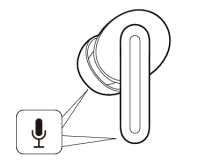
79. Q: Is the Redmi Buds 6 stereo?
A: Yes, when worn in both ears, the earbuds provide stereo sound.
80. Q: Does the Redmi Buds 6 support single-ear mode?
A: Yes, it supports single-ear use (the other earbuds should be kept in the charging case with the lid closed).
Note:
If you want to switch from single-ear use to dual-ear use after some time, simply put on the other earbud, and they will automatically connect.
81. Q: Does the Redmi Buds 6 support volume adjustment?
A: Yes, you can adjust the volume of the earbuds individually.
Here’s how to adjust the phone volume:
1. By default, the earbuds do not support this feature;
2. In the Xiaomi Earbuds APP, you can set gestures for the earbuds. Such as defining "double tap" as "volume up" (to increase the phone volume).
82. Q: Does the Redmi Buds 6 support Absolute volume (Bluetooth earbud volume)?
A: By default, the earbud volume is synchronized with the device volume.
To enable absolute volume (Bluetooth earbud volume), please refer to the following steps:
Go to [Settings] >> [Bluetooth] >> Redmi Buds 6 >> [Audio] >> enable [Absolute volume].
83. Q: Why does the Redmi Buds 6 have a bit of sound leakage?
A: The design philosophy aims to provide a comfortable and relatively loose fit, allowing you to enjoy music or calls while still being aware of your surroundings. This design can lead to some unavoidable audio leakage, which is considered normal.
85. Q: How to use spatial audio with the Redmi Buds 6?
A: To enable the feature, please refer to the steps below:
1. Open the Xiaomi Earbuds APP >> [Audio effects] >> [Spatial audio] >> turn on/off [Immersive sound];
2. Go to [Settings] >> [Bluetooth] >> Redmi Buds 6 >> [Audio] >> [Spatial audio] >> turn on/off [Immersive sound].
Note:
After enabling spatial audio in the system settings, you can experience the effect in supported music and video applications.
84. Q: Does the Redmi Buds 6 support audio sharing?
A: Yes it supports audio sharing.
85. Q: Why is there a pop sound when turning off spatial audio in the app while music is playing?
A: During playback, turning off the spatial audio will cause a momentary pop sound due to the internal algorithm. This has been optimized in the OTA1 (1.1.2.6) earbud version, so please update to the latest version in the Xiaomi Earbuds APP for a better experience.
86. Q: Why is there a "puffing" sound when ringing the bell while biking?
A: The bell sound is too loud, preventing the ANC from accurately capturing the true sound, which results in the puffing noise. For safety reasons, it’s recommended to avoid using noise cancellation while biking.
87. Q: Why are there crackling sounds when pausing or switching tracks during music playback on the Redmi Buds 6?
A: The earbud version has been optimized, so please update to version 1.1.3.4 or higher in the Xiaomi Earbuds APP for a better experience.
Noise Cancellation
88. Q: Does the Redmi Buds 6 support Active Noise Control (ANC)?
A: Yes, the Redmi Buds 6 features ENC call noise cancellation and ANC technology.
The differences between ENC and ANC are as follows:
Both ENC and ANC aim to suppress environmental noise, however, the benefit parties are different.
1. ENC (Environmental Noise Cancellation) optimizes audio signal processing algorithms to introduce additional processing steps between audio input and output. This reduces the impact of environmental noise on audio quality, enhancing call quality and audio clarity. The effectiveness of noise cancellation requires acoustic validation;
2. ANC (Active Noise Control) works by using microphones to collect external noise, then transforms it systematically into an inverted sound wave that is added to the output. The final sound coming into the human ear is the ambient noise + the inverted ambient noise. The superposition of these two noises results in a perceived reduction of noise, which benefits you. In contrast, cVc noise cancellation benefits the other party on the call.
89. Q: Why is there no response when switching noise cancellation after wearing the Redmi Buds 6?
A: This situation occurs if the Redmi Buds 6 is loose during use, preventing the earbuds from switching noise cancellation. Please readjust and wear the earbuds properly before trying to switch again.
90. Q: Why is the noise cancellation effect sometimes poor when wearing the Redmi Buds 6?
A: Please refer to the following ideas:
1. ANC effectiveness relies on good passive noise cancellation. So please wear the earbuds snugly to enhance noise cancellation;
2. ANC is more effective against low-frequency noise and the effectiveness is less for high-frequency noise. It is suitable for environments like airplanes, trains, and subways, while safety concerns prevent it from filtering high-frequency sounds like car horns and human voices. If you notice reduced noise cancellation, please try adjusting the fit and ensuring the earbuds are worn snugly.
91. Q: Why is the low-frequency performance not satisfactory when wearing the Redmi Buds 6?
A: Low-frequency performance is related to how tightly the earbuds fit.
To enhance low-frequency performance, please refer to the following suggestions:
1. Adjust the wearing of earbuds to ensure they fit snugly against your ears;
2. Modify the audio settings in the Xiaomi Earbuds APP to a softer bass setting.
92. Q: Why is there an inconsistent noise cancellation effect between the left and right earbuds of the Redmi Buds 6 in subways and buses?
A: The reasons are as follows:
1. This is primarily due to the earbuds becoming loose during bumpy rides (subways and buses), which is a common issue in half-in-ear earbuds. If this happens, please remove and reinsert the earbuds, adjusting their position to ensure both earbuds fit snugly;
2. Additionally, it is related to the firmware version. Please update the earbuds to the latest version to have a better experience.
The firmware update methods are as follows:
(1). Update via the Xiaomi Earbuds APP. Update method: Ensure the earbuds are connected to your phone and open the Xiaomi Earbuds APP. If a new version is available, a firmware update prompt will appear. Tap the prompt to enter the update interface and tap the update option to update now. After that, wait patiently for the upgrade progress to reach 100%, and the earbuds’ firmware will automatically update;
(2). Update via Bluetooth settings. Update method: Ensure the earbuds are connected to your phone, open system settings, go to Bluetooth, tap the arrow icon beside the Redmi Buds 6, and check for firmware updates. After that, wait patiently for the upgrade progress to reach 100%, and the earbuds’ firmware will automatically update.
93. Q: Why does the ANC mode switch automatically when only wearing the left earbud of the Redmi Buds 6?
A: When frequently switching between single earbud (left or right) and changing ANC modes, there is a small chance of experiencing mismatches. This has been optimized in the firmware update. Please update to the version 1.1.2.6 or above in the Xiaomi Earbuds APP to have a better experience.
94. Q: Why does the ANC switch prompt sound take 2-3 seconds to occur during calls when pressing and holding the touch controls of the Redmi Buds 6?
A: There is a slight delay in responsiveness while on a call, causing the prompt sound to be delayed. This issue has been optimized in the firmware update. Please update the earbuds to the latest version in the Xiaomi Earbuds APP to have a better experience.
95. Q: Why are there continuous bang, tapping or rumbling sounds of the Redmi Buds 6 when the car window is open?
A: This issue arises from changes in wind noise and road bumps affecting the noise cancellation system. Updating the earbuds firmware will help resolve this. Please pay attention to update notifications in the Xiaomi Earbuds APP.
Note:
This issue occurs with all high-depth noise-cancelling earbuds. At high speeds, some earbuds produce severe electrical sounds. However, different earbuds handle this in various ways. Some reduce the noise cancellation effect to resolve it. In the same environment, you can clearly hear the rumbling sound of wheels rolling on the ground through the earbuds. To ensure effective noise cancellation, some earbuds seek a balance between reducing noise and addressing these sounds to improve the overall experience.
96. Q: Why is there sometimes a sound of wind blowing the microphone of the Redmi Buds 6 that disappears after a few seconds while ANC becomes less effective?
A: The Redmi Buds 6 has a built-in wind noise cancellation algorithm that activates when a significant wind impact is detected. To minimize the effect of wind noise, the system enters the wind noise mode for about 3 seconds, during which the wind sound will disappear. However, this reduces the noise cancellation effectiveness due to the nature of how ANC works. While reducing wind noise, the microphone's algorithm is adjusted. Of course, compared to the influence of Active Noise Control (ANC), the wind noise from strong winds can have a greater impact on the experience. We will continue to optimize the wind noise cancellation feature based on your feedback.
97. Q: Why does the sound of wind blowing the microphone of the Redmi Buds 6 sometimes disappear and other times not?
A: The Redmi Buds 6 has a logical limitation in the algorithm regarding the continuity and intensity of the wind. This is to prevent the earbuds from easily entering the wind noise mode in response to a brief gust or light air from an air conditioner, thus avoiding an impact on the Active Noise Control (ANC) experience in non-windy environments. Once activated, it takes about 18 seconds to exit this mode, during which ANC effectiveness slightly declines. We will continue to optimize this feature based on feedback.
Note:
The current wind noise cancellation feature is primarily designed for outdoor use, such as when cycling in continuous strong winds or driving with the windows open.
98. Q: Why does music sometimes pause automatically when wearing the Redmi Buds 6?
A: This issue happens if the earbuds become loose during use, causing them not to detect the wearing status, so the music pauses automatically. Please reinsert the earbuds and restart your music.
99. Q: Why does music automatically pause or voice assistant activate when taking off or wearing the Redmi Buds 6?
A: The Redmi Buds 6 uses an in-ear detection sensor to detect the wearing status. When holding the earbuds, if you cover the sensor, it will cause the earbuds to mistakenly identify as being worn. If you don't need the wearing detection feature, you can enable/disable it in the additional settings in the Xiaomi Earbuds APP.
Note:
When holding the earbuds, avoid covering the sensor location indicated by the red arrow in the image.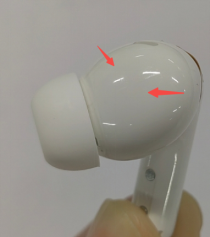
100. Q: Will the music resume automatically if either earbud of the Redmi Buds 6 is removed and put back on?
A: With the wearing detection feature enabled, when you remove the earbuds while music is playing, it will automatically pause. If you reinsert the earbuds within 2 minutes, the music will automatically resume (regardless of whether the removed earbud is placed back in the case). For video playback, whether the video automatically resumes upon reinserting an earbud depends on the video APP. Some video APPs cannot resume automatically.
101. Q: Why does music continue playing when the Redmi Buds 6 is in the charging case?
A: This issue occurs due to the charging case powering off from a low battery. Please recharge the case promptly.
Note:
If the charging case is powered off, the earbuds and the phone cannot communicate, so the earbuds will assume they are not in the case and maintain a connection with the phone, continuing music playback.
102. Q: Why doesn't the music automatically play when put the Redmi Buds 6 back in the ears?
A: This issue occurs if the other earbud is taken out of the case and immediately worn. When earbuds are used normally, the probability of this issue is low. This issue has been optimized in the latest version, so please update the earbuds to the latest version.
103. Q: Why does rotating the Redmi Buds 6 cause playback to pause?
A: The in-ear detection sensor of the Redmi Buds 6 is located on the same surface, so rotating the earbuds will lead to a situation where the sensor is not touching the ear, which can cause playback to pause.
104. Q: Why does the music pause when wearing the Redmi Buds 6 on the subway?
A: The vibrations in the subway can cause the earbuds to loosen, resulting in a pause in playback. At this time, simply re-adjusting the earbuds can resolve this issue.
105. Q: Why does the music pause when wearing the Redmi Buds 6 while riding a bike?
A: During cycling, the earbuds can be loose, leading to a decreased detection signal that triggers a disconnection. Just re-adjust the earbuds or tighten the fit.
106. Q: Why does the music stutter on the Redmi Buds 6 when the phone is playing music and entering a mobile game?
A: There is a conflict between the earbuds and the game when playing music using the earbuds, causing a brief audio delay when the game demands resources. Additionally, the game’s audio will pause the music temporarily, so you feel like there’s a stutter in the audio.
107. Q: Why does the music stutter on the Redmi Buds 6 when manually disconnecting and reconnecting the earbuds while using the phone?
A: If you manually disconnect the earbuds, then reconnect, and the phone's dynamic island appears, the music stutters on the earbuds when wearing the Redmi Buds 6 on both ears. This issue is related to certain phone models. The dynamic island feature generates audio data, leading to noise during audio switching. It is recommended to start playing music after the earbuds are connected to your phone.
108. Q: Why doesn't the music pause when taking off the Redmi Buds 6 and immediately place it in the charging case or on a desktop?
A: 1. When you take off the earbuds, the music will pause after 1-2 seconds to avoid a sudden interruption. Please place them on a desktop or in the charging case during this time;
2. When placing the earbuds, it is recommended to lay the stems flat, ensuring they make full contact with the desktop while keeping the ear tips facing up and not touching any objects.
109. Q: Why does the music resume after being paused when taking off one earbud of the Redmi Buds 6?
A: The in-ear detection relies on sensing components distributed around the sound chamber for data collection. If you take off the earbuds while your finger or palm covers the upper and lower parts of the sound chamber, it will be interpreted as the earbuds being worn, triggering the wearing detection and resuming music playback.
110. Q: Does the Redmi Buds 6 have crosstalk issues?
A: No.
Note:
The earbuds can only connect to one device at a time, so crosstalk with other devices will not occur. Rest assured that others will not hear your conversations during calls.
111. Q: Does the Redmi Buds 6 support third-party software for voice calls and input?
A: Yes, and the usage situation will vary based on different systems.
1. Both iOS and Android systems support voice calls and input;
2. Windows devices that support Bluetooth can achieve voice calls after connection and proper setup. Voice input requires third-party software support.
Note:
1. If the third-party software lacks audio input/output options, you can configure the input/output devices in Windows sound settings;
2. If the third-party software has audio input and output channels, set them to the Redmi Buds 6.
112. Q: Will pressing the touch area on the Redmi Buds 6 cause the sound to play out loud when using third-party APPs for voice calls?
A: No.
113. Q: Why is the audio quality fine while listening to music but poor when playing games with the Redmi Buds 6?
A: Different protocols are used for music and game.
1. For music, the A2DP protocol is activated;
2. For game, the game APP activates the HFP protocol, which has a narrower audio bandwidth, resulting in lower sound quality.
114. Q: Will there be any prompt sounds when wearing the Redmi Buds 6?
A: By default, if not connected, there will be a connection prompt sound when putting them on. If already connected, there will be no prompt sound.
115. Q: Why are there sometimes no prompts when switching audio streams with the Redmi Buds 6?
A: This issue occurs due to occasional failures in sending commands from the earbuds to the phone. We have optimized the firmware, so please update to the latest version in the Xiaomi Earbuds APP for a better experience.
116. Q: Does the Redmi Buds 6 support voice commands and voice hot words?
A: No.
117. Q: Does the Redmi Buds 6 support audio streaming with a PC?
A: No.
Appearance and Wearing
118. Q: Does the Redmi Buds 6 fall out easily when worn?
A: No, the Redmi Buds 6 is designed ergonomically and fits snugly in the ear canal.
1. If the earbuds are loose, please check if they are worn correctly as shown on the promotional page;
2. Before wearing, it is recommended to clean the stains or grease on the surface of the earbuds with alcohol wipes to maintain cleanliness and improve stability;
3. The earbuds are pre-installed with M-sized ear tips. The package contents include S and L sizes. You can change for better-fit ear tips according to your ear size.
Note:
Due to variations in ear shape, the ear tips cannot fit 100% of all ear shapes.
119. Q: Why is there a thumping sound when shaking head with the Redmi Buds 6?
A: The fit of the ear tips can vary from person to person. You can choose the size that best fits your ear from the S, M, or L ear tips.
120. Q: Will there be any adverse reactions when wearing the Redmi Buds 6?
A: The Redmi Buds 6 has a low power output, so you can use them with confidence.
Note:
1. The Redmi Buds 6 adopts the half-in-ear design, which can cause discomfort or fatigue with prolonged use. Wearing the Redmi Buds 6 in high-temperature environments can lead to rashes. It is advisable to take breaks after using them for about an hour;
2. Avoid setting the volume too high, as prolonged high volume can fatigue your hearing and ear canal nerves, leading to discomfort. It is recommended to lower the volume and take breaks to let your ears relax or gently massage them after wearing the earbuds for two hours.
121. Q: Will wearing the Redmi Buds 6 cause allergies? What to do if adverse reactions (such as inflammation) occur?
A: The parts of the Redmi Buds 6 that contact the skin have passed strict harmful substance inspection and will not affect the human body. When using the earbuds, please avoid wearing them for long periods (such as while sleeping), keep them clean, and avoid sweat or dirt residue that can cause discomfort, inflammation, or allergic reactions.
1. Potential causes of suspected allergic symptoms:
(1). Wearing them for extended periods (such as while sleeping) can cause a lack of breathability, leading to sweat residue on the earbuds;
(2). Earbuds accumulate dirt if not cleaned regularly, leading to possible allergic reactions;
(3). If severe discomfort or inflammation occurs after wearing the earbuds, it is advisable to stop using them and consult a doctor.
2. Please refer to the guidelines below when wearing:
(1). After exercising, check for sweat on the earbuds. If present, clean them before placing them back in the case;
(2). Regularly inspect the earbuds, ear tips, and charging case for dirt and clean them promptly if necessary;
(3). After prolonged use, take off the earbuds to let your ears rest for about half an hour to relieve fatigue;
(4). After showering, if there are water droplets inside the ears, please clean them before wearing the earbuds.
122. Q: Why do the black and blue versions of the Redmi Buds 6 have a protective film while the white version does not?
A: Due to differences in production batches, the black and blue earbuds come with a protective film that should be removed before use, while the white earbuds do not have a film and can be used directly.
Images of the black or blue earbuds with protective films:
1. Stems with films;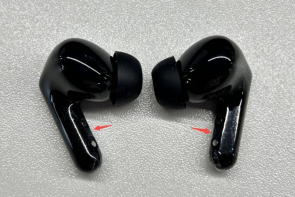
2. Stems with films + front shells with flat films;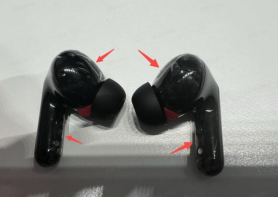
3. Stems with films + front shells with mesh films.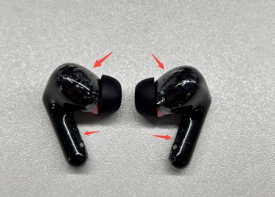
Images of the white earbuds without protective films: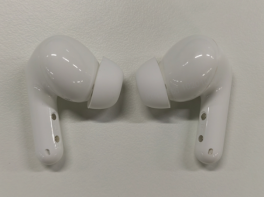
123. Q: Why is there a line on the Redmi Buds 6?
A: This line is a mold line and is not a crack, which is a normal occurrence. The surface finish of the earbuds is glossy, and the mold line will be invisible after proper polishing. If dust accumulates on the mold line after a period of use, it is recommended to clean it with a cloth.
124. Q: Why do the middle and back shells of the Redmi Buds 6 feel rough?
A: This is a product design and does not affect normal use, so you can use them with confidence.
125. Q: Why does the gap on the back of the charging case of the Redmi Buds 6 look large?
A: The gap in the charging case is a result of the fit between the upper and lower parts of the case and does not affect the use of the earbuds, so you can use them with confidence.
126. Q: What to do if there is a large gap between the upper and lower parts of the charging case of the Redmi Buds 6 during use?
A: The gap in the charging case is a result of the fit between the upper and lower parts and does not affect the use of the earbuds, so you can use them with confidence.
Troubleshooting
1. Q: What to do if the Redmi Buds 6 can't be charged, or powered on, or the indicator is off?
A: The Redmi Buds 6 cannot be charged or has unstable charging due to prolonged storage without use or poor contact with the charging case (dirty metal contacts).
Please refer to the following steps for troubleshooting:
1. Ensure the earbuds are activated while charging;
2. Check if the charging contacts of the earbuds are dirty, sunken, or damaged. Clean any dirt to ensure good contact between the charging contacts and the charging case;
Note:
Insert and remove the earbuds from the case three times. If contact is normal, the white light strip will light up for 2 seconds when the earbuds are placed in the case.
3. Place both earbuds in the charging case, keep the lid open, and connect to your phone. Check in the Xiaomi Earbuds APP interface if the battery icon shows a lightning bolt.
(1). If there is no lightning bolt icon, please apply for the after-sales service;
(2). Check if the charging case has power. If the charging case is out of battery, charge it first, then charge the earbuds. If the earbuds have not been used for a long time and have low power, the indicator will take some time to turn on.
2. Q: What to do if the charging case of the Redmi Buds 6 can't be charged?
A: Please refer to the following troubleshooting steps:
1. Try replacing the charging cable and charger to see if it can be charged. If it can be charged after replacement, the issue is with the charging cable or charger;
2. Use the charging cable and charger with other devices to verify their functionality. If they charge other devices normally, charge the charging case for half an hour and then observe. If the case still can’t be charged, please apply for the after-sales service.
Note:
This issue also can be due to the incompatibility of the charger.
3. Q: What to do if the sound from the Redmi Buds 6 is too low?
A: Please refer to the following troubleshooting steps:
1. Slide up on the touching control area to adjust the volume individually;
2. In your phone's settings, enable Absolute volume (or Keep volume consistent) and adjust the volume using the phone's volume buttons;
3. Alternatively, in the Xiaomi Earbuds APP settings interface >> [Gestures] >> set double-tap to increase volume, then press the earbuds to adjust the volume;
4. It can be due to the low battery on your phone or earbuds. Charge them fully and check again;
5. Reset the earbuds and pair them again;
6. Test with another phone. If the problem persists, please apply for the after-sales service;
7. Check if the sound outlet of the earbuds is blocked or if there are foreign objects. Clean them promptly.
Note:
Sound will be reduced in high wind conditions or noisy environments like subways, which is normal.
4. Q: What to do if the sound from the Redmi Buds 6 is intermittent or has noise?
A: This can be due to the music or hardware issues. You need to determine if the problem is with the phone or the earbuds.
Please refer to the following troubleshooting steps:
1. If the distance between the phone and earbuds or between two earbuds is too far or if there is an obstruction (like a wall), it will cause intermittent sound or noise. Keep the phone and earbuds or two earbuds close together and avoid obstructions;
2. If there is signal interference in your environment or if the phone's signal is weak, try using them in a different environment or a location with a better phone signal to see if the problem persists;
3. If there are large electromagnetic interference sources nearby, it can cause low sound or noise for others. Keep away from objects like microwaves or Wi-Fi routers that have large electromagnetic interference;
4. If you’re using a Xiaomi smartphone and hear occasional buzzing or electrical noise while playing music, and it goes away when you pause the music or put the earbuds back in the charging case and wear them again, please update your phone’s system to the latest version. (Steps: Open the [Settings] interface on your phone >> tap [About phone] >> tap [Xiaomi HyperOS] or [MIUI version], and the interface will automatically check for updates);
5. Reset the earbuds and restart your phone, then pair them again to see if the issue resolves;
6. Ensure the earbuds are sufficiently charged (above 30%), test with another phone, and if the problem persists, please apply for the after-sales service.
5. Q: Why is there no sound or why is it stuttering when the Redmi Buds 6 is connected?
A: Please refer to the following troubleshooting steps:
1. Analysis of causes:
(1). Due to the special nature of Bluetooth earbuds, the electromagnetic waves in your area interfere with the Bluetooth connection, leading to no sound;
(2). Check your phone's volume settings to ensure it is not muted;
(3). The phone is too far from the earbuds (beyond 10m), or there is an obstruction between the earbuds and the phone;
(4). If the phone is simultaneously connected to two Bluetooth devices, the sound can come from the second device, leaving the first device silent.
2. Solutions:
(1). Check if your earbuds are in an environment with large interference. Keep away from microwaves or other strong electromagnetic sources;
(2). Unmute your phone and try increasing the volume of your phone to see if the sound returns;
(3). Keep the phone and earbuds close together or reconnect them;
(4). Disconnect the earbuds, place them back in the charging case, close the lid for 5 seconds, then open the lid and reconnect to the phone. Or disconnect the phone from the other Bluetooth device;
(5). If none of the above works, try restoring factory settings: place both earbuds in the charging case, open the lid, then press and hold the function button for 10 seconds until the indicator flashes continuously, indicating a factory reset.
6. Q: Why is sound still playing from the phone even though the Redmi Buds 6 is connected?
A: If the earbuds and phone are connected while music, video, or call audio is still playing from the phone, it is due to disabling the Media audio option.
Solution: After connecting the earbuds to the phone, go to [Settings] >> [Bluetooth] >> find [Redmi Buds 6] and tap the [>] icon to enable [Media audio].
Then please refer to the following steps:
1. On the phone’s Bluetooth settings interface, disconnect the earbuds and reconnect them;
2. Turn off Bluetooth on the phone and then turn it back on. The earbuds will reconnect automatically;
3. Place both earbuds in the charging case, press and hold the function button for 2 seconds, and re-pair the Bluetooth connection;
4. If none of the above works, try restoring factory settings: place both earbuds in the charging case, open the lid, then press and hold the function button for 10 seconds until the indicator flashes continuously, indicating a factory reset.
7. Q: What to do if the sound from the left and right earbuds of the Redmi Buds 6 is out of sync?
A: Please refer to the following troubleshooting steps:
1. Reconnect the earbuds (place them back in the charging case, close the case, then reopen it) and test if the sound is in sync;
2. Bind the earbuds with the Xiaomi Earbuds APP to check for firmware updates (you can view the current version at the bottom of the device details interface);
3. Reset the earbuds, then reconnect and test if the sound is in sync.
8. Q: What to do if one earbud has no sound after connecting the Redmi Buds 6 to the phone?
A: Please refer to the following troubleshooting steps:
1. Analysis of causes:
(1). One earbud is not making good contact, causing only one side to pair;
(2). One earbud has a low battery and shuts down;
(3). Check if the sound outlet of the earbud is blocked or dirty;
(4). Check if the earbud has been exposed to water or sweat, causing a short circuit.
2. Solutions:
(1). Place the earbuds back in the case, ensure the indicator on the charging case lights up when placed inside, then re-pair them;
(2). If the battery is low, after ensuring good contact, place it in the case to charge for 10 minutes, then pair them again;
(3). Check and clean any dirt from the earbuds;
(4). Reset the earbuds. Place both earbuds in the charging case, open the lid, then press and hold the function button for 10 seconds until the indicator flashes continuously, indicating a factory reset;
(5). Apply for the after-sales service if the issue persists.
9. Q: Why is the sound uneven when listening to music or watching videos, leaning towards the left or right earbud of the Redmi Buds 6?
A: The reasons are as follows:
1. You need to adjust the angle of the earbuds during initial wear to achieve an even fit for both ears;
2. The Redmi Buds 6 supports Dimensional audio. Please ensure the Immersive sound feature is turned off;
3. Try a different song or switch videos to rule out issues with the audio source;
4. Check if there is any dirt blocking the speaker holes. You can use a brush to clean out any debris and check if the earbud volume returns to normal.
10. Q: Why does the sound of one earbud become smaller after using the Redmi Buds 6 for a while?
A: Please refer to the following troubleshooting steps:
1. Use the Xiaomi Earbuds APP to confirm that both earbuds are connected to Bluetooth;
2. Check if there is any dirt blocking the speaker holes. Clean out any debris using a brush and check if the earbuds’ volume returns to normal;
3. The earbuds support Dimensional audio. Please ensure the Immersive sound feature is turned off.
11. Q: Why is the volume still half of before on the Redmi Buds 6 even after the phone volume is set to maximum?
A: Please refer to the following troubleshooting steps:
1. Unpair the Bluetooth earbuds, search again, and reconnect;
2. If the sound is still low after reconnecting, slide up on the touching control area to increase the volume;
3. Some phones have the Absolute volume feature. It is recommended to turn on the synchronization between earbuds and the phone in the Bluetooth settings interface.
12. Q: What to do if connecting two pairs of the Redmi Buds 6 to one phone and one pair can't hear the audio when broadcasting?
A: Please try deleting the Bluetooth records in the phone's Bluetooth settings and then reconnecting the pair of earbuds that can't hear the music.
Steps to delete Bluetooth records on the phone:
Android phones >> [Settings] >> [Bluetooth] >> [Redmi Buds 6] >> tap the [>] icon >> [Unpair] (using a Xiaomi smartphone as an example).
iOS phones >> [Settings] >> [Bluetooth] >> [Redmi Buds 6] >> tap the [i] icon on the right >> [Forget This Device] (using an iPhone 15 as an example).
13. Q: What to do if the Redmi Buds 6 suddenly plays a prompt sound without any operation?
A: This phenomenon has been optimized in the new version. Please upgrade the earbuds to the latest version in the Xiaomi Earbuds APP promptly.
Does it help?