

How to enable the Silence notifications while driving on the Xiaomi 14T?
The Xiaomi 14T offers a feature that supports silent notifications while you're driving, helping you to focus on the road by reducing interruptions like calls and text messages. To minimize distractions, your device can automatically activate Do Not Disturb mode when it detects that you're driving. Additionally, your device uses motion and Bluetooth connections to work out when you’re in a moving vehicle.
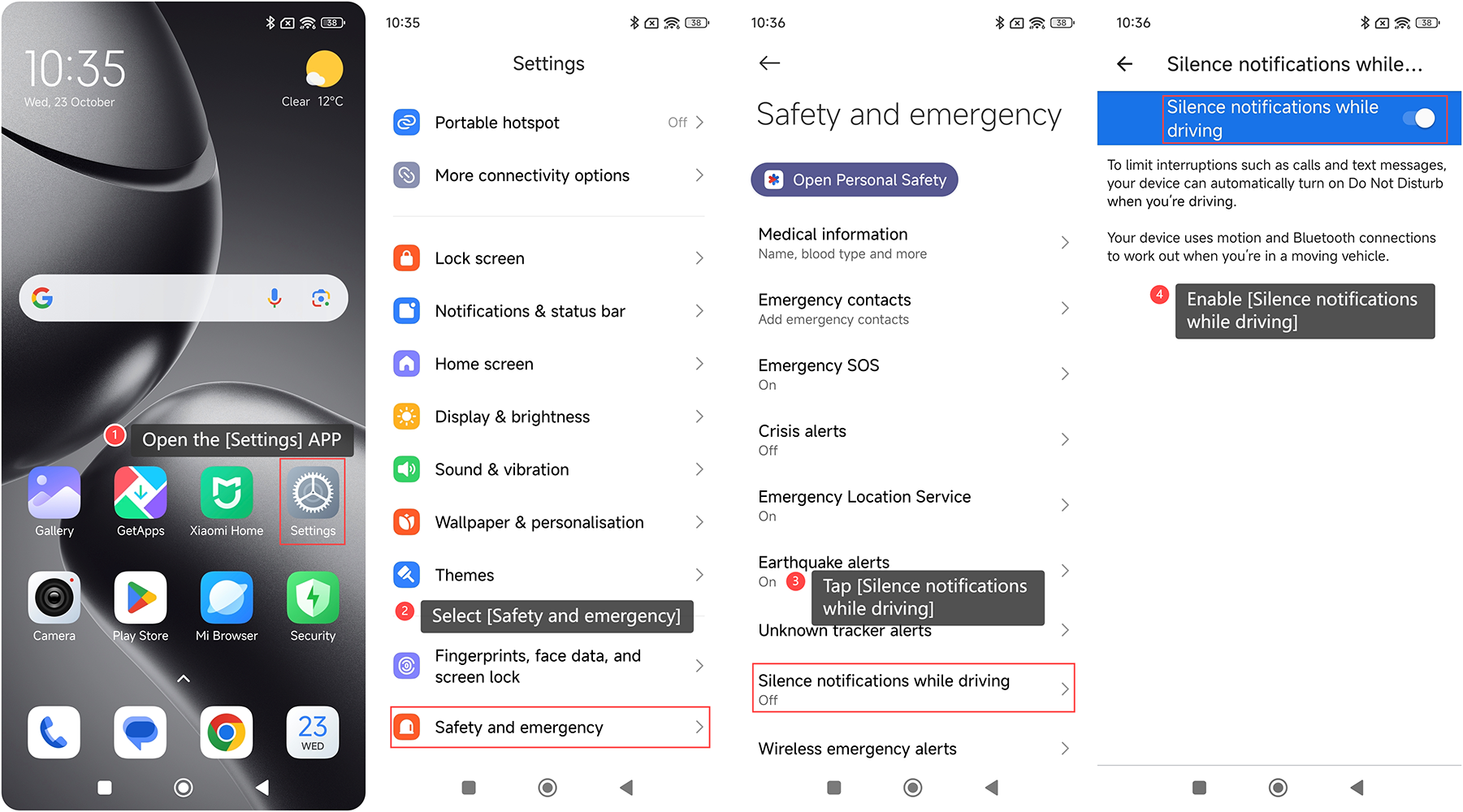
To enable the Silence notifications while driving on your phone, please refer to the following steps:
1. Open the [Settings] APP on your phone;
2. Scroll down and select [Safety and emergency];
3. Tap [Silence notifications while driving];
4. Enable [Silence notifications while driving].
To enable the Silence notifications while driving on your phone, please refer to the following steps:
1. Open the [Settings] APP on your phone;
2. Scroll down and select [Safety and emergency];
3. Tap [Silence notifications while driving];
4. Enable [Silence notifications while driving].
Does it help?
Yes
No