

How to turn on OTG on the Xiaomi 14T?
The Xiaomi 14T supports the function of OTG, which allows you to connect a USB flash drive or external hard drive to your phone for quick data transfer, backup, or media playback without a computer. You can connect peripherals like keyboards, mice, game controllers, and even printers for expanded functionality on your mobile device.
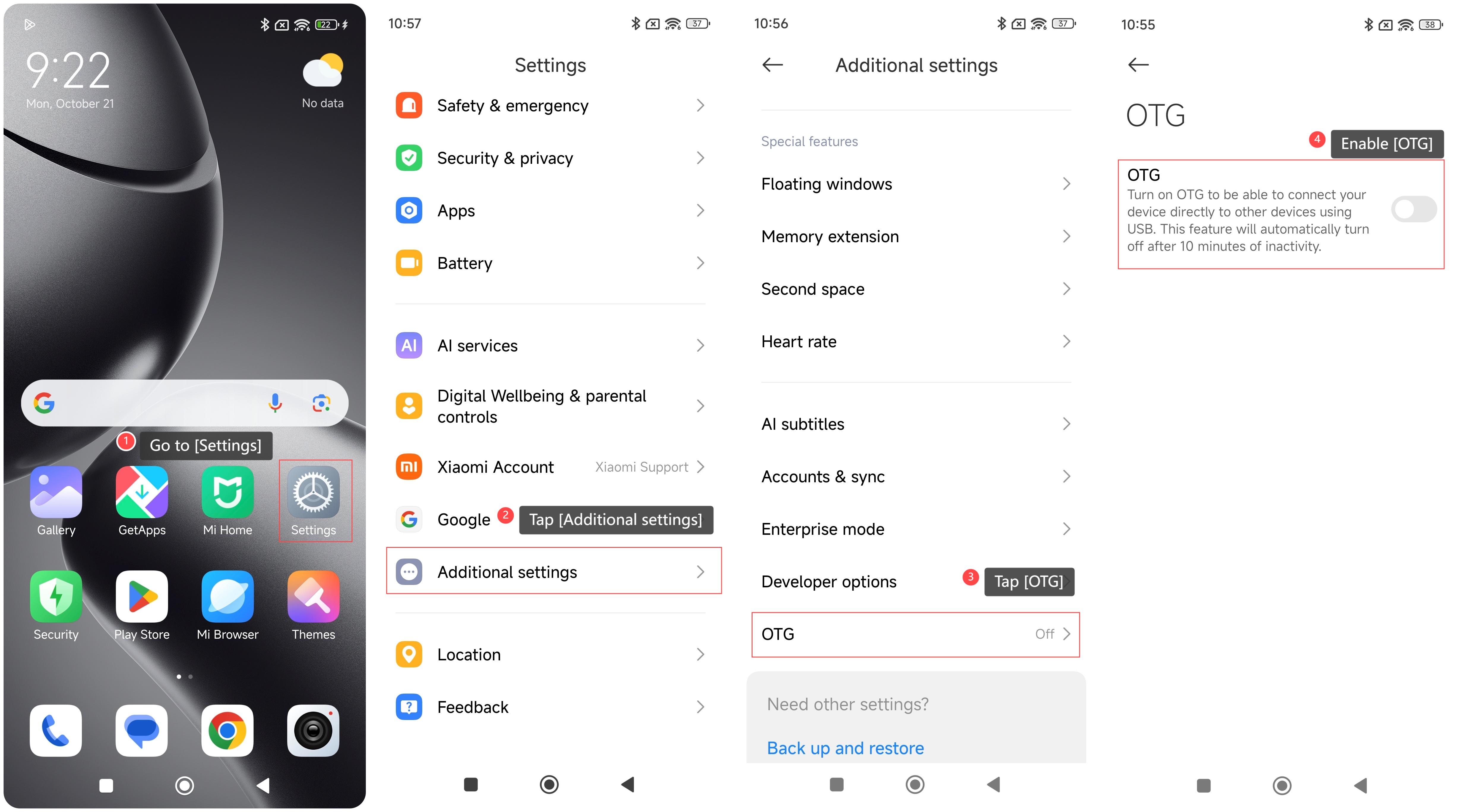
To turn on OTG on your phone, please refer to the following steps:
1. Go to [Settings];
2. Tap [Additional settings];
3. Swipe down to find and tap [OTG];
4. Enable [OTG].
Note:
Turn on OTG to be able to connect to your device directly to other devices using USB. This feature will automatically turn off after 10 minutes of inactivity.
To turn on OTG on your phone, please refer to the following steps:
1. Go to [Settings];
2. Tap [Additional settings];
3. Swipe down to find and tap [OTG];
4. Enable [OTG].
Note:
Turn on OTG to be able to connect to your device directly to other devices using USB. This feature will automatically turn off after 10 minutes of inactivity.
Does it help?
Yes
No