

How to restore the default settings on the Xiaomi 14T camera?
Restoring the camera on the Xiaomi 14T to default settings can resolve issues caused by accidental changes, optimize camera performance, and provide you with a clean starting point to easily readjust shooting parameters, ensuring the best photography results.
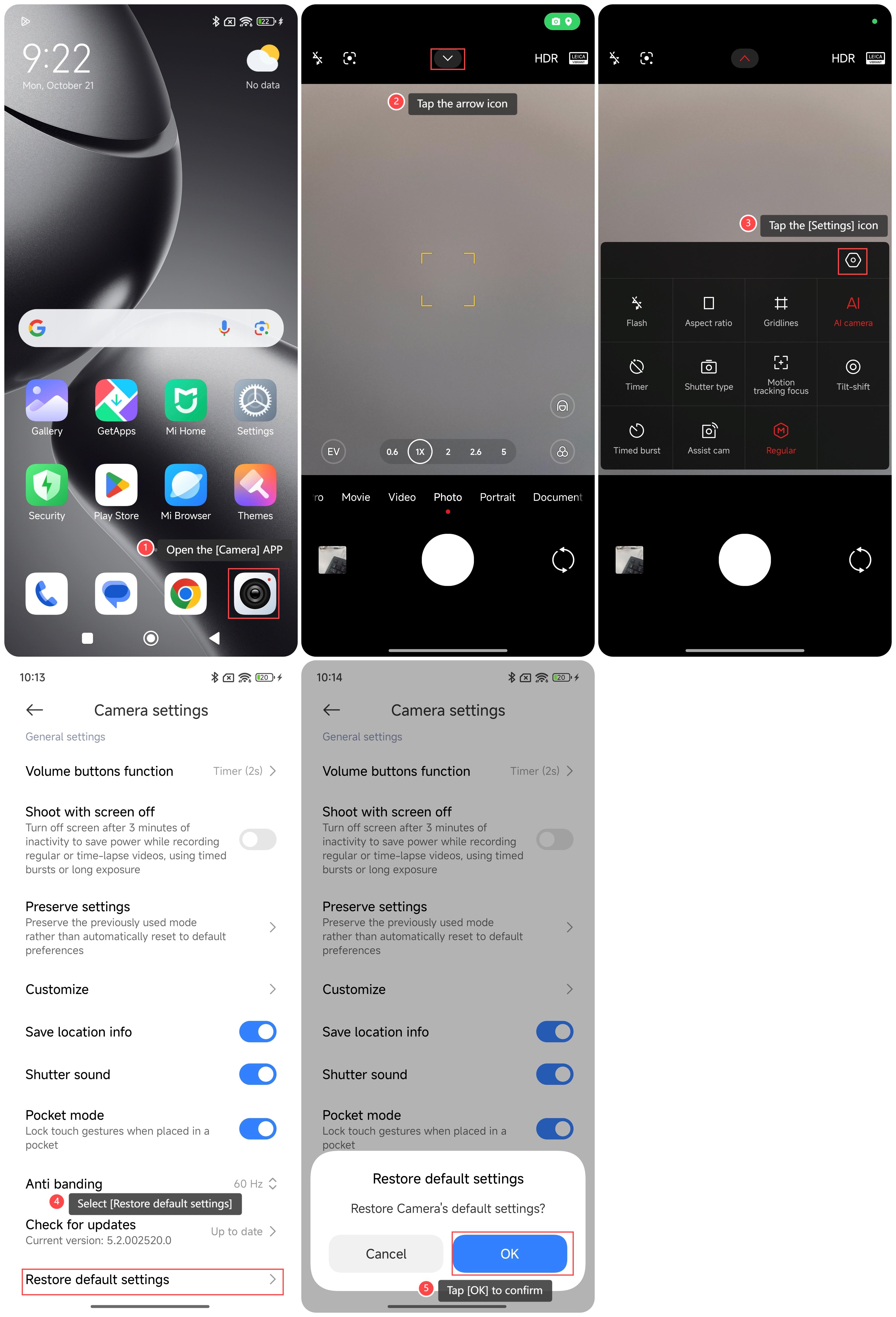
To restore the default settings of the camera on your phone, please refer to the following steps:
1. Open the [Camera] APP on your phone;
2. Tap the arrow icon on the top of the screen;
3. Tap the [Settings] icon;
4. Scroll down and select [Restore default settings];
5. Tap [OK] to confirm.
Note:
It's advisable to note any personalized settings before restoring defaults, as you'll need to reconfigure them after restoration.
To restore the default settings of the camera on your phone, please refer to the following steps:
1. Open the [Camera] APP on your phone;
2. Tap the arrow icon on the top of the screen;
3. Tap the [Settings] icon;
4. Scroll down and select [Restore default settings];
5. Tap [OK] to confirm.
Note:
It's advisable to note any personalized settings before restoring defaults, as you'll need to reconfigure them after restoration.
Does it help?
Yes
No