

How to turn on Auto night mode on the Xiaomi 14T?
The Auto night mode on the Xiaomi 14T allows you to capture better-quality photos in low-light conditions. When enabled, it detects low ambient light and automatically adjusts settings, such as exposure and brightness, to enhance details, reduce noise, and provide sharper images without needing to manually switch to night mode. This feature ensures that nighttime or low-light photography is convenient and produces high-quality results with minimal effort.
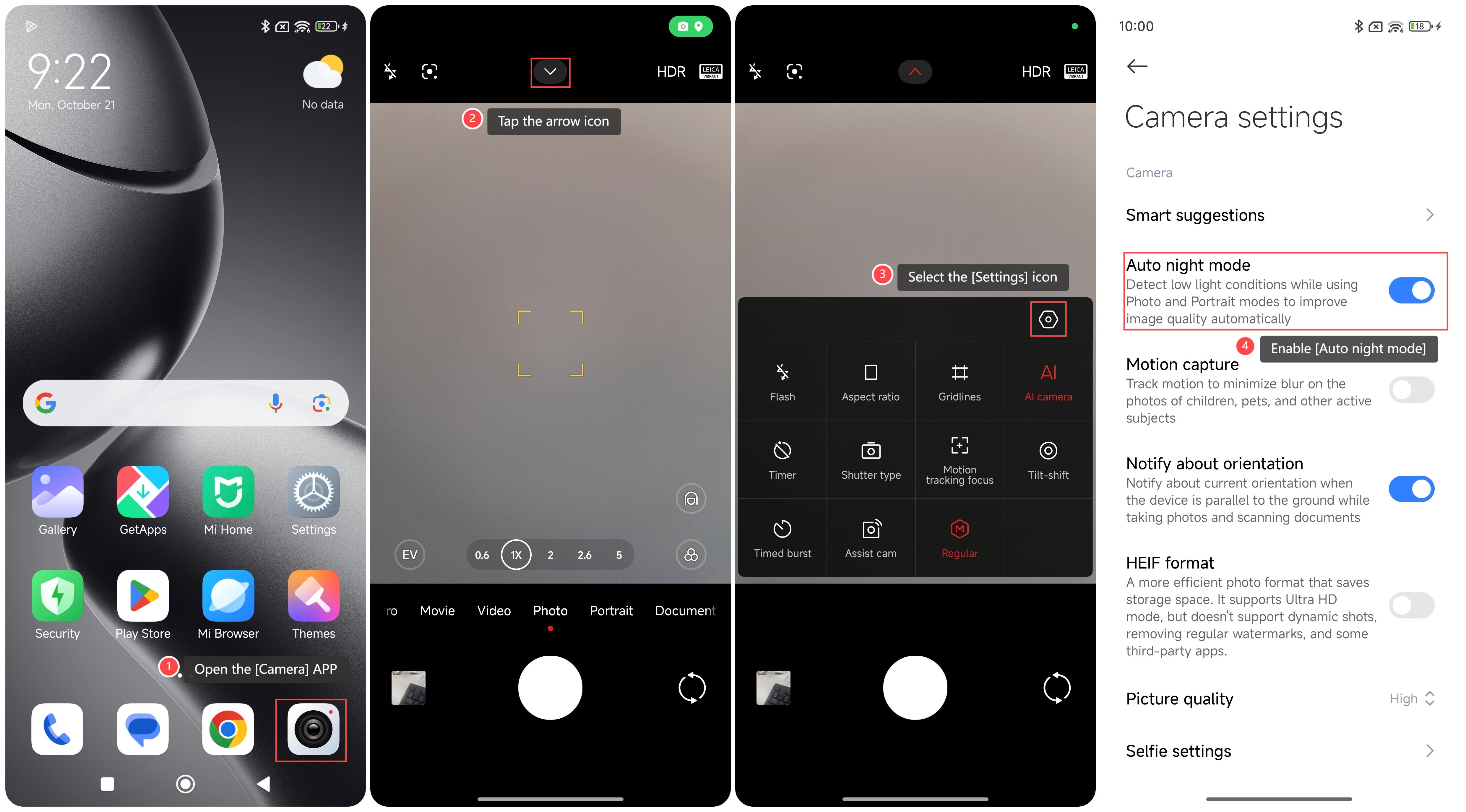
To turn on Auto night mode on the phone, please refer to the following steps:
1. Open the [Camera] APP on your phone;
2. Tap the arrow icon in the middle at the top;
3. Select the [Settings] icon;
4. Enable [Auto night mode].
Note:
In low-light environments, using an appropriate focal length can improve shooting results and avoid using an excessively long focal length, which will result in blurred images.
To turn on Auto night mode on the phone, please refer to the following steps:
1. Open the [Camera] APP on your phone;
2. Tap the arrow icon in the middle at the top;
3. Select the [Settings] icon;
4. Enable [Auto night mode].
Note:
In low-light environments, using an appropriate focal length can improve shooting results and avoid using an excessively long focal length, which will result in blurred images.
Does it help?
Yes
No