

How to allow face unlock when the Xiaomi 14T screen lights up?
The Xiaomi 14T supports allowing face unlock when screen lights up. Through this feature, you can unlock the device using face data whenever the screen lights up for incoming notifications, which will speed up the battery consumption.
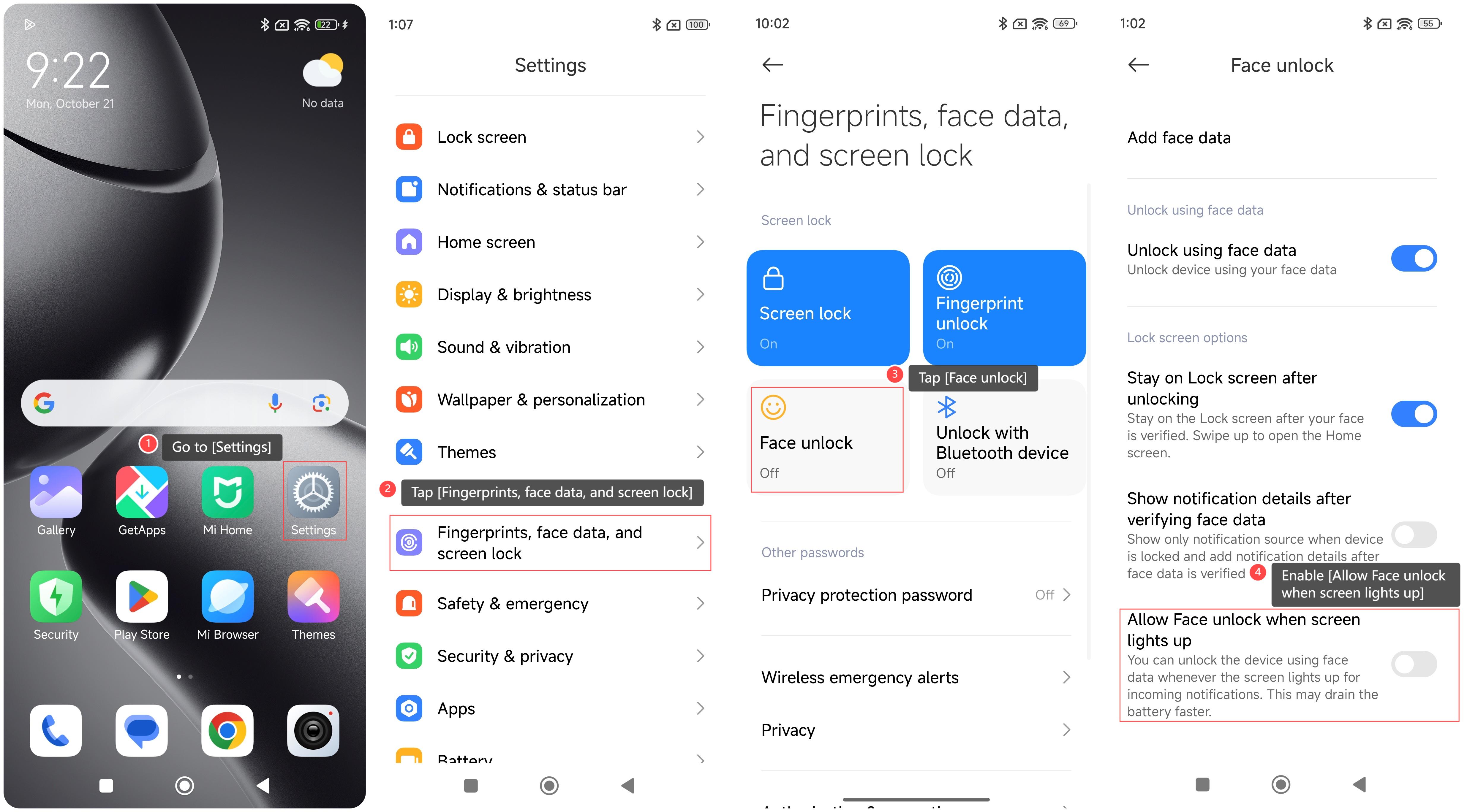
To allow face unlock when screen lights up on your phone, please refer to the following steps:
1. Go to [Settings];
2. Tap [Fingerprints, face data, and screen lock];
3. Tap [Face unlock];
4. Swipe down to find and enable [Allow Face unlock when screen lights up].
Note:
1. Please add face data before using the function of allowing face unlock when screen lights up;
2. If you want to save battery power, disable this function when not necessary.
To allow face unlock when screen lights up on your phone, please refer to the following steps:
1. Go to [Settings];
2. Tap [Fingerprints, face data, and screen lock];
3. Tap [Face unlock];
4. Swipe down to find and enable [Allow Face unlock when screen lights up].
Note:
1. Please add face data before using the function of allowing face unlock when screen lights up;
2. If you want to save battery power, disable this function when not necessary.
Does it help?
Yes
No