

How to set color scheme on the Xiaomi 14T?
The Xiaomi 14T supports setting color scheme, which allows you to customize the visual appearance of your interface, enhancing both aesthetics and usability.
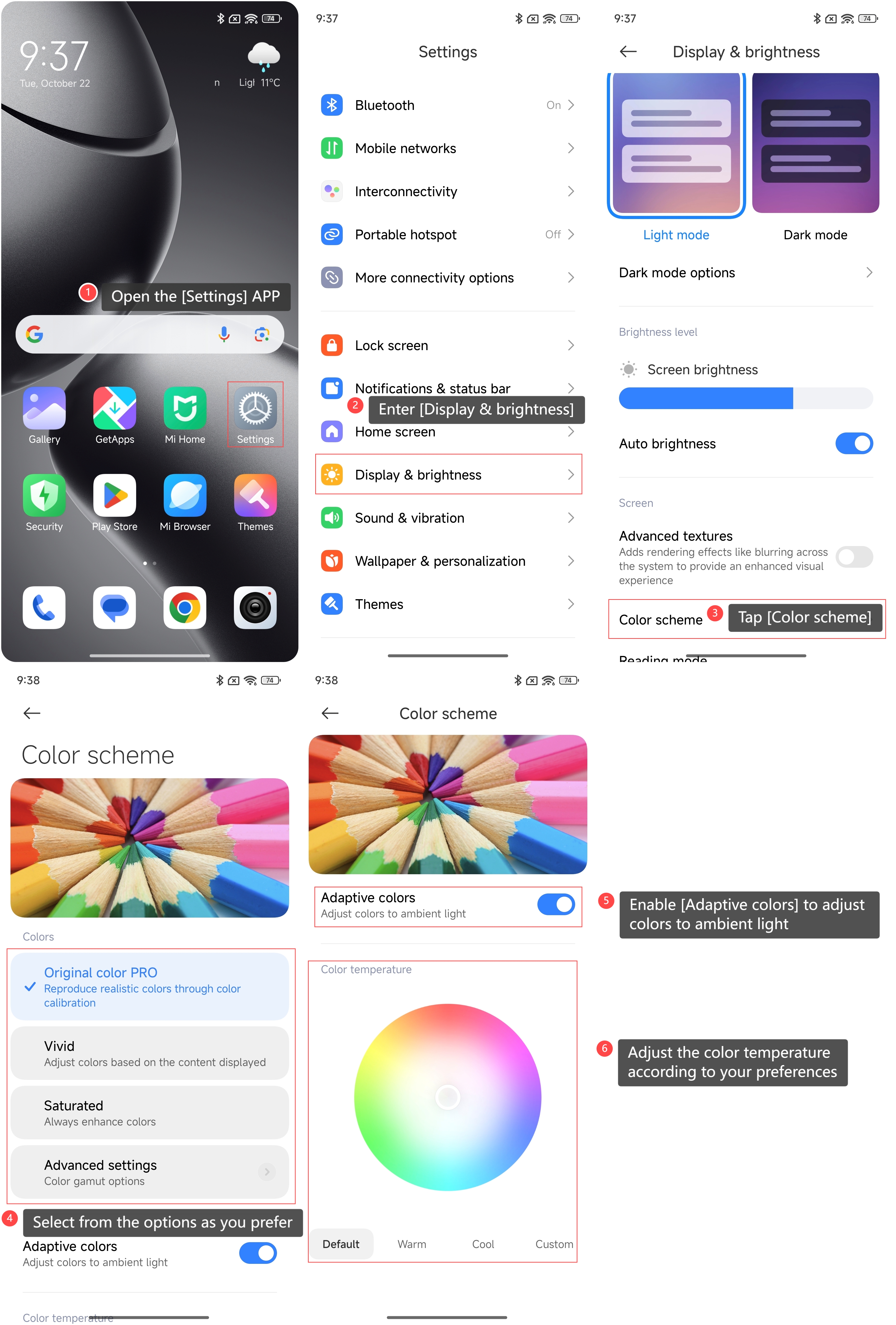
To set the color scheme on your phone, please refer to the following steps:
1. Open the [Settings] APP on your phone;
2. Enter [Display & brightness];
3. Tap [Color scheme];
4. Select from the options as you prefer;
5. You can enable [Adaptive colors] to adjust colors to ambient light;
6. You can also adjust the color temperature according to your preferences.
To set the color scheme on your phone, please refer to the following steps:
1. Open the [Settings] APP on your phone;
2. Enter [Display & brightness];
3. Tap [Color scheme];
4. Select from the options as you prefer;
5. You can enable [Adaptive colors] to adjust colors to ambient light;
6. You can also adjust the color temperature according to your preferences.
Note:
If you enable the Reading mode on your phone, you can not adjust the color scheme. You can turn off the Reading mode first and then make adjustments.
If you enable the Reading mode on your phone, you can not adjust the color scheme. You can turn off the Reading mode first and then make adjustments.
Does it help?
Yes
No