

How to enable Detect gaze on the Xiaomi 14T Pro?
The Xiaomi 14T Pro supports Detect gaze function. When you turn on Detect gaze, the device won’t lock when it detects that you’re looking at the screen. Your facial characteristics won’t be analyzed, and your face information won’t be stored on your device or uploaded to the cloud.
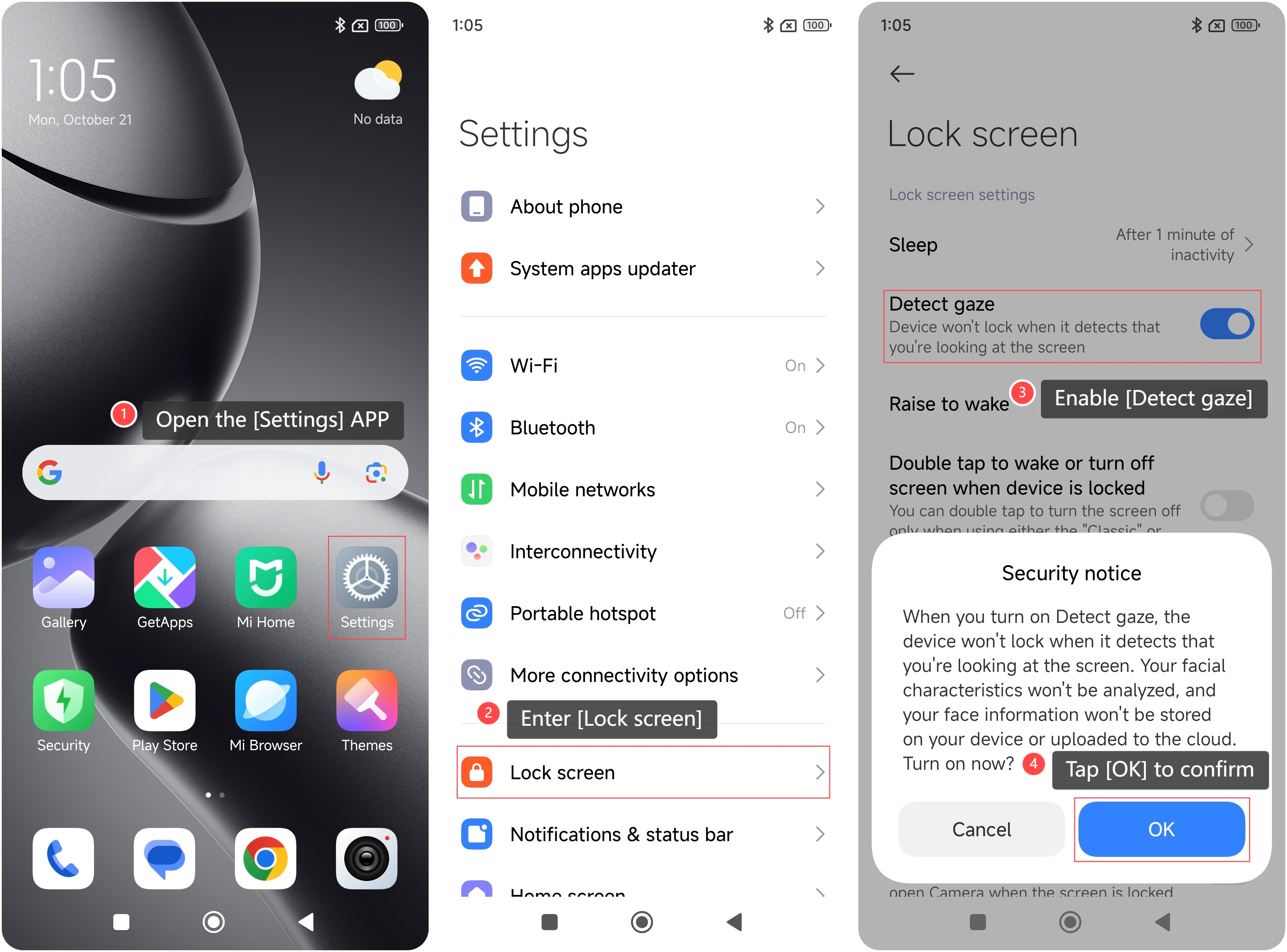
To enable Detect gaze on your phone, please refer to the following steps:
1. Open the [Settings] APP on your phone;
2. Enter [Lock screen];
3. Enable [Detect gaze];
4. Tap [OK] to confirm.
To enable Detect gaze on your phone, please refer to the following steps:
1. Open the [Settings] APP on your phone;
2. Enter [Lock screen];
3. Enable [Detect gaze];
4. Tap [OK] to confirm.
Note:
The gaze detection function can perform poorly in low-light or extremely bright environments. If you notice issues with functionality, try adjusting the lighting around you.
The gaze detection function can perform poorly in low-light or extremely bright environments. If you notice issues with functionality, try adjusting the lighting around you.
Does it help?
Yes
No