

How to add rendering effects on the Xiaomi 14T?
The Xiaomi 14T supports adding rendering effects, which will enhance visual quality and use experience. They include things like shadows, lighting, textures, and animations that make interfaces look smoother and more engaging. These effects help with readability, navigation, and overall aesthetics, contributing to a more immersive experience.
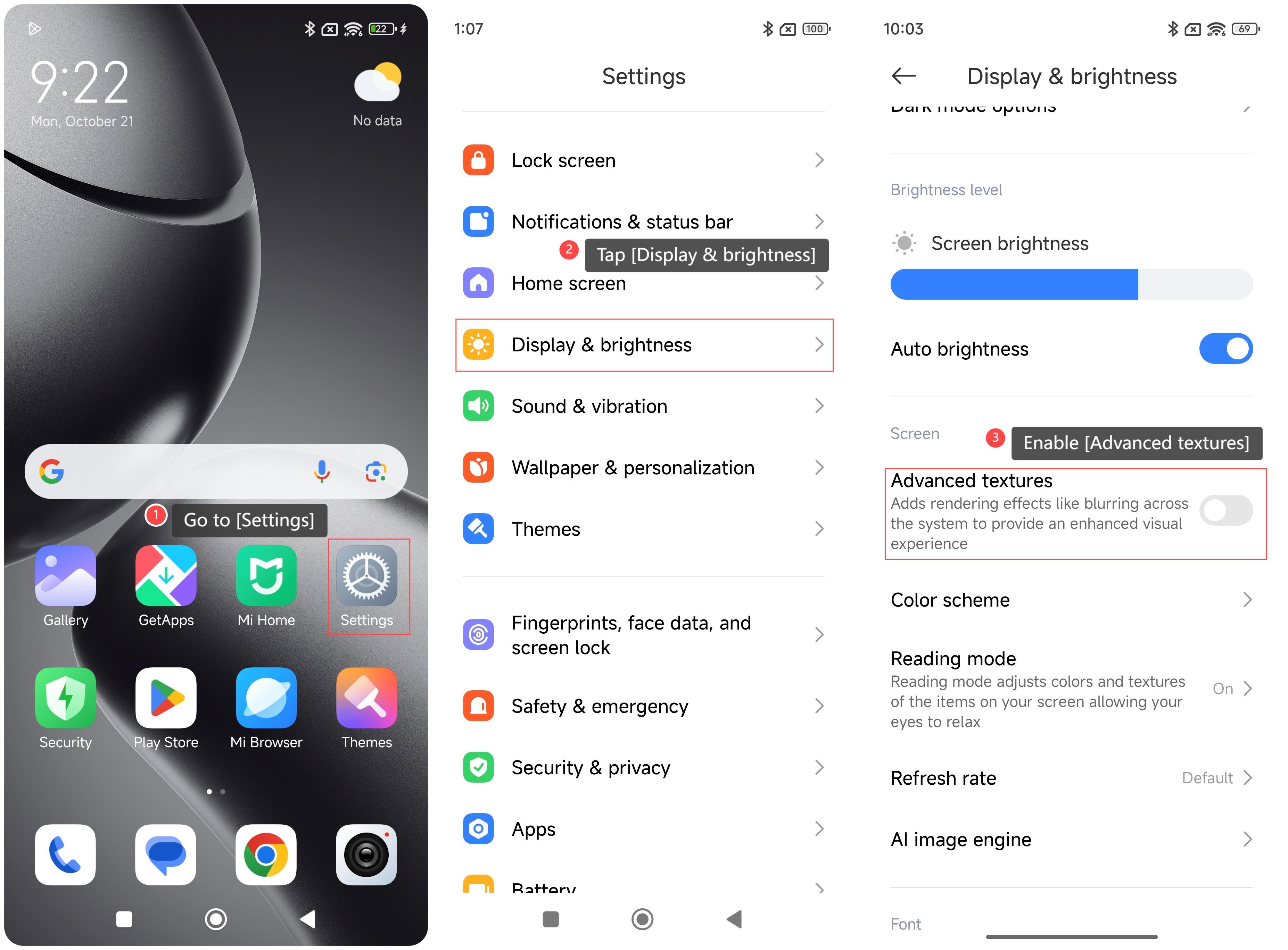
To add rendering effects on your phone, please refer to the following steps:
1. Go to [Settings];
2. Tap [Display & brightness];
3. Swipe down to find and enable [Advanced textures].
Note:
Turning on this feature will consume more battery power and make the phone heat up. It is recommended that you disable the feature when the battery power is not sufficient.
To add rendering effects on your phone, please refer to the following steps:
1. Go to [Settings];
2. Tap [Display & brightness];
3. Swipe down to find and enable [Advanced textures].
Note:
Turning on this feature will consume more battery power and make the phone heat up. It is recommended that you disable the feature when the battery power is not sufficient.
Does it help?
Yes
No