

How to use Time-lapse on the REDMI 13C 5G?
The Time-lapse feature on the REDMI 13C 5G allows you to capture slow-moving events, such as sunsets, traffic, or plant growth, in a condensed format. This creative tool transforms hours of footage into a short, engaging video, making it ideal for storytelling or showcasing changes over time.
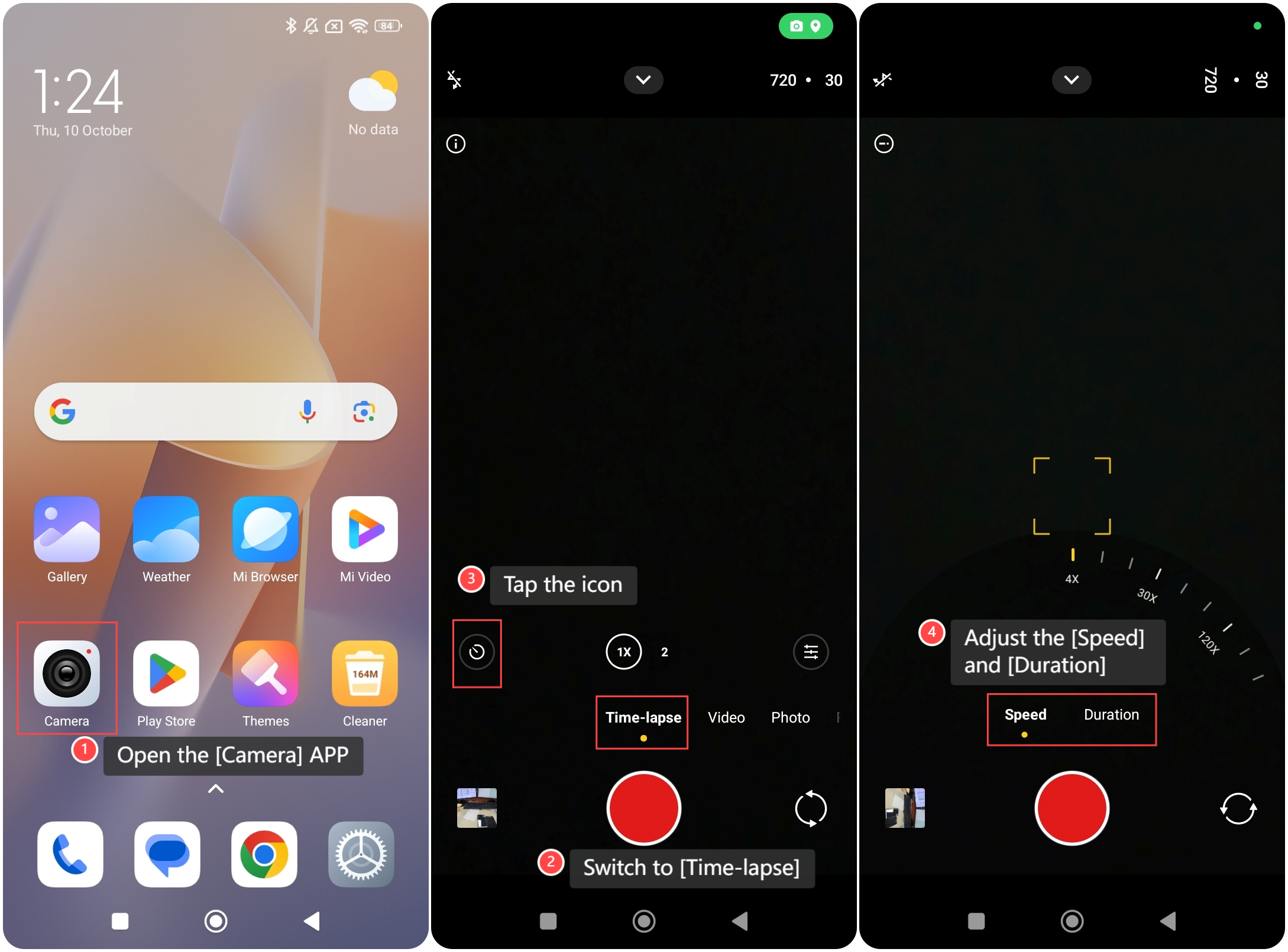
To use Time-lapse on the phone, please refer to the following steps:
1. Open the [Camera] APP on your phone;
2. Switch to [Time-lapse];
3. Tap the icon on the left side of the screen;
4. Adjust the [Speed] and [Duration] for the time-lapse video.
To use Time-lapse on the phone, please refer to the following steps:
1. Open the [Camera] APP on your phone;
2. Switch to [Time-lapse];
3. Tap the icon on the left side of the screen;
4. Adjust the [Speed] and [Duration] for the time-lapse video.
Friendly tips:
The duration of a shooting session is unlimited by default. You can also set the timer which will stop the session at a fixed moment.
The duration of a shooting session is unlimited by default. You can also set the timer which will stop the session at a fixed moment.
Does it help?
Yes
No