

How to install and configure the Xiaomi Router BE3600 for the first time?
The Xiaomi Router BE3600 can be bound using the Mi Home/Xiaomi Home APP or configured via the web backend management. It does not support binding through the Mi Wi-Fi APP.
Preparation before the configuration:
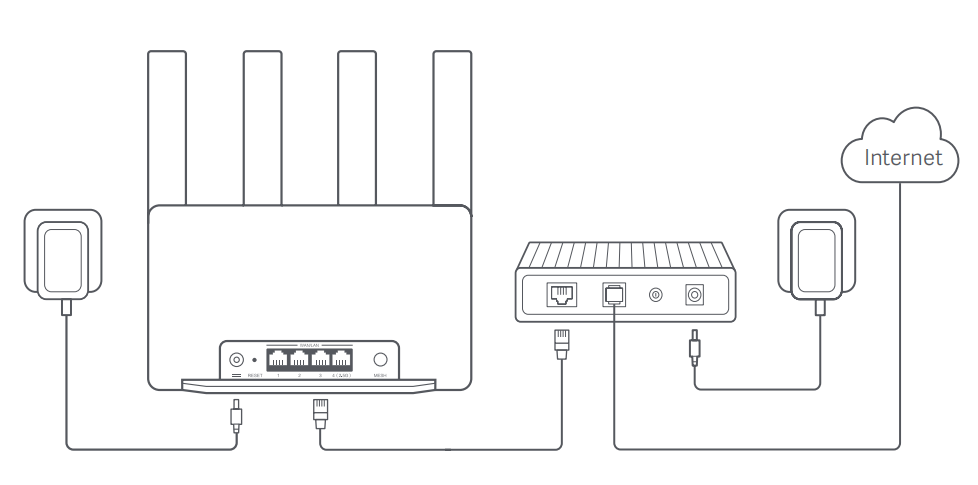
1. Connect the router to power, then the router will automatically turn on;
2. Restart your modem;
Note:
The modem is provided by your Internet service provider.
3. Plug one end of the network cable into either of the router's ports, and the other end into the LAN port of the modem.
Note:
If you use the Ethernet wall socket instead of the modem, directly plug the network cable into it.
Method 1:
1. Scan the QR code below to download the Xiaomi Home/Mi Home APP. Or search for Xiaomi Home/Mi Home in the Google Play Store to download and install it;

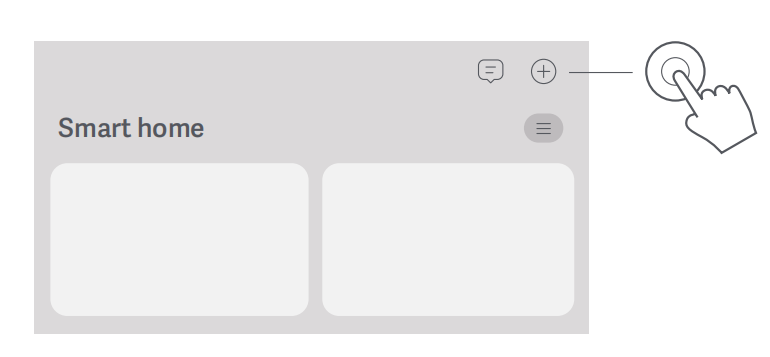
2. Open the Xiaomi Home/Mi Home APP, tap [+] on the upper right, choose the right product model, and then follow the instructions to complete the network configuration.
Note:
Please follow the instructions based on the current APP version.
Method 2:
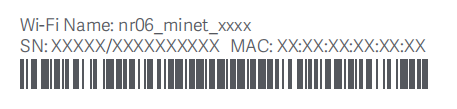
1. Check the Wi-Fi name on the label at the bottom of the router and then connect your phone or computer to the Wi-Fi;
2. Then an automatic redirection will take you to the network setup page. If not, open the web browser and enter miwifi.com or 192.168.31.1;
3. Follow the instructions on the setup page to complete the network configuration;
Note:
Contact your Internet service provider to get the details if you are not familiar with the Internet connection type.
4. After the configuration of the router is completed, the Wi-Fi module will restart. Try to search the Wi-Fi again later.
Note:
1. After completing the network configuration, you can also add the router via the Xiaomi Home/Mi Home APP. Refer to the QR code in method 1 to download and install the Xiaomi Home/Mi Home APP;
2. Make sure that the settings of the country or region in the Xiaomi Home/Mi Home APP are correct, otherwise, adding the router will be failed.
Preparation before the configuration:
1. Connect the router to power, then the router will automatically turn on;
2. Restart your modem;
Note:
The modem is provided by your Internet service provider.
3. Plug one end of the network cable into either of the router's ports, and the other end into the LAN port of the modem.
Note:
If you use the Ethernet wall socket instead of the modem, directly plug the network cable into it.
Method 1:
1. Scan the QR code below to download the Xiaomi Home/Mi Home APP. Or search for Xiaomi Home/Mi Home in the Google Play Store to download and install it;
2. Open the Xiaomi Home/Mi Home APP, tap [+] on the upper right, choose the right product model, and then follow the instructions to complete the network configuration.
Note:
Please follow the instructions based on the current APP version.
Method 2:
1. Check the Wi-Fi name on the label at the bottom of the router and then connect your phone or computer to the Wi-Fi;
2. Then an automatic redirection will take you to the network setup page. If not, open the web browser and enter miwifi.com or 192.168.31.1;
3. Follow the instructions on the setup page to complete the network configuration;
Note:
Contact your Internet service provider to get the details if you are not familiar with the Internet connection type.
4. After the configuration of the router is completed, the Wi-Fi module will restart. Try to search the Wi-Fi again later.
Note:
1. After completing the network configuration, you can also add the router via the Xiaomi Home/Mi Home APP. Refer to the QR code in method 1 to download and install the Xiaomi Home/Mi Home APP;
2. Make sure that the settings of the country or region in the Xiaomi Home/Mi Home APP are correct, otherwise, adding the router will be failed.
Does it help?
Yes
No