

How to display passwords briefly while typing on the Redmi 13C 5G?
If you set to display passwords briefly while typing on the Redmi 13C 5G, the phone allows you to see the password characters as you type them. When enabled, the characters will briefly appear in plain text before switching back to asterisks or dots for privacy. This can help ensure you’re entering the correct password without having to toggle between visible and hidden characters.
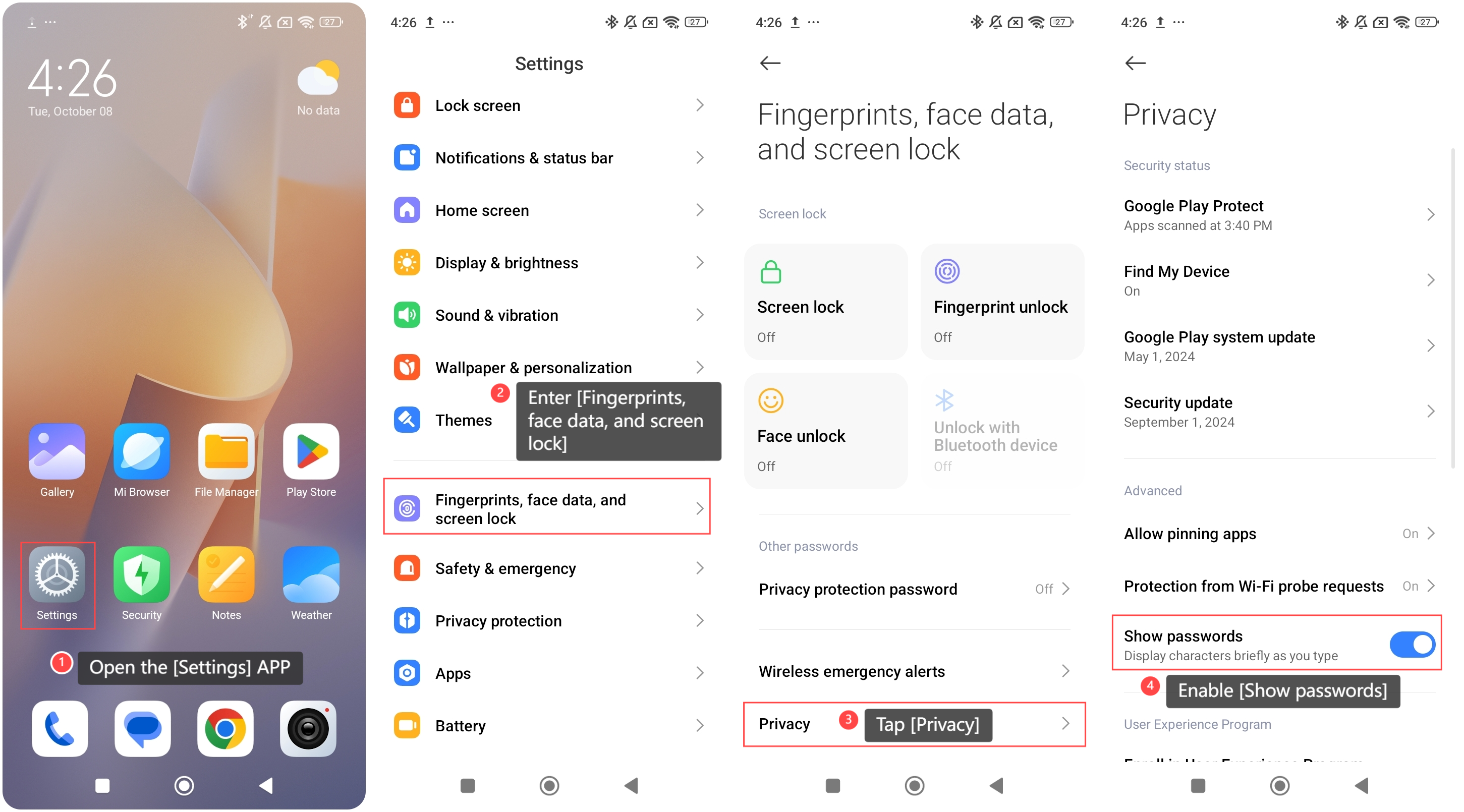
To display passwords briefly while typing on the phone, please refer to the following steps:
1. Open the [Settings] APP on your phone;
2. Enter [Fingerprints, face data, and screen lock];
3. Tap [Privacy];
4. Enable [Show passwords].
To display passwords briefly while typing on the phone, please refer to the following steps:
1. Open the [Settings] APP on your phone;
2. Enter [Fingerprints, face data, and screen lock];
3. Tap [Privacy];
4. Enable [Show passwords].
Does it help?
Yes
No