

How to set the vibration on tap on the REDMI 13C 5G?
Setting the vibration on tap on the REDMI 13C 5G is mainly used to provide tactile feedback when you touch the screen. The purpose is to enhance the experience, confirm whether the operation is successful, and help visually impaired people navigate better. At the same time, you can adjust the vibration intensity according to personal preferences to make the interaction with the device more intuitive and smooth.
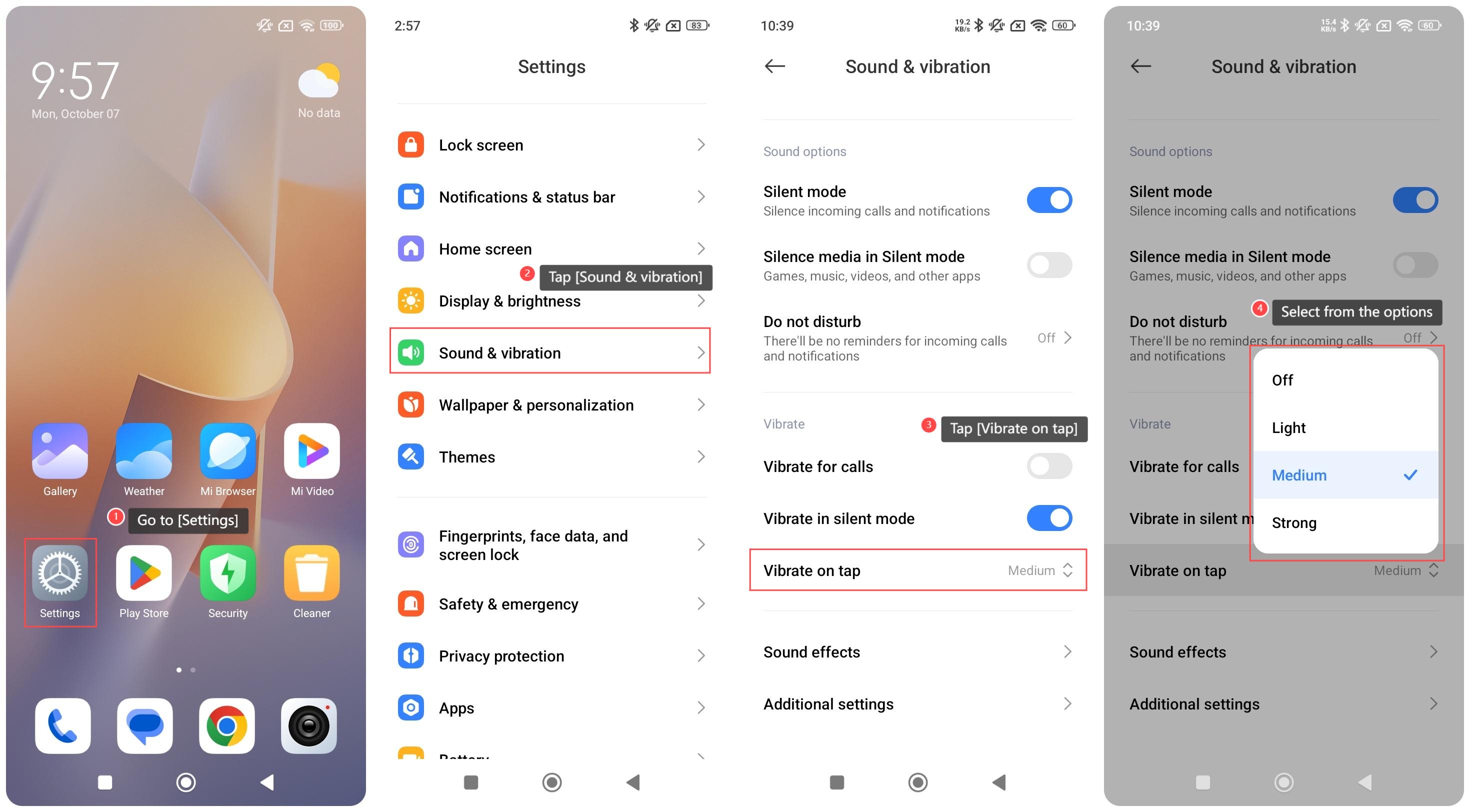
To set vibration on tap on your phone, please refer to the following steps:
1. Go to [Settings];
2. Tap [Sound & vibration];
3. Tap [Vibrate on tap];
4. Select from [Off], [Light], [Medium] or [Strong] as your preference.
Note:
Continuous use of vibration feedback will consume more power. It is recommended to adjust the vibration appropriately when the battery is low.
To set vibration on tap on your phone, please refer to the following steps:
1. Go to [Settings];
2. Tap [Sound & vibration];
3. Tap [Vibrate on tap];
4. Select from [Off], [Light], [Medium] or [Strong] as your preference.
Note:
Continuous use of vibration feedback will consume more power. It is recommended to adjust the vibration appropriately when the battery is low.
Does it help?
Yes
No