

How to set the feature on the Redmi 13C 5G after swiping up on the Home screen?
Setting the feature on the Redmi 13C 5G for what happens after swiping up on the Home screen allows you to control the action performed by this gesture.
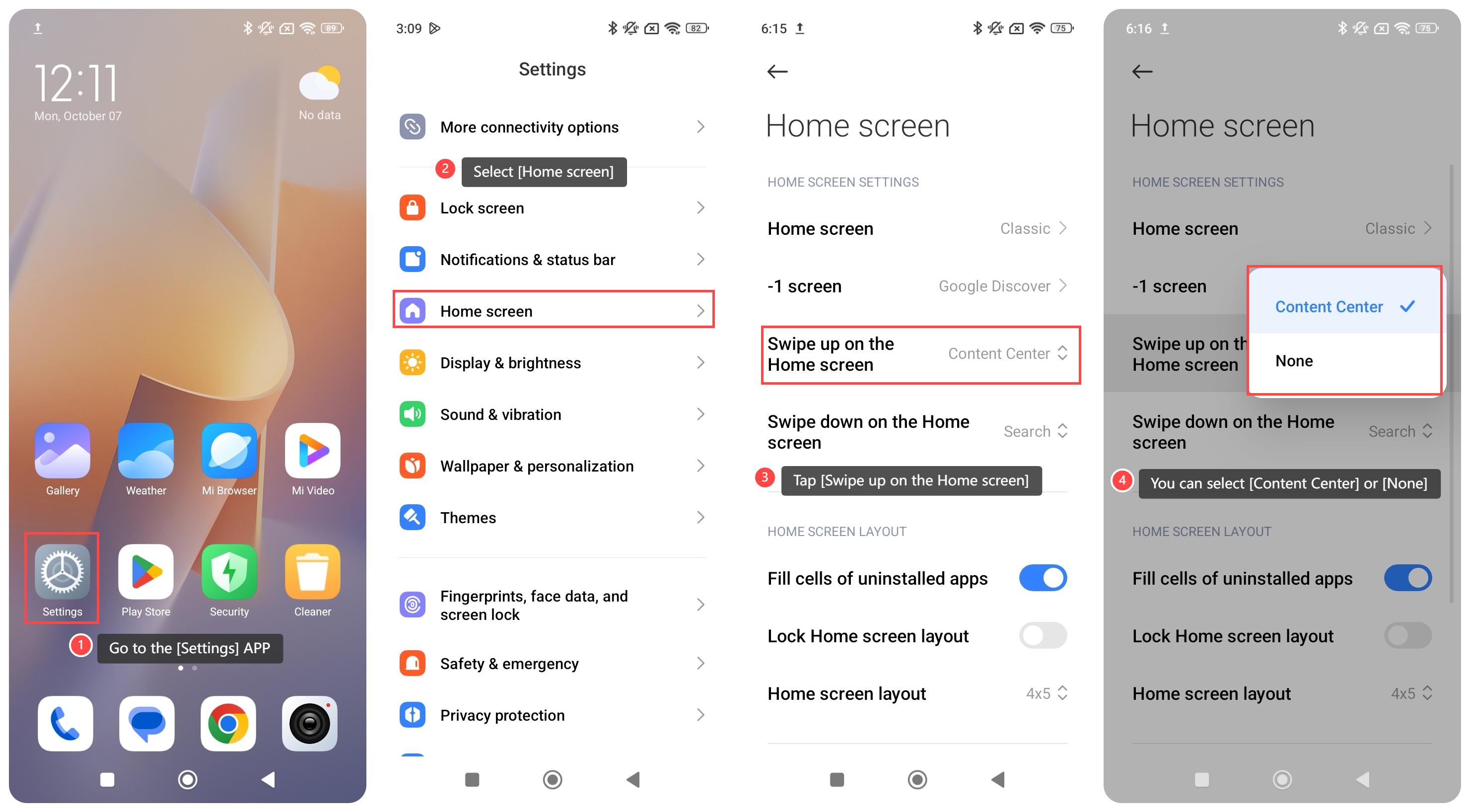
To set the feature on your phone after swiping up on the Home screen, please refer to the following steps:
1. Go to the [Settings] APP on your phone;
2. Select [Home screen];
3. Tap [Swipe up on the Home screen];
4. You can select [Content Center] or [None].
To set the feature on your phone after swiping up on the Home screen, please refer to the following steps:
1. Go to the [Settings] APP on your phone;
2. Select [Home screen];
3. Tap [Swipe up on the Home screen];
4. You can select [Content Center] or [None].
Note:
1. Content Center: When you set the swipe-up gesture to Content Center, swiping up will display personalized content, including news, APP suggestions, videos, and other media based on your interests;
2. None: If you set the swipe-up gesture to None, the swipe-up action will be disabled, and no specific function will be triggered when you swipe up from the Home screen.
Does it help?
Yes
No