

How to set the Home screen type on the Redmi 13C?
The Redmi 13C supports modifying the home screen type, which can tailor the look and feel to your preference, making your phone more enjoyable to use, customizing the layout to minimize distractions, showing only what you need for specific tasks, and using specialized widgets or shortcuts that enhance how you interact with applications and features. This level of personalization helps boost productivity and creates a more intuitive using experience, allowing you to fully optimize your phone for your daily needs.
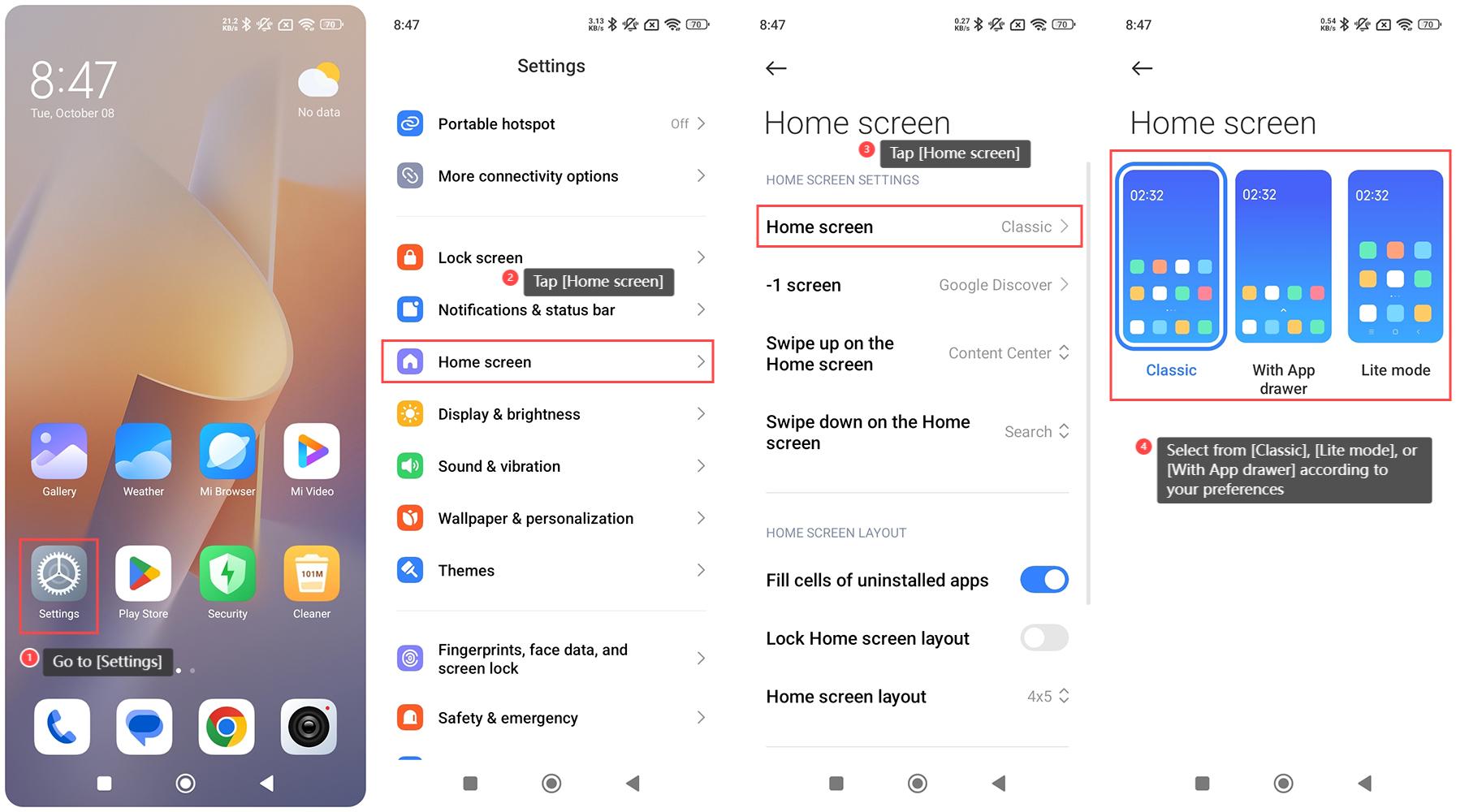
To set the Home screen type on the Redmi 13C, please refer to the following steps:
1. Go to [Settings] on your phone;
2. Tap [Home screen];
3. Tap [Home screen];
4. Select from [Classic], [Lite mode], or [With App drawer] according to your preferences.
To set the Home screen type on the Redmi 13C, please refer to the following steps:
1. Go to [Settings] on your phone;
2. Tap [Home screen];
3. Tap [Home screen];
4. Select from [Classic], [Lite mode], or [With App drawer] according to your preferences.
Does it help?
Yes
No