

How to turn on NFC DND on the Redmi 13C 5G?
NFC DND on the Redmi 13C 5G refers to a feature that blocks notifications from unrecognized NFC tags. This means that if your phone detects an NFC tag that it doesn't recognize or that isn't programmed, it won't alert you or display a notification. This helps reduce distractions from unwanted or irrelevant NFC tags, allowing for a more streamlined using experience. By minimizing unnecessary alerts, you can focus better on important tasks without interruptions. Additionally, this feature enhances privacy by preventing unsolicited interactions with unknown NFC tags.
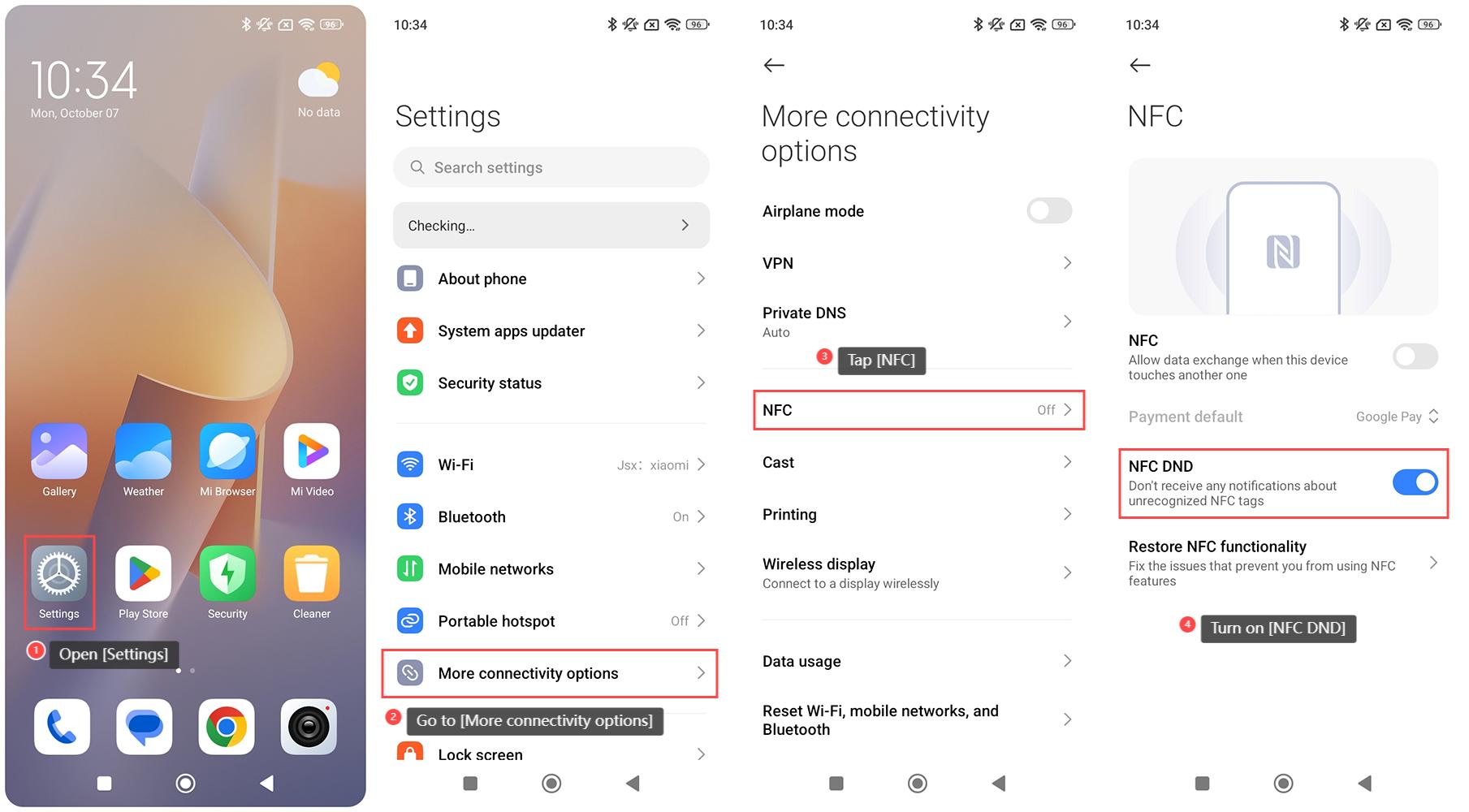
To turn on NFC DND on the Redmi 13C 5G, please refer to the following steps:
1. Open [Settings] on your phone;
2. Go to [More connectivity options];
3. Tap [NFC];
4. Turn on [NFC DND], and your phone will not receive any notifications about unrecognized NFC tags.
To turn on NFC DND on the Redmi 13C 5G, please refer to the following steps:
1. Open [Settings] on your phone;
2. Go to [More connectivity options];
3. Tap [NFC];
4. Turn on [NFC DND], and your phone will not receive any notifications about unrecognized NFC tags.
Does it help?
Yes
No