

How to set the hotspot to be turned off automatically on the Redmi 13C 5G?
The Redmi 13C 5G supports the built-in feature of turning off the hotspot automatically when no devices are connected. In case you forget to turn off the hotspot in time, this feature can turn off the hotspot automatically to decrease network usage.
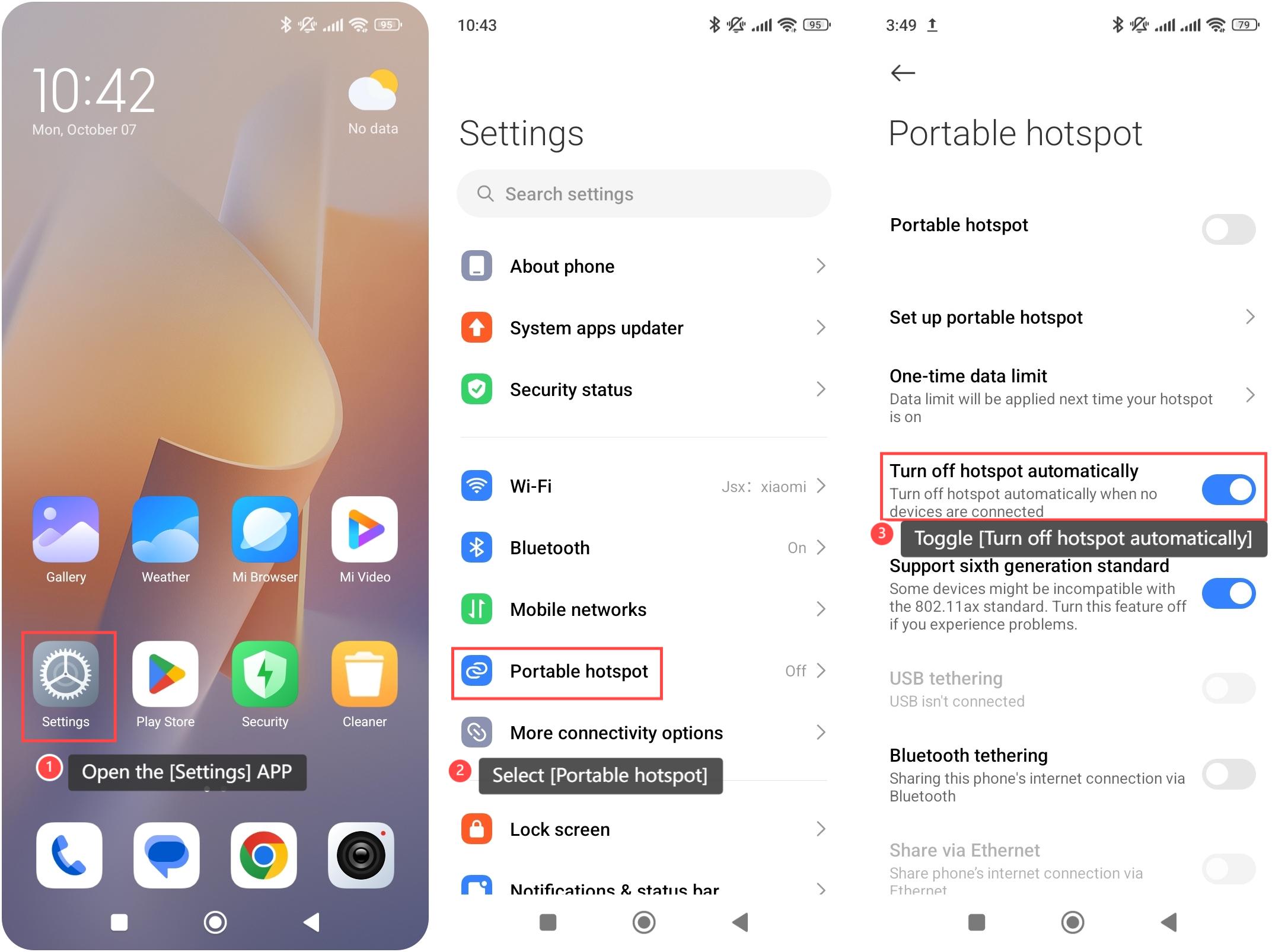
To set up turning off the hotspot automatically on your phone, please refer to the following steps:
1. Open the [Settings] APP on your device. You can find the gear icon on your home screen or in your APP drawer;
2. Select [Portable hotspot];
3. Scroll down and toggle the [Turn off hotspot automatically] switch to enable this feature.
Note:
The device has a search function within the Settings APP. You can also use the search bar to quickly find the feature of turning off the hotspot automatically.
To set up turning off the hotspot automatically on your phone, please refer to the following steps:
1. Open the [Settings] APP on your device. You can find the gear icon on your home screen or in your APP drawer;
2. Select [Portable hotspot];
3. Scroll down and toggle the [Turn off hotspot automatically] switch to enable this feature.
Note:
The device has a search function within the Settings APP. You can also use the search bar to quickly find the feature of turning off the hotspot automatically.
Does it help?
Yes
No