

How to update the system of the Redmi 13C 5G manually?
Manually updating the system ensures that your Redmi 13C 5G receives the latest software features and security patches, even when automatic updates are unavailable.
To update the system of the Redmi 13C 5G manually, please refer to the following steps:
1. Go to [Settings];
2. Select [About phone];
3. Tap [Xiaomi HyperOS];
4. Tap [Check for updates] and the phone will search for the latest updates.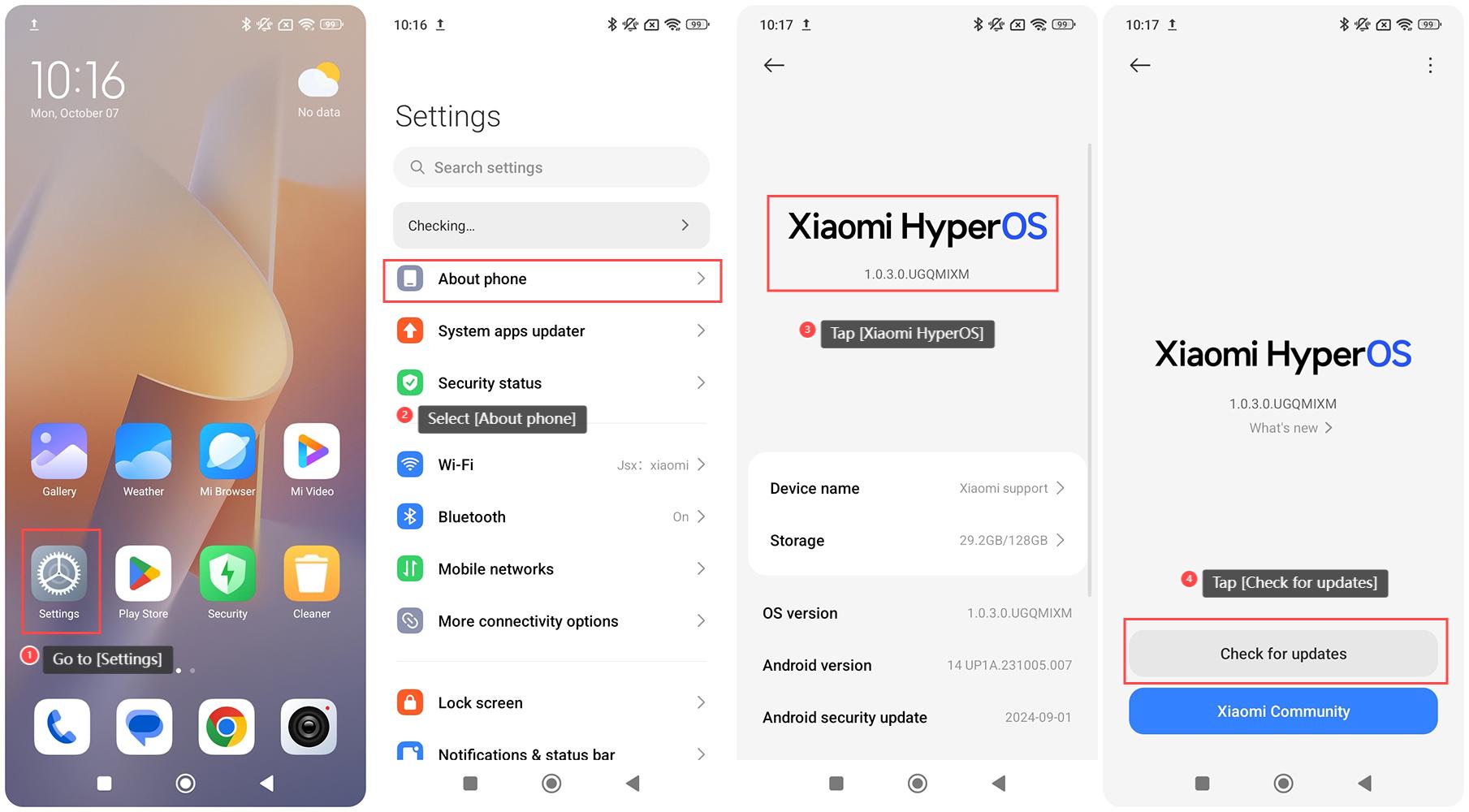
Note:
1. Ensure your phone is connected to a stable Wi-Fi network. This ensures a stable and faster download of updates;
2. Make sure your phone has a sufficient battery level before initiating the update. It’s recommended to have at least 50% battery during the update process;
3. Updates will take some time to download and install. Be patient and avoid interrupting the process. Interrupting the update could lead to issues with your device.
Does it help?