

How to activate the eSIM card?
The eSIM (embedded SIM) is a SIM card built into a device that can connect to a mobile network without a physical card. It allows you to manage multiple mobile network profiles through software, so you can switch between different operators. The advantages of the eSIM card include more convenient network switching, smaller device space requirements, and better waterproof performance.
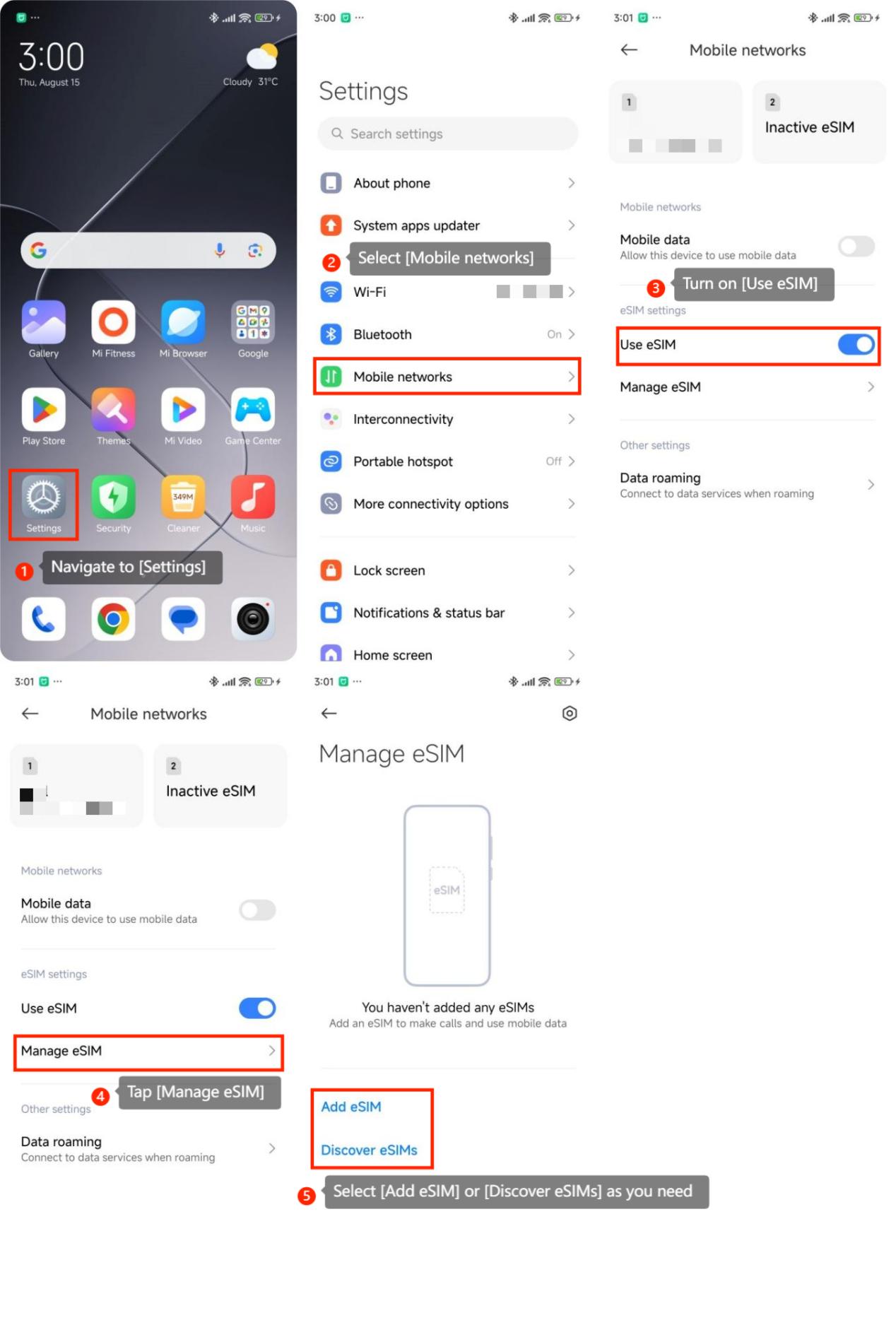
To activate the eSIM card, please refer to the following methods:
1. Navigate to [Settings];
2. Select [Mobile networks];
3. Turn on [Use eSIM];
4. Tap [Manage eSIM];
5. Select [Add eSIM] or [Discover eSIMs] as you need;
6. Follow the on-screen instructions to scan a QR code provided by your carrier or enter the activation details manually.
After scanning the QR code or entering the details, the eSIM should be added to your device.
To activate the eSIM card, please refer to the following methods:
1. Navigate to [Settings];
2. Select [Mobile networks];
3. Turn on [Use eSIM];
4. Tap [Manage eSIM];
5. Select [Add eSIM] or [Discover eSIMs] as you need;
6. Follow the on-screen instructions to scan a QR code provided by your carrier or enter the activation details manually.
After scanning the QR code or entering the details, the eSIM should be added to your device.
Note:
This path is only available on mobile phones that support eSIM.
Does it help?
Yes
No