

How to set the sound effects on the Redmi Pad SE 8.7?
Setting up sound effects on the Redmi Pad SE 8.7 allows you to customize the audio output to suit your preferences or the type of media you are consuming. This feature provides you with flexibility in shaping your tablet’s audio characteristics for a more enjoyable listening experience.
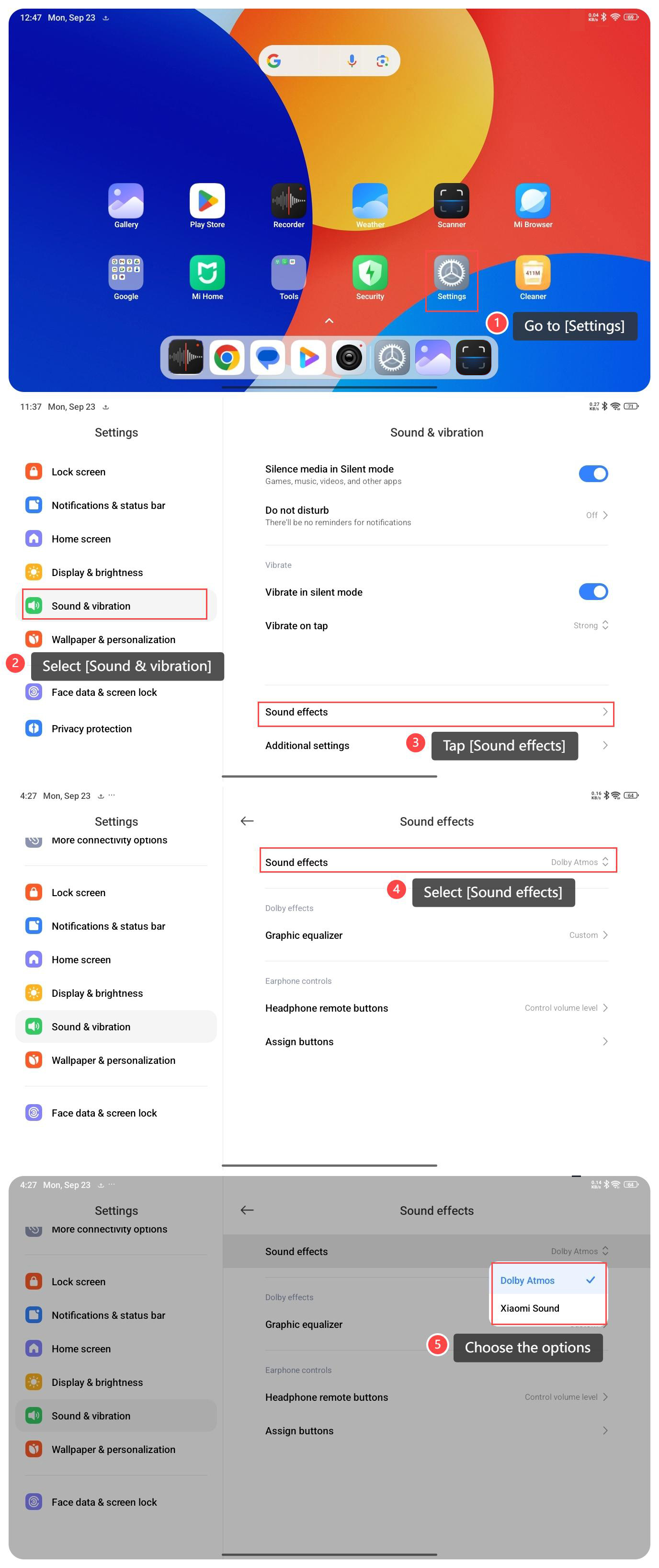
To set the sound effect on your tablet, please refer to the following steps:
1. Go to [Settings];
2. Select [Sound & vibration];
3. Tap [Sound effects];
4. Select [Sound effects];
5. Choose the options [Dolby Atmos] or [Xiaomi Sound] as you prefer.
Note:
1. Monitor battery consumption, as some features will drain power. Also, be mindful of volume adjustments to avoid sudden loud sounds that could be jarring;
2. Consider your surroundings when adjusting sound effects, and be aware that not all effects may perform optimally due to the device's hardware capabilities.
To set the sound effect on your tablet, please refer to the following steps:
1. Go to [Settings];
2. Select [Sound & vibration];
3. Tap [Sound effects];
4. Select [Sound effects];
5. Choose the options [Dolby Atmos] or [Xiaomi Sound] as you prefer.
Note:
1. Monitor battery consumption, as some features will drain power. Also, be mindful of volume adjustments to avoid sudden loud sounds that could be jarring;
2. Consider your surroundings when adjusting sound effects, and be aware that not all effects may perform optimally due to the device's hardware capabilities.
Does it help?
Yes
No