

How to add a teleprompter to the video on the Redmi Pad SE 8.7?
The Redmi Pad SE 8.7 supports adding a teleprompter to the video, which allows speakers to maintain eye contact with the camera while reading their script, creating a more engaging presentation and ensures that you deliver the intended message accurately without forgetting key points. Besides, the teleprompter of the video contributes to a polished, professional look in videos, especially for news or formal presentations.
To add a teleprompter to the video, please refer to the following steps:
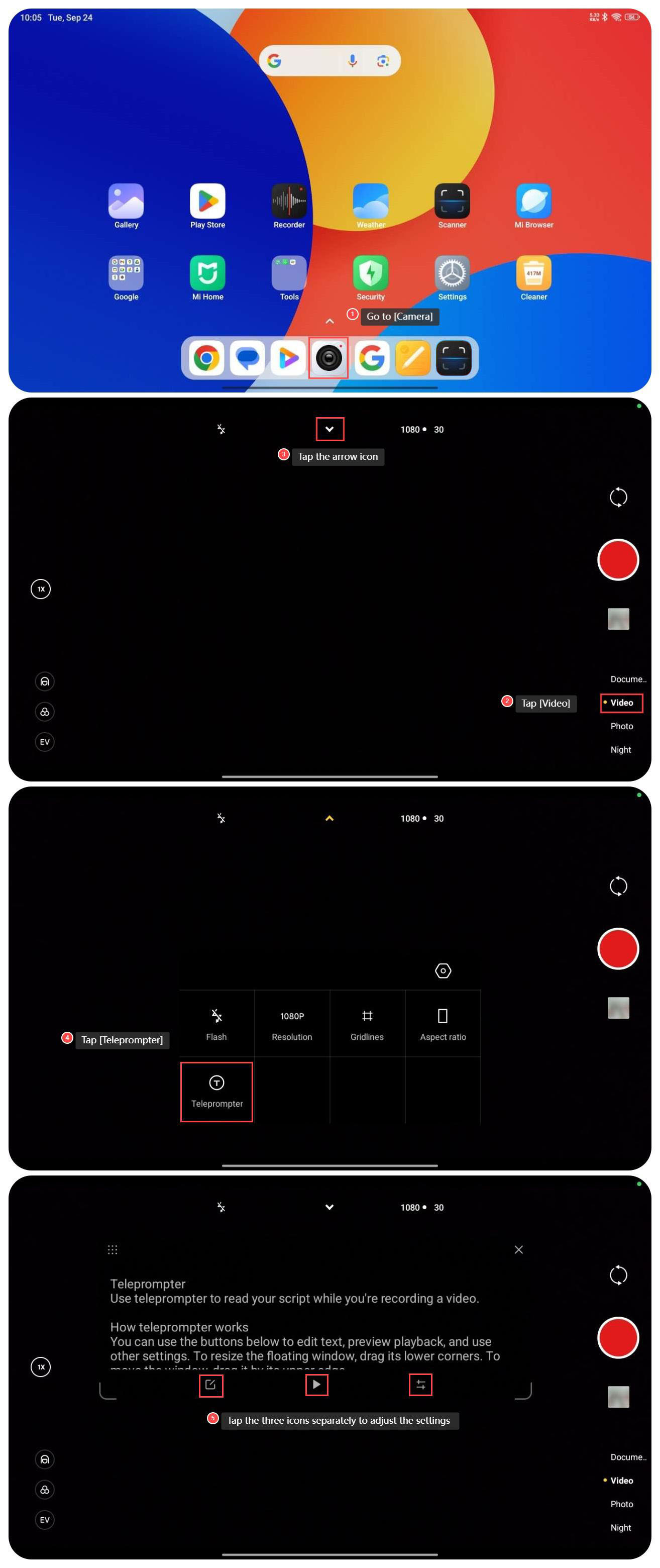
1. Go to [Camera];
2. Tap [Video];
3. Tap the arrow icon on the top of the screen;
4. Tap [Teleprompter];
5. You can tap the left icon to edit the text, tap the middle icon to start or pause, and tap the right icon to adjust the text size and scrolling speed.
To add a teleprompter to the video, please refer to the following steps:
1. Go to [Camera];
2. Tap [Video];
3. Tap the arrow icon on the top of the screen;
4. Tap [Teleprompter];
5. You can tap the left icon to edit the text, tap the middle icon to start or pause, and tap the right icon to adjust the text size and scrolling speed.
Does it help?
Yes
No