

How to set the proxy on the Redmi Pad SE 8.7 4G?
A proxy is an intermediary server that acts between a client, such as the Redmi Pad SE 8.7 4G, and the target server, handling requests and responses. It allows you to access restricted content while safeguarding your privacy.
To set up a proxy on the Redmi Pad SE 8.7 4G, please refer to the following steps:
1. Go to the [Settings] APP on your tablet;
2. Enter [Wi-Fi];
3. Select the Wi-Fi network you are currently connected to and tap the [>] icon;
4. Tap [Proxy] to choose the proxy configuration options: [None], [Manual] or [Proxy Auto-Config].
After the proxy setting is completed, to ensure the changes take effect, you need to disconnect and reconnect to the Wi-Fi network.
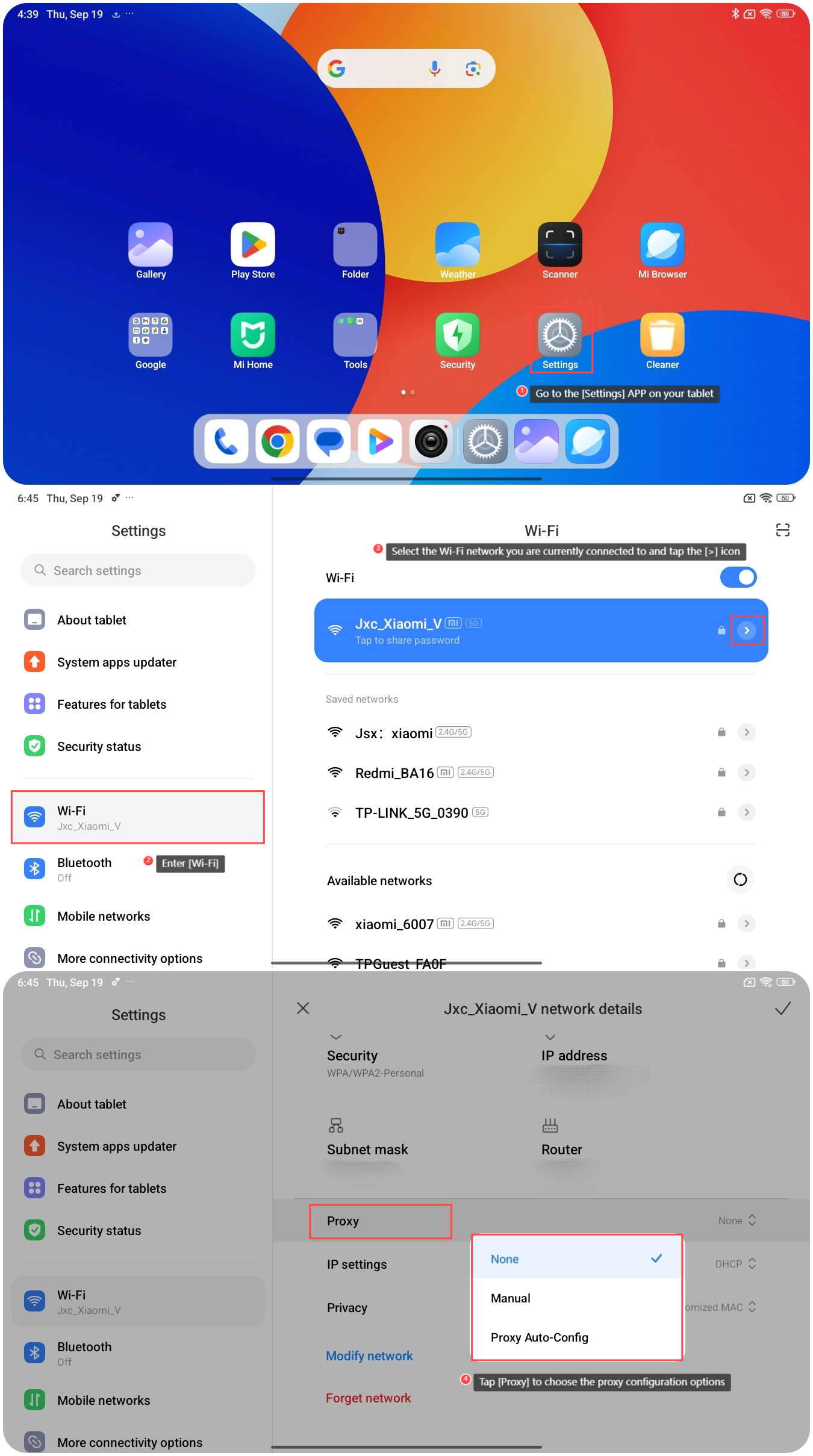
To set up a proxy on the Redmi Pad SE 8.7 4G, please refer to the following steps:
1. Go to the [Settings] APP on your tablet;
2. Enter [Wi-Fi];
3. Select the Wi-Fi network you are currently connected to and tap the [>] icon;
4. Tap [Proxy] to choose the proxy configuration options: [None], [Manual] or [Proxy Auto-Config].
After the proxy setting is completed, to ensure the changes take effect, you need to disconnect and reconnect to the Wi-Fi network.
Note:
1. If you choose [Manual], you can manually configure the proxy by entering details like the proxy's hostname, port, and any addresses that should bypass the proxy;
2. If you choose [Proxy Auto-Config], you need to provide a PAC (Proxy Auto-Config) URL, and the device automatically configures the proxy based on a predefined script.
1. If you choose [Manual], you can manually configure the proxy by entering details like the proxy's hostname, port, and any addresses that should bypass the proxy;
2. If you choose [Proxy Auto-Config], you need to provide a PAC (Proxy Auto-Config) URL, and the device automatically configures the proxy based on a predefined script.
Does it help?
Yes
No