

How to check the battery temperature of the Redmi Pad SE 8.7?
The battery temperature of the Redmi Pad SE 8.7 refers to the heat level of the device's battery during use or charging. Excessive heat can lead to reduced battery efficiency, shorter lifespan, and potential safety risks, such as swelling or leakage. Monitoring battery temperature is essential, especially during heavy usage, gaming, or charging sessions, as these activities can generate additional heat. If you notice abnormal temperatures, such as the battery feeling hot to the touch, it's advisable to stop using or charging the device until it cools down to prevent potential damage or malfunction.
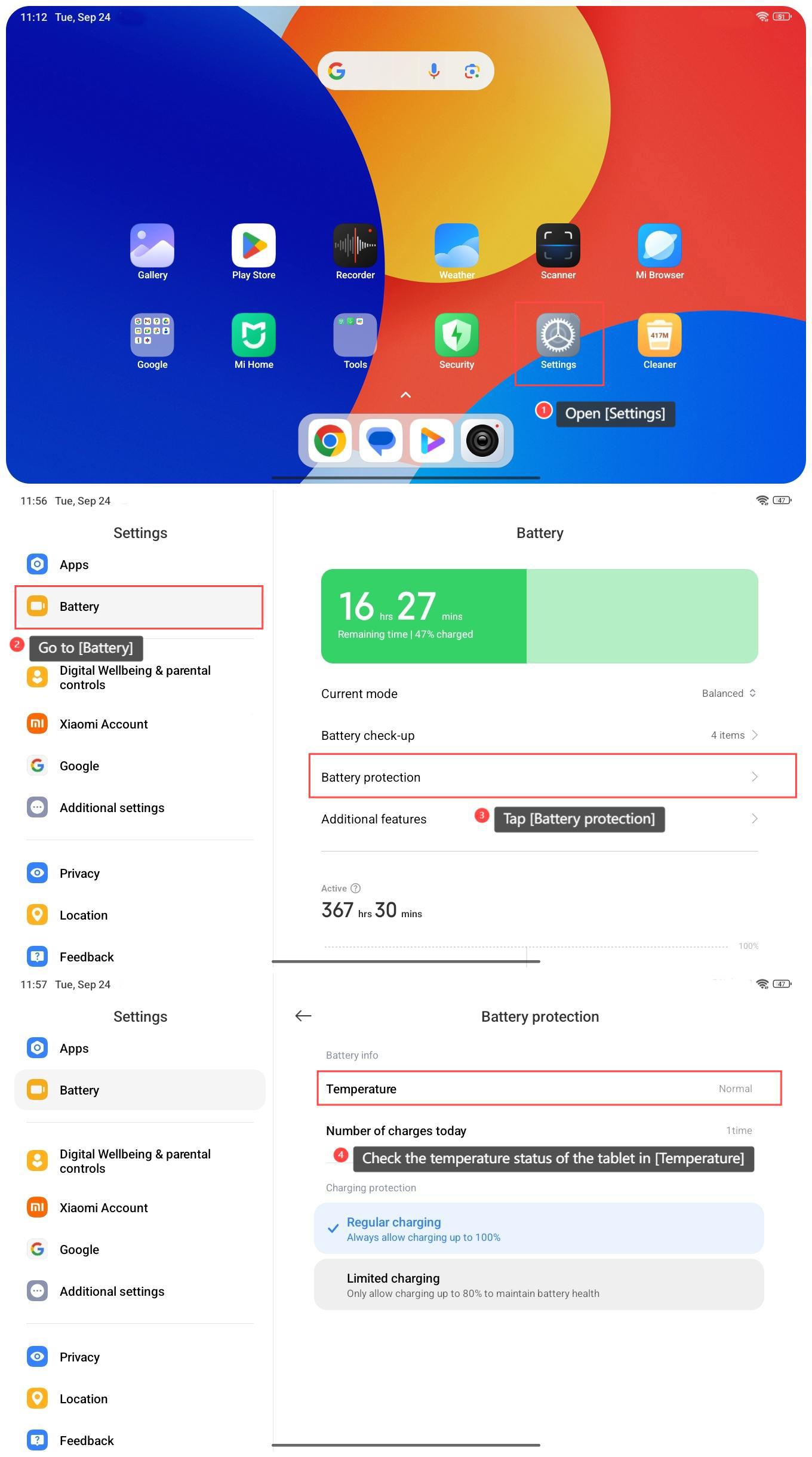
To check the battery temperature of the Redmi Pad SE 8.7, please refer to the following steps:
1. Open [Settings] on your tablet;
2. Go to [Battery];
3. Tap [Battery protection];
4. Check the temperature status of the tablet in [Temperature].
To check the battery temperature of the Redmi Pad SE 8.7, please refer to the following steps:
1. Open [Settings] on your tablet;
2. Go to [Battery];
3. Tap [Battery protection];
4. Check the temperature status of the tablet in [Temperature].
Does it help?
Yes
No