

How to use the auto detection feature on the Xiaomi Outdoor Camera CW700S?
To use the auto detection feature, please refer to the following steps:
1. Open the Mi Home/Xiaomi Home APP;
2. Select the Xiaomi Outdoor Camera CW700S;
3. Tap the three-dot icon at the upper right corner;
4. Go to [Camera settings];
5. Select [Auto detection] and enable it;
6. Once enabled, the camera will automatically detect according to the set trajectory;
7. You can select the preset detection frequency or customize it.
Note:
1. The panoramic detection requires at least two frequently viewed locations to function properly;
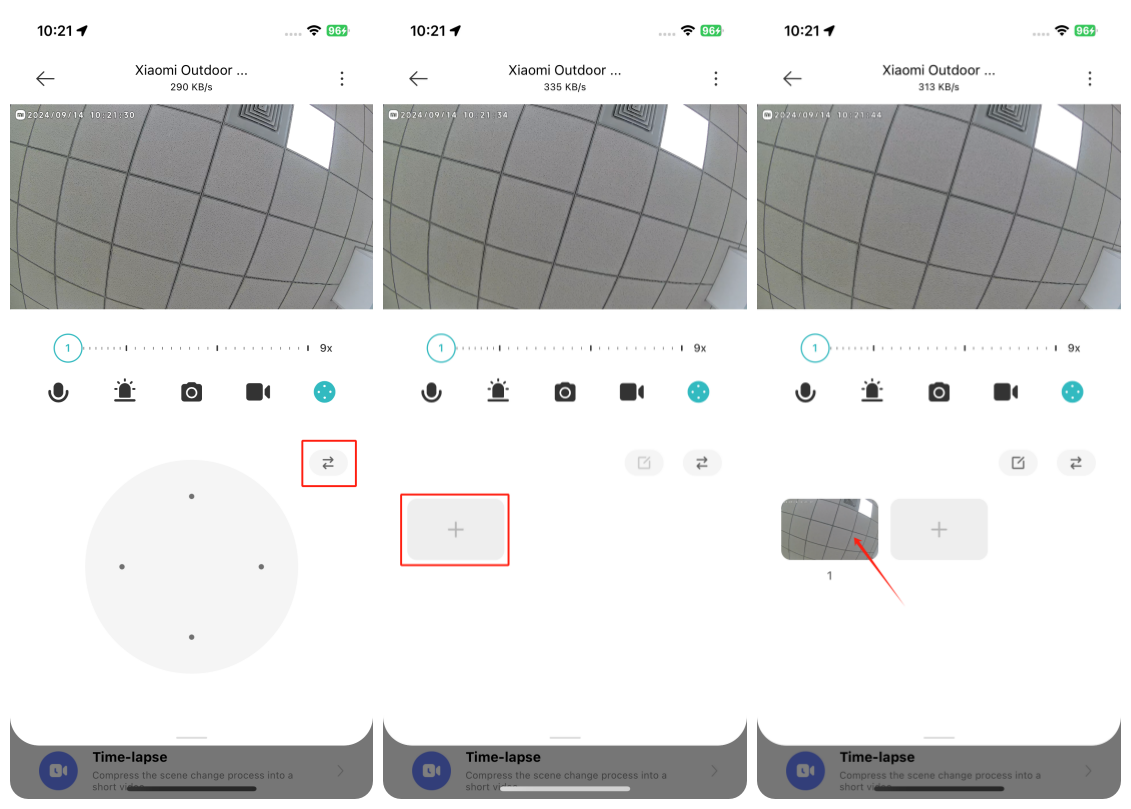
2. To save the frequently viewed locations, you can open the Mi Home/Xiaomi Home APP >> select the camera >> tap the PTZ control icon >> tap the [Add to favorites] icon at the upper right corner of the PTZ control >> tap [+].
1. Open the Mi Home/Xiaomi Home APP;
2. Select the Xiaomi Outdoor Camera CW700S;
3. Tap the three-dot icon at the upper right corner;
4. Go to [Camera settings];
5. Select [Auto detection] and enable it;
6. Once enabled, the camera will automatically detect according to the set trajectory;
7. You can select the preset detection frequency or customize it.
Note:
1. The panoramic detection requires at least two frequently viewed locations to function properly;
2. To save the frequently viewed locations, you can open the Mi Home/Xiaomi Home APP >> select the camera >> tap the PTZ control icon >> tap the [Add to favorites] icon at the upper right corner of the PTZ control >> tap [+].
Does it help?
Yes
No