

How to connect the Xiaomi Outdoor Camera CW700S to the Mi Home/Xiaomi Home APP?
To connect the Xiaomi Outdoor Camera CW700S to the Mi Home/Xiaomi Home APP, please refer to the following steps:
1. Take the camera out of the packaging and place it on a table;
2. Power on the camera by connecting the power adapter cable to the camera's power port. The camera will start up and the indicator will remain in yellow. After about 20 seconds, you will hear a voice prompt from the camera;
3. Open the Mi Home/Xiaomi Home APP;
4. Tap the [+] icon in the upper right corner;
5. Tap [Scan] and scan the QR code on the bottom of the camera;
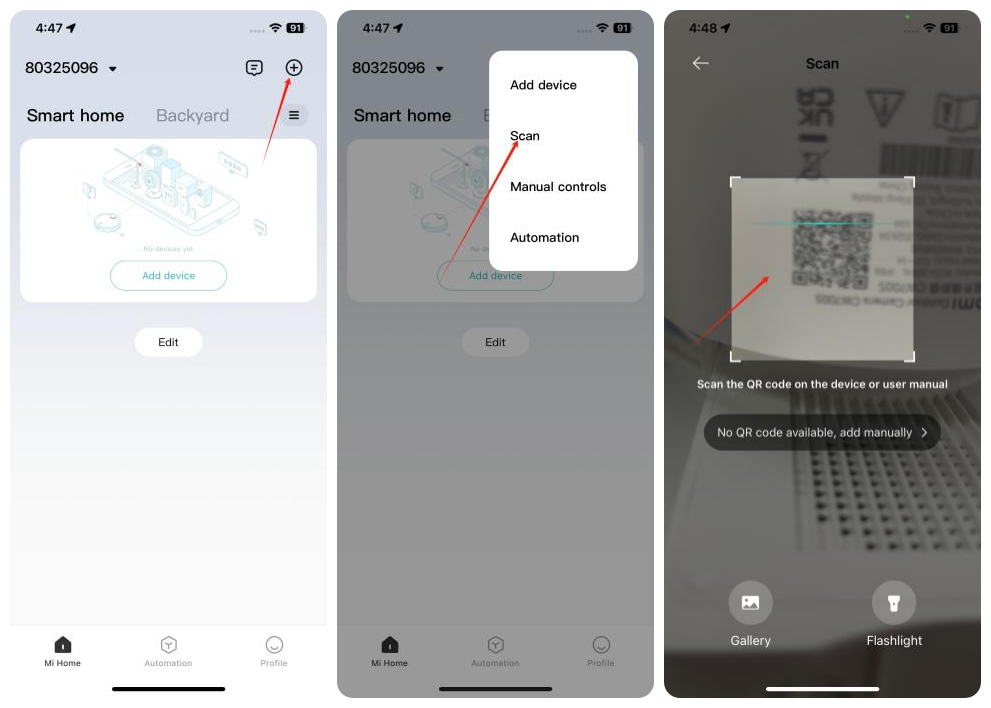
6. Follow the instructions on the APP and wait for the connection;
7. When you hear a voice prompt from the device that the account is bound successfully, the connection is successfully completed.
Note:
The camera only supports 2.4GHz Wi-Fi and cannot connect to 5GHz Wi-Fi. If your home network uses a dual-band combined Wi-Fi, it is recommended to disable the dual-band feature and reconnect the device.
1. Take the camera out of the packaging and place it on a table;
2. Power on the camera by connecting the power adapter cable to the camera's power port. The camera will start up and the indicator will remain in yellow. After about 20 seconds, you will hear a voice prompt from the camera;
3. Open the Mi Home/Xiaomi Home APP;
4. Tap the [+] icon in the upper right corner;
5. Tap [Scan] and scan the QR code on the bottom of the camera;
6. Follow the instructions on the APP and wait for the connection;
7. When you hear a voice prompt from the device that the account is bound successfully, the connection is successfully completed.
Note:
The camera only supports 2.4GHz Wi-Fi and cannot connect to 5GHz Wi-Fi. If your home network uses a dual-band combined Wi-Fi, it is recommended to disable the dual-band feature and reconnect the device.
Does it help?
Yes
No