

What are the functions of the icons on the real-time monitoring interface of the Xiaomi Outdoor Camera CW700S?
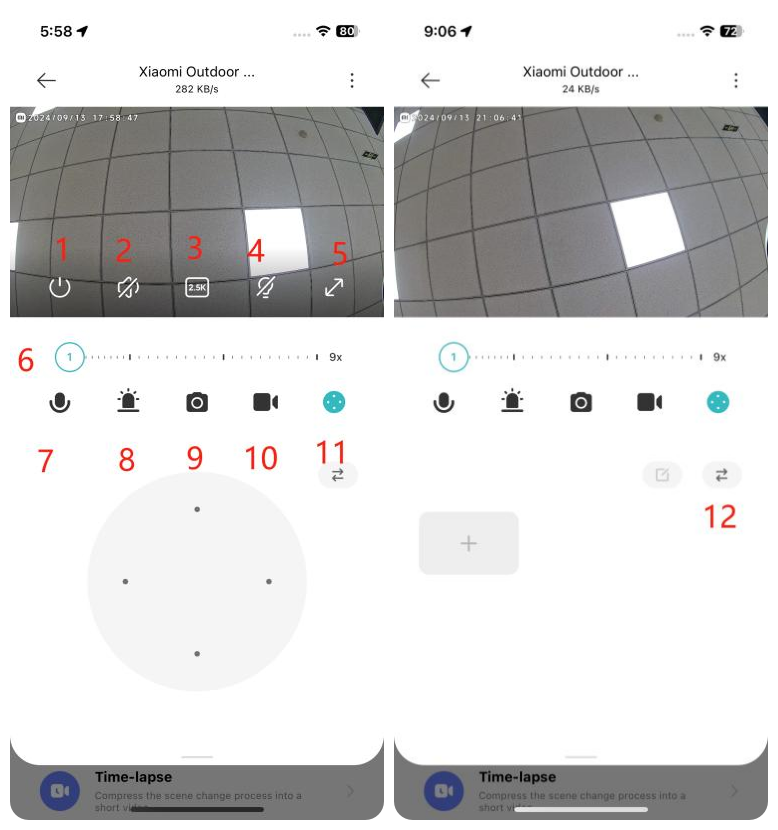
For your reference, the functions of the icons on the real-time monitoring interface are as follows:
1. Sleep: Tap this icon to turn on the sleep mode of the camera. When enabled, the camera will not perform live streaming or video recording. Tap again to turn the camera back on;
2. Mute: By default, the monitoring interface is in mute mode. Tap the mute icon to enable sound when viewing the monitoring interface;
3. Resolution: Adjust the monitoring resolution among options: 2.5K HD, 720P Smooth, or Auto (the camera adjusts the resolution based on network conditions);
4. Spotlight: The spotlight is off by default. Tap to turn it on, and it will stay on for 1 minute. You can tap again to turn it off during this period;
5. Full Screen: Tap this icon to switch the monitoring interface to landscape mode;
6. Zoom Axis: Slide the zoom axis to zoom in or out on the picture, focusing on specific details;
7. Voice Call: Tap the microphone icon to make a remote call with the camera via the Mi Home/Xiaomi Home APP;
8. Sound and Light Alert: Tap the alert icon to activate the sound and light alert, which lasts for 30 seconds. Tap again to cancel it;
9. Screenshot: Capture a screenshot of the current monitoring interface, which will be saved to the Album and the Mi Home/Xiaomi Home APP;
10. Screen Recording: Tap the screen recording icon to record the current monitoring interface, which will be saved to the Album and the Mi Home/Xiaomi Home APP;
11. PTZ Control: Tap to display the directional control (up, down, left, right) for PTZ control;
12. Add to favorites: After setting [Add to favorites] as a frequently viewed position, you can quickly check specific areas of interest.
1. Sleep: Tap this icon to turn on the sleep mode of the camera. When enabled, the camera will not perform live streaming or video recording. Tap again to turn the camera back on;
2. Mute: By default, the monitoring interface is in mute mode. Tap the mute icon to enable sound when viewing the monitoring interface;
3. Resolution: Adjust the monitoring resolution among options: 2.5K HD, 720P Smooth, or Auto (the camera adjusts the resolution based on network conditions);
4. Spotlight: The spotlight is off by default. Tap to turn it on, and it will stay on for 1 minute. You can tap again to turn it off during this period;
5. Full Screen: Tap this icon to switch the monitoring interface to landscape mode;
6. Zoom Axis: Slide the zoom axis to zoom in or out on the picture, focusing on specific details;
7. Voice Call: Tap the microphone icon to make a remote call with the camera via the Mi Home/Xiaomi Home APP;
8. Sound and Light Alert: Tap the alert icon to activate the sound and light alert, which lasts for 30 seconds. Tap again to cancel it;
9. Screenshot: Capture a screenshot of the current monitoring interface, which will be saved to the Album and the Mi Home/Xiaomi Home APP;
10. Screen Recording: Tap the screen recording icon to record the current monitoring interface, which will be saved to the Album and the Mi Home/Xiaomi Home APP;
11. PTZ Control: Tap to display the directional control (up, down, left, right) for PTZ control;
12. Add to favorites: After setting [Add to favorites] as a frequently viewed position, you can quickly check specific areas of interest.
Does it help?
Yes
No