

Redmi Watch 5 Active FAQ
Product Overview
1. Q: What are the characteristics of the Redmi Watch 5 Active?
A: The characteristics of the Redmi Watch 5 Active are as follows:1. The watch features a 2.0-inch square LCD large screen, complemented by a metal-sprayed middle frame and a TPU strap for enhanced durability and comfort;
2. With an impressive 18-day long battery life, the watch supports magnetic charging, ensuring continuous power on your wrist for maximum efficiency;
3. Equipped with dual microphones for noise reduction, the watch ensures clearer calls, enhancing your communication experience;
4. The built-in speaker and Bluetooth call function allow you to easily make calls during activities such as driving, sports, or work, where answering a call will be inconvenient;
5. The watch supports comprehensive health monitoring, including heart rate, sleep, and blood oxygen tracking, providing all-around health management to support a healthier lifestyle;
6. It also offers over 140 sports modes, catering to a wide variety of physical activities;
7. Additionally, the watch boasts over 200 customizable watch faces, allowing you to match your straps with different color schemes for a personalized look.
2. Q: What are the screen and frame materials of the Redmi Watch 5 Active?
A: The Redmi Watch 5 Active features a 2.0-inch LCD square display with a resolution of 320 × 385, a pixel density of 251 PPI, and a refresh rate of 60Hz. The middle frame is made of plastic, however, it undergoes a metal spraying process that gives it a metallic texture and sheen.3. Q: What is the strap material of the Redmi Watch 5 Active?
A: The standard strap is made of TPU and is available in Silver and Black.Note:
After the strap is dirty, it can be cleaned with cleaning liquid or wiped with alcohol.
4. Q: How to replace the strap of the Redmi Watch 5 Active?
A: The Redmi Watch 5 Active features a switch-lug strap design, utilizing quick-release buttons for easy removal and replacement of the strap.To replace the strap, please refer to the following steps:
1. Pull the quick-release button in the opposite direction. Then remove the two ends of the watch strap from the body of the watch;
2. Insert the strap into the quick-release button, then push until you hear a click. The strap is now attached. Pull on the strap to check that it is attached properly.
5. Q: What is the strap width and compatible size for the Redmi Watch 5 Active?
A: The Redmi Watch 5 Active TPU strap has a width of 22mm (long strap tail width) and is designed to fit wrist circumferences between 135mm and 205mm.6. Q: Can the Redmi Watch 5 Active use straps with other Xiaomi watches?
A: The Redmi Watch 5 Active cannot share straps with other Xiaomi watches.7. Q: What is the water resistance rating of the Redmi Watch 5 Active?
A: The Redmi Watch 5 Active has a 5ATM water resistance rating, which is equivalent to a depth of 50 meters underwater. This level of water resistance supports activities such as swimming in pools, shallow beach swimming, and other shallow water sports. However, it is not suitable for hot showers, saunas, or diving, and should avoid exposure to high-speed water impacts during water sports. Please note that while the watch is designed to be waterproof and can be worn during swimming, its waterproof function can diminish over time and it is not recommended for use in hot baths or saunas.8. Q: What are the package contents of the Redmi Watch 5 Active and what color options are available?
A: The package contents include the Redmi Watch 5 Active, magnetic charging cable and user manual (including warranty notice). The watch is available in two color options: black and silver.9. Q: Does the Redmi Watch 5 Active support connect to a heart rate strap?
A: The Redmi Watch 5 Active does not support connecting to a heart rate strap.10. Q: Does the Redmi Watch 5 Active support independent satellite positioning?
A: The Redmi Watch 5 Active does not support independent satellite positioning. It needs to rely on APP assistance.11. Q: Can wearing the Redmi Watch 5 Active cause allergies?
A: The Redmi Watch 5 Active is made from professional health and environmentally friendly materials and has passed sensitization inspections conducted by professional organizations. Components that frequently come into contact with the skin, such as the straps, bottom pads, and buttons, have undergone rigorous inspection for allergens and harmful substances. However, individual reactions to specific materials can vary. If you experience any skin discomfort while wearing the watch, please discontinue use and consult a doctor.For optimal wearing comfort, please refer to the following guidelines:
1. During exercise, ensure the watch is neither too loose nor too tight to prevent it from sliding up and down your wrist;
2. For daily use, you can wear the strap slightly looser for better skin ventilation. After extended wear, it is advisable to remove the watch and allow your wrist to rest for about half an hour;
3. After exercising, clean and wipe away any sweat from your arms and the strap, and ensure both are clean and dry before wearing the watch again.
12. Q: Is the monitoring accuracy of the Redmi Watch 5 Active the same when worn on the left or right wrist?
A: The watch can be worn on the left or right hand, which does not affect the normal sampling of sports health data. The data monitoring effect is consistent, and you can choose to wear it according to your usage habits.Note:
The watch does not have the function of selecting the wearing mode of left hand and right hand.
13. Q: Can the Redmi Watch 5 Active be worn while swimming or showering?
A: The TPU strap can be worn in swimming pools and shoals, however, it is not suitable for saunas, diving, or hot baths. It is not recommended to use it in an environment with great temperature changes. In addition, the watch cannot contact soap shower gel, and some organic solvents. After these liquid objects are glued on, the appearance of the watch will change color and appear in other abnormal conditions over time.Note:
The Redmi Watch 5 Active does not have swimming sports.
14. Q: How far should the Redmi Watch 5 Active be kept from the phone to maintain a Bluetooth connection?
A: The Bluetooth connection status between the Redmi Watch 5 Active and a mobile phone can be affected by the surrounding environment. With obstacles in between, the Bluetooth connection will automatically disconnect when the distance between the watch and the phone reaches 5-8 meters. In an open space or corridor, the connection will disconnect at a distance of up to 50 meters. If there is a person standing between the watch and the phone, the connection will disconnect at a distance of 3-5 meters.Note:
Actual performance can vary based on the specific environment.
15. Q: What is the correct way to wear the Redmi Watch 5 Active?
A: Wear the watch to about one finger away from the wrist bone and adjust the tightness of the strap to ensure that the heart rate sensor can collect data normally. Do not wear it too loose or too tight, otherwise, it will affect the accuracy of heart rate sampling.16. Q: How to clean the Redmi Watch 5 Active?
A: To clean the Redmi Watch 5 Active, please refer to the following guidelines:1. After exercise, promptly wipe off sweat stains;
2. For regular maintenance, use a soft cloth to clean the watch and remove any dirt from the crevices;
3. Do not flush directly at the microphone or vent hole of the watch;
Note:
One hole on one side of the watch is the microphone and the vent hole is on the strap side.
4. Please avoid contact with substances that can cause dirt or damage, such as dust, sand, lampblack, hand sanitizer, soapy water, cosmetics, salt water, pool water, perfume, insect repellent, detergent, sunscreen, adhesive, hair dye or other acid and alkaline substance solvents.
17. Q: How to adjust the screen brightness of the Redmi Watch 5 Active?
A: The brightness of the watch does not support automatic adjustment, only manual setting of brightness adjustment is supported.To manually adjust the brightness, please refer to the following steps:
1. Go to [Settings] on your watch;
2. Tap [Display and brightness] and screen brightness on the watch to manually adjust the brightness.
18. Q: Does the Redmi Watch 5 Active support Bluetooth disconnect reminder?
A: When disconnecting using functions that rely on mobile phone connections such as taking photos, finding mobile phones, OTA upgrades, etc., a disconnection reminder will be displayed. In addition, after disconnection, the Bluetooth icon in the watch control center will display the disconnection status.19. Q: Does the Redmi Watch 5 Active support answering calls by raising the wrist?
A: No. The watch supports Bluetooth calls and can be answered directly on the watch. To answer or reject calls, you need to tap the corresponding prompt on the watch screen.20. Q: What do the icons on the control center of the Redmi Watch 5 Active mean?
A: For your reference, please refer to the image below to see the meanings of the corresponding icons: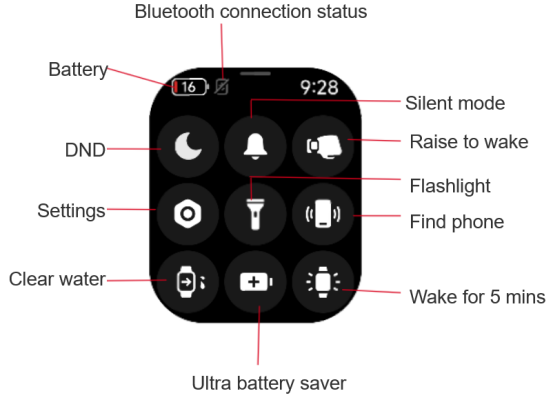
21. Q: What do the icons on the watch face of the Redmi Watch 5 Active mean?
A: For your reference, please refer to the image below to see the meanings of the corresponding icons: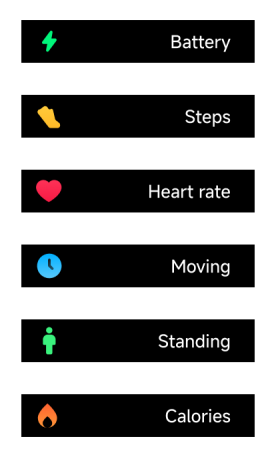
Charging and Battery Life
1. Q: What is the battery life of the Redmi Watch 5 Active?
A: The Redmi Watch 5 Active is fully charged for less than 2 hours, and can last up to 18 days in typical use mode and 12 days in heavy use mode.Typical usage mode 18-day test conditions for the Redmi Watch 5 Active are as follows:
1. Heart rate monitoring every 10 minutes;
2. Sleep monitoring (8 hours, high-precision sleep monitoring is not turned on by default);
3. All-day step monitoring (standby);
4. Data synchronization per day;
5. Push notification 100 per day;
6. Setting 3 alarms per day (30 seconds per time);
7. Bright screen 200 times per day;
8. Call reminder 2 times per day (30 seconds per time);
9. 15 minutes of Bluetooth calls per week;
10. 90 minutes of exercise per week or 30 minutes each time (voice prompts are not turned on by default).
Heavy usage mode 12-day test conditions for the Redmi Watch 5 Active are as follows:
1. Heart rate monitoring once a minute;
2. All-day step monitoring (standby);
3. Data synchronization 2 times per day;
4. Push notification 200 per day;
5. Alarm 4 times per day (30 seconds per time);
6. Bright screen 200 times per day;
7. Exercise 150 minutes per week or 30 minutes each time (voice prompts are not turned on by default);
8. Call reminder 4 times per day (30 seconds per time);
9. Sleep monitoring (turn on high-precision sleep monitoring);
10. Bluetooth call 30 minutes per week.
2. Q: What is the Redmi Watch 5 Active battery capacity and how to charge it?
A: The Redmi Watch 5 Active has a battery capacity of 470mAh and comes standard with a special magnetic charging cable.The charging steps are as follows:
1. The charging cable is aligned with the metal contact points on the back of the watch, and the charging cable is automatically adsorbed on the watch;
2. Connect the other end of the charging cable to the USB-A charger (please match the adapter with the output voltage of 5V).
Note:
1. If the watch cannot be turned on after being placed for a long time, it needs to be pre-charged for a period of time before the charging icon is displayed when it is used again;
2. Please tear off the protective film on the back of the watch before using the charging cable, and ensure that there are no other foreign objects for normal use.
3. Q: Why does the Redmi Watch 5 Active lose battery quickly after first activation?
A: When the watch is activated for the first time, a brief charging period can lead to a temporary display of inaccurate battery levels. The battery will show its true charge after about 20 minutes of use. To ensure accurate readings and optimal performance, it is recommended to charge the battery for at least 30 minutes before using the device.Device Connection
1. Q: Does the Redmi Watch 5 Active support use on iOS or Android phones?
A: Support. The Redmi Watch 5 Active needs to be bound through the Mi Fitness APP, which can be used for device binding after searching and downloading in Android and iOS application stores.Note:
The Mi Fitness APP can be downloaded by scanning the QR code of the watch to be bound interface.
2. Q: Why can't find the Redmi Watch 5 Active after downloading and installing the Xiaomi Wear APP?
A: The Xiaomi Wear APP is an older version and does not support binding with the Redmi Watch 5 Active. To resolve this, you need to scan the QR code on the watch to access the binding interface, which will direct you to download the Mi Fitness APP. Alternatively, you can download and install the Mi Fitness APP from the APP store, and then try to bind the watch.3. Q: How to bind the Redmi Watch 5 Active?
A: The Redmi Watch 5 Active needs to be bound through the Mi Fitness APP. After binding, the APP should be locked in the background to avoid being shut down by the system, which will cause disconnection from the mobile phone and affect the normal use of the watch.For your reference, the binding methods are as follows:
1. Press and hold the power button to turn on the watch. Then, either scan the QR code displayed on the watch screen using your phone or search for the Mi Fitness APP in your application store, download, and install it;
2. Open the Mi Fitness APP and grant the necessary permissions as prompted. Tap [Add device] at the upper right corner to search for the Redmi Watch 5 Active. If using an Android device, tap the watch's Bluetooth name when it appears, and confirm the pairing by matching the security code displayed on the watch screen with the one on your phone. Tap [Pair] to complete the connection;
3. If using an iOS device, after selecting the binding option or scanning the QR code, you will be prompted to connect the device from the Bluetooth list. Select the Redmi Watch 5 Active, then confirm the dual-ended pairing interface. After that, return to the APP to complete the device addition through the pairing list.
The detailed binding steps on the iOS phone are as follows:
1. Select language;
2. Scan with the APP;
3. Start binding;
4. Choose the Bluetooth name;
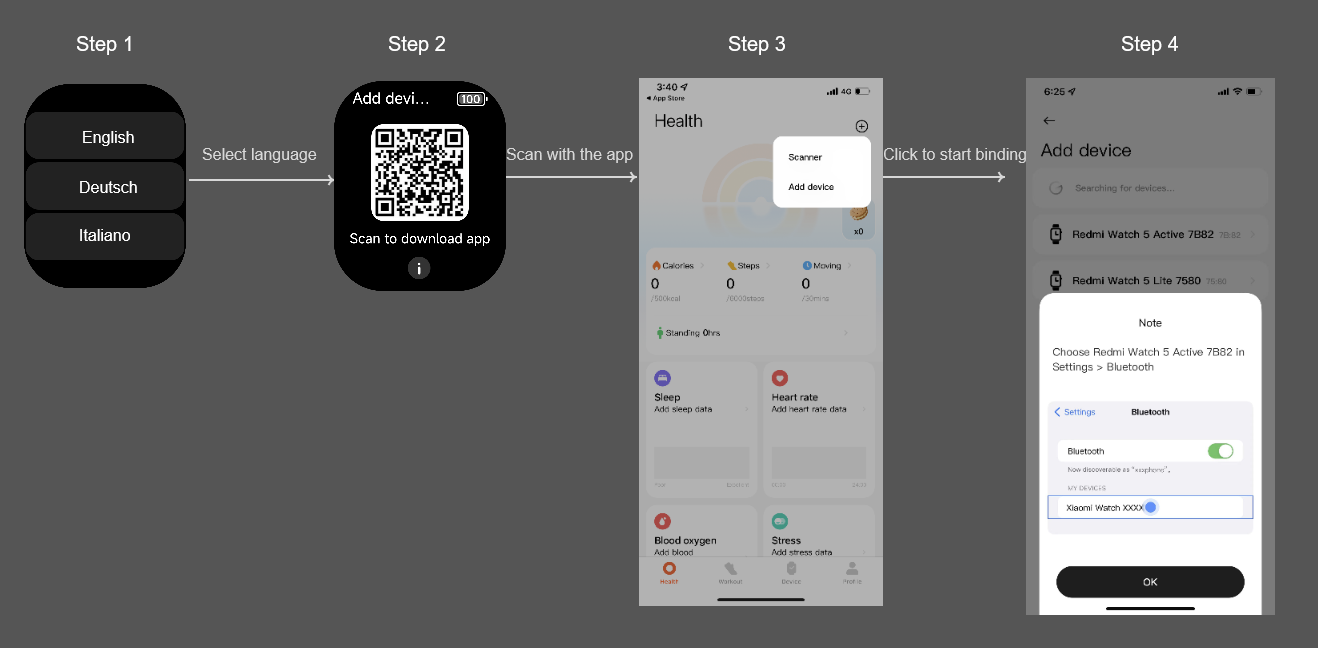
5. Pair on watch and phone;
6. The watch will automatically display the QR code page. Manually returns to the APP to scan again on the phone;
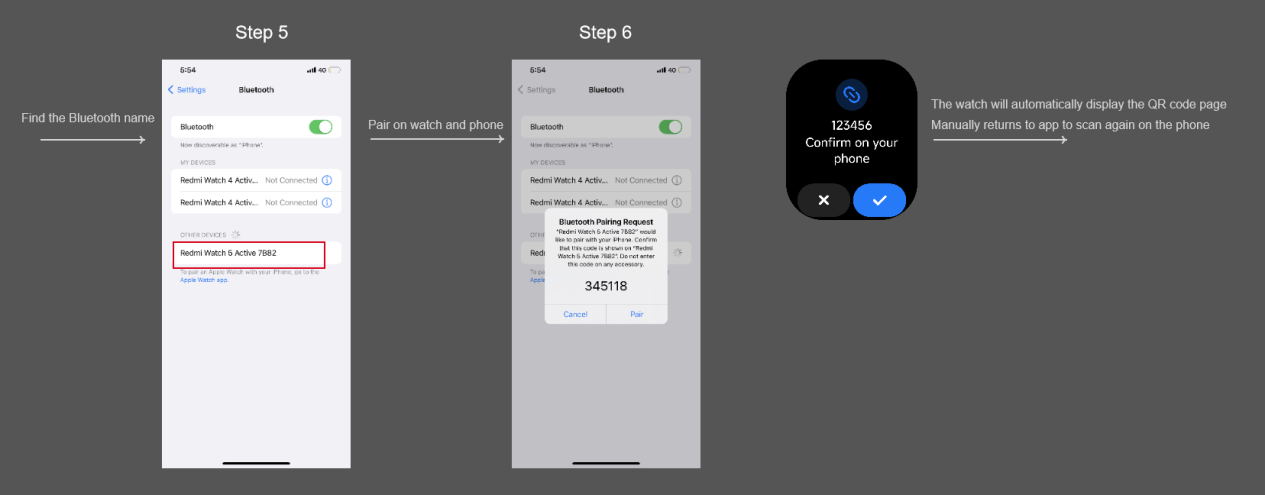
7. Scan with the APP and verify;
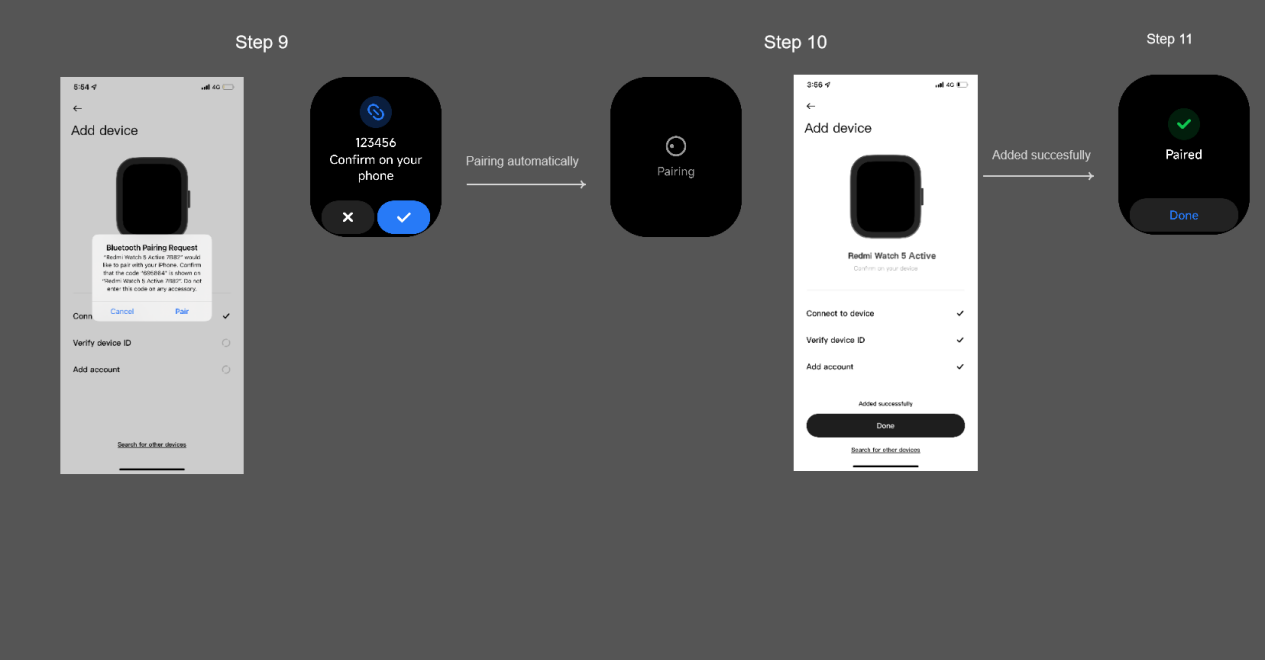
8. Pair on watch and phone;
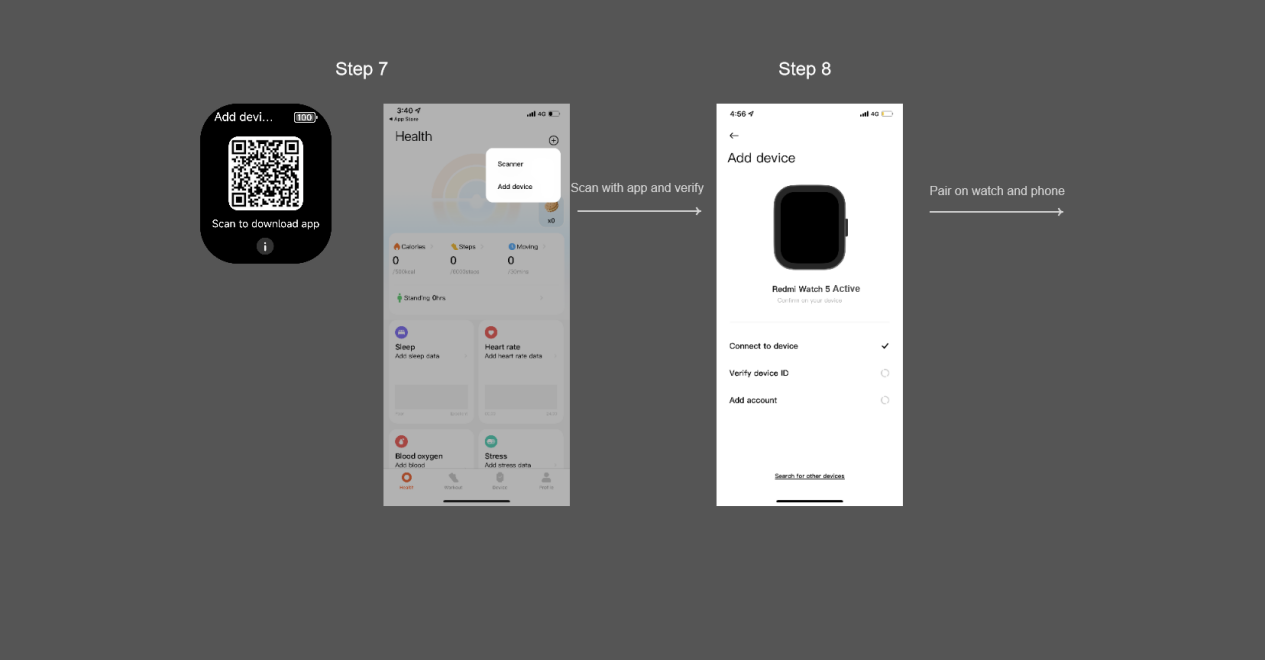
9. Pairing automatically;
10. Added successfully.
Note:
1. During the pairing process, please confirm that the Bluetooth of the mobile phone is on to ensure a normal connection between the watch and the mobile phone;
2. If the security code has popped up on the watch, however, the pop-up window for confirming pairing is not displayed on the mobile phone, please look for the pairing request in the notification shade of the mobile phone;
3. If the watch cannot be found during the process of adding the device, or the watch cannot be connected during use, please try to press and hold the power button for 3 seconds, select restore the factory settings in the system operation interface, and then add the watch again.
4. Q: How to unbind the Redmi Watch 5 Active?
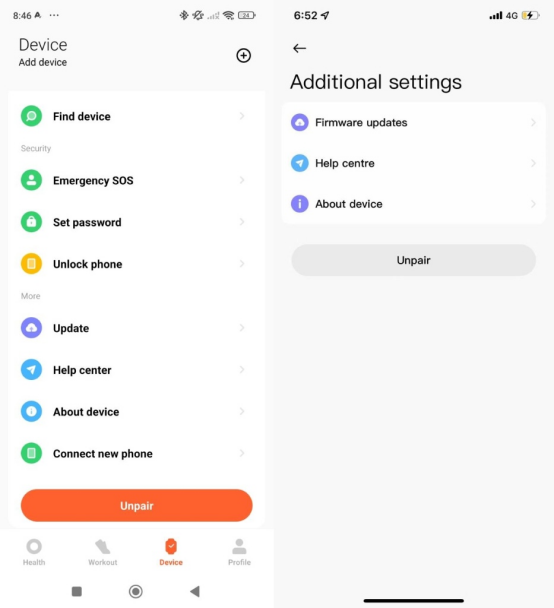
A: For your reference, the unbinding methods are as follows:1. For Android phones, open the [Mi Fitness] APP and tap [Unpair] on the [Device] interface;
2. For iOS phones, open the [Mi Fitness] APP, tap [Additional settings] on the [Device] interface, and then tap [Unpair].
Note:
1. After unbinding, the watch will be restored to factory settings and all data will be cleared;
2. After the watch is restored to factory settings, it will automatically unbind from the phone.
5. Q: Can the Mi Fitness APP bind multiple devices?
A: The Mi Fitness APP can bind multiple watches. 5-10 watches can be bound under the same account. However, only one can be enabled when using it.6. Q: How to switch to another watch in the Mi Fitness APP?
A: To switch to another watch, please refer to the following steps:1. Open the [Mi Fitness] APP;
2. Enter [Device] page;
3. Tap [Manage your devices] on the Android phone or tap the device name on the iOS phone to view all devices, and select the watch to switch.
7. Q: How to upgrade the system firmware on the Redmi Watch 5 Active?
A: The watch will push the subsequent upgrade package through the Mi Fitness APP.To upgrade the system firmware, please refer to the following steps:
1. If you are using an Android phone, please open the [Mi Fitness] APP >> [Device] >> tap [Update] to check whether the system firmware needs to be upgraded;
2. If you are using an iOS phone, please open the [Mi Fitness] APP >> [Device] >> tap [Firmware updates] to check whether the system firmware needs to be upgraded;
3. If you find that the new version can be updated, you can download the upgrade package;
4. After downloading the upgrade package, it will be automatically pushed to the watch. After receiving the upgrade package, the watch will be automatically upgraded and restarted.
Note:
The battery power of the watch needs to exceed 20% when upgrading. During the upgrading process, the watch needs to be connected to the mobile phone and keep the watch near the mobile phone as much as possible.
8. Q: What accounts does the Mi Fitness APP support for login?
A: The Mi Fitness APP currently only supports the Xiaomi Account login.9. Q: How does the Redmi Watch 5 Active maintain a connection with the Mi Fitness APP?
A: For a more stable connection, ensure the APP remains active in the background by enabling keep-alive/auto-start/turn off the power limit and other permissions on the application permission page. You can also lock the APP in the background to improve its ability to stay active.Note:
For Android devices, you can adjust these settings by following this path: Open the [Mi Fitness] APP >> Enter [Device] page >> [Background permissions]. The exact path can vary depending on your phone model.
10. Q: Does the Redmi Watch 5 Active support syncing with phone alarms?
A: At present, this function is only supported when connecting the MIUI system mobile phone. The version of the system clock APP needs to be greater than 12.8.1.1 and the watch needs to remain connected to the APP. When the mobile phone alarm rings, the watch rings synchronously. If you don't want to use the mobile phone alarm synchronization function, you can turn off this function in the alarm settings in the APP.11. Q: How to bind the Redmi Watch 5 Active after changing the phone?
A: To bind the Redmi Watch 5 Active to a new phone, open the [Mi Fitness] APP on the new phone and tap [Add device]. On the watch, go to [Settings] >> [System] and select [Connect new phone].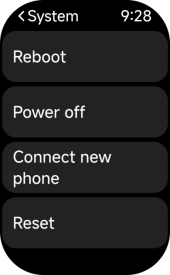
Note:
Personal data bound without changing account will not be lost. If it is changed to a new account, the watch will return to the factory settings and the unsynchronized data will be cleared.
12. Q: Why does the time on the Redmi Watch 5 Active not sync with the phone?
A: If the time on the Redmi Watch 5 Active is not syncing with the phone, first check that you are using the latest version of the Mi Fitness APP. The Redmi Watch 5 Active requires the Mi Fitness APP for proper functionality and data synchronization.Note:
The previous Xiaomi Wear APP is not compatible with the watch, so the data cannot be synced if you are using that APP.
Message Reminder Related
1. Q: How to set APP notification reminders on the Redmi Watch 5 Active?
A: The watch supports APP notification reminders. If you want to receive notifications from mobile phone APPs, such as SMS, incoming call notifications, etc., you need to open the application's message notification in the Mi Fitness APP.To open the APP notifications on the watch, please refer to the following steps:
1. Open the [Mi Fitness] APP;
2. Enter [Device] page;
3. Turn on [App notifications];
4. You can select [Receive only when phone is locked], [Wake screen], or [Notify only when worn] as you prefer for message reception.
Note:
1. For applications that notify opt-in messages in the APP, you need to turn on the notification permission of the mobile phone at the same time. If the message cannot be synchronized after opening, please tap [Help on notifications] to resolve this issue;
2. When the watch receives the message reminder by default, it only vibrates and does not actively light the screen. When viewing the message, you can lift your wrist to light the screen or manually light the screen. You can open the [Mi Fitness] APP >> [Device] >> [App notifications] >> enable the [Wake screen] to make the screen automatically light up when receiving the message;
3. The watch will also be alerted by default only when wearing the watch. You can open the [Mi Fitness] APP >> [Device] >> [App notifications] >> disable the [Notify only when worn].
2. Q: Does the Redmi Watch 5 Active support waking up the screen for notifications?
A: Support. When the watch receives a message notification from the mobile phone application after opening the [Wake screen] function, the screen will automatically light up. If you choose to close, the watch will not light up when the message comes, however, it will only vibrate, which can improve the endurance to a certain extent.You can enable this function by the following path: Open the [Mi Fitness] APP >> [Device] >> [App notifications] >> enable [Wake screen].
3. Q: How to view or delete notification messages on the Redmi Watch 5 Active?
A: After receiving a notification, the watch will vibrate and automatically display the content. If you don’t view it immediately, swipe down on the watch face page to access the notification center. The latest notification will appear first, and you can scroll down to view older notifications. If a notification message exceeds one screen, continue scrolling to read the entire content.To delete individual notifications, please open the notification details from the notification center list, and tap [Ignore] to delete it. Alternatively, you can swipe left on the notification to delete it. To clear all notifications, you can swipe down to the top of the notification page and tap [Clear all] to delete all notifications, except focus notifications. Aggregated messages will show a total of X messages in the list. Swipe left on these or enter the aggregated message group to delete all messages in that group.
Note:
1. Some applications do not support the display of all messages, please refer to the actual support of each application;
2. Messages that can be opened on the phone are only supported by certain applications on Android 11.0 and above, and require the watch to be connected to the phone;
3. The watch can store up to 10 recent notifications. Once this limit is reached, new notifications will automatically replace the oldest ones.
4. Q: How to open the message on the phone by tapping the notification details on the Redmi Watch 5 Active?
A: This function can quickly open the mobile phone’s message interface by tapping the notification details on the watch.To use this feature, the following conditions must be met:
1. Ensure the Mi Fitness APP is running in the background;
2. The mobile phone does not lock the screen, and the mobile phone does not enter another interface when the screen is locked;
3. Some phones can have issues opening mobile applications and can not support this function;
4. The compatibility between the mobile phone system and the application is important, and some calls that do not take effect. The current function is trying to adapt to more models, please wait patiently.
5. Q: Why doesn’t the Redmi Watch 5 Active take effect when tapping the notification details to open it on the phone?
A: If the mobile phone does not respond after tapping the notification details on the watch, it is due to the following reasons:
1. Whether the Mi Fitness APP keeps running in the background. If it is not turned on, please turn on the background permission;
2. Whether the mobile phone currently has a lock screen. In the lock screen state, the mobile phone can not enter another interface;
3. The current function is trying to adapt to more models, please wait patiently;
4. iOS phones do not support this feature.
6. Q: Does the Redmi Watch 5 Active support incoming call notifications?
A: Support. The Redmi Watch 5 Active supports incoming call notifications. When the watch is connected to your phone, it will vibrate and ring to notify you of incoming calls, displaying the caller's number or name. You can tap the red phone icon on the watch screen to reject the call, or tap the green icon to answer it (this action is synchronized with your phone).Android:
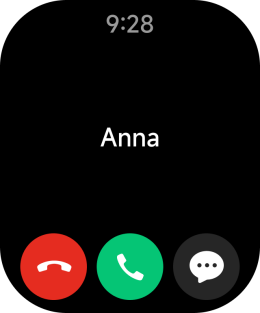
iOS:
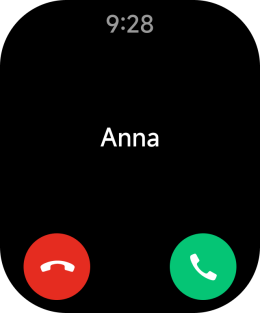
To display contact information, ensure that the watch is connected to the Mi Fitness APP. Open the APP >> [Device] >> select [Incoming calls] to display the contact information.
Note:
1. The caller ID name on the watch will match that on your phone, while unknown callers will be displayed by their phone numbers. If do not disturb mode is enabled during its scheduled period, you will not receive incoming call notifications;
2. To ensure incoming call notifications, the Mi Fitness APP must be running in the background;
3. The watch supports Bluetooth calls with dual-mode Bluetooth;
4. The incoming call notifications feature is enabled by default and cannot be turned off separately.
7. Q: Does the Redmi Watch 5 Active support quick SMS reply to calls?
A: The Redmi Watch 5 Active supports quick SMS reply to incoming calls.8. Q: Does the Redmi Watch 5 Active support emoji display?
A: Support. The Redmi Watch 5 Active supports some common emojis. However, unsupported emojis will appear as "□" on the watch screen.9. Q: Why can't the Redmi Watch 5 Active receive incoming call notifications?
A: Please check if the Bluetooth is connected.If you are using an iOS phone, please ensure that there are two identical Bluetooth names listed as connected in the Bluetooth settings. If you are using an Android phone, please verify that the phone calls switch in the Bluetooth connection list is turned on.
Please check if the watch is in any of the following modes:
1. Do Not Disturb mode is enabled;
2. Do Not Disturb synchronization is on, and the mode is activated on the phone;
3. Sleep mode is activated;
4. The watch is not being worn, and the reminder switch is set to notify only when worn.
If any of these conditions apply, the watch will not receive notifications for incoming calls.
10. Q: Why can't the Redmi Watch 5 Active receive message notifications?
A: Please confirm whether the message notification in the APP is turned on, and whether the sync notification is turned on or the switch of the corresponding APP is turned on. If it is turned off, the watch cannot receive the message.Please confirm whether the Mi Fitness APP has sufficient permissions, including the permission to get notifications and the permission to run in the background, to ensure that the APP can push notifications to the watch in the background.
Please check if the watch is in any of the following modes:
1. Whether to turn on Do Not Disturb mode;
2. Whether to turn on Do Not Disturb synchronization and turn on the mode on the phone;
3. Whether to turn on sleep mode;
4. Whether the watch is not being worn, and the reminder switch is set to notify only when worn.
Any of the above states will not remind the watch when the message is notified.
When the watch is connected to the iOS phone, if the phone cannot receive the message reminders, please refer to the following to check:
1. Ensure that the phone’s Bluetooth is connected to the device;
2. If connection issues persist, ignore the device in Bluetooth settings, then enter the Mi Fitness APP to re-pair the device;
3. If Bluetooth is connected, tap the small icon next to the connected device in Bluetooth settings to access the watch's Bluetooth details page. Confirm that the sharing system notification is open.
11. Q: What is the character and message limit supported by the Redmi Watch 5 Active?
A: The watch retains up to 10 of the most recent messages in the message list. Tap to clear all the messages in the current list. It supports the burn after reading function, where messages read on the phone are automatically deleted from the watch.Messages can be viewed by turning pages. The watch displays up to about 200 English letters or 300 numbers. This is consistent with the number of words shown in the mobile phone notification shade and can vary depending on the specific APP.
The watch does not support picture messages. However, it supports some common emojis. Unsupported emoji will appear as “□” on the watch.
Note:
The emoji display can vary based on specific expressions. It provided by the default keyboard is more compatible than those from applications.
12. Q: How to increase the vibration intensity of the Redmi Watch 5 Active?
A: The default vibration mode of the watch is standard, which can be set in the [settings] on the watch >> [Sound and vibration].When setting the vibration mode, according to the selection of different vibration modes (incoming call notifications, alarm reminders, APP notification reminders, standing reminders, SMS reminders, and schedule reminders), the watch will perform the corresponding vibration preview. With different reminders, the default vibration duration is different. It is not impossible to stop the vibration, please wait for the vibration to end automatically. The vibration duration for incoming calls or alarms is approximately 1 minute.
13. Q: Does the iOS phone support receive only when phone is locked function?
A: The iOS phone does not support this feature.14. Q: What is the message reading mechanism of the Redmi Watch 5 Active?
A: The message of the message list can be previewed. After tapping on the message, when returning to the message list, the message will still exist as long as the message is not manually cleared.Watch Face Related
1. Q: How to download/delete watch faces on the Redmi Watch 5 Active?
A: When the watch is connected to the mobile phone, you can download the new watch face through the Mi Fitness APP. The path is: Open the [Mi Fitness] APP >> [Device] >> [Manage watch faces]. Download and use it.To delete the watch face, please refer to the following methods:
1. On the watch, you can go to [Settings] >> [Watch faces] >> tap the delete icon. Additionally, you can also press and hold the watch face to enter the watch face editing page and tap the delete icon;
2. On your phone, open the [Mi Fitness] APP >> [Device] >> [Manage watch faces] >> [Local] >> tap on the corresponding watch face to delete.
Note:
The default watch face does not support deletion (restoring the factory settings requires restoring the preset watch face, so it cannot be deleted here).
2. Q: How to change the watch face on the Redmi Watch 5 Active?
A: The Redmi Watch 5 Active comes with 3 pre-installed watch faces and offers over 200 additional options that can be downloaded and used via the Mi Fitness APP. You can also easily change the watch face style directly on the watch.To change the watch face, please refer to the following methods:
1. On the watch, you can go to [Settings] >> [Watch faces], slide left and right to select as you prefer, and tap the screen to confirm to complete the watch face replacement;
2. On your phone, please open the [Mi Fitness] APP >> [Device] >> [Manage watch faces]. After entering the management page, download and synchronize to complete the watch face replacement.
3. Q: How many watch faces does the Redmi Watch 5 Active support?
A: The Redmi Watch 5 Active supports over 200 online watch faces, offering a wide range of categories, colors, and styles to match your outfits and straps. It comes with 3 pre-installed watch faces, and you can download up to 3 additional cloud watch faces via the Mi Fitness APP to sync with the watch.4. Q: Does the Redmi Watch 5 Active have the always-on display feature and how to enable it?
A: The Redmi Watch 5 Active does not have the always-on display feature.5. Q: How to switch photos on the Redmi Watch 5 Active?
A: Switching photos on the watch is not supported.6. Q: How to enter the watch face small icons such as weather on the Redmi Watch 5 Active?
A: Only partially supported due to different watch face designs.7. Q: Can the watch face background (album background) of the Redmi Watch 5 Active be customized?
A: The Redmi Watch 5 Active supports customizing the watch face background.To customize the watch face background, please refer to the following steps:
1. Open the [Mi Fitness] APP, connect and synchronize the device correctly;
2. On the homepage of the [Mi Fitness] APP, enter the [Device] page and tap [Manage watch faces];
3. After entering the management page >> [Online] >> [Custom] >> choose the digital display style as you prefer >> select the background picture >> select the reserved picture position >> [Continue] >> tap [Apply] to use it.
Note:
If you've downloaded the album watch face without updating the APP, try deleting the album watch face and then re-download it after upgrading both the watch and APP to the latest version.
System Settings
1. Q: How to power on/off or reboot the Redmi Watch 5 Active?
A: To power on/off or reboot the watch, please refer to the following information:1. To power on, in the power off state, press and hold the power button for a long time to power on and enter the watch interface;
2. To power off, in the power on state, press and hold the power button for a long time to enter the page of Reboot, Power off, Connect new phone, and Restore factory settings. Additionally, you can also go to the [Settings] on the watch >> [System] >> select [Power off];
Note:
If the current device has set a password and is not unlocked, the restore factory settings option will be hidden.
3. To reboot the watch, in the power on state, press and hold the power button for a long time to enter the page of Reboot, Power off, Connect new phone, and Restore factory settings. Select [Reboot] to restart the watch. You can also go to the [Settings] on the watch >> [System] >> select [Reboot] to restart. Additionally, when the watch is powered on, press and hold the power button for more than 12 seconds, and the watch will be forced to reboot.
2. Q: What are the regular operations of the Redmi Watch 5 Active? What are the functions of the power button?
A: The screen operation is as follows:1. Slide down on the watch face homepage to turn on message notifications;
2. Slide on the watch face home page to open the control center;
3. Slide left and right on the watch face home page to switch widget cards;
4. Slide right from the left edge on other pages to return to the previous level.
The power button functions are as follows:
1. The power button allows you to enter the application list or return to the watch face home page with a short press;
2. Press and hold the power button for 3 seconds to enter the page of Reboot, Power off, Connect new phone, and Reset;
3. Press and hold the power button for more than 12 seconds will force a restart;
4. Triple pressing the button (three consecutive presses within 2 seconds) will call the emergency contact.
3. Q: How to customize widgets on the Redmi Watch 5 Active?
A: The Redmi Watch 5 Active supports widget functions. On the watch face, slide left and right to view different widget cards.To set the widget, please open the [Mi Fitness] APP >> [Device] >> [Widgets] >> press and hold the right side of the widget and drag it up and down to adjust the order. After tapping on the widget to enter, tap the widget that needs to be customized. Select the item you prefer to display.
4. Q: How to customize the shortcut function on the Redmi Watch 5 Active?
A: The Redmi Watch 5 Active does not support customizing the shortcut function.5. Q: How to set the Do Not Disturb function on the Redmi Watch 5 Active?
A: When the Do Not Disturb mode is activated, incoming calls and APP notifications will be silenced. However, system reminders, such as alarms, will still be notified. If you enable Do Not Disturb mode synchronization in the APP, the watch and phone will remain connected, and the Do Not Disturb status will be synchronized in both directions. This means that if the Do Not Disturb is turned on at one terminal, it will also be activated at the other terminal.To set the Do Not Disturb function on the watch, please refer to the following methods:
1. Slide into the control center on the watch, tap the Do Not Disturb mode icon to turn on/off, and a shortcut time list will pop up when you select to turn on. You can select the required Do Not Disturb time in the list;
2. Go to the [Settings] on the watch >> [DND] >> tap to turn on/off;
3. Go to the [Settings] on the watch >> [DND] >> [Scheduled] >> set start and end time. The watch will turn on DND mode at a fixed time within the duration;
4. Go to the [Settings] on the watch >> [DND] >> sleep do not disturb. The watch turns on Do Not Disturb mode after detecting sleep and turns on Do Not Disturb mode at a fixed time within the set period.
Note:
The Do Not Disturb synchronization function is only supported on Android 11.0 and above phones.
6. Q: What are the options for turning off the screen on the Redmi Watch 5 Active?
A: To turn off the screen of the watch, please refer to the following information:1. By default, if the watch does not operate within 5 seconds, the screen will automatically turn off. You can modify the rest screen time in [Settings] on the watch >> [Display and brightness] >> [Auto lock] >> select the rest screen time;
2. The watch supports the Cover to sleep function. After opening, cover and contact the watch face with the palm of your hand, when the area reaches 1/2, the watch face directly changes from a bright screen to a rest screen. You can enable this function by opening [Settings] on the watch >> [Display and brightness] >> [Cover to sleep];
3. Lower or turn the wrist to rest the screen, and reverse the wrist again to wake up the screen.
Note:
After enabling the Raise to wake function, lower or turn the wrist can rest the screen.
7. Q: How to set the Raise to wake function on the Redmi Watch 5 Active?
A: To set the Raise to wake function on the watch, go to [Settings] >> [Display and brightness] >> [Raise to wake]. There will be an effective time option when turning on regularly, and the effective time can be set according to your needs.Slide up the watch face to open the control center, and tap the Raise to wake icon to quickly switch on and off this function.
8. Q: How to adjust the screen brightness of the Redmi Watch 5 Active?
A: The brightness of the watch does not support automatic adjustment, only can be set manually. You can go to [Settings] on the watch >> [Display and brightness] >> manually adjust the brightness.9. Q: How to set the standing reminder of the Redmi Watch 5 Active?
A: To set the standing reminder, please refer to the following information:1. On the Android phone, please open the [Mi Fitness] APP >> [Device] >> [Standing] >> turn on standing reminder. It also supports setting the reminder period, and custom start time or end time;
2. On the iOS phone, please open the [Mi Fitness] APP >> [Device] >> [Fitness and health] >> [Standing] >> turn on the standing reminder. It also supports setting the reminder period, and custom start time or end time;
3. If you don't want to be disturbed during lunch break, you can open the DND option and set lunch break time.
10. Q: What is the logic of standing reminder on the Redmi Watch 5 Active?
A: The watch sends a standing reminder when all the following conditions are met:1. The standing reminder is turned on;
2. The 50th minute of the current hour;
3. You did not stand in the current hour;
4. In the first 50 minutes of this hour, the unworn state time is <5 minutes, and the sleep state time is <5 minutes;
5. The current time point is within the reminder time range set by you (note that the DND function during lunch break is opened with the default period of 12:00-14:00, or the DND function is enabled during sleep, etc.).
11. Q: Does the Redmi Watch 5 Active support setting PIN?
A: Support. After this function is turned on, when the watch detects that it is not worn, the password lock screen will be activated to ensure information security. The password is a 6-digit combination of 0-9.To set the device lock, please go to [Settings] on the watch >> [PIN] >> set the password.
If you forget your password, you can go to the Mi Fitness APP, after successfully connecting the watch, you can modify or turn off the watch password in the PIN settings of the interface.
12. Q: Does the Redmi Watch 5 Active support Bluetooth unlocking mobile phones?
A: To enable this function, please refer to the following steps:1. Open the [Mi Fitness] APP >> enter [Device] >> tap [Unlock phone];
2. If you have set the lock screen password, you do not need to operate this step. If there is no lock screen password, you need to set a password, and return to the previous interface in the Mi Fitness APP after setting it;
3. Confirm on your wearable device;
4. Verify password;
5. Complete device security verification;
6. Setup complete.
13. Q: Does the Redmi Watch 5 Active support the WLAN connection?
A: The Redmi Watch 5 Active does not support the WLAN connection.14. Q: Does the Redmi Watch 5 Active support connecting to Bluetooth headphones and how to use it?
A: The Redmi Watch 5 Active does not support connecting to Bluetooth headsets.15. Q: Does the Redmi Watch 5 Active support switching application layout and how to set it?
A: The Redmi Watch 5 Active supports switching the application layout. Please open [Settings] on your watch >> [Layout] >> select the application layout [List] or [Grid] as you prefer.16. Q: How to turn on silent mode on the Redmi Watch 5 Active?
A: The silent mode is supported in the following ways to open:1. Open [Settings] on the watch >> [Sound and vibration] >> turn on the [Silent] switch;
2. Slide up on the watch to open the control center and tap the silent mode icon;
3. Open [Settings] on the watch >> [Sound and vibration] >> manually adjust the ringtone volume to 0.
After turning on the silent mode, alarms and timers will still ring and vibrate as normal, however, incoming calls, notifications, and other reminders will only vibrate.
17. Q: Does the Redmi Watch 5 Active support custom ringtones?
A: The Redmi Watch 5 Active does not support custom ringtones and all ringtones are system defaults.18. Q: What is the drainage function of the Redmi Watch 5 Active?
A: The principle of drainage function is to play the sound of a specific frequency, let the diaphragm vibrate, and use the vibration to shake out the water that invades the speaker space to protect the speaker from water erosion.19. Q: How to check the MAC address, serial number and other information of the Redmi Watch 5 Active?
A: For your reference, please refer to the following methods:1. Open [Settings] on the watch >> [About watch];
2. When the watch is connected to the mobile phone, open the [Mi Fitness] APP >> [Device] >> [About device].
20. Q: Does the Redmi Watch 5 Active support the Ultra battery saver mode?
A: Support. You can turn on the [Ultra battery saver] switch in [Settings] >> [Battery].21. Q: How to set the time of the Redmi Watch 5 Active?
A: After the watch is paired with the mobile phone Bluetooth and synchronizes the data, the watch will automatically synchronize the time of the mobile phone system without manual setting. If the time of the mobile phone is modified, the watch will be synchronized after connecting with the mobile phone.22. Q: How to check the Bluetooth connection status when using the Redmi Watch 5 Active?
A: Slide up into the control center on the watch face to view the Bluetooth connection status. The icon is gray to indicate that it is not connected, and the icon is lit to indicate that it is connected.23. Q: Does the Redmi Watch 5 Active support the adjustment of the vibration strength?
A: Support. You can choose the appropriate intensity in [Settings] on the watch >> [Sound and vibration] >> select vibration mode.24. Q: Can the Redmi Watch 5 Active add multiple world clocks?
A: The watch face does not support dual time zone settings. However, it can be viewed after adding multiple countries via the world clock.25. Q: Can someone search for the Redmi Watch 5 Active if it's not nearby?
A: No, after the watch is bound, the Bluetooth of the watch will not be searched by others.26. Q: What data will be cleared after the Redmi Watch 5 Active is restored to the factory settings?
A: After the watch is restored to the factory settings, all data will be erased.27. Q: Why can't the icon of Do Not Disturb mode on the Redmi Watch 5 Active be eliminated at night? Why can't receive message notifications only at night? How to use the sleep mode function on the Mi Fitness APP?
A: Please check whether you have turned on the Do Not Disturb function or turned on the sleep mode in the Mi Fitness APP and set the corresponding work and rest period. During this period, your watch will enter Do Not Disturb mode, and incoming calls and application notifications will not be reminded. However, system prompts, such as alarms, will still be reminded.28. Q: Why does the gesture of sliding right to go back not work on the Redmi Watch 5 Active?
A: Please quickly slide from left to right to try, if there is no effect, please press and hold the power button for more than 12 seconds to restart.29. Q: When the mobile phone is connected to the Redmi Watch 5 Active and the Bluetooth headset at the same time, why can't the Bluetooth headset be used as the default calling device when making calls?
A: When the mobile phone is connected to the Bluetooth headset and the watch device at the same time, in order to ensure that the phone is answered through the currently used device, the call audio will be played by default on the device where the incoming call is answered. If you tap the answer icon on the watch to answer the incoming call, the audio will be played on the watch. If you expect to play on the Bluetooth headset, it is recommended that you try to select the connected headset in the Bluetooth device list on the mobile phone to enter the settings interface and turn on the Automatic answer phone function (this function is only supported in the MIUI system).30. Q: Does the Redmi Watch 5 Active support modifying other languages?
A: The Redmi Watch 5 Active supports a variety of languages, including English, German, Italian, French, Spanish, Dutch, Portuguese, Turkish, Arabic, Polish, Ukrainian, Romanian, Czech, Slovak, Greek, Hebrew, Russian, Thai, Vietnamese, Brazilian Portuguese, Indonesian, Lithuanian, Bulgarian, Hungarian, Croatian, Japanese, Korean, and Traditional Chinese. Before binding the device, you can select the desired language or change the watch's language by switching the system language on the connected phone.Sports Related
1. Q: How to measure and view heart rate on the Redmi Watch 5 Active?
A: Heart rate is the number of heartbeats per minute. The Redmi Watch 5 Active uses photoplethysmography technology to detect heart rate and display heart rate values. When continuous heart rate detection is turned on, continuous heart rate fluctuation curves can be drawn. The Redmi Watch 5 Active’s heart rate measurement frequency is divided into intelligent monitoring (heart rate measurement 25 seconds every 10 minutes when quiet, heart rate measurement 25 seconds every 1 minute when active), monitoring every minute, monitoring every 10 minutes, and monitoring every 30 minutes. The interval will be automatically measured and the heart rate chart will be drawn.To view the heart rate, please refer to the following:
1. After the watch turns on the continuous heart rate monitoring, enter the application list to open the heart rate application, or slide left or right on the watch face to view the heart rate widget, which can view the real-time heart rate, and some watch faces can also display data such as heart rate in real-time;
2. If the watch turns off the continuous heart rate monitoring, enter the application list to open the heart rate application, or slide left or right on the watch face to enter the heart rate application through the heart rate widget, and the watch automatically performs real-time heart rate measurement. After the measurement is completed, you can choose to quit or re-measure.
Slide down on the heart rate function interface to view the heart rate range. The average resting heart rate, the highest resting heart rate, and the lowest resting heart rate in the past 30 days. When detecting the heart rate, please make sure that the watch is facing up. The heart rate detection area is attached to the wrist. It is best to press the watch surface lightly to increase the fit with the wrist.
2. Q: What is the resting heart rate of the Redmi Watch 5 Active?
A: Resting heart rate is also called quiet heart rate. It refers to the number of heartbeats per minute when awake and inactive.The best time to measure resting heart rate is the resting state after the natural waking in the morning. The resting heart rate of adults is in the range of 50-100 beats/minute, and the resting heart rate of professional athletes is 40-60 beats/minute. Since the watch can not be in the best time for automatic measurement, the resting heart rate value will not be displayed temporarily or the test value will deviate from the actual value.
3. Q: What is the heart rate range of the Redmi Watch 5 Active?
A: The heart rate interval refers to the range or level where the current heart rate is compared with the maximum heart rate. It reflects the load level of the heart. It is used to measure a person's exercise intensity. Exercise at the appropriate heart rate interval can help you enhance your heart and lung ability and improve your fitness level.The maximum heart rate value of the watch is automatically calculated, and it can also be set in the [Mi Fitness] APP >> [Profile] >> tap your Xiaomi Account >> set the [Max heart rate].
There are several states in the heart rate interval:
| Interval | Description |
| Warm up | Used to develop basic physical fitness or warm up before exercise. Type of exercise: such as brisk walking. |
| Fat burning | Used to improve basic physical fitness, which is conducive to increasing the speed of fat release and cardiovascular regulation. Type of exercise: such as jogging. |
| Aerobic | For endurance training, it is beneficial to improve aerobic fitness, increase vital capacity and control breathing rhythm. Type of exercise: such as easy running. |
| Anaerobic | It is used for speed improvement training, which is conducive to improving physical fitness. It is necessary to properly control the exercise time in this interval. Type of exercise: such as rhythm running or interval running training. |
| Limit | It is used for explosive force exercises. At this time, lactic acid accumulates rapidly and the probability of injury is high. It is necessary to strictly control the exercise time in this interval. Type of exercise: such as extreme running. |
4. Q: What factors affect the heart rate test results of watches?
A: For your reference, the factors are as follows:1. Non-standard wearing methods, such as light leakage caused by incomplete fit, arm swing, and slight movement of the watch on the skin, etc;
2. Too tight wearing of the watch, arm elevation, and fist clenching will affect blood circulation and can also affect heart rate signals;
3. The watch is worn near the joint;
4. There are many sweat stains on the watch;
5. Due to the characteristics of the PPG chip, blood oxygen (red light) and heart rate (green light) cannot be turned on at the same time, that is, blood oxygen and heart rate cannot be measured at the same time. If the blood oxygen measurement is continuous for a long time, there will be no background heart rate monitoring data for this period of time.
Note:
1. The correct measurement method: Keep your arm flat, relaxed, and still, ensuring the watch is snug against your arm;
2. If worn correctly, individual differences such as skin color, hair, tattoos, and scars can also affect heart rate monitoring (brown skin and black skin cannot be measured, and dark skin cannot be detected for large absorption of green light).
5. Q: What to do if the Redmi Watch 5 Active detects a high heart rate?
A: When the heart rate is too high, you should rest properly and not exercise too much. If the heart rate continues to be too high, it is recommended to consult doctors promptly according to your situation.6. Q: Does the Redmi Watch 5 Active display heart rate when not worn?
A: When you are not wearing the watch, enter the watch heart rate application, the real-time heart rate will not be displayed. You can view the historical heart rate and the resting heart rate.Note:
1. The watch face supports the display of heart rate data, and the heart rate is displayed as “-” when not worn;
2. In some cases (e.g. real-time heart rate detection can be triggered during exercise), due to the heart rate judgment mechanism, the watch can display heart rate when placed on some dark surfaces.
7. Q: How to measure and view blood oxygen saturation on the Redmi Watch 5 Active?
A: Support all-day blood oxygen monitoring. You can enter the blood oxygen saturation application, and start to measure. When the first value appears in the measurement, the calibration process will be entered, and the data will be displayed after the calibration is completed.The blood oxygen history measurement value will be distributed in a columnar trend, which you can also view in the Mi Fitness APP.
8. Q: Does the Redmi Watch 5 Active support sleep monitoring?
A: The watch supports full sleep monitoring, including both long sleep periods and short naps throughout the day. Sleep monitoring will display REM sleep distribution only when continuous heart rate monitoring is enabled. When you wear the watch normally at night, it can automatically detect sleep through its built-in sensors.To view the sleep data, please refer to the following methods:
1. On the watch, you can slide left and right on the watch face home page to the entrance of the sleep widget to view the sleep duration last night. You can also enter the application to view more details;
2. Tap the sleep icon in the application list to view the sleep data of the day;
3. After the watch is connected to the mobile phone to synchronize the data, tap Sleep in the data section of the Mi Fitness APP to view historical sleep data, including day, week, month, and year. You can also view the daily sleep period, the proportion of deep sleep, light sleep, rapid eye movement, and awake sleep, as well as detailed sleep status at each time point.
Note:
1. There is a delay in the generation of sleep reports. If the sleep function is turned on immediately after waking up, there is no sleep report for the time being;
2. The watch only retains the sleep data of last night. Please synchronize the data to the Mi Fitness APP in time to avoid the loss of data.
9. Q: How to use the Breathing function of the Redmi Watch 5 Active?
A: Breathing training helps regulate heart rate, improve stress, relax and relieve. Regular deep breathing is helpful for health.To use the Breathing function, please refer to the following information:
1. Turn on the Breathing application and you can choose 1-5 minutes and the appropriate speed for breathing training according to your needs;
2. Please keep still and follow the breathing animation on the watch screen to take deep breaths;
3. After the breathing training, you can see the comparison of your heart rate before and after the breathing training.
10. Q: Does the Redmi Watch 5 Active support stress monitoring?
A: Supports all-day monitoring and single measurement.Stress here refers specifically to mental stress, excluding physical stress caused by high-intensity exercise. The principle of stress detection is to use heart rate variability to evaluate the current stress intensity, compare the current heart rate variability data with the individual's heart rate variability during sleep and relaxation, and at the same time combine the individual's limb activity tracking to assist judgment. When in low-intensity limb activity, if the heart rate variability becomes significantly weaker, it means that the current mental stress is under higher intensity.
To view the stress value, please refer to the following methods:
1. After wearing the watch normally, open the stress application to view the pressure data;
2. In the data section of the Mi Fitness APP, you can check the stress curve of day, week, month, and year, the maximum, minimum, average pressure and other information. You can also do some decompression activities to relieve stress through pressure data.
The stress value introduction is as follows:
| Pressure score | Pressure level |
| 81~100 | Severe |
| 51~80 | Moderate |
| 26~50 | Mild |
| 1~25 | Relax |
1. When continuous heart rate monitoring is turned off, stress data will not be displayed normally;
2. When strenuous exercise or moderate and high intensity activities are frequent, the accuracy of stress data evaluation will be affected to some extent;
3. The watch is not a medical apparatus. The data results and suggestions are for reference only.
11. Q: How to turn on the workout mode of the Redmi Watch 5 Active?
A: To turn on the workout mode, please refer to the following information:1. Tap the workout application or the widget through the watch (you need to add it on the Mi Fitness APP) to enter the sports page, then select the sports you want to start and start the sport;
2. After the movement starts, the movement data will be displayed;
3. During the exercise, press the power button to pause the exercise, and then choose to end or continue the exercise.
Note:
1. If the exercise time or distance is too short, the end of the exercise will prompt "Workout time too short to record. End?" or "Workout distance too short to record. End?";
2. Sports such as running need to wait for the watch to successfully obtain the location of the mobile phone before turning it on, otherwise, the movement track will be abnormal.
12. Q: Does the Redmi Watch 5 Active support VO2 max function?
A: The Redmi Watch 5 Active does not support VO2 max function.13. Q: What sports modes are available on the Redmi Watch 5 Active?
A: The Redmi Watch 5 Active currently has 142 sports modes including Outdoor running, Treadmill, Indoor cycling, Outdoor cycling, Walking, Trekking, Trail run, Freestyle, Hiking, Elliptical, Rower, Jump rope, HHT, Yoga, Basketball, Tennis, etc.The complete sports modes are organized as follows:
| Sports modes | Whether using the GPS data |
| Outdoor running | Yes |
| Walking | Yes |
| Hiking | Yes |
| Outdoor cycling | Yes |
| Trekking | Yes |
| Trail run | Yes |
| Rock climbing | No |
| Skateboarding | No |
| Roller skating | No |
| Parkour | No |
| ATV | No |
| Paragliding | No |
| BMX | No |
| Race walk | No |
| Freestyle | No |
| Treadmill | No |
| Jump rope | No |
| HIIT | No |
| Yoga | No |
| Indoor cycling | No |
| Elliptical | No |
| Rower | No |
| Stair climber | No |
| Stepper | No |
| Spinning | No |
| Core training | No |
| Flexibility | No |
| Pilates | No |
| Gymnastics | No |
| Stretching | No |
| Strength | No |
| Cross training | No |
| Stair climbing | No |
| Aerobics | No |
| Physical training | No |
| Wall ball | No |
| Dumbbell | No |
| Barbell | No |
| Weightlifting | No |
| Deadlift | No |
| Burpee | No |
| Sit-ups | No |
| Functional training | No |
| Upper body | No |
| Lower body | No |
| Abs | No |
| Back | No |
| Air walker | No |
| Horizontal bar | No |
| Parallel bars | No |
| Step aerobics | No |
| Mass gymnastics | No |
| Cardio combat | No |
| Battle rope | No |
| Aerobic combo | No |
| Indoor walking | No |
| Indoor fitness | No |
| Square dancing | No |
| Belly dance | No |
| Ballet | No |
| Street dance | No |
| Zumba | No |
| Folk dance | No |
| Jazz dance | No |
| Latin dance | No |
| Hip hop | No |
| Pole dance | No |
| Breaking | No |
| Ballroom dance | No |
| Modern dance | No |
| Dance | No |
| Boxing | No |
| Wrestling | No |
| Martial arts | No |
| Tai chi | No |
| Muay Thai | No |
| Judo | No |
| Taekwondo | No |
| Karate | No |
| Kickboxing | No |
| Kendo | No |
| Fencing | No |
| Jujitsu | No |
| Tennis | No |
| Basketball | No |
| Golf | No |
| Soccer | No |
| Volleyball | No |
| Baseball | No |
| Softball | No |
| American football | No |
| Hockey | No |
| Table tennis | No |
| Badminton | No |
| Cricket | No |
| Handball | No |
| Bowling | No |
| Squash | No |
| Billiards | No |
| Shuttlecock | No |
| Beach soccer | No |
| Beach volleyball | No |
| Sepak takraw | No |
| Futsal | No |
| Hacky sack | No |
| Bocce | No |
| Jai alai | No |
| Gateball | No |
| Dodgeball | No |
| Snowboarding | No |
| Skiing | No |
| Cross-country skiing | No |
| Ice skating | No |
| Indoor ice skating | No |
| Curling | No |
| Other winter sports | No |
| Snowmobile | No |
| Ice hockey | No |
| Bobsleigh | No |
| Sledding | No |
| Archery | No |
| Darts | No |
| Horse riding | No |
| Tug of war | No |
| Hula hoop | No |
| Kite flying | No |
| Fishing | No |
| Frisbee | No |
| Shuttlecock | No |
| Swinging | No |
| Somatosensory game | No |
| Table football | No |
| Shuffleboard | No |
| Esports | No |
| Chess | No |
| Checkers | No |
| Weiqi | No |
| Bridge | No |
| Board game | No |
| Equestrian | No |
| Athletics | No |
| Auto racing | No |
14. Q: What data can be viewed during exercise on the Redmi Watch 5 Active?
A: The Redmi Watch 5 Active presents the most critical exercise data for each workout mode. Take outdoor running as an example: When running outdoors, it can display data such as time, heart rate, distance, pace, calories, cadence, and total number of steps.Note:
The types of data displayed in exercise are various for different workout modes.
15. Q: How to set goals while exercising when using the Redmi Watch 5 Active?
A: When the watch selects the workout mode, the target setting can be carried out: The movement with distance, time, calorie consumption, and number of times as the target can be selected according to your needs, and the goals supported by different workout modes are different. The target value of this movement can be set for the above 5 goals, and the target can be cleared by sliding.The detailed target information is as follows:
1. Target time: The default is 10 minutes, and the adjustment unit is 1 minute. It can be set according to your situation;
2. Target distance: The default value of the running class is 5.0 kilometers, and the adjustment unit is 0.1 kilometers. The default value of the riding class is 10 kilometers, and the adjustment unit is 1 kilometer. It can be set according to your situation;
3. Target calories: The default is 300kcal, and the adjustment unit is 50kcal, which can be set according to your situation;
4. Target number: 1000 by default and 100 by adjustment unit, which can be set according to your situation;
5. Target times: The default is 200 times, and the adjustment unit is 10 times. It can be set according to your situation.
16. Q: How to view sports records of the Redmi Watch 5 Active?
A: After completing the exercise, the watch will generate a detailed report. This report includes data on the exercise date, time, heart rate, distance, pace, calories burned, cadence, total steps, and other relevant metrics.The view methods are as follows:
1. View detailed exercise data in the watch's Activity application;
2. After the watch is connected to the mobile phone, tap [Health] in the Mi Fitness APP, and tap [Show all] under the workout section, then you can view the sports record by week, month, and year. In addition to the sports information on the watch, you can also view the sports track and other information.
17. Q: How to check the number of steps, calories, and effective standing for the day when using the Redmi Watch 5 Active?
A: There are three ways to view it:1. Slide left or right on the watch face to view the current calorie, number of steps and effective standing data on the corresponding widget;
2. Press the power button to enter the application list, and tap the [Stats] application to view it;
3. When the mobile phone is connected to the watch, open the Mi Fitness APP and view the data on the [Health] page.
18. Q: Does the Redmi Watch 5 Active support voice broadcasting during exercise?
A: The Redmi Watch 5 Active does not support voice broadcasting.19. Q: How to set the women's health management notification of the Redmi Watch 5 Active?
A: Open the [Mi Fitness] APP >> [Health] >> enter [Cycles] >> turn on [Period prediction]. The watch will synchronize the menstrual period data of the mobile phone. It will remind you of the upcoming menstrual period and ovulation day at the reminder time you set.20. Q: Does the Redmi Watch 5 Active support energy detection?
A: The Redmi Watch 5 Active does not support energy detection.21. Q: How does the Redmi Watch 5 Active determine effective standing?
A: Standing is considered effective when the number of steps per hour exceeds 200 or the duration of moderate and high-intensity activities exceeds 3 minutes. Sitting for a long time can bring health risks to the body. We recommend completing more than 12 standing activities per day.22. Q: Does the Redmi Watch 5 Active support workout reminders?
A: Support. The watch can remind each sport in the workout mode.23. Q: How long can the data on the Redmi Watch 5 Active be saved?
A: The watch can save about 20 pieces of exercise data recently. 20 pieces are not fixed numbers. If a single piece of exercise lasts too long, the number of 20 will become less. The heart rate data is kept for 15 days. The sleep page only shows the data of the day. However, about 7 pieces of data will be saved. Please connect with your mobile phone and synchronize to the Mi Fitness APP in time. If the watch is reset, the previous exercise data on the watch will be erased, and the data synchronized to the Mi Fitness APP will not be erased.Note:
1. All sports will not be saved until they meet the minimum sports record standard, otherwise, they will not be saved;
2. Indoor cycling, free training, etc. will save the data to the sports record after reaching 1 minute;
3. For Outdoor running, Treadmill, Outdoor walking, Outdoor cycling, Hiking, and Trail run, any exercise distance greater than 100 meters is considered valid and will be recorded and saved in the exercise log.
24. Q: Why does the Redmi Watch 5 Active show storage space is full and force the workout to end during exercise?
A: The theoretical storage duration for outdoor workouts is 4.25 hours, and this duration can be extended if the GPS signal is weak. For other types of exercises, the storage duration is even longer, with activities like Freestyle reaching over 50 hours. If you continue exercising when the storage space is full, the watch will delete previous workout records. Please ensure you connect the watch to your phone and sync the data to free up storage space.25. Q: How to delete the workout data of the Redmi Watch 5 Active?
A: After uploading the workout record to the Mi Fitness APP, if you want to delete it, you can select a certain exercise report on the exercise record page and select [Delete] at the upper right corner.26. Q: Can the Redmi Watch 5 Active support automatic pause during exercise?
A: Support. Outdoor running, Treadmill, Walking, Outdoor cycling, Trail run, and Hiking sports support automatic recognition pause.27. Q: Why does the Redmi Watch 5 Active unable to locate after starting an outdoor cycling session?
A: If the Mi Fitness APP or watch fails to locate your position when starting an outdoor cycling session, please check whether the APP has location permissions enabled. For example, on a Xiaomi phone: Open the [Mi Fitness] APP >> [Profile] >> [App permissions] >> [Access location] >> [App permissions] >> [Location] >> select [Allow all the time]. Additionally, ensure you are in an open area with minimal surrounding buildings when starting the outdoor cycling session. If the issue persists, try unbinding and re-binding your phone to determine if the problem is related to the phone's location services.Other Applications
1. Q: How to check the weather information on the Redmi Watch 5 Active?
A: When the Redmi Watch 5 Active is connected to the mobile phone, you can check the weather information on the watch.To check the weather information, please refer to the following methods:
1. On the watch, press the power button to enter the application list, select the Weather APP from the list, and view details such as local temperature, weather conditions, wind level, UV intensity, relative humidity, sunrise and sunset times, and future weather forecasts. Slide up or down to view the information;
2. Slide the screen left and right on the watch face homepage to view the weather widget to obtain temperature and weather condition information. You can also tap the widget to enter the weather application to view more details.
Note:
1. If the watch is not connected to the mobile phone, the weather shows the synchronized information when the mobile phone was connected last time;
2. If the weather widget is hidden in the Mi Fitness APP, the weather cannot be viewed through the widget on the watch;
3. The weather information displayed on the watch is obtained and pushed by the Mi Fitness APP from the service provider. If it is different from the weather service provider used by the mobile phone system, the displayed results will be slightly different;
4. You can manually add 4 cities to check the weather information.
2. Q: Does the Redmi Watch 5 Active support the Find phone or Find device feature?
A: The Redmi Watch 5 Active supports the function of finding a mobile phone. In the Bluetooth connection between the mobile phone and the watch, if the mobile phone cannot be found, you can use the function of finding the mobile phone of the watch.To search for the phone, please refer to the following steps:
1. On your watch, select [Settings] >> [Find phone] >> tap [Search];
2. During the search process, tap [Stop] to end the search state.
The Redmi Watch 5 Active supports the find device function. If the watch cannot be found in the Bluetooth connection between the mobile phone and the watch, you can use this function to search your watch.
To search for the watch, please refer to the following steps:
1. Open the [Mi Fitness] APP >> [Device] >> [Find device];
2. During the search process, tap [Stop] to end the search state.
Note:
If Bluetooth is not connected, the find phone and find device function is not available.
3. Q: Does the Redmi Watch 5 Active support the compass function?
A: The Redmi Watch 5 Active does not support the compass function.4. Q: Does the Redmi Watch 5 Active support viewing the pressure and elevation?
A: The Redmi Watch 5 Active does not support viewing the pressure and elevation.5. Q: How to turn off the alarm vibration and sound on the Redmi Watch 5 Active?
A: To turn off the alarm vibration and sound on the watch, please refer to the following methods:1. Turn off the alarm vibration on the watch, which can be set in [Settings] >> [Sound and vibration] >> turn off the vibration;
2. Turn off the alarm ring on the watch, you can set the alarm volume to 0 in [Settings] >> [Sound and vibration] >> adjust the alarm volume.
6. Q: How to use emergency contacts on the Redmi Watch 5 Active?
A: To use emergency contacts on the watch, please refer to the following methods:1. To set an emergency contact, please open the [Mi Fitness] APP >> [Device] >> [Emergency SOS] and enable the switch. You can modify the emergency contact information by yourself. After modification, tap the confirmation icon at the upper right corner to save. Prompt "Applied successfully" means that it has been synchronized to the watch;
2. To call the emergency contact, make sure that the watch can make Bluetooth calls normally. Press the power button three times in a row to directly dial the emergency contact's phone.
Note:
When you use this function, the device needs to keep connected to the mobile phone Bluetooth.
7. Q: How to answer and make calls with the Redmi Watch 5 Active?
A: When connecting the watch through the Mi Fitness APP, ensure that you authorize the watch to establish a Bluetooth audio connection. Keep the phone and watch connected via Bluetooth, and check the phone's Bluetooth connection list to confirm that the watch indicates support for audio and calls.To answer or make a call on the watch, please refer to the following methods:
1. To answer a call, the watch will synchronously display an incoming call notification when your phone rings. You can tap the answer or hang-up icon on the watch to accept or reject the call. If you answer the call on your phone, you can choose the watch as the audio device or use the watch directly to answer the call;
2. To make a call, select a contact from the call history or missed call notifications on the watch to initiate the call, with the phone carrying out the action simultaneously.
8. Q: How to take photos using the Redmi Watch 5 Active?
A: The Redmi Watch 5 Active allows you to control your phone's camera to take photos. Once the watch is connected to your phone, open the camera on your phone, then open the Camera APP on the watch. Tap the control icon on the watch's APP interface to capture photos using your phone.If you cannot use the remote control phone photography function, please check the following settings:
1. Check whether the watch and Bluetooth are in pairing status;
2. If it is already in pairing status, please check whether the Bluetooth of the mobile phone is connected to more than one Bluetooth device. If it is connected to more than one Bluetooth device, please disconnect some of the devices and try again;
3. Check if the Bluetooth setting of your mobile phone is used as an input device on your phone: [Settings] >> [Bluetooth] >> tap the icon on the right side of the Bluetooth >> check whether the [Input device] option is turned on.
Note:
The watch interface does not display the contents of the photo.
9. Q: Can the Redmi Watch 5 Active control music playback on the phone?
A: To use this feature, follow these steps: After starting the music player on your phone and playing music, access the function list on your watch and select the music icon to enter the music control page. From there, you can start/pause music, switch to the previous/next track, and adjust the volume.Note:
Most music players on the market are supported. However, due to differences in the openness of music players and APP versions, the watch’s music control functionality can be affected to some extent.
10. Q: Why can't some music APPs be controlled for playing and pausing on the Redmi Watch 5 Active?
A: Please confirm that the mobile phone and the device are connected. If it is connected, the issue is due to the music player. Currently, most music players on the market are supported, however, due to the openness of the music player and the differences in APP versions, It will affect the experience of the watch's music control function to a certain extent.Troubleshooting
1. Q: Why is the step count on the Redmi Watch 5 Active inaccurate?
A: Pace principle: The watch uses a built-in accelerometer. The data detected by the accelerometer is then combined with an algorithm and basic information of the human body to ultimately convert the information into steps, consumption and other information.Factors that affect the number of steps recorded by a watch:
1. The principle of measuring the walking distance of a watch is to estimate your step length according to the height, sex and weight set by yourself, and then multiply it by your step number to obtain an estimated value;
2. Because the mileage varies, and people of the same height, sex, and weight can have different step counts, the final calculated value can also have large errors;
3. The accuracy of step counting, that is, the number of steps you take, is influenced by many uncertain factors related to your behavior, such as the amplitude of your arm movements and your walking habits. There are many scenarios where human activity occurs (such as walking, riding, driving, bathing, etc.), and your arm movements can be complex (such as typing on a keyboard, moving a mouse, lifting and pulling objects, etc.);
4. Due to the reasons mentioned above, the final calculated distance on your watch is also an estimate. The watch cannot be used as a professional measurement tool for measuring distance. We will continue optimizing the software algorithm to calculate more accurate data.
2. Q: Why is GNSS positioning on the Redmi Watch 5 Active sometimes slow?
A: GNSS positioning is slow, which can be caused by the GPS data sent by the mobile phone not in time. Please make sure to exercise in the open area and ensure the normal connection between the watch and the mobile phone.3. Q: Why is there sometimes no movement track or track loss after movement?
A: The device does not have GPS hardware, and depends on the Mi Fitness APP positioning to obtain trajectory information. Please ensure that the APP is connected to the watch by Bluetooth during exercise, and keep the Mi Fitness APP running in the background or foreground.4. Q: Why does the trajectory drift on the Redmi Watch 5 Active?
A: GPS drift refers to a continuous track where there is a certain gap between the actual position and the real location when using GPS positioning. This can occur both during exercise and on the actual route. Many factors can affect GPS, such as tall buildings nearby, complex terrain, and complicated electromagnetic environments, as well as harsh weather conditions like sandstorms, heavy rain, and other severe natural weather conditions.5. Q: Why cannot the Redmi Watch 5 Active synchronize the exercise data?
A: If there is no exercise data on your watch, please refer to the following points to troubleshoot:1. Please confirm whether the watch is worn properly and whether the heart rate is normal;
2. After the exercise is started, check whether the exercise time or distance reaches the minimum standard of exercise recording;
3. It can be caused by improper wearing and abnormal heart rate monitoring.
Note:
Outdoor running, outdoor walking, outdoor riding and treadmill initiated from the Mi Fitness APP are recorded sports for the mobile phone.
6. Q: What to do if the Redmi Watch 5 Active cannot be charged?
A: Please refer to the following methods for testing:1. Charge with an original standard charging adapter;
2. Check whether there are foreign objects in the charging base;
3. Remove the watch from the charging seat and put it back again, plug and unplug the USB of the base again, and try to replace the socket;
4. Restart the watch and then put it on the base for charging;
5. If the above methods are invalid, please apply for the after-sales service center inspection.
Note:
The Redmi Watch 5 Active does not support connecting Hub charging, which will cause failure to charge. The adapter selected for charging is at least a 5V/1A regular standard charging head.
7. Q: Why does the Redmi Watch 5 Active show heart rate when worn on other objects?
A: The watch collects signals from optical sensors to analyze your heart rate. Due to the limitation of the working principle of the sensor itself, if the watch is worn on other objects or there is a shelter in front of the heart rate sensor, the sensor can detect changes in the optical signal and calculate a heart rate value. Therefore, when the algorithm is compatible with the aforementioned signals, the latter's signal can be misjudged, resulting in the calculation of the heart rate value.8. Q: What to do if the data synchronization between the mobile phone and the Redmi Watch 5 Active fails?
A: Please refer to the following methods to resolve this issue:1. Refresh the page of the Mi Fitness APP and reconnect the watch to it;
2. Turn off the Bluetooth of the mobile phone and reopen it. Re-open the Mi Fitness APP and connect;
3. Restart the watch and the phone, and try to reinstall the Mi Fitness APP.
9. Q: What to do if the Redmi Watch 5 Active does not vibrate?
A: If your watch does not vibrate, please refer to the following methods to troubleshoot:1. Check whether the vibration function is turned off on the watch. Open the watch >> [Settings] >> [Vibration];
2. Check whether the Do Not Disturb mode is enabled;
3. If the vibration switch is on and the do not disturb mode is not enabled, you can restart the watch and test the functions such as stopwatch or alarm clock. If the watch still does not vibrate, you can apply for the after-sales service center.
10. Q: What to do if the Redmi Watch 5 Active crashes, shows a black screen, or cannot be turned on?
A: If your watch crashes, shows a black screen or cannot be turned on, please refer to the following methods to solve the issue:1. Connect the watch to the charging base and charging cable, and continue charging for more than 10 minutes;
2. When your watch cannot be turned on after charging, you can press the power button for more than 15 seconds to restart it;
3. If the watch still cannot be turned on, apply for the after-sales service center inspection.
11. Q: What to do if the Redmi Watch 5 Active fails to update?
A: If your watch fails to update, please refer to the following steps to solve the issue:1. If the Mi Fitness APP or the watch prompts that the upgrade fails, please try to restart the watch and upgrade again;
2. Place the watch on the charger and wait until the battery is above 20% before attempting the upgrade again;
3. Reset the watch and try to upgrade after re-pairing;
4. Try using a different phone to re-bind and upgrade;
5. If the watch fails to power on after an upgrade failure, please contact the after-sale service center for assistance.
12. Q: What to do if the system OTA upgrade push interface on the Redmi Watch 5 Active is stuck at 100%?
A: If the system OTA upgrade push interface is stuck when the push is up to 100%, please press the power button for 12 seconds and push again.13. Q: What to do if the time of the Redmi Watch 5 Active is inconsistent with the mobile phone?
A: If the watch time is inconsistent with the mobile phone time, you can connect the Mi Fitness APP for refresh operation.14. Q: What to do if the Redmi Watch 5 Active cannot be bound?
A: Please refer to the following methods for troubleshooting:1. Exit the Mi Fitness APP and turn off the Bluetooth to reopen the binding attempt;
2. If the watch cannot be found in the Mi Fitness APP, you can put your watch close to your mobile phone or go to a place with fewer Bluetooth devices to search and add it again;
3. If it is still not searched, check whether there is watch information in the Bluetooth settings of the mobile phone, clear the Bluetooth pairing information of the watch, and then enter the Mi Fitness APP to add the device again.
Android system: Go to [Settings] >> [Bluetooth] >> select [Redmi Watch 5 Active] >> [Unpair], and then add the watch to bind;
iOS system: Go to [Settings] >> [Bluetooth] >> select [Redmi Watch 5 Active] >> [Forget this Device], and then add the watch to bind;
4. Try to restart the watch or mobile phone and reset the watch to change the environment.
15. Q: What to do if the weather data of the Redmi Watch 5 Active does not update?
A: If the weather data has not been updated for a long time, please check as follows:1. Please open the Mi Fitness APP and check whether the watch and mobile phone are disconnected from Bluetooth on the homepage;
2. Check whether the weather updates toggle is turned on in the Mi Fitness APP >> [Device] >> [Weather] >> [Weather updates].
16. Q: What to do if the Redmi Watch 5 Active cannot receive the APP notifications reminder?
A: If the APP notifications do not remind you on the watch, please check as follows:1. Check whether the connection state between the watch and the mobile phone is normal, and confirm that the mobile phone has been paired and is in the Bluetooth connection state;
2. Check whether the Do Not Disturb mode is turned on, please turn off this mode;
3. Confirm that the Mi Fitness APP has correctly opened the notification reading permission. If it is the latest system of the Xiaomi mobile phone, you need to open the permission: Go to [Settings] >> [Security& privacy] >> [More security & privacy] >> [Special permissions] >> [Device & app notifications] >> [Mi Fitness] APP >> turn on [Allow notification access];
4. Check if the current application information can be correctly displayed in the notification bar of the mobile phone. If it is not displayed, please turn on the notification management authority on the mobile phone of this application. Take Xiaomi's latest mobile phone system as an example: Go to [Settings] >> [Notifications & status bar] >> [App notifications] >> turn on the [Mi Fitness] toggle;
5. Check the message notification that the application is opened in the Mi Fitness APP. The setting method: Mi Fitness APP >> [App notifications] >> turn on [App notifications];
6. Restart or reset the watch, then bind it again;
To turn on the notification permission on the iOS phone:
1. Go to [Settings] >> [Bluetooth] >> tap [Exclamation Mark] >> Turn on [Sharing System Notification];
2. Go to [Settings] >> [Notifications] >>[Show Previews] >> select [Always].
Note:
When the mobile phone is in the chat interface, the chat message will not be pushed to the watch.
17. Q: Why does the Redmi Watch 5 Active only vibrate without a bright screen when there is a new message reminder?
A: When the watch receives a message reminder by default, it only vibrates and does not actively light the screen. When viewing the message, you can lift your wrist to light the screen or manually light the screen. If you need a message reminder to light up the screen, you can turn on the switch [Wake screen] in the Mi Fitness APP >> [Device] >> [App notifications].18. Q: Why is the number of steps of the Redmi Watch 5 Active different from that of the Mi Fitness APP? (General)
A: 1. The connection between the watch and the APP is disconnected, and the number of steps is not synchronized in time. The Mi Fitness APP can be synchronized after being refreshed again;2. In addition, when the watch synchronizes data with the mobile phone APP, the device receives the data value transmitted by the APP to be discarded when it is less than the local value of the device (the device data is not covered), and when it is greater than the local data of the device, the transmitted data is used. Synchronize to the local, and continue to accumulate after the current hour is synchronized (there will be a 30-minute delay in data synchronization), which is also one of the reasons for this phenomenon.
19. Q: What to do if the Redmi Watch 5 Active is successfully bound but cannot be connected?
A: Please refer to the following methods for inspection:1. Ensure that the watch has sufficient power;
2. Check the connection status of the Mi Fitness APP. If it is disconnected, tap the pair icon to restore the connection;
3. End the process of the Mi Fitness APP, restart your phone’s Bluetooth, restart the phone or watch, and try to refresh the connection state in the APP;
4. Please try to restore the watch to the factory, and then tap the pair icon on the APP. When the same pairing code appears on the watch and the APP interface, tap the pair icon;
5. If it still cannot be solved, please clear the Bluetooth pairing with the watch in the Bluetooth settings of the mobile phone. Restore the factory settings of the watch, and then restart the binding process.
20. Q: Why is the weather of the Redmi Watch 5 Active inconsistent with the weather of the mobile phone? (General)
A: The weather information displayed on the watch was obtained from the service provider by the Mi Fitness APP.21. Q: Why does the Redmi Watch 5 Active not count the steps when it has already started walking?
A: The watch will update the number of steps for many times every minute, but not in real time every second.22. Q: Why is the heart rate not valued on the Redmi Watch 5 Active?
A: Please confirm whether the heart rate lamp on the back shell flashes in normal condition. If the heart rate lamp is normal, please try to adjust the tightness of the watch to measure again. If the heart rate lamp is not on, please try to press and hold the power button for more than 15 seconds to restart the watch.23. Q: How long does it take to upgrade the Redmi Watch 5 Active system?
A: The watch upgrade is related to the mobile phone, network environment, and software package size. It is normal for some versions to take about 10 minutes to upgrade. Please wait patiently.24. Q: Why do some watch faces of the Redmi Watch 5 Active download and install slowly?
A: Due to the rich content and large file memory of some watch faces, downloading and installing takes a relatively long time compared with others, which is a normal phenomenon. Please wait patiently.25. Q: Why does the screen of the Redmi Watch 5 Active show abnormalities (black and white stripes, blurry, false touch jump, etc.)?
A: If your watch is still working, please try to restart it first. If it still shows abnormalities after restarting, please check whether the watch is the latest version. If it is not, please update to the latest version of the firmware. If there are still abnormalities after the update, please apply for the after-sales service center maintenance or replacement.26. Q: Why does the Redmi Watch 5 Active restart automatically?
A: If your watch is still working, please follow the APP instructions and update to the latest version of your watch firmware first. If there are still abnormalities after the update, please follow the after-sales instructions for after-sales maintenance or replacement.27. Q: Why are there interface lags or unsmooth situations when using the Redmi Watch 5 Active?
A: If you experience this issue, please update the watch firmware to the latest version. Additionally, the interface will occasionally lag slightly in specific situations (such as when reading more information) due to data transmission, this does not affect normal usage.28. Q: After the watch has not been used for a long time, the charging is relatively slow, and the power consumption shows 0%
A: If your watch is not charged in time after low power shutdown, or has not been used for more than two months, the device battery needs a longer charging time to activate the battery due to excessive discharge. Please make sure that the charging connection of the device is normal. Wait patiently for a period of time until the charging animation is displayed.29. Q: What to do if the screen of the Redmi Watch 5 Active becomes unresponsive?
A: The watch can be restored by pressing the power button for more than 12s, and then the watch is upgraded to the latest version.30. Q: Why cannot some watch faces of the Redmi Watch 5 Active be found?
A: The watch is pre-installed with a variety of watch faces, but some watch faces are in the watch faces market of the Mi Fitness APP, which can be found in the market.31. Q: What to do if the Redmi Watch 5 Active stops charging?
A: Please check whether there are any metal foreign objects between the watch and the charging base, or whether there is a poor connection between the charging base and the adapter.32. Q: Why does the Redmi Watch 5 Active have two Bluetooth names on the Bluetooth list?
A: The watch supports Bluetooth calls. After binding the connection, there are two Bluetooth names seen in the Bluetooth list of iOS phones. One is BT connection and the other is BLE connection. For Android phones, BT and BLE will be integrated and only one Bluetooth name will be displayed.33. Q: Why cannot the Redmi Watch 5 Active be paired after tapping [Connect new phone]?
A: For the case of pairing failure after tapping [Connect new phone] and the watch is turned off and turned on again, the watch can be paired again by restoring the factory settings.34. Q: Why cannot the iOS phone be reconnected to the Redmi Watch 5 Active after disconnection?
A: If you encounter the above situation, please go to [Settings] >> [Bluetooth] on your mobile phone, find the previously paired Bluetooth (including call Bluetooth), tap [Forget This Device] and then try binding.35. Q: What to do if there is a touch insensitivity issue on the Redmi Watch 5 Active?
A: 1. If the device is turned on the Cover to sleep function, you can try to cover the screen and light the screen again to see if it is normal;2. Press and hold the power button 15s to restart it;
3. Verify the firmware version, update to the latest version and try again;
4. If the above methods cannot resolve the issue, please contact the after-sales service center for assistance.
Warning List FAQ
1. Q: What to do if the back cover surface of Redmi Watch 5 Active scratches?
A: Please avoid direct friction with hard objects and contact with sharp objects to avoid irreparable wounds on the surface.2. Q: Why are there color differences between the middle frame and power button of the Redmi Watch 5 Active?
A: The different light source environments will have a certain impact on the color of NCVM. In practice, the color of the middle frame and power button is consistent.3. Q: What to do if the Redmi Watch 5 Active does not charge due to the dirt on the contact points?
A: You can use the alcohol to clean up the charging PIN to solve this problem of non-charging.4. Q: What to do if the screen of the Redmi Watch 5 Active is scratched and damaged?
A: 1. The screen cover is a glass cover. Metals, sand and other sharp objects in daily life will cause scratches on its surface. Such use scenarios should be avoided as much as possible;2. The watch falls and collides. If the front of the screen is hit by a heavy impact, there is a possibility of breaking the screen. Avoid falling, heavy pressure, collision and other scenes when daily use.
5. Q: Why does the screen surface of the Redmi Watch 5 Active appear unclean or lack bulk coating on the glass surface?
A: There is a layer of anti-fingerprint coating on the surface of the watch screen. This coating is sensitive to alkaline environments. If you contact the alkaline liquid environment such as soap and bath liquid for a long time, it is easy to cause the coating to fall off. Please try to avoid contact with the alkaline liquid environment when using.6. Q: Why does the middle frame of the Redmi Watch 5 Active discolor?
A: Avoid long-term contact with the alkaline liquids (soap, bath lotion, etc.). If you have no intention of touching it, please wipe the liquid in time.7. Q: Why does the paint surface on the Redmi Watch 5 Active scratch and drop?
A: Dropping or colliding the watch will cause scratches on the paint surface, please avoid the watch falling from a height.8. Q: What to do if the Redmi Watch 5 Active strap is not fully assembled and falls off?
A: Please make sure that the strap is in place. When it is in place, you can experience the sound of the rebound feedback of the elastic needle.9. Q: How to enhance the wearing experience of the Redmi Watch 5 Active strap?
A: When wearing, choose the strap hole suitable for you, buckle the nail buckle, and then wear the strap to the watch ring. Practice many times to be familiar with the nail buckle fastening method.10. Q: Why does the heart rate measurement on the Redmi Watch 5 Active have no data feedback?
A: Please select the appropriate wrist circumference and keep the back shell heart rate boss directly attached to your skin.11. Q: What to do if the Redmi Watch 5 Active is caused low sound and noise after contacting the water?
A: After wearing it in the shower, swimming pool and shallow beach swimming, please use the drainage function of the watch, and shake the watch. It can be restored after standing for some time.12. Q: What to do if the liquid (milk, Coke, Sprite, etc.,) enters the horn hole of the Redmi Watch 5 Active, resulting in low sound and silent phenomenon?
A: Please wash it in clean water at room temperature. The water can be restored after drying.13. Q: What to do if the horn hole and MIC hole of the Redmi Watch 5 Active are blocked?
A: It is recommended that you do not block the horn hole and the MIC hole, which can be recovered after being blocked and cleaned by foreign bodies.14. Q: What to do if the heart rate lens on the back shell of the Redmi Watch 5 Active cracks?
A: The heart rate lens is made of polycarbonate with high light transmission performance. Some chemicals have corrosive and destructive effects on it. In daily use, avoid chemicals such as perfume or cosmetics from touching the heart rate lens. If accidentally touched, it needs to be cleaned with clean water at room temperature in time before wearing. If the heart rate lens has cracked, it will affect the accuracy of heart rate detection, blood oxygen detection, and wear detection.15. Q: Why does the phone not download the Mi Fitness APP by scanning the QR code on the Redmi Watch 5 Active?
A: Please try the following operations:1. Make sure the mobile phone network communication is normal;
2. Try to use other applications to scan the QR code;
3. Go to the Play Store to download the latest version of the APP.
16. Q: Why is the QR code on the Redmi Watch 5 Active not recognized by the phone?
A: Please try the following operations:1. Make sure to select the correct area;
2. Make sure the watch screen is clean and free of dirt;
3. Make sure the mobile phone camera is successfully focused.
17. Q: What to do if the time on the Redmi Watch 5 Active is inconsistent with the phone time?
A: 1. Re-switch Bluetooth to connect again;2. Restart the watch to connect again.
18. Q: How to synchronize data after connecting the Redmi Watch 5 Active to the Mi Fitness APP?
A: Please refer to the following steps to sync the data:1. Automatic synchronization: In the case of Bluetooth connection, the APP is synchronized once when switching from the background to the foreground (the data is not synchronized when switching page);
2. Manual synchronization: When the APP is on the Health interface, you can pull down and refresh the synchronization data. Tap the Sync icon on the Device interface.
19. Q: What to do if the Redmi Watch 5 Active cannot be connected to the phone?
A: To connect the watch to the Mi Fitness APP, you need to make sure that the phone can connect to the network and turn on the Bluetooth switch of your phone.If the phone is set properly but still cannot connect to the watch, please refer to the following steps:
1. Please try to turn off the Bluetooth switch of your phone and then turn it on again;
2. Slide on the QR code interface, select restart, and restart the watch;
3. After the watch restarts, try to connect the watch again in the APP.
20. Q: What to do if the Redmi Watch 5 Active Bluetooth disconnects and does not connect back?
A: Please try the following operations:1. Make sure that the phone network communication is normal, and the Bluetooth switch of the phone is on;
2. Please try to re-switch the Bluetooth of the phone or restart the watch to connect again;
3. Make sure that the distance between the phone and the watch is within 20 meters.
21. Q: What to do if the heart rate of the Redmi Watch 5 Active is inaccurate?
A: 1. Please wear the watch about one finger away from the wrist bone. Wearing it too loosely will affect the accuracy of heart rate monitoring data;2. Please ensure that the heart rate light at the bottom of the watch is in direct contact with the skin, and there is no dirt blocking the heart rate sensor.
22. Q: What to do if the sleep data of the Redmi Watch 5 Active is inaccurate?
A: First of all, please confirm whether the wearable device and APP are the latest version. If they are not the latest version, please upgrade to the latest version.The following phenomena can be used to troubleshoot your problem:
1. Sleep data is not recorded. If the wrist movements are more or very unstable, the watch can be mistaken for non-sleep, resulting in non-recording of sleep. If the sleep time is less than 15 minutes, the watch will not be able to monitor, and sleep data will not be recorded at this time.
Sleeping on subways, high-speed trains, buses and other vehicles will not be able to record sleep data due to the shaking or acceleration of the vehicles;
2. Too loose wearing will lead to abnormal sleep monitoring. It is recommended to ensure that the watch is positive when wearing, wear it a little behind the wrist bone, and do not press on the wrist bone. Adjust the wristband to ensure that it fits the skin;
3. The sleep data is recorded, which can be that the watch is in a relatively quiet state, and there is a movement range similar to sleep. It makes the device misjudged as a sleep state, resulting in a false increase in sleep duration.
For example, when you watch TV, play with your mobile phone, or read a book in a lying position before going to bed, you have mistakenly counted sleep. The principle of sleep is to monitor sleep through the principle of heart rate variability. The heart rate sensor senses changes in light and cannot distinguish between living and non-living bodies.
Therefore, when the light changes received by the device sensor are similar to those of the wrist, it will be determined that the current state is worn, and sleep monitoring will be carried out, resulting in sleep data and sleep time differences from actual sleep;
4. The device cannot display the sleep of the previous day. The standard range of sleep data of the day is the data from 00:00 of the previous day to 24:00 of the same day. The sleep wake-up time of the day is attributed to the same day from 00:00 to 24:00. The watch only shows the sleep fragments of the day. If you have a sleep before 00:00, you can check it in the APP.
23. Q: What to do if the blood oxygen saturation measurement on the Redmi Watch 5 Active is slow?
A: 1. Factors such as hair, tattoos, shaking, low temperature, and incorrect wearing can affect the measurement results, and even lead to value failure. Wear the device tightly to the distance from one finger of the wrist bone, and keep it stationary throughout the measurement, which can greatly improve the success rate of the value;2. To ensure the accuracy of the measurement, please wear the watch correctly, keep the arm flat, keep the watch screen upward, and the watch and wrist skin are comfortably attached. Do not wear it on the wrist joint, and then start the blood oxygen saturation measurement on the watch to keep the arm stationary throughout the measurement;
3. Ensure that the sensor on the back of the watch is clean and dry, and there is no foreign body occlusion;
4. In low temperature environments (such as high altitudes, winter and other low temperature scenes), you can take off the watch, rub the watch parts, and then wear the watch to measure;
5. To make the measurement result more accurate, it is recommended that you wear it for 3-5 minutes before measuring the blood oxygen saturation.
24. Q: What to do if the music playback control status on the Redmi Watch 5 Active is out of sync?
A: 1. The watch and the mobile phone are always connected, and the Mi Fitness APP needs to keep running in the background;2. Please confirm that the APP on the Android phone has turned on Allow notification access permissions.
25. Q: Why the lifting wrist cannot light the screen of the Redmi Watch 5 Active?
A: 1. Check whether the Raise to wake function has been turned on. Go to [Settings] >> [Display & Brightness] >> [Raise to wake]. If the timing is selected and the effective period is set, the watch will only enable the [Raise to wake] function during the effective period;2. If you turn on the sleep mode or long endurance mode, and the Raise to wake function will not be turned on.
26. Q: What to do if Raise to wake function of the Redmi Watch 5 Active is not sensitive?
A: 1. It is recommended that you put the watch face up, avoid the wrist bone, and wear it tightly. In the back position of the wrist bone, ensure that the device will not slide;2. Please tilt the watch inward 30-90 degrees when you lift your wrist, and within 1 second, you can light up the screen;
3. Please try to stay on the screen toward your face when lifting your wrist or turning your wrist.
27. Q: What to do if the screen touch on the Redmi Watch 5 Active is not sensitive?
A: After the touch screen of the watch is wet, please dry the surface water stains with a soft cloth before operating.28. Q: What to do if there is no response on the screen of the Redmi Watch 5 Active?
A: 1. Please connect the charging cable to check whether the device has power;2. If your mobile phone screen is dirty or has water stains, it will affect the touch sensitivity of the screen. It is recommended that you wipe the screen clean and try again;
3. Turn off the watch, and restart it.
29. Q: What to do if the screen of the Redmi Watch 5 Active cannot be lit?
A: 1. Please connect the charging line to check whether the device has power;2. Check whether it has been turned on;
3. Check whether the charging can be activated.
30. Q: What to do if the version upgrade of the Redmi Watch 5 Active fails?
A: The following situations can cause the upgrade to fail:1. The network is disconnected during the download of the upgrade package by the Mi Fitness APP, which causes the download of the upgrade package to fail;
2. When the App pushes the upgrade package to the watch, the distance between the watch and the mobile phone is too far, which causes the transmission to be interrupted;
3. The watch is too low in power and automatically shuts down during the upgrade process. After the watch fails to upgrade, it will automatically restart. After it is turned on, the watch can still be used, but the version before the upgrade is maintained. You can upgrade again after ensuring that the watch has sufficient power and that the download of the installation package is completed.
31. Q: What to do if the Redmi Watch 5 Active can not control the mobile phone to take pictures?
A: The principle of the remote control camera function is to call the mobile phone volume key function. Before use, it is necessary to ensure that the mobile phone volume key has the shutter camera function. Android mobile phone needs to enable the camera function in advance.If you cannot use the remote control photo function, please check the following settings:
1. Check whether the watch and Bluetooth are in pairing status;
2. If it is already in pairing status, please check whether the Bluetooth of mobile phone is connected to more than one Bluetooth device. If it is connected to more than one Bluetooth device, please disconnect some of the devices and try again;
3. Check if the Bluetooth setting of your mobile phone is used as an input device: Go to [Settings] on the phone >> [Bluetooth] >> [Redmi Watch 5 Active] >> [Input device].
Note:
Due to compatibility problems, some mobile phones with MTK chips cannot support this function.
32. Q: What to do if the weather data on the Redmi Watch 5 Active is not updated?
A: The weather data is updated once every 1 hour in the connection status.If it is still not updated for more than 1 hour, please check the following options:
1. Open the APP, check whether the watch and the mobile phone are disconnected from the Bluetooth connection on the Device interface. Tap [Device] >> [Weather] >> [Weather updates]. Check whether the Weather updates toggle is turned on. If it is turned on, please turn off it and turn it on again;
2. Check whether the system location-based service and App location information acquisition permissions are turned on. In the APP, go to [Device] >> tap the [Sync] icon on the right side of the watch, and manually resynchronize the data.
33. Q: Why is the movement record on the Redmi Watch 5 Active watch lost?
A: The maximum number of sports records stored on the watch is 20. After the storage limit is exceeded, the earliest sports records will be automatically deleted.You can view all sports records in the Mi Fitness APP:
Go to the Health interface to view sports records by week, month, year and other cycles.
34. Q: What to do if Redmi Watch 5 Active's unread notification message is lost?
A: Reason: It can be that there are too many unread messages. The watch can receive up to 10 message notifications. If it exceeds 10, the newly received messages will overwrite the previous messages.Solution: Please check the message notifications on the watch in time. If unread messages are found missing, please check them on the phone.
Note:
Only messages displayed in the notification bar of the mobile phone are received on the watch. Messages read on the phone will not be notified again on the watch.
35. Q: Why is the calorie calculation on the Redmi Watch 5 Active not accurate?
A: 1. The watch is not worn correctly. The heart rate sensing area on the back of the device does not fit the wrist skin, and data cannot be obtained;2. The heart rate sensing area on the back of the watch is dirty, or there is sweat between the wrist and the device, which will affect the measurement results;
3. The wrist is not kept still during the measurement and the arm is shaken;
4. Being in a low temperature environment, or the wrist skin temperature is too low, or causes blood flow to decrease, which affects the measurement results;
5. The wrist wearing the watch is in a state of compression, which affects blood circulation and also causes the measurement results to be inaccurate;
6. Tattoos or pigmentation on the wrist will affect the penetration of red light from the sensor, resulting in inaccurate measurement results.
36. Q: What to do if the blood oxygen measurement on the Redmi Watch 5 Active is inaccurate?
A: 1. The watch is not worn correctly. The heart rate sensing area on the back of the device does not fit the wrist skin, and data cannot be obtained;2. The heart rate sensing area on the back of the watch is dirty, or there is sweat between the wrist and the device, which will affect the measurement results;
3. The wrist is not kept still during the measurement and the arm is shaken;
4. Being in a low temperature environment, or the wrist skin temperature is too low, or causes blood flow to decrease, which affects the measurement results;
5. The wrist wearing the watch is in a state of compression, which affects blood circulation and also causes the measurement results to be inaccurate;
6. Tattoos or pigmentation on the wrist will affect the penetration of red light from the sensor, resulting in inaccurate measurement results.
37. Q: What to do if the Redmi Watch 5 Active does not slide smoothly?
A: 1. If the watch is in the process of connecting back, it is recommended to wait for the connection to be successful, or try again after the connection is completely disconnected;2. If the device is synchronizing data with the APP, it is recommended to try again after the data is synchronized;
3. Try again after restarting the watch.
38. Q: What to do if the Redmi Watch 5 Active watch’s alarm clock and mobile phone’s alarm clock are not synchronized?
A: 1. It only supports synchronization MIUI mobile phone alarm clock to the watch reminder.You need to open the mobile phone alarm clock reminder switch in the APP:
Tap [Device] >> [Alarm] >> turn on [Sync alarms from phone]. When the phone has an alarm clock, the watch and the phone need to be in a Bluetooth connection state, and keep the APP running in the background;
2. It does not support the alarm clock set in the watch to remind on the phone.
39. Q: What to do if the Redmi Watch 5 Active cannot receive messages?
A: When the APP maintains a Bluetooth connection with your watch, it will push the notification generated by the mobile phone notification shade to your watch to remind you that the phone has received a new message. When the notification message is not displayed in the mobile phone notification shade, even if the mobile phone's application receives a new message, the mobile phone will not push notification to your watch.If you find that you have not received the reminder, please check whether it is due to the following reasons:
1. Please make sure that in the mobile phone, the new message reminder is turned on, and ensure that the message content can be successfully displayed in the mobile phone’s notification shade;
2. The message notification switch is not turned on in the APP. Solution: Tap [App notifications] in the APP and enable this feature;
3. The Do Not Disturb mode is turned on on the watch, and within the period of the DND mode, the watch will not vibrate after receiving new messages. Turn off the Do Not Disturb mode on the watch, or modify the time period when the Do Not Disturb mode is effective;
4. For Android phones, the watch is disconnected from the mobile phone. Please ensure that the mobile phone's network connection is good, Bluetooth remains open, and the connection with the watch is normal. You can check the connection status in the device interface of the APP;
5. APP is turned off in the background of the phone. Add the Mi Fitness APP to the background of the phone;
6. For iOS phones, if you find that you have not received the reminder, please check one by one whether the following permissions are turned on: Turn on the application notification permission in the phone settings. Turn on the application permission that allows the message notifications displayed in your phone’s notifications, so that it can be synchronized to the device. Open the [Settings] >> [Notifications] >> [Show Previews] >> change to [Always], and modify the notification style in the mobile phone settings. Open the [Settings] >> [Notifications] >> select the specific application >> turn on all switches >> change the [Show Previews] option to [Always]. Open the [Settings] >> [Bluetooth] >> tap the exclamation icon beside the device >> turn on [Share System Notifications] (If there is no shared system notification option, there is no need to set it).
40. Q: What to do if the Redmi Watch 5 Active cannot synchronize the mobile phone schedule?
A: 1. Schedule synchronization is only supported by the MIUI calendar and iOS calendar;2. Supported models need to turn on the sync events switch in the Mi Fitness APP;
3. Only synchronize the schedule for the next seven days.
41. Q: What to do if the Redmi Watch 5 Active is not fully charged or the charging icon flashes?
A: Because some adapters have a small current protection mechanism, the watch will stop charging repeatedly when it is charged to about 99%. Replacing other adapters to recharge can solve this problem.42. Q: Why does the package label of the Redmi Watch 5 Active have black squares?
A: There are differences in batch selling, which will not affect the abnormal use.Note:
Some labels are printed and corrected.
43. Q: What to do if the package of the Redmi Watch 5 Active is fluffy and wrinkled?
A: After the packaging box passes through the high temperature environment, individual packages will undergo physical and chemical reactions, namely oxidation, causing the package and the package label to fluff. After ultraviolet rays and a high PH environment, the degree of oxidation will be accelerated, and the probability of fluff between the package and the package label is faster. In addition, the product will inevitably bump or fall during the logistics and transportation process, causing the outer package to fold, which will not affect the normal function of the watch. Please feel free to use it.44. Q: How to troubleshoot the Bluetooth connection failures of the Redmi Watch 5 Active?
A: If it is a Bluetooth connection problem or the APP cannot connect/cannot bind, please refer to the following steps to troubleshoot:1. Enter the Bluetooth interface of the mobile phone to check whether the Bluetooth address of the current watch has been connected. If it has been connected, you need to forget the Bluetooth before trying to connect;
2. Check the Bluetooth connection distance between the wearable device and the mobile phone. Long distance will cause the Bluetooth to automatically disconnect;
3. Use the latest version of the Mi Fitness APP;
4. The watch resumes the factory settings;
5. Open the Bluetooth settings of the mobile device to check whether the watch’s Bluetooth address can be found;
6. Check the operating system and supplier of your mobile phone, check the APP usage scenarios, and update the APP version;
7. Verify the firmware version and update to the latest version and retry.
If the message/incoming call does not remind the watch, refer to the following steps:
1. Check whether the device opens the relevant permissions;
2. Slide into the control center on the watch to check whether the DND mode is turned on. If the DND mode is turned on, incoming calls and application notifications will not be reminded;
3. Verify the firmware version, update to the latest version and try again.
45. Q: Why does the battery life of the Redmi Watch 5 Active is short?
A: The actual battery life of the watch is related to the configuration, operation, and use environment. There will be differences.Please upgrade the watch to the latest version and refer to the following methods to set it up, which will help save electricity:
1. Reduce the brightness of the watch. Under the condition of sufficient light, the screen brightness of the watch can be appropriately reduced to save electricity;
(1). Turn off the Raise to wake function. When you don't need to use the Raise to wake function, you can turn off this function to avoid frequent lighting of the watch screen, which causes the power consumption of the device;
(2). Turn off unnecessary push notifications. When you view the message notifications pushed from the mobile phone in the watch, it will also consume power. You can turn off some applications that don't need to push messages in the APP. At the same time, you can also turn off the Wake screen function of the App notifications, so as to avoid the power consumption of the frequently lighting up the device's screen;
2. In the APP, enter the device interface and reduce the monitoring frequency of some health functions, which can effectively save electricity. Select low-frequency heart rate monitoring. The higher the frequency of heart rate monitoring, the more detailed the data, and the faster the power consumption of the device at the same time. In the heart rate settings, select low-frequency heart rate monitoring to save electricity;
(1). Turn off Advanced monitoring of sleep. After turning on Advanced monitoring of sleep, during your sleep, the watch will increase to the frequency of once per second to monitor your heart rate, which will improve the accuracy of sleep data monitoring, but at the same time seriously reduce the battery life;
(2). After turning off Advanced monitoring of sleep, the watch will monitor your heart rate during sleep with the set heart rate monitoring frequency to save electricity.
46. Q: What to do if the Redmi Watch 5 Active can’t be charged?
A: 1. Check whether the watch can be turned on. In the power-on state, replace the charging cable to confirm whether the charging cable is damaged and does not charge;2. Wipe the contact points of the watch to avoid sweat or moisture residue. Check whether the contact points are damaged or collapsed;
3. Check whether the contact points on the back of the watch are completely attached to the charging cable;
4. If the watch cannot be turned on after a long time of storage, it needs to be pre-charged for about 3 minutes before the charging icon is displayed;
5. Verify the firmware version, update to the latest version and try again.
47. Q: How to solve the common problem of not turning on the Redmi Watch 5 Active?
A: 1. Place the device on the charging cable and keep charging for more than 5 minutes to check whether the watch is turned on;2. When the watch cannot be turned on after 5 minutes of charging, you can try to press the power button for more than 12 seconds to force the watch to restart. If the forced restart can be turned on, verify the firmware version and update to the latest version.
48. Q: How to troubleshoot the insensitive touch or touch screen failure problem on the Redmi Watch 5 Active?
A1. If the device enables the Cover to sleep function, you can try to cover the rest screen and light the screen again to see if it is normal;2. Press the power button 12s to check if the forced restart is normal;
3. Verify the firmware version, update to the latest version and try again.
Does it help?
Yes
No