

How to enable the charging animation on the Redmi Note 13?
The Redmi Note 13, which operates on MIUI 14, includes a charging animation feature that adds a visual effect while your device is charging. This animation continues to display on your screen even after the device is unlocked, providing a dynamic visual indicator of the charging status. It is only hidden during video playback or other full-screen activities to avoid interference with your viewing experience.
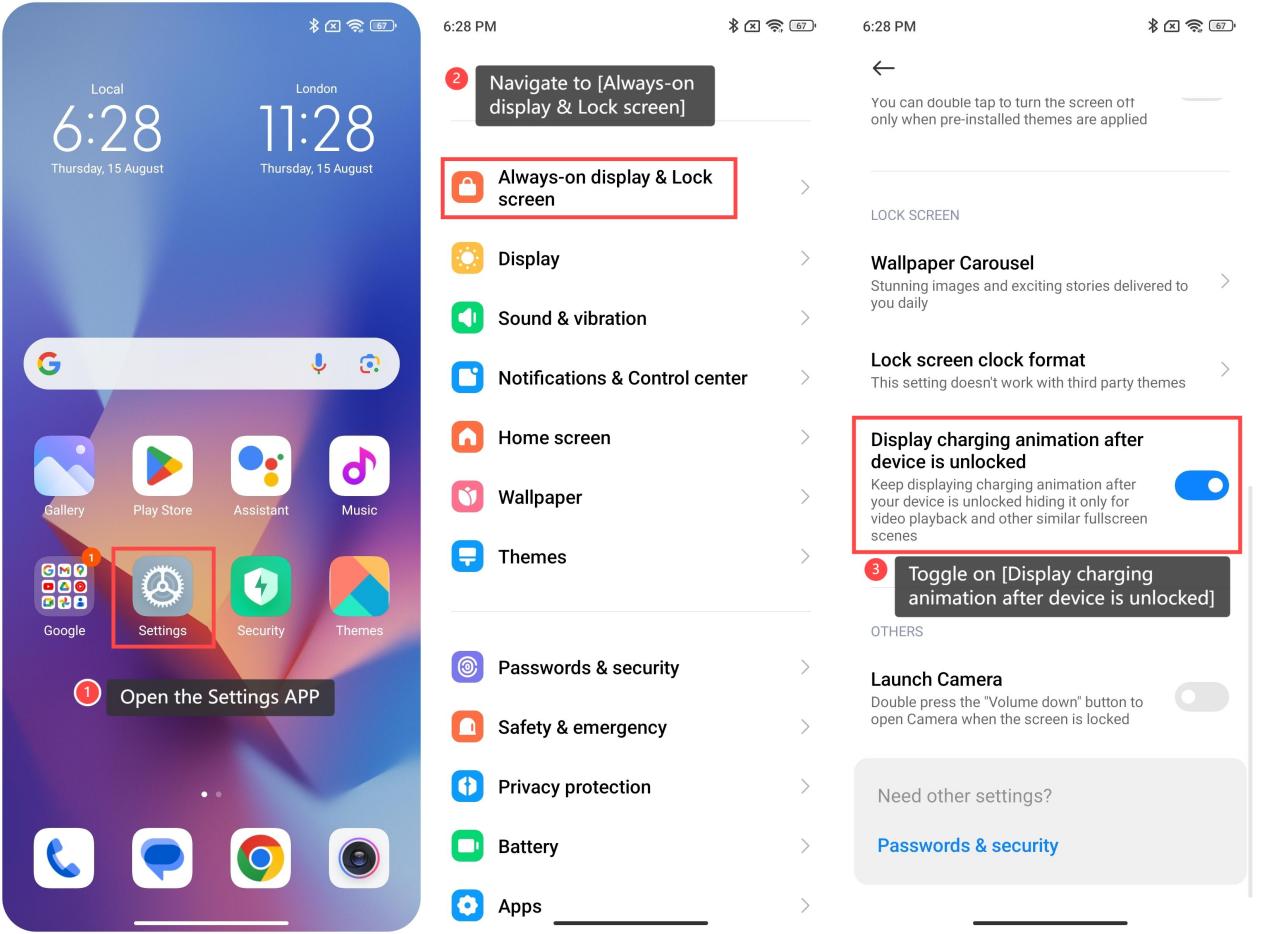
To enable the charging animation on your Redmi Note 13, please refer to the following steps:
1. Open the Settings APP on your device;
2. Navigate to the [Always-on display & Lock screen] option within the settings interface;
3. Scroll down and find the [Display charging animation after device is unlocked] option. Toggle this option on to activate the charging animation.
To enable the charging animation on your Redmi Note 13, please refer to the following steps:
1. Open the Settings APP on your device;
2. Navigate to the [Always-on display & Lock screen] option within the settings interface;
3. Scroll down and find the [Display charging animation after device is unlocked] option. Toggle this option on to activate the charging animation.
Does it help?
Yes
No