

Xiaomi Motion Sensor 2S FAQ
Overview
Q1: What are the selling points of the Xiaomi Motion Sensor 2S?
A: The selling points of the Xiaomi Motion Sensor 2S are listed below:
1. A new high sensing sensitivity is added, which can identify small movements such as leaning over and waving, and report the human body status in the space more accurately and quickly, thereby triggering precise instructions.
2. With a longer battery life of 3 years, long-lasting and stable monitoring will be provided.
3. Upgraded light sensor, which can quantitatively monitor the ambient light value (within the range of 0 to 1000 lux), matches a richer lighting environment scene, and you can formulate preferred instructions according to your needs.
Note:
The battery life is calculated by the Gewu Laboratory based on the evaluation of working conditions. At room temperature of 25℃, 1600 human movements are triggered, and 300 light-intensity messages are reported every day. The sensor provides a custom monitoring interval function. When the monitoring interval is reduced, the battery life will be greatly reduced as the number of human movements in front of the sensor increases.
Q2: What does the Xiaomi Motion Sensor 2S adapt to?
A: The Xiaomi Motion Sensor 2S needs to connect to the Bluetooth Mesh gateway to experience full software functions. You need to accomplish several smart scenes with other Xiaomi smart devices through wireless control.
Introduction and Usage
Q1: What is the Xiaomi Motion Sensor 2S?
A: The Xiaomi Motion Sensor 2S is a device that detects human movement and ambient light illumination. When someone moves into the detection area or the ambient light illumination changes significantly, the sensor will send a notification to the Xiaomi Home App through a nearby Bluetooth gateway.
Q2: What are the standard packaging contents of the Xiaomi Motion Sensor 2S?
A: There is a Xiaomi Motion Sensor 2S and a User manual.
Q3: What is the product overview of the Xiaomi Motion Sensor 2S?
A: The product overview of the Xiaomi Motion Sensor 2S is listed below:
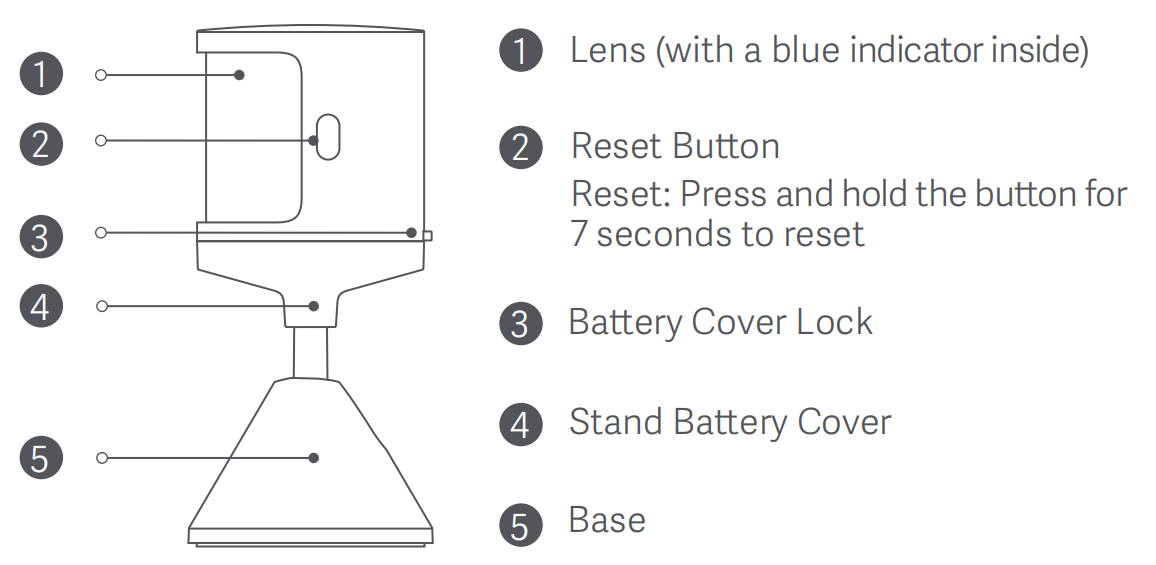
There is a Lens, Reset Button, Battery Cover Lock, Stand Battery Cover and Base.
Q4: How to check the SN of the Xiaomi Motion Sensor 2S?
A: To check the SN of the sensor, please refer to the following methods:
1. You can check the SN on the sticker at the bottom of the packing contents.
2. You can scan the QR code at the bottom of the sensor to check the SN.
Q5: How to reset the Xiaomi Motion Sensor 2S?
A: Press and hold the reset button for 7 seconds to reset the sensor.
Note:
If you change the Xiaomi Account, please reset the sensor and reconnect the sensor to the Xiaomi Account.
Q6: Can the Xiaomi Motion Sensor 2S be connected to the home circuits?
A: Not supported. The sensor is battery-powered and cannot be connected to home circuits.
Q7: How to install the Xiaomi Motion Sensor 2S and what are the precautions?
A: Please confirm that the sensor is connected to the Bluetooth gateway at the place where the sensor is used and install it.
1. Enter the homepage of the Xiaomi Motion Sensor 2S in the Xiaomi Home App. After “Connected” is displayed below the Xiaomi Motion Sensor 2S, start using it.
2. If it prompts that it is not connected, please confirm whether there is an available Bluetooth Mesh gateway nearby.
3. Verify the communication distance. At the pre-selected installation location, press the reset button of the sensor. The Xiaomi Home App will indicate that the sensor and the Bluetooth gateway communicate in normal conditions.
4. Adjust the position and angle of the sensor so that it faces the detected area to achieve the best detection effect.
5. When using adhesive stickers for installation, please tear off the adhesive sticker protective film first. To ensure the bonding effect, please choose a surface with strong adhesiveness and avoid installing it on a slippery, rough, or high-temperature surface.
6. Do not point the sensor toward heating objects such as air conditioners and heating air outlets, stoves, etc. Keep away from direct sunlight to avoid infrared interference and cause the sensor to be triggered incorrectly.
7. When the sensor's sensing signal encounters glass, it cannot penetrate the glass. However, it will be reflected and easily captured at high sensing sensitivity.
The above factors need to be considered during installation.
The installation methods are listed below:
1. Install the bracket battery cover. The bracket battery cover of the sensor supports 360° horizontal rotation and 90° vertical rotation to flexibly adjust the detection range. The bottom of the bracket has adhesive backing, which is suitable for vertical or inverted mounting.
2. Install the bottom battery cover. The base battery cover of the sensor is equipped with a non-slip rubber pad, which can be placed horizontally on the table or inverted with the included adhesive sticker.
Q8: How to determine if the Xiaomi Motion Sensor 2S can be used in normal conditions?
A: When the sensor is connected to the network, the sensor reports motion in the Xiaomi Home App when you move in front of the sensor (with an interval of 30 seconds).
When the sensor is connected to the network, the change in brightness is over 20%. For instance, the sensor reports the brightness change (with an interval of 10 seconds) when you turn on or turn off the light in a dark environment.
Q9: What are the battery requirements of the Xiaomi Motion Sensor 2S and how to replace the battery?
A: The battery model is a CR2450 button battery.
To replace the battery, please refer to the following details:
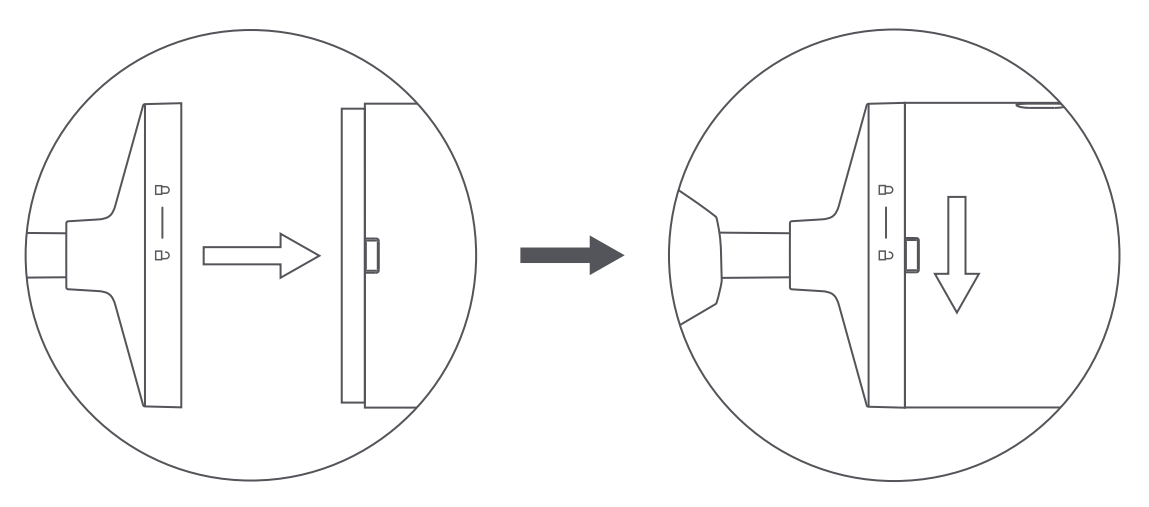
1. Hold the motion sensor and press the battery cover lock. Rotate the motion sensor or the battery cover in the direction illustrated to open the battery compartment. Then, replace the CR2450 battery with a new one. Make sure that the positive side of the battery faces outwards.
2. Align the unlock icon on the battery cover with the battery cover lock. Then rotate the motion sensor or the battery cover until the lock icon is aligned with the lock to secure the battery cover to the motion sensor.
Q10: How long can the Xiaomi Motion Sensor 2S be used?
A: The Xiaomi Sensor 2S can be used for 3 years under the condition that at room temperature of 25°C, 1600 human movements are triggered and 300 light intensity messages are reported every day.
Q11: Does the Xiaomi Motion Sensor 2S have a battery reminder?
A: You can check the battery level in the Xiaomi Home App.
When the battery level of the sensor is higher than 3% and lower than 5%, the Xiaomi Home App will indicate that the battery level is low. When the battery level of the sensor is lower than 3%, the Xiaomi Home App will indicate that the battery level is depleted.
Q12: What does the indicator of the Xiaomi Motion Sensor 2S represent?
A: 1. When the network is not connected, you can press the reset button for over 7 seconds; the blue indicator will blink 6 times, with 0.1 seconds of lighting-on and 0.4 seconds of lighting-off, and there will be a voice prompt.
2. You can press the reset button during the voice prompt, and the blue indicator will blink once.
3. When the sensor is powered on again, the blue indicator will blink twice.
4. When the OTA firmware of the sensor is updated, the blue indicator will blink twice.
5. When the sensor is bound to the Xiaomi Home App, the blue indicator will blink twice.
6. You can press the reset button after the sensor is connected, and the blue indicator will blink once with an interval of 5 seconds, which will last 1 minute.
7. You can press and hold the reset button for over 7 seconds, and the blue indicator will blink 6 times, with 0.1 seconds of lighting-on and 0.4 seconds of lighting-off, and there will be a voice prompt.
8. When turning on or turning off the indicator is configured on the sensor, the blue indicator will blink once when the sensor detects motion.
Q13: What is the recommended distance between the Xiaomi Motion Sensor 2S and the Bluetooth gateway?
A: The straight-line distance between the sensor and the Bluetooth gateway in an unobstructed environment is ≥ 30 meters. If there is a wall between the sensor and the gateway and the home network environment is complex, the communication distance will be shortened. It is recommended that the distance should not exceed 5 meters.
About App
Q1: How to bind the Xiaomi Motion Sensor 2S to the Xiaomi Home App?
A: 1. Open the Xiaomi Home App, turn on Bluetooth, and ensure the location permission of the Xiaomi Home App is allowed.
2. Press and hold the reset button for over 7 seconds; the blue indicator will blink 6 times, and there will be a voice prompt. You need to connect the sensor to the app within 3 minutes after the voice prompt.
3. Tap [+] on the top right of the screen in the Xiaomi Home App to search for the device automatically. If the sensor is not found, you can manually add the sensor in the Xiaomi Home App.
4. If the sensor is still not found, please reset the sensor again and check whether the location permission of the Xiaomi Home App is allowed and whether Bluetooth is turned on.
5. When the sensor is searched, you can follow the instructions to press the reset button and enter the matching process.
6. After the sensor is added, you can allocate the sensor to the desired room, rename the sensor, and use the sensor.
Q2: What can the Xiaomi Motion Sensor 2S do through the Xiaomi Home App?
A: The Xiaomi Motion Sensor 2S supports 12 trigger conditions, such as Someone moved, No motion detected for 2 minutes, and No motion detected for 5 minutes. The corresponding added action will be implemented if the trigger conditions are achieved.
Q3: How long can the logs of the Xiaomi Motion Sensor 2S be kept?
A: The logs of the Xiaomi Motion Sensor 2S will be kept forever without being deleted and with no limitation on the number of pieces.
Q4: Can the logs of the Xiaomi Motion Sensor 2S be saved locally?
A: Not supported.
Q5: Can the logs of the Xiaomi Motion Sensor 2S be saved locally and uploaded to the Xiaomi Home App after the sensor is connected to the App or the Bluetooth gateway?
A: Not supported.
Q6: What types of Bluetooth gateway does the Xiaomi Motion Sensor 2S support connecting to?
A: The Xiaomi Motion Sensor 2S supports connecting to the Bluetooth Mesh gateway and does not support connecting to the ZigBee Hub.
Q7: How does the Xiaomi Motion Sensor 2S connect to the Bluetooth gateway?
A: 1. The Xiaomi Motion Sensor 2S and the Bluetooth Mesh gateway need to be bound in the same Xiaomi Account.
2. Put the sensor close to the Bluetooth Mesh gateway. You can check the previous Bluetooth gateway in the Xiaomi Home App.
3. For the first-time binding, please wait for 1 to 5 minutes. The sensor will be connected to the gateway automatically. If the Bluetooth Mesh gateway is not found after 5 minutes, please try to power off and restart the Bluetooth Mesh gateway.
Q8: How to check the motion recording of the Xiaomi Motion Sensor 2S?
A: You can tap [Motion] on the homepage of the Xiaomi Motion Sensor 2S in the Xiaomi Home App to check the motion recording.
Q9: How long and how many can the motion recording of the Xiaomi Motion Sensor 2S be kept?
A: The motion recording of the Xiaomi Motion Sensor 2S can keep the motion recording for the utmost 3 months, with no limitation on the number of pieces.
Q10: How to update the firmware of the Xiaomi Motion Sensor 2S?
A: To update the firmware of the sensor, please refer to the following steps:
1. Open the Xiaomi Home App.
2. Tap [Xiaomi Motion Sensor 2S].
3. Tap the three-dot icon on the top right of the screen.
4. Tap [Firmware update], and the sensor will be updated to the latest version.
Note:
To update the sensor to the latest version, the phone needs to stay close to the sensor, and the phone needs to connect to the sensor.
Q11: How to configure the sensing sensitivity on the Xiaomi Motion Sensor 2S and what is its function?
A: The Xiaomi Motion Sensor 2S has two grades of sensing sensitivity, which is configured as standard by default for the first-time binding.
When the sensing sensitivity is standard, if motion is detected in the detection area, “Someone moved” will be prompted immediately.
When the sensing sensitivity is high, the sensor will detect slight motions than human motion, such as bending, waving hands, turning around, and accidentally turning off the lights in the bathroom and kitchen. Waving hands will trigger detection.
To adjust the sensing sensitivity, please refer to the following steps:
1. Open the Xiaomi Home App.
2. Tap [Xiaomi Motion Sensor 2S].
3. Tap [Sensor settings].
4. Tap [Sensing sensitivity].
5. Select [Standard] or [High] according to your needs.
Note:
If you select higher sensitivity, motion will be detected more accurately. Keep in mind that higher sensitivity increases power consumption.
Q12: How to check the plugin version of the Xiaomi Motion Sensor 2S?
A: To check the plugin version of the Xiaomi Motion Sensor 2S, please refer to the following steps:
1. Open the Xiaomi Home App.
2. Tap [Xiaomi Motion Sensor 2S].
3. Tap the three-dot icon on the top right of the screen.
4. Tap [Additional settings].
5. Check [Plugin version].
Q13: What smart scenes does the Xiaomi Motion Sensor 2S support creating?
A: The triggering conditions of the Xiaomi Motion Sensor 2S are listed below:
1. Someone moved.
2. No motion detected for 2 minutes.
3. No motion detected for 5 minutes.
4. Someone moved with illuminance lower than.
5. Someone moved with illuminance higher than.
6. Someone moved in dark ambient light (10lux).
7. Someone moved in bright ambient light (100lux).
8. Illuminance lower than.
9. Illuminance higher than.
10. Dark ambient light (10lux).
11. Bright ambient light (100lux).
Note:
The sensor is a triggering device, with no implementation actions.
Q14: Can the high sensing sensitivity of the Xiaomi Motion Sensor 2S avoid accidentally turning off the light?
A: There is an optimization effect. When the sensor is set to high sensing sensitivity, it can detect even slight movements. In some scenarios, it can optimize the effect of automatic determination of no one in certain minutes, which requires appropriate unmanned movement time. For example, the conference room space can be used with 5 minutes of unmanned movement. During the 5 minutes, although the human body does not stand and walk, posture adjustments, such as leaning over, turning sideways, or arm gestures when speaking, can be detected with high sensing sensitivity, thereby reducing the issue of accidentally turning off the light.
Troubleshooting
Q1: Why do some of the dates in the motion recording of the Xiaomi Motion Sensor 2S display in gray and cannot be pressed?
A: The dates displayed in gray represent that there is no motion recording generated on the corresponding dates. You can press the dates displayed in black to check the motion recording of that day.
Q2: Why cannot the Xiaomi Motion Sensor 2S be connected?
A: 1. Check whether the insulating strip of the device is pulled down.
2. Check whether the battery is charged. You can replace a new CR2450 button battery.
Q3: Why cannot the Xiaomi Motion Sensor 2S be connected to the Bluetooth gateway?
A: 1. The device that you are us is not equipped with a Bluetooth Mesh gateway, or the Bluetooth Mesh gateway on the device is not turned on.
2. The distance between the sensor and the Bluetooth Mesh gateway is too far (the normal operating distance ranges from 10 to 15 m).
3. There are too many obstructions from the wall between the sensor and the Bluetooth Mesh gateway (the Bluetooth signal can penetrate 1 to 2 pieces of wall).
4. The battery level is low after long-term use.
Does it help?
Yes
No