

How to install the Xiaomi Automatic Soap Dispenser (Color Edition)?
To install the Xiaomi Automatic Soap Dispenser (Color Edition), please refer to the following steps:
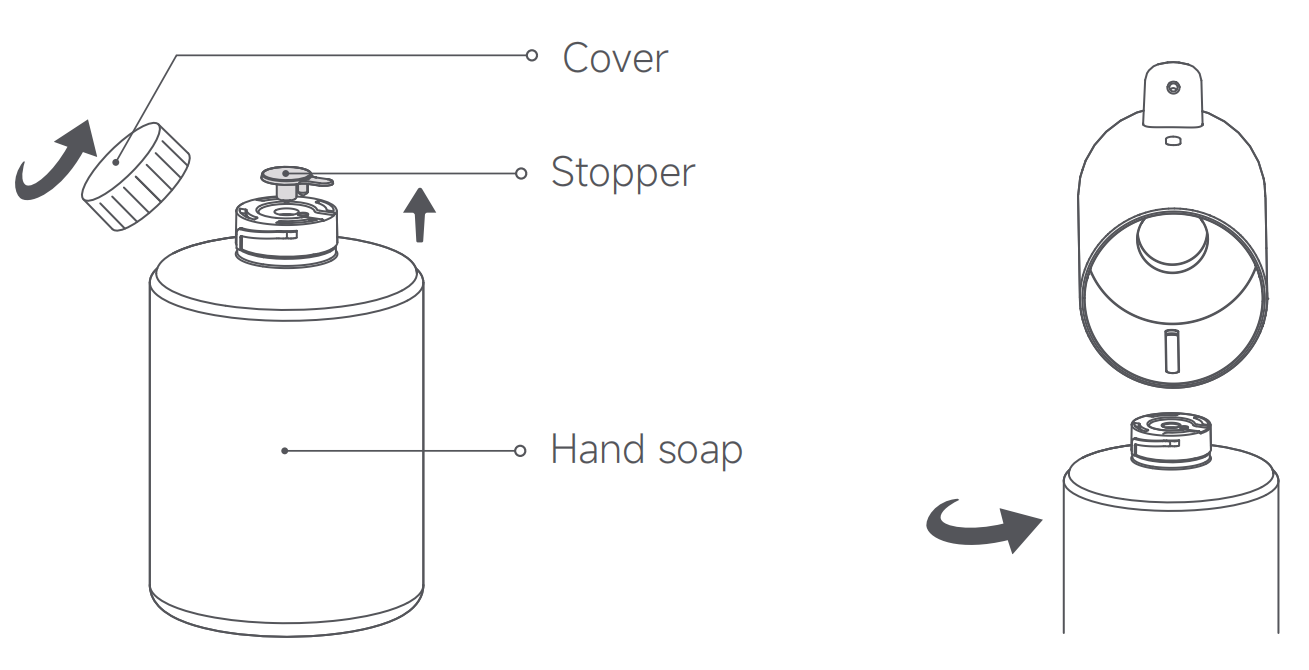
1. Take out the hand soap bottle, unscrew the cover counterclockwise, and remove the stopper;
2. Twist the hand soap bottle counterclockwise to fix it into the soap dispenser;
3. Press and hold the power button for 1 second to turn on the device. Place your hand near the sensor area to dispense foam.
Note:
It is recommended to fully charge the soap dispenser before using it for the first time. Remove the silicone plug from the Type-C charging port, plug the provided Type-C charging cable into the charging port and connect it to a power outlet to start charging. Place back the silicone plug once fully charged.
1. Take out the hand soap bottle, unscrew the cover counterclockwise, and remove the stopper;
2. Twist the hand soap bottle counterclockwise to fix it into the soap dispenser;
3. Press and hold the power button for 1 second to turn on the device. Place your hand near the sensor area to dispense foam.
Note:
It is recommended to fully charge the soap dispenser before using it for the first time. Remove the silicone plug from the Type-C charging port, plug the provided Type-C charging cable into the charging port and connect it to a power outlet to start charging. Place back the silicone plug once fully charged.
Does it help?
Yes
No