

How to perform factory reset on the Xiaomi TV A Pro 43 2025?
A factory reset on a TV resolves software issues, removes unwanted settings, clears personal data, and improves performance.
For your reference, here are two methods to perform factory reset on the TV:
Method 1:
If the Home screen can show up, please refer to the following steps:
1. From the TV home screen, navigate to the settings icon;
2. In the settings menu, tap [All settings];
3. Scroll down and select [System];

For your reference, here are two methods to perform factory reset on the TV:
Method 1:
If the Home screen can show up, please refer to the following steps:
1. From the TV home screen, navigate to the settings icon;
2. In the settings menu, tap [All settings];
3. Scroll down and select [System];
4. Tap [About];
5. Select [Reset];
6. Tap [Factory reset].

5. Select [Reset];
6. Tap [Factory reset].
Method 2:
If the Home screen can’t show up, please enter the Recovery Mode to perform factory reset:
1. Make sure the TV is completely turned off, which includes turning off your TV and removing the cable from the electricity. Then please wait for about 10 seconds;
2. Simultaneously press and hold on the [OK] and [Back] buttons on the remote control;
3. While holding these buttons, put the TV cable back into the electricity. Continue to hold the buttons until the Recovery Mode interface appears;
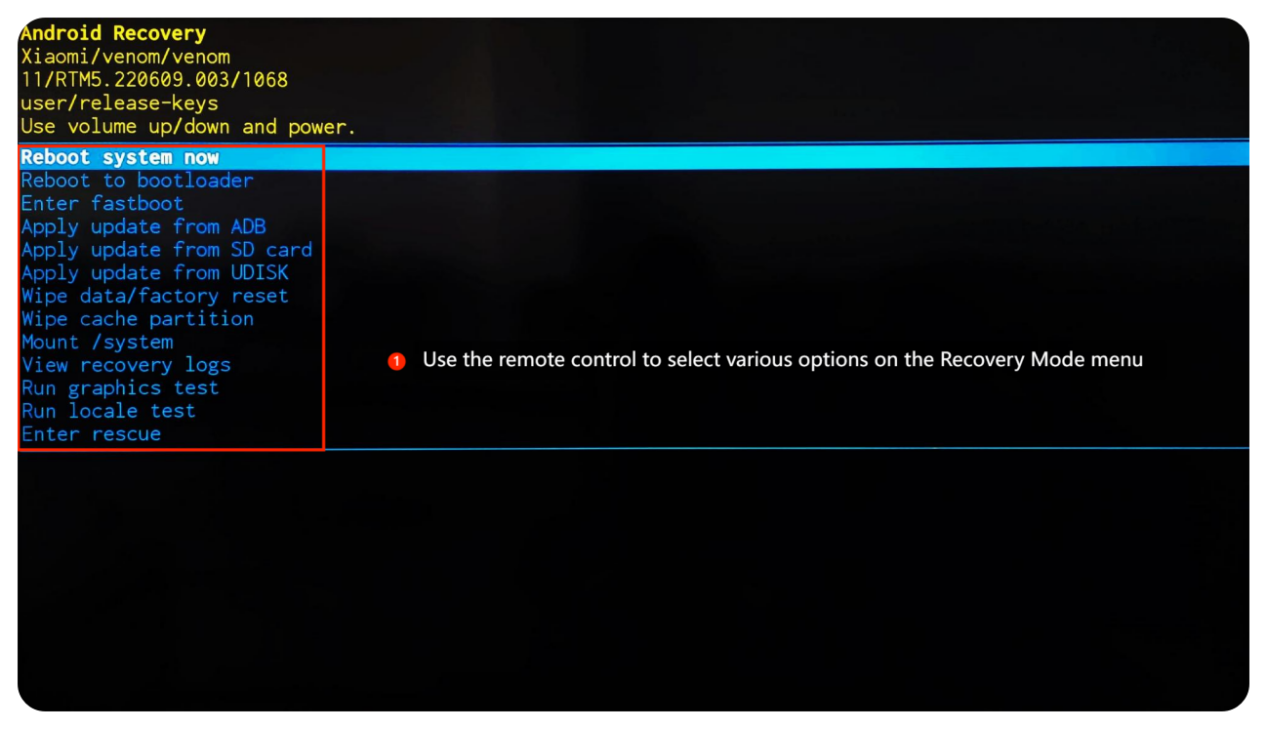
4. You can use the directional buttons on the remote control to select various options on the Recovery Mode menu;
5. Wait for seconds until the home screen is displayed, which means the process is completed.
If the Home screen can’t show up, please enter the Recovery Mode to perform factory reset:
1. Make sure the TV is completely turned off, which includes turning off your TV and removing the cable from the electricity. Then please wait for about 10 seconds;
2. Simultaneously press and hold on the [OK] and [Back] buttons on the remote control;
3. While holding these buttons, put the TV cable back into the electricity. Continue to hold the buttons until the Recovery Mode interface appears;
4. You can use the directional buttons on the remote control to select various options on the Recovery Mode menu;
5. Wait for seconds until the home screen is displayed, which means the process is completed.
Does it help?
Yes
No