

Does the Xiaomi Smart Tower Fan 2 support an indicator switch?
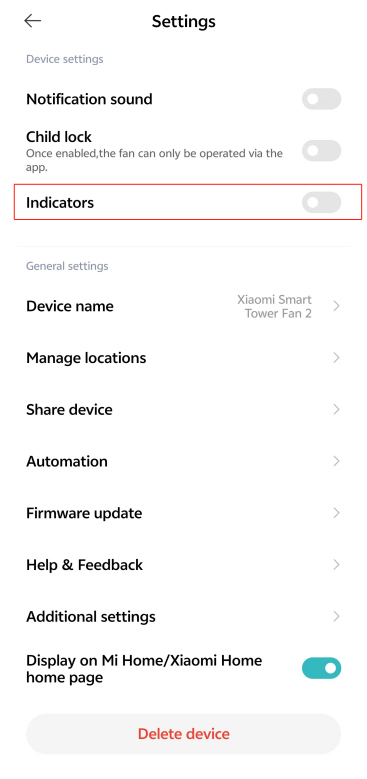
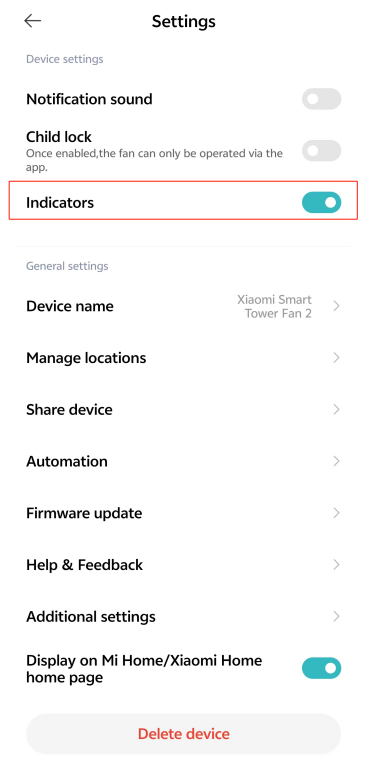
The Xiaomi Smart Tower Fan 2 comes with a convenient feature that allows you to control the indicators through the Mi Home/Xiaomi Home APP.
To turn on/off the indicators, please refer to the following steps:
1. Open the Mi Home/Xiaomi Home APP on your smartphone;
2. Locate and tap on the device card for the Xiaomi Smart Tower Fan 2;
3. Tap the three-dot icon at the upper right corner;
4. In the settings menu, you can simply turn on/off the [Indicators] toggle to control it.
Note:
Please note that while you can control whether the indicators are displayed, their brightness level cannot be adjusted.
To turn on/off the indicators, please refer to the following steps:
1. Open the Mi Home/Xiaomi Home APP on your smartphone;
2. Locate and tap on the device card for the Xiaomi Smart Tower Fan 2;
3. Tap the three-dot icon at the upper right corner;
4. In the settings menu, you can simply turn on/off the [Indicators] toggle to control it.
Note:
Please note that while you can control whether the indicators are displayed, their brightness level cannot be adjusted.
Does it help?
Yes
No