

How to turn off the child lock on the Xiaomi Smart Tower Fan 2?
To disable the Child lock function, please refer to the following methods:
Method 1:
Simultaneously press and hold the Oscillation Button and Scheduled Standby Button for 7 seconds until you hear a long beep.
Method 2:
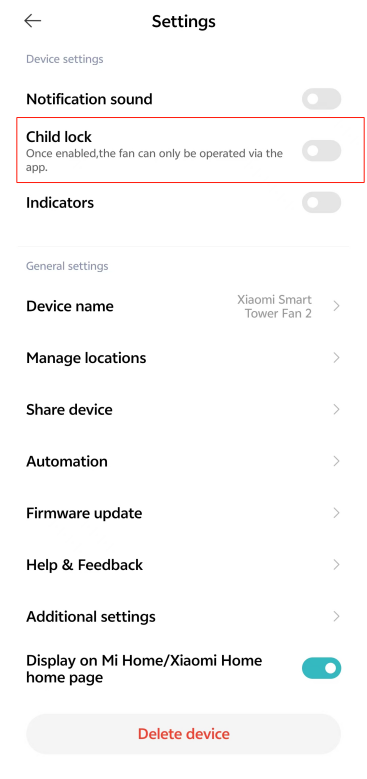
You can also disable this function by going to the [Mi Home/Xiaomi Home] APP >> tap the device card >> tap the three-dot icon at the upper right corner >> turn off [Child lock].
Note:
Resetting the Wi-Fi or unplugging the power adapter and then turning on the fan can also disable this function.
Method 1:
Simultaneously press and hold the Oscillation Button and Scheduled Standby Button for 7 seconds until you hear a long beep.
Method 2:
You can also disable this function by going to the [Mi Home/Xiaomi Home] APP >> tap the device card >> tap the three-dot icon at the upper right corner >> turn off [Child lock].
Note:
Resetting the Wi-Fi or unplugging the power adapter and then turning on the fan can also disable this function.
Does it help?
Yes
No