

How to turn on the child lock on the Xiaomi Smart Tower Fan 2?
To enable the Child lock function, please refer to the following methods:
Method 1:
Simultaneously press and hold the Oscillation Button and Scheduled Standby Button for 7 seconds until you hear a long beep.
Method 2:
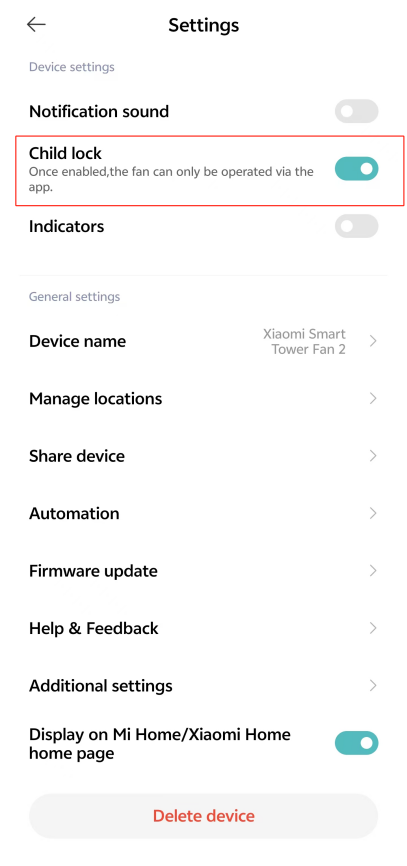
You can also enable this function by going to the [Mi Home/Xiaomi Home] APP >> tap the device card >> tap the three-dot icon at the upper right corner >> turn on [Child lock].
Note:
Once the function is enabled, the fan will not respond if pressing any button but all indicators will blink twice and the fan will beep twice instead.
Method 1:
Simultaneously press and hold the Oscillation Button and Scheduled Standby Button for 7 seconds until you hear a long beep.
Method 2:
You can also enable this function by going to the [Mi Home/Xiaomi Home] APP >> tap the device card >> tap the three-dot icon at the upper right corner >> turn on [Child lock].
Note:
Once the function is enabled, the fan will not respond if pressing any button but all indicators will blink twice and the fan will beep twice instead.
Does it help?
Yes
No