

Xiaomi Wireless Keyboard and Mouse Combo FAQ
Overview
1.Q: What is Xiaomi Wireless Keyboard and Mouse Combo?
A: Xiaomi Wireless Keyboard and Mouse Combo is based on 2.4GHz wireless connection, inherited Xiaomi's simple design style, standard 104-key layout with independent numeric keypad, membrane keyboard structure, thin and light chocolate independent keycaps, the surface of the surface of the micro-arc curved shape, more close to the fingers finger curvature, striking the sound of the smaller, more comfortable hand feeling. It is easy to use.
2.Q: What comes standard with the Xiaomi Wireless Keyboard and Mouse Combo?
A: Xiaomi Wireless Keyboard and Mouse Combo comes standard with: Xiaomi Wireless Keyboard×1, Mouse (built-in receiver)×1, Manual×1, AAA×2 size 7 batteries.
3. Q: How to use Xiaomi Wireless Keyboard and Mouse Combo?
A: Remove the receiver from the receiver compartment of the mouse (the mouse and keyboard share a common receiver) and connect it to the computer. Install the 7-cell batteries from the package into the keyboard and mouse battery compartments, one in each compartment, and turn on the mouse's power switch.

4.Q: What type of keyboard is the Xiaomi Wireless Keyboard and Mouse Combo?
A: Xiaomi Wireless Keyboard and Mouse Combo is a membrane keyboard, not a mechanical keyboard.
5.Q: How is the Xiaomi Wireless Keyboard and Mouse Combo powered and how long does it last?
A: Xiaomi Wireless Keyboard and Mouse Combo can be powered by one 7-cell battery in the battery compartment on the back of the device, which can last up to 4 months based on 8 hours of usage per day (the battery life may vary depending on the actual usage frequency and situation).
6.Q: What is the number of keys on the Xiaomi Wireless Keyboard and Mouse Combo and does it support numeric keypad?
A: Xiaomi Wireless Keyboard and Mouse Combo is a 104-key full-size keyboard with numeric keypad and all shortcut keys.
7.Q: In what ways does the Xiaomi Wireless Keyboard and Mouse Combo support connecting to computers, mobile phones and other devices?
A: The Xiaomi Wireless Keyboard and Mouse Combo USB receiver connects to computers and other devices.
8.Q: Does the Xiaomi Wireless Keyboard and Mouse Combo have a key backlight?
A: Xiaomi Wireless Keyboard and Mouse Combo does not have key backlight.
9.Q: Can Xiaomi Wireless Keyboard and Mouse Combo adjust the height of the keyboard?
A: Xiaomi Wireless Keyboard and Mouse Combo does not support height adjustment.
10.Q: What are the requirements of connected devices for Xiaomi Wireless Keyboard and Mouse Combo?
A: Xiaomi Wireless Keyboard and Mouse Combo supports Windows, if you use it on macOS, some function keys may be affected.
11.Q: What is the life expectancy of Xiaomi Wireless Keyboard and Mouse Combo?
A: Xiaomi Wireless Keyboard and Mouse Combo has a lifespan of 3 million clicks for the left, centre and right mouse buttons, and 300,000 clicks for the scroll wheel.
12.Q: Are the keycaps of the Xiaomi Wireless Keyboard and Mouse Combo laser engraved?
A: The keycaps are laser engraved with clear and durable fonts.
FAQs
1. Q: Where is the USB receiver placed on the Xiaomi Wireless Keyboard and Mouse Combo?
A: The USB receiver of Xiaomi Wireless Keyboard and Mouse Combo is located in the battery compartment on the back of the mouse, and can be removed by opening the battery compartment cover.
2.Q: How do I re-code the Xiaomi Wireless Keyboard and Mouse Combo with the USB receiver?
A: Xiaomi Wireless Keyboard and Mouse Combo has been successfully paired with the USB connector from the factory, so there is no need to manually pair the keys (self-setting is not supported).
3.Q: What are the indicators of Xiaomi Wireless Keyboard and Mouse Combo?
A: Xiaomi Wireless Keyboard and Mouse Combo has the following indicators:
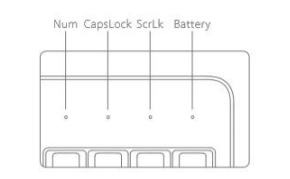
1)When the keypad is switched on, the three white LEDs will light up simultaneously for 3 seconds to indicate that the keypad is in working condition. When the keyboard is low on power, the orange light will flash for 3 seconds after the keyboard is switched on or woken up from hibernation to indicate battery replacement.
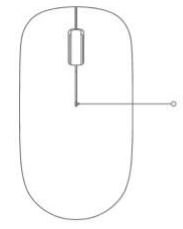
2) When the mouse is low on power, the centre seam indicator light will flash orange for 10 seconds after the mouse is switched on or woken up from hibernation to prompt battery replacement.
Note: The mouse is designed to save power and the indicator light will automatically go into hibernation off state during use, so please use it with peace of mind. The battery life of Xiaomi Wireless Keyboard and Mouse Combo varies depending on the usage environment and workload, about 4 months or more under normal circumstances.
4.Q: How to clean the Xiaomi Wireless Keyboard and Mouse Combo?
A: It is recommended to use a damp towel or wet towel to wipe the Xiaomi Wireless Keyboard and Mouse Combo, and do not wash the keyboard as it is not waterproof.
5.Q: Are the feet of the Xiaomi Wireless Keyboard and Mouse Combo adjustable in height?
A: The height of the feet of the Xiaomi Wireless Keyboard and Mouse Combo is not adjustable.
6.Q: Can the keycaps of Xiaomi Wireless Keyboard and Mouse Combo be pulled off and replaced?
A: Please do not pull up the keycaps of Xiaomi Wireless Keyboard and Mouse Combo, if you force to pull up, it may cause damage to the keys and keycaps, and does not support to replace the keycaps by yourself.
7.Q: Is it possible to plug the Xiaomi Wireless Keyboard and Mouse Combo USB receiver into a USB HUB?
A: It is not recommended to plug the Xiaomi Wireless Keyboard and Mouse Combo USB receiver into a USB HUB for adapter use, otherwise some of the functions of the keys may be abnormal.
8.Q: Can the Xiaomi Wireless Keyboard and Mouse Combo connect to my mobile phone to play mobile games?
A: This question needs to consult the game developer whether to support the operation of external devices, the keyboard for mobile phones as an external device with the help of an adapter to use some of the functions may be abnormal, can support typing, but for the game whether to support the keyboard itself does not have the relevant settings, the main point is to see whether the game supports the external keyboard.
9.Q: How to determine if the power level of Xiaomi Wireless Keyboard and Mouse Combo is too low?
A: When the keyboard is low on battery, the orange light will flash for 3 seconds after the keyboard is switched on or woken up from hibernation to indicate battery replacement. When the mouse is low on power, the centre seam light will flash orange for 10 seconds after the mouse is switched on or wakes up from hibernation to prompt for battery replacement.
10.Q: Is it possible to adjust the DPI of Xiaomi Wireless Keyboard and Mouse Combo?
A: Xiaomi Wireless Keyboard and Mouse Combo is located in the mobile office, 1000DPI can already meet the needs of most people's mobile office, so there is no DPI adjustment button on the mouse, if you need to adjust it, it is recommended that you use Windows Mouse Properties to adjust the speed of pointer movement.
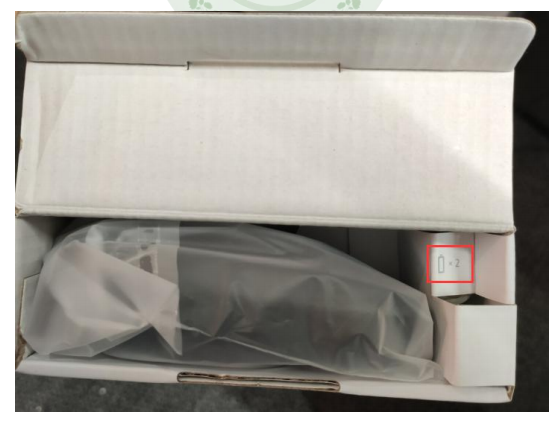
11.Q: How to deal with Xiaomi Wireless Keyboard and Mouse Combo if I open the package and can't find the mouse and battery?
A: Xiaomi Wireless Keyboard and Mouse Combo package adopts double-opening design, you can take out the mouse and keyboard from the left and right sides respectively, and the battery is located on the side of the mouse as shown in the picture below:
12.Q: Does Xiaomi Wireless Keyboard have key punchless?
A: Xiaomi Wireless Keyboard doesn't have full key punchless (it can support 6-key punchless). Key punchless refers to the phenomenon that when you press one or several keys on the keyboard, the other keys will not malfunction. The characteristic of conflict-free keyboards is that you can press several keys at the same time without causing the system to be messed up, and punchless keyboards are mainly related to the internal control logic of the keyboard, mechanical keyboards and membrane keyboards have punchless design.
13.Q:How to deal with the connection failure in Xiaomi Wireless Keyboard and Mouse Combo USB receiver mode or no response to input after connection?
A:1、Check whether the keyboard power is sufficient, whether the indicator light is normal after switching on, and avoid the distance between the keyboard and the device is too far;
2、Replace the use environment, replace the connected device and then observe whether it can be used normally;
3、If the above troubleshooting steps are completed or the connection fails or there is no response to input after connection, please guide the after-sales testing.
14.Q: How to deal with Xiaomi Wireless Keyboard and Mouse Combo button warping, dropping, and not being able to spring back?
A: If it is not caused by yourself, please contact after-sale for inspection, and the after-sale inspection results will prevail.
15.Q: What should I do if there is a delay in input or connection interruption when using Xiaomi Wireless Keyboard and Mouse Combo?
A: 1. Avoid the distance between the keyboard and mouse and the device is too far;
2, change the use of the environment, replace the connection device and then observe whether there is this phenomenon;
3.If there are still delays and connection interruptions, please guide the after-sales service for testing.
16.Q: Can the mouse in Xiaomi Wireless Keyboard and Mouse Combo be customised with key functions?
A: The mouse does not support customised buttons.
17.Q: The mouse in Xiaomi Wireless Keyboard and Mouse Combo is too fast to adapt to the use of the pointer, how to adjust the pointer speed?
A: You can adjust the pointer speed through the mouse settings in the operating system as follows:
Windows10 Open Control Panel -> Mouse -> Pointer Options.
18.Q: The mouse slides with astringent feeling not smooth how to do?
A: Mouse with Teflon foot stickers, surface layer of the scratch-resistant transparent protective film, tear and then use, slide more smoothly.
19.Q: Why is there no light at the bottom of the mouse lens hole?
A: The mouse adopts infrared light as the tracing engine, which improves the positioning accuracy and adapt to more desktop. Infrared light is almost invisible to the naked eye. Almost invisible, the bottom lens hole can only see a weak red light.
20. Q: What should I do if the keyboard & mouse lags when I use it?
A:
(1) Laptop computer try to plug the receiver into the left USB port, to avoid touching the receiver when the mouse moves to affect the stability;
2)Desktop computer try to plug the receiver into the front USB port of the host computer, there is no obstruction to improve the reception performance;
(3) If the receiver is plugged into the USB HUB port of USB3.0, there is a certain chance of high frequency interference, so try to plug it directly into the USB port of the computer.
(4) Routers, chargers, fans, motors and other equipment away from the receiver to provide a clean and smooth environment for wireless transmission;
5) Keep the desktop or mouse pad clean, and keep the lens hole at the bottom of the mouse free of dust, so that the mouse can move and position more smoothly.
21. Q: Why doesn't the keyboard indicator light stay on for a long time?
A:
1) To save power, the three function indicator lights will automatically turn off after 3 seconds of long illumination;
2) Keyboard for the number lock (Num), caps lock (Caps), scroll lock (ScrLk) keys provide an independent indicator, click a key, the three indicator lights at the same time to show the current state, light prompts 3 seconds after the automatic extinction, intuitive and energy-saving;
3) When the battery is low, the low battery indicator will flash to remind you to replace the battery in advance.
22.Q: Is the mouse silent button?
A: The mouse is not silent buttons, click on the keys have a light crisp key sound, compared to the silent keys rebound more quickly, the keys feel more real feedback.
23.Q: Keyboard key stroke is how much?
A: Keyboard key trigger stroke is 1.75mm, the total stroke of 2.95mm, trigger sensitive, rebound quickly.
24.Q: What systems does the Xiaomi Wireless Keyboard and Mouse Combo support?
A: The product is developed based on the Windows system, and has been officially certified by Microsoft for Win10 system, which is compatible with Win10.
Note: Mac OS with USB interface support can theoretically be used, but the keys are not fully compatible, consumers can set up their own solution, no additional support.
1.Q: What is Xiaomi Wireless Keyboard and Mouse Combo?
A: Xiaomi Wireless Keyboard and Mouse Combo is based on 2.4GHz wireless connection, inherited Xiaomi's simple design style, standard 104-key layout with independent numeric keypad, membrane keyboard structure, thin and light chocolate independent keycaps, the surface of the surface of the micro-arc curved shape, more close to the fingers finger curvature, striking the sound of the smaller, more comfortable hand feeling. It is easy to use.
2.Q: What comes standard with the Xiaomi Wireless Keyboard and Mouse Combo?
A: Xiaomi Wireless Keyboard and Mouse Combo comes standard with: Xiaomi Wireless Keyboard×1, Mouse (built-in receiver)×1, Manual×1, AAA×2 size 7 batteries.
3. Q: How to use Xiaomi Wireless Keyboard and Mouse Combo?
A: Remove the receiver from the receiver compartment of the mouse (the mouse and keyboard share a common receiver) and connect it to the computer. Install the 7-cell batteries from the package into the keyboard and mouse battery compartments, one in each compartment, and turn on the mouse's power switch.
4.Q: What type of keyboard is the Xiaomi Wireless Keyboard and Mouse Combo?
A: Xiaomi Wireless Keyboard and Mouse Combo is a membrane keyboard, not a mechanical keyboard.
5.Q: How is the Xiaomi Wireless Keyboard and Mouse Combo powered and how long does it last?
A: Xiaomi Wireless Keyboard and Mouse Combo can be powered by one 7-cell battery in the battery compartment on the back of the device, which can last up to 4 months based on 8 hours of usage per day (the battery life may vary depending on the actual usage frequency and situation).
6.Q: What is the number of keys on the Xiaomi Wireless Keyboard and Mouse Combo and does it support numeric keypad?
A: Xiaomi Wireless Keyboard and Mouse Combo is a 104-key full-size keyboard with numeric keypad and all shortcut keys.
7.Q: In what ways does the Xiaomi Wireless Keyboard and Mouse Combo support connecting to computers, mobile phones and other devices?
A: The Xiaomi Wireless Keyboard and Mouse Combo USB receiver connects to computers and other devices.
8.Q: Does the Xiaomi Wireless Keyboard and Mouse Combo have a key backlight?
A: Xiaomi Wireless Keyboard and Mouse Combo does not have key backlight.
9.Q: Can Xiaomi Wireless Keyboard and Mouse Combo adjust the height of the keyboard?
A: Xiaomi Wireless Keyboard and Mouse Combo does not support height adjustment.
10.Q: What are the requirements of connected devices for Xiaomi Wireless Keyboard and Mouse Combo?
A: Xiaomi Wireless Keyboard and Mouse Combo supports Windows, if you use it on macOS, some function keys may be affected.
11.Q: What is the life expectancy of Xiaomi Wireless Keyboard and Mouse Combo?
A: Xiaomi Wireless Keyboard and Mouse Combo has a lifespan of 3 million clicks for the left, centre and right mouse buttons, and 300,000 clicks for the scroll wheel.
12.Q: Are the keycaps of the Xiaomi Wireless Keyboard and Mouse Combo laser engraved?
A: The keycaps are laser engraved with clear and durable fonts.
FAQs
1. Q: Where is the USB receiver placed on the Xiaomi Wireless Keyboard and Mouse Combo?
A: The USB receiver of Xiaomi Wireless Keyboard and Mouse Combo is located in the battery compartment on the back of the mouse, and can be removed by opening the battery compartment cover.
2.Q: How do I re-code the Xiaomi Wireless Keyboard and Mouse Combo with the USB receiver?
A: Xiaomi Wireless Keyboard and Mouse Combo has been successfully paired with the USB connector from the factory, so there is no need to manually pair the keys (self-setting is not supported).
3.Q: What are the indicators of Xiaomi Wireless Keyboard and Mouse Combo?
A: Xiaomi Wireless Keyboard and Mouse Combo has the following indicators:
| Indicator status | Light Colour | Keyboard Status | Lighting time |
| Num indicator is always on | White | Numeric Lock On | 3 seconds |
| CapsLock indicator long on | White | Caps Lock On | 3 seconds |
| ScrLk indicator is on | White | Scroll lock On | 3 seconds |
| Battery indicator is always on | Orange | Battery Low | 3 seconds |
2) When the mouse is low on power, the centre seam indicator light will flash orange for 10 seconds after the mouse is switched on or woken up from hibernation to prompt battery replacement.
Note: The mouse is designed to save power and the indicator light will automatically go into hibernation off state during use, so please use it with peace of mind. The battery life of Xiaomi Wireless Keyboard and Mouse Combo varies depending on the usage environment and workload, about 4 months or more under normal circumstances.
4.Q: How to clean the Xiaomi Wireless Keyboard and Mouse Combo?
A: It is recommended to use a damp towel or wet towel to wipe the Xiaomi Wireless Keyboard and Mouse Combo, and do not wash the keyboard as it is not waterproof.
5.Q: Are the feet of the Xiaomi Wireless Keyboard and Mouse Combo adjustable in height?
A: The height of the feet of the Xiaomi Wireless Keyboard and Mouse Combo is not adjustable.
6.Q: Can the keycaps of Xiaomi Wireless Keyboard and Mouse Combo be pulled off and replaced?
A: Please do not pull up the keycaps of Xiaomi Wireless Keyboard and Mouse Combo, if you force to pull up, it may cause damage to the keys and keycaps, and does not support to replace the keycaps by yourself.
7.Q: Is it possible to plug the Xiaomi Wireless Keyboard and Mouse Combo USB receiver into a USB HUB?
A: It is not recommended to plug the Xiaomi Wireless Keyboard and Mouse Combo USB receiver into a USB HUB for adapter use, otherwise some of the functions of the keys may be abnormal.
8.Q: Can the Xiaomi Wireless Keyboard and Mouse Combo connect to my mobile phone to play mobile games?
A: This question needs to consult the game developer whether to support the operation of external devices, the keyboard for mobile phones as an external device with the help of an adapter to use some of the functions may be abnormal, can support typing, but for the game whether to support the keyboard itself does not have the relevant settings, the main point is to see whether the game supports the external keyboard.
9.Q: How to determine if the power level of Xiaomi Wireless Keyboard and Mouse Combo is too low?
A: When the keyboard is low on battery, the orange light will flash for 3 seconds after the keyboard is switched on or woken up from hibernation to indicate battery replacement. When the mouse is low on power, the centre seam light will flash orange for 10 seconds after the mouse is switched on or wakes up from hibernation to prompt for battery replacement.
10.Q: Is it possible to adjust the DPI of Xiaomi Wireless Keyboard and Mouse Combo?
A: Xiaomi Wireless Keyboard and Mouse Combo is located in the mobile office, 1000DPI can already meet the needs of most people's mobile office, so there is no DPI adjustment button on the mouse, if you need to adjust it, it is recommended that you use Windows Mouse Properties to adjust the speed of pointer movement.
11.Q: How to deal with Xiaomi Wireless Keyboard and Mouse Combo if I open the package and can't find the mouse and battery?
A: Xiaomi Wireless Keyboard and Mouse Combo package adopts double-opening design, you can take out the mouse and keyboard from the left and right sides respectively, and the battery is located on the side of the mouse as shown in the picture below:
12.Q: Does Xiaomi Wireless Keyboard have key punchless?
A: Xiaomi Wireless Keyboard doesn't have full key punchless (it can support 6-key punchless). Key punchless refers to the phenomenon that when you press one or several keys on the keyboard, the other keys will not malfunction. The characteristic of conflict-free keyboards is that you can press several keys at the same time without causing the system to be messed up, and punchless keyboards are mainly related to the internal control logic of the keyboard, mechanical keyboards and membrane keyboards have punchless design.
13.Q:How to deal with the connection failure in Xiaomi Wireless Keyboard and Mouse Combo USB receiver mode or no response to input after connection?
A:1、Check whether the keyboard power is sufficient, whether the indicator light is normal after switching on, and avoid the distance between the keyboard and the device is too far;
2、Replace the use environment, replace the connected device and then observe whether it can be used normally;
3、If the above troubleshooting steps are completed or the connection fails or there is no response to input after connection, please guide the after-sales testing.
14.Q: How to deal with Xiaomi Wireless Keyboard and Mouse Combo button warping, dropping, and not being able to spring back?
A: If it is not caused by yourself, please contact after-sale for inspection, and the after-sale inspection results will prevail.
15.Q: What should I do if there is a delay in input or connection interruption when using Xiaomi Wireless Keyboard and Mouse Combo?
A: 1. Avoid the distance between the keyboard and mouse and the device is too far;
2, change the use of the environment, replace the connection device and then observe whether there is this phenomenon;
3.If there are still delays and connection interruptions, please guide the after-sales service for testing.
16.Q: Can the mouse in Xiaomi Wireless Keyboard and Mouse Combo be customised with key functions?
A: The mouse does not support customised buttons.
17.Q: The mouse in Xiaomi Wireless Keyboard and Mouse Combo is too fast to adapt to the use of the pointer, how to adjust the pointer speed?
A: You can adjust the pointer speed through the mouse settings in the operating system as follows:
Windows10 Open Control Panel -> Mouse -> Pointer Options.
18.Q: The mouse slides with astringent feeling not smooth how to do?
A: Mouse with Teflon foot stickers, surface layer of the scratch-resistant transparent protective film, tear and then use, slide more smoothly.
19.Q: Why is there no light at the bottom of the mouse lens hole?
A: The mouse adopts infrared light as the tracing engine, which improves the positioning accuracy and adapt to more desktop. Infrared light is almost invisible to the naked eye. Almost invisible, the bottom lens hole can only see a weak red light.
20. Q: What should I do if the keyboard & mouse lags when I use it?
A:
(1) Laptop computer try to plug the receiver into the left USB port, to avoid touching the receiver when the mouse moves to affect the stability;
2)Desktop computer try to plug the receiver into the front USB port of the host computer, there is no obstruction to improve the reception performance;
(3) If the receiver is plugged into the USB HUB port of USB3.0, there is a certain chance of high frequency interference, so try to plug it directly into the USB port of the computer.
(4) Routers, chargers, fans, motors and other equipment away from the receiver to provide a clean and smooth environment for wireless transmission;
5) Keep the desktop or mouse pad clean, and keep the lens hole at the bottom of the mouse free of dust, so that the mouse can move and position more smoothly.
21. Q: Why doesn't the keyboard indicator light stay on for a long time?
A:
1) To save power, the three function indicator lights will automatically turn off after 3 seconds of long illumination;
2) Keyboard for the number lock (Num), caps lock (Caps), scroll lock (ScrLk) keys provide an independent indicator, click a key, the three indicator lights at the same time to show the current state, light prompts 3 seconds after the automatic extinction, intuitive and energy-saving;
3) When the battery is low, the low battery indicator will flash to remind you to replace the battery in advance.
22.Q: Is the mouse silent button?
A: The mouse is not silent buttons, click on the keys have a light crisp key sound, compared to the silent keys rebound more quickly, the keys feel more real feedback.
23.Q: Keyboard key stroke is how much?
A: Keyboard key trigger stroke is 1.75mm, the total stroke of 2.95mm, trigger sensitive, rebound quickly.
24.Q: What systems does the Xiaomi Wireless Keyboard and Mouse Combo support?
A: The product is developed based on the Windows system, and has been officially certified by Microsoft for Win10 system, which is compatible with Win10.
Note: Mac OS with USB interface support can theoretically be used, but the keys are not fully compatible, consumers can set up their own solution, no additional support.
Does it help?
Yes
No