

Xiaomi Buds 3 FAQ
Q1: What are the features of Xiaomi Buds 3?
A:1. Flagship-level hybrid noise cancellation.
2. HiFi sound quality. With the Xiaomi HRTF professional tuning curve, sound can be restored to its original state.
3. Dual transparency modes to ensure great music and beautiful sound.
4. Dual-device connectivity.
5. Up to 32 hours of playback time when used in conjunction with the charging case. The charging case supports the Qi wireless charging protocol, compatible with various charging devices.
6. Triple-microphone environmental noise cancellation for clear calls.
7. MIUI Pop-up for Quick Pairing.
8. IP55 dust and water resistance. (IP55 rating applies to the earbuds themselves, not the earbud charging case. )
9. Download the Xiaomi Earbuds App to adjust the noise cancellation and gesture settings for your Xiaomi Buds 3 wireless earbuds.
*The dual-device connectivity experience may vary depending on the device. A computer video app is required to support synchronous pause or resume when answering or ending phone calls.

When the earbuds is in the charging case, the function keys work as follows:
Q3: Is the charging case for the earbuds compatible with other True Wireless Speaker (TWS)?
A: No. The charging case of Xiaomi Buds 3 is not compatible with other TWS earbuds due to design differences. Due to design differences, the charging case of Xiaomi Buds 3 is not compatible with other TWS earbuds.
Q4: What is the Bluetooth version of the Xiaomi Buds 3?
A: The Xiaomi Buds 3 supports Bluetooth® 5.2.
Q5: How long does the Xiaomi Buds 3 last?
A: The battery life in different scenarios is as follows.
(1) With 50% volume and active noise cancellation (ANC) off, the earbuds can last for about 7 hours on a single charge, plus the charging case can store the power from multiple additional charges, which meets the battery life of about 32 hours (Note: 50% volume and ANC off).
(2) In the case of 50% volume + active noise cancellation on: the earbuds can be used for about 5 hours on a single charge, plus the charging case can store the power of multiple additional charges, to meet the battery life of about 23 hours (Note: 50% volume and ANC on).
(3) In the case of using the earbuds to make a call: the battery life of a single call is about 3 hours, and the battery life of the earbuds + charging case can be about 16 hours.
Listening battery life test conditions: when the earbuds are fully charged, turn off the ANC function, active noise cancellation, 50% volume, AAC format, music playback time up to 7 hours. With earbuds fully charged and the charging case fully charged, the total duration of music playback can be about 32 hours.
Battery life test conditions: The earbuds' battery level is 100%, the volume of the earbuds is adjusted to 50%, the Bluetooth encoding mode is AAC, and the ANC feature and transparency mode are turned off through the device settings.
Test item:
Fully discharge the Xiaomi Buds 3 battery while playing audio until either earbud stops playing. Ensure that the charging port is free of liquid and foreign objects before charging. Earbud charging and battery life data was retrieved from internal test carried out by the manufacturer. Actual hours of use may vary depending on usage condition, charging level and environmental factors.
Q6: Does the Xiaomi Buds 3 battery support replacement?
A: The battery is not removable and does not support replacement.
Q7: Does the Xiaomi Buds 3 support dust and water resistance?
A: IP55 rating applies to the earbuds themselves, not the earbud charging case.
The Xiaomi Buds 3 is IP55-rated to protect against water splashing from all directions, so whether you're sweating profusely (like at the gym) or walking or cycling in the rain, the earbuds will work just fine. It is recommended to wipe the earbuds after sweating.
Note:
1. This product is splash-proof, water-resistant, and dust-resistant at the time of purchase; however, these properties are not permanent and may diminish over time with everyday wear and tear. Your warranty does not cover damage caused to your device by immersion in liquid.
2. Please do not use your earbuds around hot water; your earbuds cannot be used when bathing or showering. Please try to avoid using your earbuds during strenuous exercise; sweat during exercise may cause damage to the device.
Q8: Is the surface of the charging case and earbuds frosted or glossy?
A: For the Xiaomi Buds 3:
(1) Black edition: the surface of the charging case and earbuds is frosted.
(2) White edition: the surface of the charging case and the earbuds is glossy.
(3) Star Wars Edition: The charging case and earbuds are glossy.
Usage
Q1: How to wear the Xiaomi Buds 3?
A: Take the earbuds out of the charging case and wear it according to the left and right (L&R) markings on the earbuds.
Note:
After use, place the earbuds back into the charging case in a timely manner to prolong their life and prevent loss.
Q2: Does the Xiaomi Buds 3 support noise cancellation?
A: Xiaomi Earbuds 3 has an in-ear design and supports noise cancellation.
In the Xiaomi Earbuds app interface, you can switch between three modes: noise cancellation, transparency mode, and off.
Switch noise cancellation by long-pressing the pressure-sensitive area of the headphone handle for 2 seconds, in the following order: noise cancellation on→transparency mode→noise cancellation off.
Note:
Noise cancellation cannot be switched to "noise cancellation&transparency mode" when wearing a single ear.
Q3: Does the Xiaomi Buds 3 support dynamic noise cancellation?
A: This earbuds supports noise cancellation, but not dynamic noise cancellation (adaptive noise cancellation).
Q4: How to charge the Xiaomi Buds 3? Does it support wireless charging?
A: For Xiaomi Buds 3, this product supports both wired and wireless charging.
1. Charging the earbuds: Place the earbuds in the charging case, and it will charge automatically. When the charging case is fully charged, it takes about 60 minutes to fully charge the earbuds from a low battery to full. When the charging case is fully charged, the earbuds can be charged 3 times for both earbuds. 2.
2. Wired charging for the charging case: Connect the charging case with a Type-C charging cable and use a genuine 5V charging head to charge the charging case. It takes about 100 minutes to fully charge the earbuds and the charging case (depending on the power status of the charging case).
3. Wireless charging for the charging case: earbuds + charging case will take about 3 hours to fully charge (charging time may be extended when the ambient temperature is high).
(1)Place the charging case on a wireless charger (compatible with Qi-certified wireless chargers);
(2) Place the charging case on a compatible wireless charger with the indicator light facing upwards. The centre of the wireless charger is located about 15mm below the Xiaomi logo on the back of the headphone case. You need to align this centre with the centre of the wireless charger to charge. The charging indicator light is on to indicate that the wireless charging is normal.
(3) Ensure that the contact surface is free of metal, water damage, or a thicker protective cover barrier.
Note:
1. When the ambient temperature is too high (>35 ℃) or too low (<15 ℃), it will affect wireless charging efficiency.
2. If the charging case is not removed from the wireless charging base for a long period of time after charging to full power, the power will drop off in a small amount, and will be recharged twice. Because the charging case has a temperature rise protection design, it is a normal situation.
FAQs
Q1: Can all Type-C charging cables be used to charge the charging case of the Xiaomi Buds 3?
A: All Type-C charging cables can be used to charge the charging case of the Xiaomi Buds 3, but please use a reputable brand 5V-0.5A power adapter.
Q2: Can the charging case of the Xiaomi Buds 3 be charged on a computer USB port?
A: The Xiaomi Buds 3 can be charged on a computer USB port, and you can charge the charging case by connecting it to your computer using a Type-C charging cable. However, the charging efficiency of the earbuds is related to the computer USB port output.
Q3: What do I need to pay attention to when charging Xiaomi Buds 3?
A: For the Xiaomi Buds 3, please refer to the following precautions:
(1) It is recommended to use a 5V regular brand charger. (Input parameter of charging case is 5V-0.5A)
(2) Do not charge in high temperature, high heat, high humidity or low temperature environments. Please charge the earbuds and charging case in an environment of 15 ℃-35 ℃, and the charging time will be extended to other temperature environments.
(3) After the charging case is fully charged and not in use, the battery will run out of power and shut down after about 90 days. In order to prolong the service life, it is recommended to charge the battery once every 1 month (the earbuds battery is fully charged), to avoid over-discharge damage to the battery due to a long period of time without power.
Q4: What do the indicators on the Xiaomi Buds 3 charging case mean?
A: For Xiaomi Buds 3, the red arrow position in the picture below is the position of the charging case indicator.
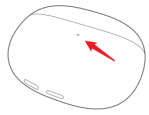
1. Charging: When charging the charging case, the indicator turns red when the charging case battery is 0-95%, and turns green when it is over 95%.
2. Pairing: Keep earbuds in the charging case, open the lid, and press and hold the function button for 2 seconds. The indicator of the charging case will blink white, and the earbuds are waiting to be connected. If there is no connection for 1 minute, the earbuds will go into sleep mode, and the indicator will turn off.
3. Clear the connection record: Keep earbuds in the charging case, open the lid, and press and hold the function button for 10 seconds. The white light of the charging case will be on. Release the button. The earbuds will restart, the old connection record will be cleared, the charging case light will be flashing white, and the earbuds will re-enter the pairing mode.
4. In case detection: When the earbuds are put into the case, the green light of the charging case will always be on for 7 seconds.
Q5: How to check the power level of the Xiaomi Buds 3?
A: You can refer to the following 5 ways.
1. The status bar of Android mobile phones to check the earbuds' power level (minimum power level).
2. Xiaomi phone pop-up window to show the dual earbuds and charing case power level (some mobile phones).
3. Xiaomi Earbuds app to view the earbuds and charging case power.
4. Bluetooth interface (MIUI system 12.5 or above stable version has this menu).
5. The charging case automatically detects the battery level when the lid is opened, and pressing the button also triggers the battery level detection. The related logic is organised as follows.
The following correspondence does not distinguish whether the charging case lid is closed or not:
(1) If the earbuds are not in the charging case, press the bottom button or open the charging case, the indicator shows the power level of the charging case.
(2) If the earbuds are in the charging case, press the bottom button or open the charging case, the indicator shows the power level of the earbuds.
logic of power level display corresponding to the indicator:
(1) If the battery level is very low (≤5%), the red light will flash 5 times for 1 second.
(2) If the battery level is low (5%<battery level ≤40%), the red light will be on for 7 seconds and then off.
(3) If the power level is high (power>40%), the green indicator will be on for 7 seconds and then off.
Q6: Why is the power level of the Xiaomi Buds 3 displayed on the mobile phone sometimes not accurate?
A: The earbuds are in use or during the charging process, the battery will fluctuate, the mobile phone to receive the earbuds power information will also fluctuate, and the power is 5% reported, there will be momentary differences.
Q7: How to connect the Xiaomi Buds 3 to mobile phone?
A: For Xiaomi Buds 3, the connection steps are as follows.
1. Connect a new device:
(1) Place the earbuds into the charging case, open the cover, and press and hold the function button for 2 seconds. The indicator of the charging case will go into a white blinking state, and the earbuds will wait for connecting (1 minute without connecting the earbuds will go into sleep mode and the indicator will turn off).
(2) Turn on Bluetooth on your mobile phone, search for and connect to "Xiaomi Buds 3". (If you need the connection password, enter "0000").
Note:
1. If the connection fails, put the earbuds back to the charging case and repeat the above operation.
2. For first-time use, you need to activate the earbuds. There are 2 ways (a and b):
a. Manual power on: Make sure the earbuds are in the charging case, open the lid, and press and hold the function button for 5 seconds to activate the earbuds. After activation, the earbuds will automatically enter the wait for connection state.
b. Plug in and switch on: If the earbuds is in the charging case, connect the charging case to the power supply to activate the earbuds. (At this time, the indicator of the charging case will be on and the earbuds will enter the charging state).
2. Use the Xiaomi phone's quick connection: Put the earbuds into the charging case, close the lid, and close a Xiaomi phone that is unlock and enable Bluetooth. Open the lid of the charging box, and according to the mobile phone interface prompts to connect the earbuds.
Note:
To use the quick connection function, you need to first update the mobile phone system to the latest stable version, and then open the mobile phone Bluetooth >> [Additional settings] >> enable [Pair compatible devices]. At present, only some Xiaomi mobile phones support MIUI Pop-up quick connection.
3. Connection interruption
When the device turns off the Bluetooth or out of the range of the earbuds connection, Bluetooth disconnection, the earbuds will emit a disconnection tone, and then automatically enter the waiting for connection state. If you do not connect to any device within 5 minutes, the earbuds will enter the passive back to the connection state, and then enter the hibernation state after 10 minutes, and then can be awakened by wearing the earbuds again, and then enter the waiting for connection state.
Note:
Passive back to connect means that the earbuds can not actively connect back to the device, you need to enter the device Bluetooth interface to manually tap on the earbuds Bluetooth device name will be connected back. (The earbuds have a connection record with the device)
4. Automatic reconnection
The earbuds are in the charging case, open the charging case, the earbuds will automatically connect back to the most recently connected Bluetooth device. If no connection record is detected or cannot successfully connect back to any Bluetooth device, the earbuds will automatically enter the wait for connection state.
Note:
If the earbuds can't connect back to the device automatically, you need to connect manually in the Bluetooth interface of the device.
Q8: How do I clear the pairing history of the Xiaomi Buds 3 with my device and reset the earbuds?
A: For Xiaomi Buds 3, there are 2 methods which are organised as follows.
1. Delete from mobile phone:
Phone >> [Settings] >> [Bluetooth] >> [Xiaomi buds 3] >> [Unpair] (Take Xiaomi phone for example).
2. Reset method (restore factory settings):
(1) Put the earbuds into the charging case.
(2) Open the lid and press and hold the function button of the charging case for more than 10 seconds. The indicator of the charging case is white and always on. Release the button. The earbuds are reset, the old connection record is cleared, the charging case indicator enters the white blinking state, and re-enter the pairing mode.
Note:
Due to the connection characteristics of Bluetooth signal, in places with dense electromagnetic signal interference at 2.4 GHz, there may be occasional intermittent disconnection or no sound.
Q9: Does the Xiaomi Buds 3 support volume adjustment?
A: The volume of the earbuds is synchronised with the phone and does not support adjusting the volume of the earbuds itself. There are 2 ways to adjust the volume of your mobile phone:
(1) You can adjust the volume of your mobile phone through the volume keys on the side of the phone.
(2) Set up gestures for the earbuds in the Xiaomi Earbuds app, and select it as Control Volume +.
Q10: How do I control the Xiaomi Buds 3?
A: The Xiaomi Buds 3 is controlled by pressure sensing.
Q11: Does Xiaomi Buds 3 support in-ear detection?
A: The Xiaomi Buds 3 support in-ear detection function, which is enabled by default.
For a better experience, Xiaomi Buds 3 adds in-ear detection function: wear the earbuds to play music automatically, and take off the earbuds to pause the music playback during listening.
Q12: Does the Xiaomi Buds 3 support automatic call answering?
A: No, the Xiaomi Buds 3 doesn't support automatic call answering.
Q13: Does Xiaomi Buds 3 support displaying in the notification bar?
A: Support, you need to set it in the Xiaomi Earbuds app. After setting it up, you can view the battery level and some function entrances in the notification bar of your phone.
Note:
This function is not available for iOS devices.
Q14: Can the Xiaomi Buds 3 connect to two mobile phones at the same time?
A: The Xiaomi Buds 3 supports dual device connection function.
1. Setting method: [Xiaomi Earbuds app] >> [Xiaomi Buds 3] >> [Additional settings] >> [Dual connection].
2. Connection method: (mobile phone 1 and mobile phone 2, respectively)
After connecting the Bluetooth of phone 1, put the earbuds into the charging case, with the charging case open, press and hold the charging case function button for 2 seconds, then the indicator will blink continuously, the earbuds will enter the pairing state. Use the mobile phone 2 to search for the Bluetooth name of the earbuds, and then you can connect. After a successful connection, manually connect back to the mobile phone 1 to achieve the dual-device connection function.
Note:
When you turn off the "Dual connection" function, it will disconnect the connection of mobile phone 1, and mobile phone 2 will flash off and then connect back automatically.
Q15: Does Xiaomi Buds 3 support the Missing earphone alert?
A: Yes. This function is only for the earbuds with Bluetooth connection status.
Open the Bluetooth settings interface of your mobile phone, tap the name of the earbuds >> [Additional settings] >> [Missing earphone alert].
Q16: Does the Xiaomi Buds 3 support Smart Scene?
A: No, the Xiaomi Buds 3 doesn't support smart scene.
Q17: Does the Xiaomi Buds 3 support connection with Xiaomi Smart Band or other Bluetooth bands?
A: No, it does not support connection because the earbuds and Bluetooth bands belong to the same receiving terminal device, so they cannot be connected.
Q18: Does the Xiaomi Buds 3 support recombining the left and right earbuds?
A: No, the Xiaomi Buds 3 doesn't support recombining the left and right earbuds.
Q19: Does it support connecting a mobile phone or other device to each of the left and right earbuds to be used as two single earbuds?
A: No, the earbuds of the Xiaomi Buds 3 can't be used as two independent earbuds.
Q20: Does Xiaomi Buds 3 support single-earbud mode?
A: Single-earbud use is supported (with the other earbuds in the case and the lid closed). If you use one ear for a period of time and want to use both ears, they will automatically connect and produce sound when you put on the other earbuds.
Q21: Can I use the Xiaomi Buds 3 while it is charging?
A: Different scenarios are introduced as follows:
(1) Charging the charging case alone: the earbuds can be used.
(2) Charging case and earbuds charging at the same time: earbuds need to be put into the charging case during the charging process, so you can't take them out and wear them.
(3) Charging case to charge earbuds: earbuds in the charging process need to be put into the charging case, so they can not be taken out to wear.
Note:
If the charging case only charges one earbud, the other earbud can be used separately.
Q22: How to turn on or off the Xiaomi Buds 3?
A: The settings are as follows:
(1) Power on: When the earbuds are in the case, open the charging case, and the earbuds will automatically power on.
(2) Sleep (switch off): When the earbuds are put back in the charging case, and the cover is closed, the earbuds will automatically disconnect and charge, and then enter the sleep state after it is fully charged.
Q23: Is it possible to use a power bank to charge the Xiaomi Buds 3?
A: It is not recommended to use a power bank to charge the earbuds. Some power banks can charge the charging case, but you need to use a Type-C charging cable.
Note:
Some power banks do not support low current output. The charging current of the charging case is much lower than the minimum load current of the power bank. It will think that the battery is fully charged, and the power bank will cut off automatically, so there will be a case of insufficient charging or not charging.
Q24: Does the Xiaomi Buds 3 fall off easily when I wear it?
A: It is not easy to fall off, the design of these earbuds follows ergonomics, and the earbuds fit the outer ear canal, wearing solid.
(1) Due to the inherent connection characteristics of Bluetooth signals, earbud performance may be affected in environments with strong interference, resulting in audio stuttering during music playback.
(2) Due to the differences in the structure of the ear shape, we can not guarantee that the earbuds 100% fit all ear shapes.
Q25: Is the connection stable when using the Xiaomi Buds 3 for calls, listening to music, or gaming?
A: The Xiaomi Buds 3 uses Bluetooth 5.2 technology for a more stable connection.
1. Due to the connection characteristics of Bluetooth signals, the signal of the earbuds will be affected under a strong interference environment, causing the earbuds to listen to music stuttering. Bluetooth products have this problem, such as in the subway/train/airport, where there will be varying degrees of interference, and there may be stuttering/intermittent situations.
2. Currently, the product is used in the office, coffee shop, home, and other environments where the interference is not strong; there will be no stuttering.
Q26: Why is there a delay in the sound when the Xiaomi Buds 3 is used for voice, video and games?
A: The Xiaomi Buds 3 adopts true wireless Bluetooth technology. The audio is first transmitted from the mobile phone to the main earbud, and then the main earbud transmits the audio to the secondary earbud. There will be a certain delay during the transmission of audio from the main to the secondary earbuds, but it will not affect the music and calls. If there is a serious delay on the screen, we suggest that you restart your mobile phone and reopen the audio software to try to see if the delay phenomenon will be reduced.
In addition, when the network environment is poor, signal transmission will be delayed due to packet loss.
Note:
Compared to traditional "wireless earbuds", the connection of true wireless earbuds is not only the signal transmission between the earbuds and the signal transmitting device, but also the wireless connection between the main and secondary earbuds.
Q27: Does the Xiaomi Buds 3 support third-party software for voice calls and using input?
A: For Xiaomi Buds 3, the usage will be different according to the system.
1. The Android system supports voice calls and voice input.
2. Windows devices that support Bluetooth can make voice calls after connecting and with the correct settings. As for voice input, third-party software support is required.
Q28: Is the Xiaomi Buds 3 a dual-channel earbud?
A: Yes, the Xiaomi Buds 3 a dual-channel earbud.
Q29: Will music play automatically when I take off the Xiaomi Buds 3 and put them back on during music playback?
A: The earbuds are equipped with in-ear detection function by default. When the function is on, if you take off the earbuds during music playback, the music will be paused automatically. If you wear the earbuds again, the music will be played automatically (no matter whether the removed earbuds are in the case or not).
Q30: Why is there a difference in battery level between the left and right earbuds?
A: For the Xiaomi Buds 3, when both earbuds are in the charging case, the right earbud is the main ear by default, and when it is responsible for the same function as the left earbud, it is also responsible for transferring data to the left earbud and connecting to the mobile phone. It is also responsible for transmitting data to the left earbud and connecting to the mobile phone, so the power consumption will be higher than that of the left earbud and the usage time will be shorter.
When the left earbud (or right earbud) is taken out of the charging case first, the left earbud (or right earbud) is the main ear by default. In other words, the earbuds that leave the charging case first are the main earbuds.
Note:
TWS earbuds in use, divided into main and secondary roles, the power consumption of the main and secondary earbuds in different working conditions is not the same; the power consumption of the main earbud is greater than that of the secondary earbud. Prolonged use will result in differences in the display of the power (left and right earbuds of the power to see the inconsistency of the App), and the same range of time is not the same is a normal phenomenon.
Q31: Why is there a difference in volume level when the Xiaomi Buds 3 is connected to different devices?
A: The following situations are possible automatic volume adjustment phenomena, which are normal phenomena; please rest assured when using.
When connecting to Xiaomi devices, the Xiaomi volume protection mechanism will automatically adjust the volume to medium volume.
Note:
After the earbuds and mobile phone are paired successfully, when the earbuds is connected to the mobile phone again, the volume will be synchronised to the medium volume last set by the mobile phone.
Q32: Does Xiaomi Buds 3 support MIUI Pop-up?
A: The Xiaomi Buds 3 supports MIUI pop-up.
Note:
1. Please place the Xiaomi Buds 3 close to the Xiaomi mobile phone that supports the pop-up window, you need to place the earbuds inside the case, and make sure that the [Pair compatible devices] in the advanced Bluetooth connection option of your mobile phone is on.
2. When used for the first time, the phone must be connected to Wi-Fi (cannot be a mobile hotspot). Because the quick connection function recognizes the earbuds product and needs to download the earbuds animation data through Wi-Fi when using it for the first time. After downloading the quick connection resources through Wi-Fi for the first time, the pop-up window can still pop up normally when using the same earbuds without connecting to Wi-Fi.
3. Keep the charging case and mobile phone within 30 cm, slowly open and close the lid 3-5 times (do not open and close the lid quickly). The pop-up window may be the default picture at the beginning, and the animation effect will appear after a while under the Wi-Fi network. (The duration depends on the internet speed).
Q33: What features does the MIUI pop-up for the Xiaomi Buds 3 support?
A: The MIUI Pop-up for the Xiaomi Buds 3 displays current power information, charging status, and quick connect for both the earbuds and charging case.
Q34: Why is there a difference between the first time the mobile phone pop-up window displays an image and the later animation effect?
A: The first pop-up window of the Xiaomi mobile phone is a sketch, which is the initial setting of the App. Because of the large number of earbud models, it does not download all the dynamic pictures of all models to the mobile phone by default to avoid taking up unnecessary space. Motion pictures need to be downloaded automatically from the cloud. Under normal circumstances, if the earbuds are connected to the phone for the second time, you can switch to the animation effect.
Note:
1. When you change the connection to your mobile phone, you may encounter the same problem. Put the earbuds back in the charging case and reconnect them.
2. If it is the first time using it, the loading speed of the dynamic pop-up window may be affected by the interference of the surrounding network environment. If this pop-up window is the default interface during subsequent use, please put the earbuds back into the charging case and open the cover again; the dynamic pop-up window will be displayed normally.
Q35: What to do if there is no MIUI pop-up when connecting the Xiaomi Buds 3?
A: The MIUI pop-up function supports some models. Please refer to the following steps:
1. Confirm whether your phone is supported and whether the system version is the latest.
2. Check whether [Pair compatible devices] is turned on. Please open the [Settings] App on the phone >> [Bluetooth] >> [Additional settings] >> enable [Pair compatible devices].
Note:
1. When used for the first time, the phone must be connected to Wi-Fi (cannot be a mobile hotspot). Because the quick connection function recognizes the earbuds product and needs to download the earbuds animation data through Wi-Fi when using it for the first time. After downloading the quick connection resources through Wi-Fi for the first time, the pop-up window can still pop up normally when using the same earbuds without connecting to Wi-Fi.
2. Keep the charging case and mobile phone within 30 cm, slowly open and close the lid 3-5 times (do not open and close the lid quickly). The pop-up window may be the default picture at the beginning, and the animation effect will appear after a while under the Wi-Fi network. (The duration depends on the internet speed).
Q36: How many microphones does the Xiaomi Buds 3 have?
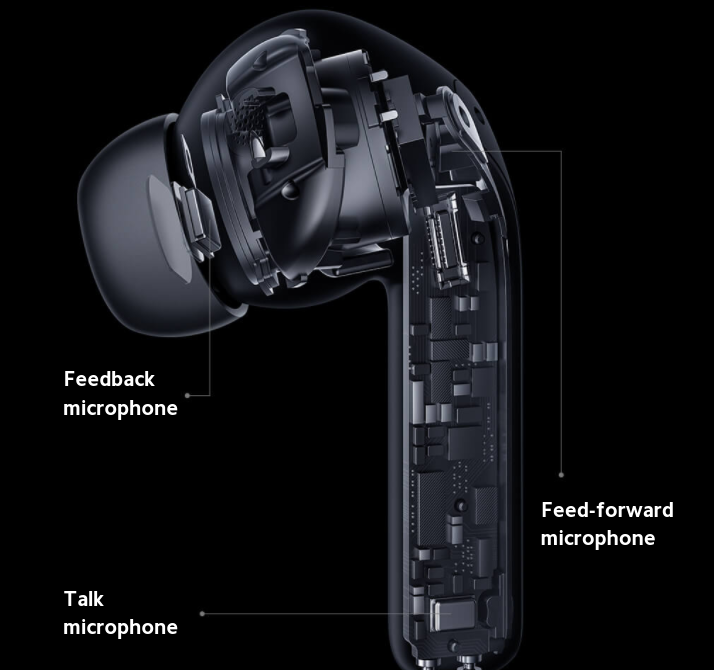
A: The Xiaomi Buds 3 has 3 microphones in each earbud, including the talk microphone, feedback microphone, and Feed-forward microphone. The talk microphone and the feedback microphone are located as shown in the picture below. The feed-forward microphone is inside the earcap (you can see it by removing the earbud tip).
Q37: Why is there a delay in the Xiaomi Buds 3?
A: When multiple routers or Bluetooth devices are used simultaneously near the Xiaomi Buds 3, varying degrees of interference may occur, which may appear as lag, intermittent, or disconnected.
Affected by the use of the environment, network, and mobile phone codec speed, it may cause varying degrees of delay when transmitting mobile phone audio data to the earbuds. Earbuds using true wireless Bluetooth technology, when the audio from the mobile phone is transmitted to the main/secondary earbuds, there will be a certain delay, but it will not affect the quality of the music and the call. Whether it is the sound details of the call, or music in the rich frequency band, it can be truly rendered!
Q38: What to do if the Xiaomi Buds 3 is disconnected?
A: If multiple routers or Bluetooth devices are used around the Bluetooth earbuds at the same time, there will be varying degrees of interference, and lags, intermittent, and disconnection may occur.
1. Cause of disconnection
(1) The earbuds' battery is low.
(2) The mobile phone is far away from the earbuds, exceeding the effective transmission distance (10 m), or there are obstacles between the earbuds and the mobile phone.
(3) Due to the particularity of Bluetooth earbuds, electromagnetic waves in the area may interfere with Bluetooth connections.
2. Solution
(1) Please charge the earbuds immediately.
(2) Put the earbuds and mobile phone together and reconnect.
(3) Please confirm whether your earbuds are in an environment with strong interference, and stay away from microwave ovens, monitors, and other objects with large electromagnetic interference.
(4) If none of the above works, put the earbuds into the case, close the cover for 5 seconds, and then reconnect.
(5) If the problem still cannot be solved, please try to restore the earbuds to factory settings. Please pair again after resetting.
Q39: If the Xiaomi Buds 3 has been paired with other mobile phones, how can I pair it with a new mobile phone?
A: Please refer to the following steps:
(1) Put the earbuds into the charging case.
(2) Open the lid and press and hold the charging case function button for more than 10 seconds. The charging case indicator will be white, then release the button. The earbuds are reset, the old connection record is cleared, the charging case indicator goes into white blinking state, and re-enter the pairing mode.
Note:
1. If the dual device connection function is enabled, you only need to press the button briefly for 2 seconds to open the pairing mode.
2. Due to the connection characteristics of the Bluetooth signal, in places with dense electromagnetic signal interference at 2.4 GHz, there may be occasional intermittent disconnection or no sound.
Q40: What is the effective distance of the Xiaomi Buds 3?
A: The effective connection distance between the earbuds and mobile phone is about 10 metres in an unobstructed environment. If you are in an office or at home, the effective distance will be reduced due to walls or other obstacles. So wearing the earbuds from the living room to the bedroom may cause stuttering or Bluetooth disconnection.
Q41: Can I transfer data with the standard charging cable of the Xiaomi Buds 3?
A: No, the standard charging cable of the Xiaomi Buds 3 cannot be used to transfer data.
Q42: Why does the MIUI pop-up prompt "This is not your earbuds"?
A: The earbuds will make a pop-up broadcast when it opens the cover, and the Xiaomi phone will make a judgment after scanning the broadcast: if it is a previously paired device, a connection box will pop up. If it is not your own paired device, a pop-up message "This is not your earbuds" will appear. Please follow the instructions in the pop-up window to perform the relevant pairing and connection actions.
For Xiaomi Buds 3, there are 3 cases as follows. You may encounter this prompt, which is normal. Please feel free to use it.
1. New earbuds (not connected to a mobile phone).
2. Earbuds have been connected to other devices (e.g. mobile phones).
3. After the earbuds has been reset.
Note:
Because of the differences in the charging case mechanism, the logic of this prompt will vary from earbuds to earbuds.
Q43: Does the Xiaomi Buds 3 have an anti-wind noise mode?
A: There is an anti-noise mode. You can switch to "Anti-Wind Noise" in the Noise cancellation option in the Xiaomi Earbuds app.
Explanation of Anti-Wind Noise Mode: In windy environments, such as outdoor walking, running, cycling, riding in a car, and other windy conditions, the earbuds will not pick up external wind noise after turning on the Anti-Wind Noise Mode, so as to avoid wind noise from affecting the experience of the earbuds.
Q44: Does the Xiaomi Buds 3 support active noise cancellation technology?
A: Yes, it adopts ANC active noise cancellation technology.
Q45: Does the Xiaomi Buds 3 support broadcasting contact names?
A: No, the Xiaomi Buds 3 doesn't support broadcasting contact names.
Q46: How do I answer/hang up a call using the Xiaomi Buds 3?
A: 1. With the earbuds on, press the pressure-sensitive area on either side of the earbuds: answer/hang up.
2. Press either side of the earbuds' pressure-sensitive area twice in a row: refuse to answer.
Q47: Does the Xiaomi Buds 3 support low latency mode?
A: The Xiaomi Buds 3 does not support low latency mode.
Q48: Is it normal for the charging case of the Xiaomi Buds 3 to get hot during wireless charging?
A: The charging case of the Xiaomi Buds 3 supports wireless charging, and it is normal to experience heating during the process.
When the magnetic field emitted by the transmitting coil passes through the battery, the metal inside the battery will generate an induced current. This induced current will generate a magnetic field in the opposite direction of the magnetic field generated by the transmitting coil, which cancels out the magnetic field generated by the transmitting coil, causing the induced voltage received by the receiving coil to drop, and the induced current will be converted into heat.
Q49: What to do if the charging case of the Xiaomi Buds 3 does not charge properly when placed on the wireless charger?
A: When using wireless charging, you need to align the position of the charging case coil to the centre of the wireless charger; otherwise, you may not be able to charge, or the charging may be slow. When using wireless charging, try to avoid using a too-thick earbuds protective case, otherwise it may not be able to charge.
Q50: Does the charging case of the Xiaomi Buds 3 support reverse charging of mobile phones?
A: If your phone supports reverse charging, you can charge your Xiaomi Buds 3. Turn on reverse charging on your phone and place the centre of the back of the Xiaomi Buds 3 charging case close to your phone's wireless charging coil to start reverse charging.
The efficiency of reverse charging is related to the output of the phone and may be unstable.
Q51: If the Xiaomi Buds 3 disconnect because they are too far from the phone, will they automatically reconnect once brought back within range?
A: The effective transmission distance of Bluetooth is more than 10 metres under the condition of no obstruction and no interference. When the effective transmission distance is exceeded, the connection between the earbuds and the mobile phone will be disconnected automatically. The current setting logic of the Xiaomi Buds 3 is as follows.
(1) If the connection is lost, it will automatically reconnect if you return within 5 minutes; if more than 5 minutes have passed, the earbuds will enter sleep mode, and wearing them once will automatically reconnect them.
(2) If the earbuds can not be automatically connected back to the mobile phone, please restart the Bluetooth of the mobile phone, and press the charging case function button for 2 seconds with the lid open. After the charging case indicator flashes to enter the pairing state, reconnect the mobile phone.
Q52: Will the Xiaomi Buds 3 automatically disconnect when putting them in the charging case?
A: The current setting logic of the Xiaomi Buds 3 is as follows.
(1) When the earbuds are put into the charging case, they will not be disconnected automatically if the cover is not closed, and will remain connected.
(2) When the earbuds are put into the charging case, if the cover is closed, the earbuds and the mobile phone will be disconnected automatically after 5 seconds.
(3) If you want to disconnect your mobile phone from the earbuds, you can do so by turning off the Bluetooth of your mobile phone or by putting the earbuds into the case and closing the lid.
Q53: Will the Xiaomi Buds 3 have crosstalk?
A: No. By default, the earbuds can only be connected to one device at a time. There will be no crosstalk with other devices. Please feel free to use it.
Q54: When recording video or audio, am I using the Xiaomi Buds 3 or the phone's microphone?
A: When recording video and audio, different mobile phones and software have different settings, depending on the specific scene you are using.
1. The earbuds microphone is used when making calls, listening to music, and watching videos, and the mobile phone microphone may be used when recording video and audio.
2. You can test this by doing the following:
After connecting the earbuds and mobile phone, open the recording software, put the earbuds away from the mobile phone at a distance (about 3~5 metres), and start recording. After stopping recording, check whether the recorded video or audio has sound. If there is no sound or the sound is small, it means that the recording is using the mobile phone microphone; if the sound is clear, it means that the recording is using the earbuds microphone.
Q55: Can I go out without a charging case and just take the Xiaomi Buds 3?
A: If your mobile phone is already connected to the earbuds, and the power of the earbuds can meet your needs when you go out, you can not bring the charging case. However, in order to prevent the use of the earbuds from being affected by the lack of battery, and to prevent them from being lost, we recommend that you bring the charging case with you when you go out as much as possible.
Q56: Does the charging case running out of power affect the use of the Xiaomi Buds 3?
A: When the earbuds are fully charged, the charging case will not affect the use of the earbuds even if it is out of power. However, excessive discharge may cause a decline in battery performance, so it is recommended to charge them whenever possible.
Q57: What will happen after the charging case of the Xiaomi Buds 3 is switched off with low power?
A: In addition to not being able to connect back and affect the pair connections, the following situations may occur.
(1) The LED will not light up after opening the lid.
(2) It is not possible to connect a second mobile phone by pressing the function button.
(3) The earbuds are placed in the charging case, but the case fails to detect their presence.
(4) Factory settings cannot be restored.
(5) Earbuds' firmware cannot be upgraded through OTA.
Q58: Does the music pause or start the voice while the Xiaomi Buds 3 is being removed and put on?
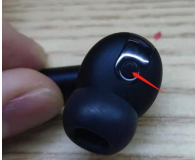
A: The earbuds detect wear through the in-ear detection sensor. When holding the earbuds, if blocking the sensor, it will cause the earbuds to be misrecognized as wearing the earbuds. At this time, if the finger skin mistakenly touches the back of the touch sensing area, it will play a corresponding knocking effect.
Note:
When holding the earbuds in your hand, do not cover the sensor position as shown below (red arrow position)
Q59: Why is the sound quality of the Xiaomi Buds 3 fine when listening to music, but deteriorates when playing games?
A: Because the enabled protocols are different.
(1) When listening to music, the A2DP protocol is activated.
(2) When playing games, the game App will start the HFP call protocol, and the audio bandwidth of the HFP protocol is narrow, and the sound quality is a bit poor.
Q60: How to maintain the Xiaomi Buds 3?
A: It is recommended to refer to the following information for maintenance:
1. Never expose the earbuds to liquids or moisture.
2. Do not use abrasive solvents to clean the earbuds.
3. Please try your best to avoid placing the earbuds for a long time in the low temperatures (below 0 ℃), high temperatures (45 ℃ or more), or a large temperature difference in the environment. Using earbuds for a long time in these environments, the battery activity is easily damaged, resulting in battery damage.
4. Do not expose the earbuds to open flames to avoid the risk of explosion.
5. Do not touch the earbuds to sharp objects, which may cause scratches or damage.
6. Do not insert any objects into the earbuds, as this will damage the internal components.
7. Do not attempt to disassemble the earbuds.
8. If you do not use the earbuds for a long time, please ensure that it is placed in a dry place, and if it is placed for more than one month, it should be charged on time to ensure that the battery and the earbuds' working performance.
Q61: Why is there no response when pressing the touch control area on the Xiaomi Buds 3?
A: The Xiaomi Buds 3 adopts pressure-sensitive operation instead of touch control. Please gently press on the protruding area on both sides of the tail of the earbuds after wearing the earbuds. At this time, you will hear a "da" pressure-sensitive button operation tone, and follow the instructions described in the manual for the function of the operation guidelines.
If you don't get any response when you press the sensing area after wearing the earbuds, please try to wear the earbuds again, adjust the position, or use the "Earbud Fit Check" function in the Xiaomi Earbuds app to adjust the fit.
Q62: Why is the pressure sensing on the Xiaomi Buds 3 not sensitive?
A: The earbuds' pressure-sensing feature utilizes the deformation of the housing—triggered by physical compression—to function as a control button. Consequently, it requires a certain amount of force to activate. The standard trigger zone for this pressure-sensing function is located on the raised, marked area along the side of the headphone stem. You can locate this raised tactile guide by touch (blind pressing) before attempting to apply pressure; once successfully pressed, you will hear a distinct "click," indicating that the pressure-sensing command has been successfully registered.
Q63: Why does the sound of one side of the earbuds become smaller after using the Xiaomi Buds 3 for a while?
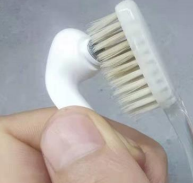
A: It is recommended to check whether the position of the speaker hole is dirty. You can use a brush to brush down the speaker hole. At this time, the volume of the earbuds is back to normal.
Q64: Why is the Xiaomi Buds 3 volume still only half of what it was before, even though the phone's volume is turned up to the maximum?
A: Please refer to the following steps:
(1) Unpair the Bluetooth earbuds, search and connect again.
(2) If the sound of the earbuds is still low after reconnecting, you can switch the "Absolute volume" option of the mobile phone again and try again.
Q65: Does the Xiaomi Buds 3 support connection to a TV?
A: It supports connecting to a Smart TV with Bluetooth function, and you can listen to the sound of the TV after connecting the earbuds.
Q66: Why is it easy to hang up when taking off the earbuds while talking on the phone?
A: The protruding area on the side of the earbuds is the pressure bar area. When taking off the earbuds during a call, if your hand touches the pressure-sensitive area, it may be sensed as a control operation. In this case, please try to adjust the position of your hand when taking off the earbuds to avoid touching the pressure-sensitive area.
Q67: Are the earbuds attached to the charging case and will they fall out?
A: The earbuds will be magnetically attached to the charging case when you put them in the case, and will not fall out in normal use. The charging case is also magnetically attached between the top and bottom lids, and will not come off in normal use.
Q68: What is the purpose of the protective film between the charging case and earbuds?
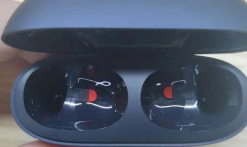
A: For Xiaomi Buds 3, the protective film on the charging case, where the earbuds are placed (as shown below with a semi-circular red film), is to avoid scratches caused by the friction between the earbuds and the charging case, and the film can be removed when in use, which will not affect the use of the product.
Note:
The red warped position is just the non-adhesive part of the film, use your fingernail to remove the protective film from that position.
Q69: Why is there no noise cancellation function in the Bluetooth settings interface of some mobile phones after connecting the Xiaomi Buds 3?
A: Whether or not the noise cancellation feature appears in your phone's Bluetooth settings varies depending on your specific phone model. If you do not see this option within your phone's Bluetooth menu, we recommend enabling it via the Xiaomi Earbuds App instead.
Q70: Is the Xiaomi Buds 3 speaker location waterproof?
A: The earbuds' speaker steel mesh position is due to the need to allow sound to pass through the speaker hole, which can not be completely waterproof, and can only be anti-splash water spray, etc. IP55 waterproof level is anti-jet water flow. Please do not soak the earbuds in water; water will affect the performance of the speaker.
Troubleshooting
Q1: What to do if the Xiaomi Buds 3 won't charge, won't turn on, or the indicator doesn't light up?
A: The earbuds may not be able to charge, or charging is unstable due to long-term unused storage, poor contact between the earbuds and charging case (dirty contacts), and other reasons. Please follow the following method to troubleshoot.
1. Charge the earbuds for at least 30 minutes to ensure activation.
2. Check the charging contacts of the earbuds for dirt, corrosion, and damage, and clean up the dirt in time to ensure good contact between the charging contacts and the charging case.
Note:
Repeat the earbuds in and out of the charging case 3 times. If the contact is normal, the LED will light up for 1 second when the earbuds are in the case.
3. Put both earbuds into the charging case, keep the lid open, then connect them with your mobile phone and check the green icon of the battery level in the MIUI Pop-up or Xiaomi Earbuds app interface for a lightning bolt:
(1) If there is no lightning mark, please apply for after-sales service.
(2) Check whether the charging case is charged. If the charging case is not charged, charge the charging case and then charge the earbuds to switch them on. If the earbuds have not been used for a long time, resulting in insufficient power, it needs to be charged for a period of time before the indicator comes on.
Q2: What to do if the charging case of the Xiaomi Buds 3 cannot be charged?
A: If the charging case of the Xiaomi Buds 3 cannot be charged, please troubleshoot as follows:
1. Replace the charging cable and charger to try whether it can be charged. If it can be charged after replacement may be the charging cable or charger failure.
2. In case of wireless charging, the centre of the charging case needs to be aligned with the centre of the wireless charger; otherwise, it will not be able to charge, or the phenomenon of slow charging will occur. When charging wirelessly, try to avoid the use of excessively thick earbud protective cases, it will not be able to charge.
3. Use the charging cable and charger to charge another device to verify whether the charging cable and charger are normal. If charging another device normally, please charge the charging case for half an hour and then observe. If you still can't charge, please apply for after-sales testing.
Note:
It is also possible that the charger is not compatible.
Q3: What to do if the Xiaomi Buds 3 cannot be paired or searched?
A: When your mobile phone searches for Bluetooth earbuds, the Bluetooth earbuds also need to be in the pairing state.
(1) First of all, please make sure that the earbuds are fully charged (the indicator is always on when you open the charging case).
Keep earbuds in the charging case, open the lid of the charging case, and press and hold the Function button for 2 seconds; the indicator will flash continuously. The Bluetooth earbuds are in pairing status. Please try to search for the Bluetooth earbuds "Xiaomi Buds 3" through your mobile phone for pairing.
(2) Make sure the binding steps are correct. The earbuds are in pairing state, waiting for a connection. If there is no connection for a long time, the earbuds go into sleep mode, and the indicator turns off.
(3) It is possible that the version of the Xiaomi Earbuds app is too low to support Xiaomi Buds 3. Please scan the QR code of the Xiaomi Earbuds app on the box with your mobile phone, or search for "Xiaomi Earbuds" in the App Store to get the latest version of the app before trying to add it.
(4) If none of the above works, try restoring the earbuds to factory settings.
(5) There may be more interference in the neighbourhood. Please move to another location to try. Due to the characteristics of Bluetooth earbuds, the electromagnetic wave in your area may interfere with the Bluetooth connection, and even no sound or disconnection may occur after connection.
Note:
If you have already connected 1 mobile phone and need to connect a new one, please keep the earbuds in the charging case, open the lid of the charging case, and press and hold the Function button for 2 seconds. Then, the white light will blink, and please use another phone to search for the earbuds again. When using the "Dual Device Connection" function, the earbuds can only connect to the Xiaomi Earbuds App on one device.
Q4: What to do if the device can search for the Xiaomi Buds 3 but can't connect?
A: If the device can search for the Xiaomi Buds 3 but cannot connect, it may be due to the device's Bluetooth data abnormality. Try to delete the previous connection record on the device, reset the earbuds, and then try to pair and connect again.
Delete Bluetooth records from your phone: [Settings] >> [Bluetooth] >> [Xiaomi Buds 3] >> [Unpair].
Q5: What to do if the Xiaomi Buds 3 have been connected to my mobile phone but do not automatically reconnect when I open the case?
A: Please refer to the following:
1. Bluetooth is not switched on in your phone.
2. The earbuds automatically reconnect to the last connected device by default. If the last connected device is not the current mobile phone, you need to reset and reconnect.
3. The mobile phone is far away from the earbuds, exceeding the effective transmission distance (10 m), or there is an obstacle between the earbuds and the mobile phone.
4. Due to the special characteristics of Bluetooth earbuds, the electromagnetic waves in your area may interfere with the Bluetooth connection, and the earbuds may be disconnected and unable to automatically reconnect in time. Confirm whether you are in a strong interference environment, away from microwave ovens and other objects with large electromagnetic interference.
5. The copper post at the bottom of the earbuds is dirty. Please clean the copper post at the bottom of the earbuds and re-pair them.
6. Check to see if "Media Audio" is turned off in the Bluetooth. If it is turned off, it will not connect back automatically when you open the lid, and you will need to connect manually.
7. If the above does not solve the problem, please reset the earbuds and reconnect them.
Q6: Can I be allergic to wearing the Xiaomi Buds 3? What should I do if I have an adverse reaction (e.g. inflammation)?
A: This product's earbuds, ear caps and so on, with skin contact parts, have passed strict testing of harmful substances, and will not have an impact on the human body. The power of the earbuds is very small; there will be no heat. Please pay attention to avoid wearing them for a long time (such as when sleeping), keep your ears clean, avoid sweat or dirt residues lead to wear after the ear discomfort, inflammation, suspected allergies, and other problems.
Suspected possible causes of allergic symptoms:
(1) Wearing it for a long time (e.g., when sleeping), it is not breathable, and the earbuds have sweat residue. Eczema may occur in a hot environment.
(2) The earbuds are dirty and have not been cleaned for a long time, and the residue builds up, causing suspected allergy symptoms.
(3) If you experience serious discomfort, or inflammation and allergy phenomenon, it is recommended to stop wearing and consult a physician in a timely manner. If only slight itchy symptoms, it can be recommended that the following guidance be followed:
1. After wearing earbuds for exercise, please check whether there is sweat on the earbuds. Also, please wipe them clean before putting them into the charging case.
2. After taking a bath, there may be residual water droplets inside your ears, so please clean them up before wearing the earbuds for use.
3. For daily use, regularly check whether there is any dirt in the earbuds, ear caps, and charging cases. If so, please clean them promptly.
4. The earbuds have an in-ear design, which can cause fatigue and possibly a little pain when worn for long periods of time. You can remove the earbuds after a long period of continuous wear and let your ears rest for about half an hour to relieve ear fatigue. In addition, it is recommended to choose the right ear tips, which can increase the comfort of the ear, such as choosing to wear a smaller ear tip than usual.
5. The volume of earbuds should not be too high, long time use of excessive volume will make your hearing and ear canal nerve fatigue, making your ears feel pain and soreness. It is recommended that you turn down the volume and take off the earbuds after every 2 hours of wear to give your ears a relaxing or kneading massage.
Q7: What to do if the sound is low when using Xiaomi Buds 3?
A: Please troubleshoot as follows:
(1) The TWS earbuds do not support adjusting the volume individually, and you can adjust the sound by using the "Volume+" button on your mobile phone.
(2) Access the Bluetooth settings on the phone >> [Xiaomi Buds 3] >> [Audio] >> enable [Absolute volume] option.
(3) It may be because the power of the mobile phone or the earbuds is not enough. Please observe it after full charge.
(4) Reset the earbuds and pair them for use again.
(5) Replace the mobile phone with another one for testing. If the problem still exists, please apply for after-sales testing.
Note:
There will be a problem with the sound becoming smaller in windy environments.
Q8: What to do if the sound of the Xiaomi Buds 3 is intermittent or noisy?
A: Please troubleshoot as follows:
(1) If the distance between the mobile phone and the earbuds or between two earbuds is too far or there is an object blocking the signal (e.g., a wall), there may be a problem with intermittent or garbled sound. Bring the mobile phone and the earbuds closer together, and the two earbuds closer together while avoiding blocking the signal.
(2) If the usage environment has signal interference or a weak mobile phone signal, you can try to use it in other environments or a place with a good mobile phone signal, where there is no such phenomenon.
(3) If there is an object with large electromagnetic interference next to it, it may cause the other party to hear a small sound and a murmur. It is recommended to stay away from objects with large electromagnetic interference, such as microwave ovens, during use.
(4) If you connect to your Xiaomi mobile phone and there is a probable noise/current sound when playing music, and it is normal when you pause the music or "put the earbuds back into the charging case and wear them again", please upgrade your mobile phone system to the MIUI 13 version.
(5) Reset the earbuds and restart the mobile phone before pairing to see if it works.
(6) Make sure the earbuds have enough power (more than 30%). Replace other mobile phones to test. If the problem still exists, please apply for after-sales testing.
Q9: Why is there no sound or lag when the Xiaomi Buds 3 is connected?
A: Please troubleshoot as follows:
1. Analysis of causes
(1) Due to the special characteristics of the Bluetooth earbuds, the electromagnetic waves in your area may interfere with the Bluetooth connection, and there will be no sound.
(2) Please check the volume setting of your mobile phone to see if the mobile phone volume is not turned on and is in mute state.
(3) The mobile phone is far away from the earbuds, exceeding the effective transmission distance (10 m), or there is an obstacle between the earbuds and the mobile phone.
(4) When the phone is connected to two Bluetooth devices at the same time, the sound is emitted from the second device, and there is no sound from the first connected device.
2. Solutions
(1) Please make sure that your earbuds are not in an environment with strong interference, and stay away from objects with large electromagnetic interference, such as microwave ovens.
(2) Mute the phone and try turning up the volume to see if the sound is normal.
(3) Use the mobile phone and earbuds together or reconnect them.
(4) Disconnect and put the earbuds back into the charging case. Close the case cover. After 5s, open the case cover to reconnect with the phone or disconnect the phone from another Bluetooth device.
(6) If none of the above works, restore the earbuds to factory settings and try again.
Q10: Why doesn't the notification bar show the battery level when the Xiaomi Buds 3 is connected to the mobile phone?
A: Please refer to the following:
1. The feature of displaying the battery level in the notification bar of your mobile phone is not supported by all mobile phones, and the battery level cannot be displayed if the mobile phone does not support it.
2. Please check if the [Show on Notification shade] option is enabled in the Xiaomi Earbuds app. (The Xiaomi Earbuds app on iOS does not have this feature).
Q11: Why is the sound still external when the Xiaomi Buds 3 is already connected?
A: If the earbuds and mobile phone have been connected, but the sound of music, video, call, etc. is still external, please refer to the following:
After connecting the earbuds with your mobile phone, open [Settings] >> [Bluetooth] >> find "Xiaomi Buds 3" and tap the > icon on the right side. You can open [Media audio] and [Phone call]. Then refer to the following steps to deal with it.
(1) On the Bluetooth settings page of your mobile phone, disconnect the Bluetooth and connect it again to recover.
(2) Turn off Bluetooth on your mobile phone, turn on Bluetooth again, and the earbuds and mobile phone automatically connect back to the success of the recovery.
(3) Put both earbuds into the charging case, open the lid, and press the function button for 2 seconds and re-pair the Bluetooth to recover.
(4) If none of the above can be solved, please restore the earbuds to factory settings and try again.
Q12: Why is the actual battery life of the Xiaomi Buds 3 shorter than advertised?
A: Battery life is strongly correlated with usage habits, and the advertised life figures all correspond to specific scenarios.
1. Reasons affecting the battery life:
(1) If the earbuds' power is low, the battery life will be affected.
(2) Using in higher volume will consume power faster.
(3) The earbuds may be in a large electromagnetic interference environment, or between the earbuds and the mobile phone there are walls and other obstacles to block.
2. Suggestions to improve battery life:
(1) It is recommended to fully charge the earbuds before use.
(2) It is recommended to turn down the volume to see if the use of time is normal.
(3) Note that when in use as far as possible away from microwave ovens and other objects with large electromagnetic interference, and to ensure that there are no obstacles between the earbuds and the mobile phone blocking.
3. Test data in the Xiaomi laboratory, the actual environment, because of the existence of signal interference and electromagnetic interference, will lead to certain differences, which is normal.
Q13: What to do if the sound of the left and right earbuds of the Xiaomi Buds 3 is not synchronised?
A: Please refer to the following steps for troubleshooting:
1. Reconnect the earbuds (just put the earbuds back into the charging case, close the charging case and then open it to take them out) and test whether the sound of the left and right earbuds is synchronised.
2. Bind the earbuds to the Xiaomi Earbuds app to detect and upgrade the firmware version of the earbuds. (You can check the current version at the bottom of the device details screen.)
3. Reset the earbuds, reconnect them after reset, and test whether the left and right earbuds' sounds are synchronised.
Q14: What to do if there is no sound in one earbud after connecting the Xiaomi Buds 3 to my mobile phone?
A: When there is no sound from one earbud, please refer to the following ideas to deal with it:
1. Analysis of causes
(1) Poor contact on one side of the earbuds, resulting in only one side of the earbuds being paired.
(2) The single-sided earbuds may turn off with low power.
(3) Please check whether the earbud tips have dirt blocking the speakers.
(4) The Bluetooth of the left and right earbuds is disconnected.
(5) Whether the earbuds get into water and sweat, resulting in a short circuit and death.
2. Solutions
(1) Please put the earbuds back into the charging case, make sure the indicator on the charging case lights up, and then re-pair the Bluetooth.
(2) If the battery is low, make sure that the earbuds have good contact, put them into the case to charge for 10 minutes, and then pair them with Bluetooth again.
(3) Check and clean the earbud tips for dirt.
(4) Reset the earbuds and then re-pair to see if it works.
(5) Please apply for after-sales inspection.
Q15: When travelling in a car with the windows open, why is there a continuous "thumping", "clattering" or "booming" sound in the Xiaomi Buds 3?
A: This problem is mainly caused by the wind noise generated by the special scenes such as opening the windows of the car/the "rumble" sound when driving through the bumpy road, which affects the noise cancellation system of the earbuds. We will update the software version of the earbuds as soon as possible to solve the problem through the OTA. Please pay attention to the Xiaomi Earbuds app's update reminder and update it in time.
Note:
This problem occurs in every high depth noise cancelling earbuds, some of them will have serious current sound when the car speed is too fast, but each headphone has a different way to deal with it. Some earbuds can be solved by reducing the noise cancellation effect. In the same environment, the "rumble" of the wheels rubbing the ground may be clearly heard in the earbuds. In order to ensure that the noise cancellation effect is achieved, while also finding a balance between noise reduction and this noise to improve the experience.
Q16: Why do the Xiaomi Buds 3 sometimes last less than 3 hours for music? And sometimes up to 6 hours?
A: When the active noise cancellation (ANC) function is open, the power consumption of the earbuds will be very high, which can only reach 3 hours of battery life. It is recommended to close the function for its own non-frequent use, which can help increase the battery life.
Q17: Why isn't the noise cancellation effect obvious in the new Xiaomi Buds 3?
A: For Xiaomi Buds 3, if you feel that the noise cancellation effect is not obvious when you use the new earbuds, it may be because the noise cancellation of the earbuds is in the equalisation mode by default, please bind to the Xiaomi Earbuds app and then select "depth" noise cancellation in the noise cancellation interface, and then confirm whether there is any improvement in the noise cancellation effect. If you feel that the noise cancellation effect is not obvious, it may be because the earbuds are in equalisation mode by default.
Q18: Why is the noise cancellation of the Xiaomi Buds 3 not good at some times?
A: The noise cancellation effect of low-frequency noise is very obvious, very suitable for aircraft, trains, and underground noise cancellation. For security reasons, car horns, vocals, and other high-frequency signals will not be filtered. For high-frequency noise, you will feel that the noise cancellation effect is not very obvious.
If you feel that noise reduction in the surroundings is not obvious, please refer to the following ideas.
First of all, the active noise cancellation (ANC) effect is built on the basis of good passive noise cancellation, so please choose the earbud tips that suit you first, in order to optimise the passive noise cancellation effect. If you find that the effect of noise cancellation is not obvious in the surrounding environment, you can adjust the size of the earbud tips you are wearing to experience the effect.
Secondly, it is recommended to use the earbuds' fit test function to verify if the fit is OK.
Finally, in different environments, it is recommended to manually set the noise cancellation mode to "Deep" in the latest version of the Xiaomi Earbuds App.
Q19: Why is the mid- and high-frequency vocal effect of the Xiaomi Buds 3 not good?
A: In this case, what needs to be confirmed is the sealing of the earbud tips, so it is recommended to choose earbud tips that are suitable for you and can achieve a better sealing effect, and try it again.
Q20: Why does the Xiaomi Buds 3 always appear not tight after wearing?
A: We suggest you replace the earbud tips that fit you and then test and confirm the effect.
The Wear Tightness Test is a relative test, mainly to find a tight wearing angle. Even if the test is not passed, the earbuds through its own algorithm to achieve a good noise-cancelling experience effect. If you have particularly small ears, there may be a persistent failure, but it will not affect the normal noise cancellation experience.
Q21: Why do the earbud tips turn out when the Xiaomi Buds 3 is used for a long period?
A: The earbud tips are made of liquid silicone, which is healthy and comfortable to wear. As the liquid silicone material is soft and the surface has been specially treated, it brings good adhesion and avoids the unhealthy problem of the general coating. So after wearing them for a long time, the inside of the ear is prone to micro-sweat, which can make the adhesion stronger, and it is easy to produce outward turning when pulling out due to the softer earplugs.
Q22: Why does the music in the Xiaomi Buds 3 pause automatically sometimes?
A: If there is a situation where you don't pause the music manually, but the music is paused automatically, it may be one of the following situations.
(1) It is possible that another application on your phone is generating a notification sound or has temporarily seized control of the audio decoder, causing the music player to pause. We recommend accessing the phone's Recents interface to clear or remove other apps running in the background; once the decoder is no longer occupied, the music should automatically resume playback.
(2) If the earbud tips are too small, or if you are engaging in physical activity, the earbuds may slip out of your ear canals; since the earbuds no longer detect that they are being worn, the music will automatically pause. We recommend readjusting the earbuds and resuming playback. Additionally, please select a pair of earbud tips that fit you properly to ensure a snug and secure fit between the earbuds and your ears.
Q23: Why is the music still playing when the Xiaomi Buds 3 are in the charging case?
A: Please refer to the following reasons and corresponding solutions:
1. The earbud's copper contacts may be dirty, resulting in a poor connection. Please wipe the copper contacts and then re-pair the device.
2. Using earbud tips that are not included with the product may cause the earbuds to not fit properly into the case. Please select a suitable pair of earbud tips from the set provided with the earbuds.
Q24: Why does the music not pause automatically when I remove the Xiaomi Buds 3?
A: Please refer to the following reasons and corresponding solutions:
First of all, make sure that the [In-ear detection] of the earbuds is turned on. You can check this function in the Xiaomi Earbuds App.
If the automatic pause feature still does not activate even after enabling [In-ear detection], please verify your gesture for removing the earbuds. The in-ear detection system relies on sensors positioned above and below the acoustic cavity to collect data; if your fingers or palm happen to cover these specific areas while you are removing the earbuds, the device may mistakenly interpret this as the earbuds still being worn. Consequently, since no "removal action" is detected, the audio will not pause.
Q25: Why does the music come back after removing one earbud and pausing the music?
A: Because the [In-ear detection] function relies on the sensing components distributed on the top and bottom of the sound cavity to do data collection, if you take off the earbuds, your finger or palm just covers the top and bottom of the sound cavity, it is equivalent to the earbuds having recognised the wearing, and it will start the wearing detection and replay the music.
Q26: Why is the noise cancellation switching unresponsive when the Xiaomi Buds 6 is worn?
A: In this case, we recommend replacing the earbud tips with the right one, then connecting to the Xiaomi Earbuds App to do a fit test, and retrying the switch after using the right earbud tips.
Q27: Why are the vocals not very clear in transparency mode on the Xiaomi Buds 3?
A: Transparency mode is designed to increase the ambient sound. According to your needs, you can choose normal transparency mode (the default selection when turning on transparency mode) and vocal enhancement mode. You can connect the earbuds to the Xiaomi Earbuds app, select the "Vocal Enhancement" mode in the app, and try again to experience the effect. We will continue to collect feedback and improve the product experience in the software.
Q28: Why does the Xiaomi Earbuds app sometimes not show the Xiaomi Buds 3 's charging case battery level?
A: When the earbuds leave the charging case, the mobile phone will only show the power level of the earbuds. When the earbuds are in the case, the App will show the power level of the earbuds and the case.
Q29: What to do if the noise cancellation is ineffective or cannot be switched when wearing the Xiaomi Buds 3?
A: This situation may occur if the earbuds become loose during use, causing the noise cancellation feature to deactivate; you can resolve this by adjusting and properly reseating the earbuds. In the Xiaomi Earbuds app, you can perform an earbuds fit test and then try again.
Note:
The noise cancellation feature can only be activated when dual earbuds are worn.
Q30: Why do the touch gestures on the Xiaomi Buds 3 revert to their default settings after connecting them to a new phone?
A: This is because pressing the button to reset paired devices automatically resets the custom functions assigned to the left and right earbuds.
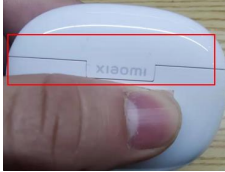
Q31: Is it normal to have a big gap between the top and bottom of the Xiaomi Buds 3 charging case?
A: For Xiaomi Buds 3, the gap visible in the charging case is a standard clearance between the upper and lower shells. This does not affect the functionality or usage of the earbuds in any way. Please feel free to use them with confidence.
Q32: Is it normal for the Xiaomi Buds 3 to have an odour when opened?
A: This odor comes from the internal plastic material and has no impact on human health. Our product is environmentally certified. If you find the smell pungent after opening the box, we suggest you place the earbuds in a well-ventilated environment for half an hour until the odor dissipates before using them.
Q33: Is it normal for the gaps around the decorative parts of the Xiaomi Buds 3 to be relatively wide?
A: Due to design tolerances, the decorative components on the earbuds may not achieve a completely seamless fit and a tolerance gap of less than 0.1 mm may be present. This is considered normal and does not affect the product's functionality; please use it with confidence.

Does it help?