

Xiaomi Watch 2 Pro FAQ
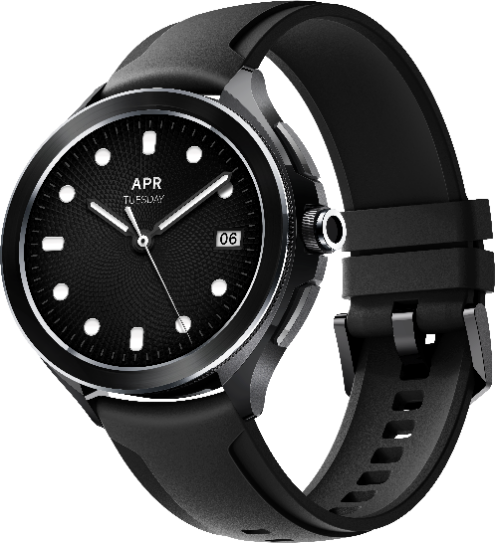
1. Q: What are the features of Xiaomi Watch 2 Pro?
A: 1. Xiaomi Watch 2 Pro uses a 1.43-inch AMOLED circular screen with a resolution of 466×466 and a PPI of up to 326. The display is clear and delicate, touch and sliding are sensitive and smooth, and the operation is smoother.
2. The simple and bright design of Xiaomi Watch 2 Pro, with different colored straps and personalized dials, is suitable for various scenarios.
3. It supports full-course exercise data tracking in a variety of mainstream sports modes, which is the best choice for sports enthusiasts.
4. All-round health tracking, support heart rate, pressure, Temperature, Body fat, blood oxygen monitoring,g and other functions, help you understand your body profile more deeply, and escort a healthy life.
2. Q: How to replace the Xiaomi Watch 2 Pro strap?
A:1.Remove the watch strap: firmly press down the ear spring in the direction of the watch strap and remove the watch strap.
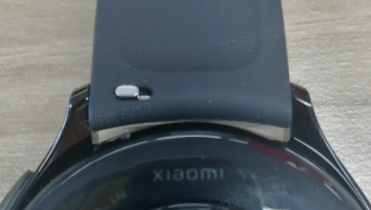
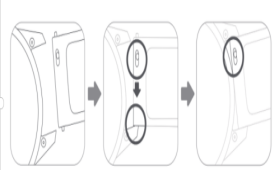
2. Install the watch strap: Put the worn strap into the hole on one side of the lug first, press the lug spring on the other side and send it to the lug. Gently move it until you feel the lug enter the hole.
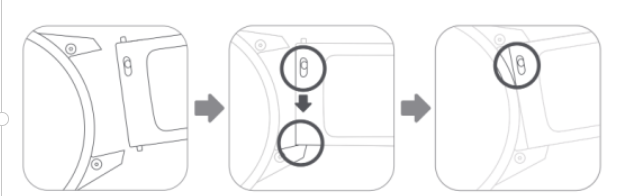
After installing the strap, please pull the strap to ensure that it is installed successfully.
Note: The raw ear refers to the steel rod of the link between the fixed strap and the watch body.
3. Q: What is the waterproof rating of Xiaomi Watch 2 Pro?
A: Xiaomi Watch 2 Pro has a waterproof rating of 5ATM, which can be used in shallow water activities such as pool swimming and beach swimming. Not suitable for saunas, hot springs, and other high-humidity and high temperature scenes, nor suitable for diving, diving, surfing and other high-speed water currents
Wading activities and deep water activities.
Note:
4. Q: What comes standard package of Xiaomi Watch 2 Pro? What are the colors?
A: Xiaomi Watch 2 Pro comes standard package with a watch body x 1, a contact charging base x 1, and a product manual guide x 1.
At present, there are two colors: black and silver. The standard strap of black is black, the standard strap of silver is brown.
App use-related
1. Q: Does Xiaomi Watch 2 Pro support which device binding? Does it support iOS?
A: Xiaomi Watch 2 Pro needs to be bound to the Mi Fitness App on Android, the apps can be searched and downloaded in the App Store, and it does not support iOS.
2. Q: How to unbind Xiaomi Watch 2 Pro?
A:1. Open the Mi Fitness App, click the device to unpair.
2. After the watch is restored to factory settings, it will automatically unbind from the phone.
After unbinding, the watch will be restored to factory setting and all data will be cleared.
3. Q: Can the Mi Fitness App be bound to multiple Xiaomi Watch 2 Pro?
A: You can bind multiple watches to the Mi Fitness App. Generally, you can bind 5-10 watches under the same account, but only one can be activated when using it.
4. Q: How to upgrade the system firmware of Xiaomi Watch 2 Pro?
A: Xiaomi Watch 2 Pro will push the follow-up upgrade package through the Mi Fitness App to update its functions.
1. On the watch, click Settings > System > Firmware update;
2. If a new version is found to be updated, click to download the upgrade package.
3. After the upgrade package is downloaded, the watch will automatically upgrade and restart.
Note:
When upgrading your watch, please keep at least 50% of the battery and connect to the Internet.
The watch needs to be connected to the phone during the upgrade process, and try to keep the watch near the phone.
To avoid consuming your mobile data during the firmware upgrade, please try to use your watch to connect to WiFi and turn off the watch’s Bluetooth.
Function and use related
1. Q: How about the battery life of Xiaomi Watch 2 Pro? How long can it be fully charged?
A: It takes about 1 hour to fully charge the Xiaomi Watch 2 Pro. The battery life can be up to 3 days or more in normal use, 24 hours in heavy use, and 7 days in normal use.
2. Q: How to charge Xiaomi Watch 2 Pro?
A: Xiaomi Watch 2 Pro has a battery capacity of 495mAh and comes standard with a magnetic USB dedicated charging dock.
The charging method is as follows:
1. Place the watch on the charging stand so that the charging contacts on the back of the watch and the metal contacts on the charging stand fit perfectly.
2. Connect the other side of the charging base to the USB-A charger (output voltage is 5V, output current ≥0.5A).
When the battery level of the watch is lower than 20%, it will prompt to connect the charger to charge; during the charging process, there will be a charging prompt.
Note:
3. Q: Does Xiaomi Watch 2 Pro support sleep monitoring?
A: Yes, it does, and the sleep monitoring function needs to be in the state of continuous heart rate monitoring and wear the watch normally at night to fall asleep. The watch can monitor heart rate through built-in sensors, automatically recognize and monitor night sleep.
4. Q: Does Xiaomi Watch 2 Pro support App notification reminders?
A: Yes, when the watch and mobile phone remain connected, opening the application notification on the Mi Fitness App, you can check it on the watch
Look at the message notification on the mobile phone; the message notification is displayed in a list and does not support folding or replying.
When the message is reminded, the watch only vibrates and does not actively light up. When viewing messages, you can raise your wrist to turn on the screen or manually charge the screen.
5. Q: How to check exercise records on Xiaomi Watch 2 Pro?
A: After the exercise is completed, the watch will generate a rich and vivid exercise report. All exercise record data includes exercise date, time, distance, calories, steps, pace, speed, heart rate, pace curve, speed curve, heart rate curve, Heart rate percentage, cadence curve, stride length, training effect, maximum oxygen uptake, energy consumption, exercise recovery time, etc.
View method:
1. View detailed exercise data in the "History" application of the watch.
2. After the watch is connected to the mobile phone, click "Health" on the Mi Fitness App homepage, and click the workout icon. You can view the exercise information in addition to the exercise information, movement track, and other information on the watch.
6. Q: How to set up a bright screen on Xiaomi Watch 2 Pro?
A: Setting method: in the watch settings >> [Display] >> [Brightness].
You can set the custom and adaptive brightness to your needs.
7. Q: Can the Xiaomi Watch 2 Pro add time in multiple countries?
A: The setting of dual time zones is not supported.
8. Q: What should I do if I forgot the password for Xiaomi Watch 2 Pro?
A: Please contact the after-sales service in time.
Frequent questions
1. Q: What is the resting heart rate of Xiaomi Watch 2 Pro?
A: Resting heart rate, also known as quiet heart rate, refers to the number of heartbeats per Minute in a state of wakefulness, inactivity, and silence.
The best time to measure resting heart rate is in a resting state in the morning after natural wakefulness.T he resting heart rate of an adult is usually between 50 and 100 beats.
In the interval of per Minute, the resting heart rate of professional athletes is usually between 40 and 60 beats/Min. Since the watch may not be in the best when it is automatically measured, the resting heart rate may not be displayed temporarily, or the test value may deviate from the actual value.
2. Q: What is the heart rate interval of Xiaomi Watch 2 Pro?
A: Heart rate interval refers to the range or level where the current heart rate is compared to the maximum heart rate. It reflects the negative load level of the heart. It is usually used to measure a person's exercise intensity.
1. Heart rate interval refers to the heart rate range per Minute, which is calculated based on the percentage of the maximum heart rate.
2. The maximum heart rate of the watch is calculated automatically, and it can also be set in the Mi Fitness App. There are several states of heart rate interval:
| Warm up | Used to develop basic physical fitness or to warm up before exercise.Type of exercise: brisk walking. |
| Fat burning | Used to improve basic physical performance and is conducive to increasing the rate of fat release and cardiovascular regulation. Type of exercise: Such as jogging. |
| Aerobic | Used for endurance training, it is beneficial to improve aerobic fitness, enhance vital capacity, and control breathing rhythm. Type of exercise: Such as easy running. |
| Anaerobic training | Used for speed raising training, which is beneficial to improve physical fitness. Exercise time between zones should be properly controlled. Type of exercise: Such as tempo or interval training. |
| Extreme Sports | Used for explosive force practice, in which lactic acid rapidly accumulates, and the probability of injury is high. Therefore, exercise time in this area should be strictly controlled. Type of exercise: such as extreme running. |
A: 1. Non-standard wearing methods, such as light leakage caused by incomplete fitting, arm swing, and slight movement of the watch on the skin; Wearing a tight watch, raising arms, and clenching fists can affect blood circulation, as well as heart rate signals.
2. The watch has more stains above the sweat.
The right way to measure: Lay your arms flat, relax and hold still, while keeping your watch close to your arms.
Note: Individual differences such as skin color, hair, tattoos, and scars may also affect heart rate monitoring if worn correctly (brown and black skin cannot be measured, and dark skin has a high absorption of green light and cannot be detected).
4. Q: What should I do if my heart rate is too high as measured by Xiaomi Watch 2 Pro?
A: When the heart rate is too high, you should take a proper rest instead of excessive exercise. If the heart rate continues too high, it is recommended to consult medical staff in a timely manner according to your own situation.
5. Q: How to judge the effective standing of Xiaomi Watch 2 Pro?
A: Effective standing: more than 200 steps per hour or more than 3 Minutes of moderate to vigorous activity counts as effective standing
Set up. Sitting for long periods of time may pose health risks to your body. We recommend that it be completed more than 12 standing activities between 00:00 and 24:00 every day.
6. Q: What is the number of words and messages that Xiaomi Watch 2 Pro supports?
7. Q: Does the Xiaomi Watch 2 Pro support connecting a heart rate band?
A: The heart band connection is not supported.
8. Q: What are the lighting options of Xiaomi Watch 2 Pro?
A: 1. In the off-screen state, click the power button or shortcut key.
2. If the screen is turned on, lift the wrist to light up the screen.
3. Click " " in the control panel to keep the screen on for 5 Minutes.
Note:
Double-clicking to light up the screen is not supported.
9. Q: Does the Xiaomi Watch 2 Pro support low-light mode?
A: The watch supports AOD(low-light mode). When turned on, the watch will enter the AOD(low-light mode) after automatic screen-out. You can go [Settings] >> [Display] >> [Always-on display] to turn on.
Note:
1. This function will reduce the battery life of the watch after it is turned on. It is suggested that users can choose whether to turn it on or not according to their needs.
2. In the off display state, you can touch to wake the screen to exit the off display and light up the screen.
Turning on this function will reduce the battery life of the watch, and the function of lifting the wrist to light the screen will be unable to be used.
If the screen is on, the screen will go dim if you take it off your it for 5 sec. If the screen is on, it will go dim if you manually cover it. Night detection of sleep will be dim screen.
Troubleshooting
1. Q: Why does my Xiaomi Watch 2 Pro count inaccurately?
A: Step recording principle: The watch has a built-in acceleration sensor that detects data through the acceleration sensor and then combines the algorithm and the basic information of the human body, which is eventually converted into information such as steps, consumption, etc.
Factors that affect the number of steps recorded by the watch:
1. Because the watch measures the walking distance based on the user's own set height, gender, and weight to estimate the user's step, and then multiplied by the number of steps taken by the individual to arrive at an estimated value.
2. Because steps will vary from person to person, maybe people with the same height, gender, and weight will have different steps, so the final calculated value will also have a large error.
3. The accuracy of the pace, that is, the number of steps walked, there are many uncertainties will have a lot to do with each person's behavior habits, such as the arm swinging range walking habits and human activity scenes more (such as walking, riding, driving, bathing, etc.), arm movements are more complex (such as keyboard tapping, moving the mouse, lifting objects, etc.).
4. It is precisely because of the above reasons that the watch's final calculated distance is also an estimated value; the watch can not be used as a professional measurement tool to measure the distance. This is followed by continuous optimization of the software algorithm to calculate more accurate data.
2. Q: What to do if there is a wrist lift screen failure, heart rate failure, push dial failure, compass failure, or Bluetooth frequent disconnection?
A: In either case, try pressing and pressing the key on the watch for 12 seconds to restart the watch and return to normal after the restart.
3. Q: Why is GPS sometimes slow?
A: A GPS start-up is divided into cold start, warm start, and hot start. A cold start generally occurs in the following situations:
1. watch GPS function when first used.
2. watch battery exhaustion shut down caused by the loss of satellite calendar information;
3. watch shutdown state displacement of more than 200 kilometers
Solution: When GPS positioning is slow, you can turn the AP back on and reconnect your watch to sync data, which will also greatly improve GPS positioning speed.
Because in a cold start state, the watch GPS positioning system needs to download satellite calendar information, therefore, positioning will be much larger than the temperature start and heat start conditions. Taking into account the way the watch is worn and the impact of the arm on the GPS antenna, it is recommended that the user choose an open space during cold start-up (including first positioning), keep the dial pointing to the sky under normal watch wear, and complete the download of the star calendar and GPS cold start-up positioning in 60 to 90 seconds, depending on the weather and surrounding environment.
If the watch has not shifted significantly since the last positioning and is less than 2 hours apart from the last positioning, the watch GPS can achieve a hot start. In open spaces, the watch is worn normally, and the dial can be positioned in about 5 seconds when the dial points to the sky. The specific time is related to the weather and the surrounding environment.
4. Q: Why is there sometimes, there is no movement track or track loss after movement?
A:1. Before the start of the movement, please check to confirm that in the sports preparation interface, GPS positioning success (i.e., GPS symbol turned yellow, and there is a vibration prompt) after the start of the movement.
2. GPS is affected by many factors, such as surrounding tall buildings, complex terrain, overpasses, tunnels, and complex electrical signal environments, harsh climatic conditions, such as sandstorms, heavy rain, and bad natural weather will cause GPS positioning failure, loss of track, and so on.
3. In order to ensure that the GPS movement trajectory is more accurate, it is recommended to keep the phone and watch connected when the motion is turned on.
5. Q: Why didn't Xiaomi Watch 2 Pro generate motion data after exercise?
A: 1. Please confirm that the watch is functioning normally, heart rate is normal.
2. After the movement is turned on, whether the exercise time or distance reaches the Minimum standard of sports records;
3. Maybe due to improper wearing, the heart rate is not properly monitored.
Note: If the user feedback freestyle posture, distance recognition is not allowed, the follow-up software will be continuously optimized; it is recommended that users wait for updates.
6. Q: Why is there no sleep data in Xiaomi Watch 2 Pro?
A: 1. Please confirm whether the watch is worn normally.
2. There is a delay in the generation of sleep reports. If you open the sleep app for the first time after you wake up, there may be no sleep report. Users are advised to check it again after a period of time.
3. Update the system version to the latest version and restart the watch.
7. Q: What to do if the Xiaomi Watch 2 Pro can't be charged?
A: Please troubleshoot or check according to the following methods:
1. It is recommended to use the regular standard charging head for charging.
2. Check the main body of the watch metal contacts and the charging cable metal contacts for stains. You can try to wipe with paper towels, etc. (If corrosion occurs, wipe with cotton sticks or cotton cloth with alcohol) to ensure that the watch body and charging cable do not come into contact with the situation.
3. The watch from the charging stand to take back, re-plug, and replace the socket to try.
4. If the above troubleshooting is invalid, you can apply for after-sales inspection.
8. Q: What should I do if the Xiaomi Watch 2 Pro doesn't vibrate?
A: 1. First, check whether the watch has turned on the do-not-disturb mode.
2. If it is not turned on, you can restart the watch. After the restart is successful, you can set more alarm clocks. If the watch screen can normally display the alarm clock alarm interface at the time point, but the watch does not vibrate, you can apply for after-sales processing of the watch.
9. Q: What should I do if the system upgrade of Xiaomi Watch 2 Pro fails?
A:1. If the app or wearable device prompts that the upgrade failed, please try to restart the wearable device and upgrade again.
2. Put the watch on the charger and upgrade it when the battery of the watch is more than 50%.
3. Reset the watch, pair again, and then try to update.
4. Please keep the WiFi network on your phone or watch open.
3. If the upgrade fails, please contact the after-sales department for handling.
10. Q: How to deal with Mi Fitness App and Xiaomi Watch 2 Pro sync failure?
A: 1. Please check the mobile phone App version and watch firmware version is up-to-date; if not, try upgrading first.
2. Please check your phone's internet connection. If your phone's Wi-Fi connection is disconnected, try reconnecting, and if your Wi-Fi connection is working and you still can't sync, use mobile data.
3. Check the watch and mobile phone connection status, make sure that the Bluetooth connection is working, and try refreshing the App several times.
4. You can restart the phone Bluetooth, try restart watch.
11. Q: How to deal with Xiaomi Watch 2 Pro heart rate measurement failure?
A: Turn off the continuous heart rate detection, click the heart rate of the watch, and measure the heart rate at a single time. When the watch is measuring, check whether the heart rate light at the bottom of the watch will be on. If it is not on, you can unbind and rebind the watch or restart the watch. If it still fails, you can apply for after-sales detection.
12. Q: How to deal with the time error of Xiaomi Watch 2 Pro?
A: If the watch time does not match the phone time, you can connect Mi Fitness App for refresh operations.
13. Q: What if the Xiaomi Watch 2 Pro can't be connected?
A:1. Confirm whether the downloaded app is correct. Android needs to download the Mi Fitness App.
2. Exit the app and turn off the Bluetooth switch to turn on the binding attempt again.
3. If you can't find a watch in the Mi Fitness App, you can put the watch close to your mobile phone, or go to a place where there are few Bluetooth devices to search and add it again.
4. If it still can't be searched, check whether there is watch information in the Bluetooth settings of the mobile phone, clear the Bluetooth pairing information of the watch, and then enter the homepage of Mi Fitness App to re-add the device. Take the Xiaomi mobile phone as an example: [Settings] >> select the watch >> [Device] >> tap the drop-down arrow next to the model >> delete the watch, and then add binding again.
5. Restart the watch or mobile phone, reset the watch, and change the environment attempt.
14. Q: What should I do if the weather on Xiaomi Watch 2 Pro is not updated?
A: The weather is usually updated every 15 to 30 Minutes. If you find the weather is not updated for a long time, please check as follows:
1. Please open the Mi Fitness App and check whether the Bluetooth connection is disconnected between the watch and the mobile phone on the home page.
15. Q: What if Xiaomi Watch 2 Pro’s screen doesn't light up?
A: If the watch screen turns off, you can't light up the screen by lifting the wrist or pressing the power key/shortcut key. Please try the following operations:
1. The watch may be out of power. Please connect the charging stand to check whether the power is sufficient.
2. Please press the power button for 12 seconds to force the watch to restart. After the restart, please check the watch value version. Please update the watch to the latest version.
16. Q: What should I do if the heart rate measurement of Xiaomi Watch 2 Pro is not accurate?
A: 1. Nonstandard way of wearing will affect the measurement of the heart rate signal, such as light leakage caused by incomplete fit, arm swing, and slight movement of the watch on skin. Wearing a watch too tightly, raising the arm, and clenching will affect blood circulation and may also affect heart rate.
2. Check the condition of the clothing. It needs to be a little tight when checking. If you move the watch above, down, left, and right, it can't slide. Secondly, it is necessary to verify the position of wearing the watch. It is not allowed to wear it at the wrist joint. If the wrist joint moves more, it is easy to cause a loose fit between the bottom of the watch and the skin.
17. Q: Why does the watch vibrate but does not light up when there are new news reminders?
A: This is a normal phenomenon. The watch system optimizes the strategy of message reminders. Considering that there are many message notifications in normal use, it will frequently touch the bright screen. On the one hand, it will have a certain impact on power consumption; on the other hand, it is also an excessive disturbance. Therefore, the strategy of message notification and reminder is updated. When the message comes, it only vibrates and does not actively light up the screen. The control right of viewing is in itself.
You can set this mode by yourself on the Mi Fitness app:[App notifications] >> [Wake screen >> [Turn on].
18. Q: Why are the steps of the watch different from those of the Mi Fitness App?
A: It may be caused by the disconnection of the watch and app, and the step number information is not synchronized in time. It can be synchronized after refreshing in the app.
19. Q: What if Xiaomi Watch 2 Pro is successfully paired but not connected?
A: 1. First of all, make sure the watch has sufficient power.
2. The flight mode of the watch must be turned off. On the watch dial page, slide up the screen to see if the flight mode icon is turned off.
3. Check the connection status of the Mi Fitness App. If it is disconnected, click to connect again.
4. Finish the process of Mi Fitness App, restart the Bluetooth of the mobile phone, restart the mobile phone or watch, and try to refresh the connection in the App.
5. Please try to restore the watch to the factory settings, and then click Connect on the home page of the app. When the same pairing code appears on the watch and app interface, tap Pair.
6. If the problem still cannot be solved, please clear the Bluetooth pairing with the watch in the Bluetooth settings of the mobile phone, restore the watch to the factory settings, and then proceed with the binding process again.
20. Q: Why is the weather of the watch different from that of the mobile phone?
A: The weather information displayed on the watch is pushed back by the Mi Fitness App from the service provider. If it is different from the weather service provider used by the mobile phone system, the result displayed may be slightly different.
21. Q: Why is it that the watch doesn't count when it's already walking?
A: The watch will update step several times every Minute, but not in real time every second.
22. Q: Why can't my OPPO phone call switch to my watch?
A: Some current OPPO phones do not support switching calls to the watch.
23. Q: Why is the Mi logo reversed after switching the crown direction?
A: Because the Mi logo does not belong to the system interface, it is only switched for the system interface.
24. Q: Why is the pop-up timeout when getting the weather?
A: Please go to [Settings] >> [System] >> [Date & Time] and make sure the "Automatic date & time" and "Automatic time zone" switches are on.
25. Q: Why do I enter the passcode lock screen after changing the crown direction?
A: When changing the direction of the crown, the wearing sensor will restart, and then the watch will enter the password lock screen. Please enter the correct password to unlock the watch.
26. Q: Why is there an error in the altitude/air pressure data? (or large error)
A: When the network is not connected, the watch will calculate the current altitude/air pressure through the sensor, and there will be errors. Connecting to the network can improve the accuracy of altitude/air pressure. Please keep the network connection normal.
27. Q: Why are the workout reports and drawings displayed on the watch and mobile phone inconsistent?
A: The screen of the watch is small, and its performance is not as good as that of the mobile phone, so the drawing ability of the watch is not as rich as that of the mobile phone. To view more detailed data, please go to the Mi Fitness App.
28. Q: The watch is not factory reset after unbinding from the Mi Fitness App?
A: Please ensure that the watch is connected to the mobile phone. If you unbind it when it is not connected, the watch will not be restored.
29. Q: Why does the watch experience delays in system response, freezes, and no response to touch when the watch is in a low-power state?
A: When the watch prompts low power status, in order to protect the current power as much as possible, the chip manufacturer will reduce the operating frequency when the processor state enters the low energy consumption mode, thereby reducing the power consumption of the CPU. In addition, the performance of the operating system is reduced, i.e., it uses fewer resources to run. Therefore, the performance of rendering may be reduced, and even the stability of the application may be affected. At this time, you need to charge the watch.
30. Q: Why is my Xiaomi Watch 2 Pro's blood oxygen saturation measurement inaccurate?
A: The following reasons may lead to inaccurate measurement of oxygen saturation:
1. The watch is not properly worn, and the sensing area on the back of the device is not in contact with the skin of the wrist, so data cannot be obtained.
2. The sensing area on the back of the watch is dirty, or there is sweat between the wrist and the device, which may affect the measurement result.
3. In a low temperature environment, orwhen the wrist skin temperature is too low, or lead to reduced blood flow, affecting the measurement results.
4. The wrist of wearing the watch is in a state of pressure, which affects blood circulation and can also lead to inaccurate measurement results.
5. The wrist position of the watch has tattoos or pigmentation, which will affect the penetration of the sensor light, resulting in inaccurate measurement results.
6. If it is a single measurement, it does not keep the wrist still during the process, shake the arm, or talk to people, and get emotional.
31.Q: Xiaomi Watch 2 Pro always stays on the Mi logo when it power on.
A: Please make sure not to press the up button and the crown button at the same time when the watch is power on. This will turn on the port mode and the interface will stay on the Mi logo. Please try holding the down button for 8 seconds to restart or reset.
Does it help?