

How to select or switch input sources on the Xiaomi TV A Pro 55 2025?
The Xiaomi TV A Pro 55 2025 supports several external devices, such as gaming consoles, Blu-ray or DVD players. When you switch input sources, you instruct your TV to receive a signal from a different connected device.
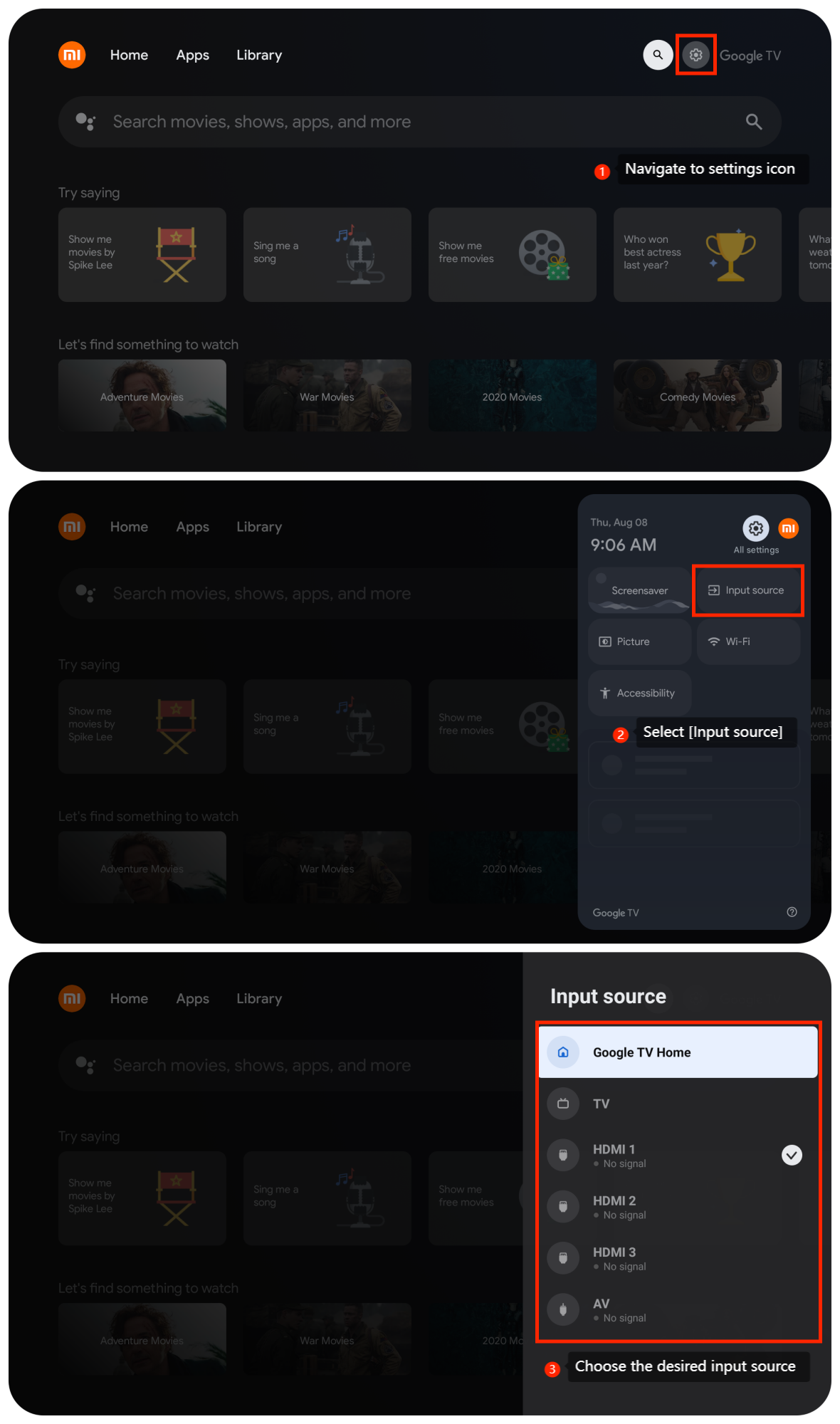
To select or switch input sources on the TV, please follow these steps:
1. From the TV home screen, navigate to the settings icon;
2. In the settings menu, select [Input source];
3. Choose the desired input source from the list.
To select or switch input sources on the TV, please follow these steps:
1. From the TV home screen, navigate to the settings icon;
2. In the settings menu, select [Input source];
3. Choose the desired input source from the list.
Note:
You can also use your remote control by pressing the input button which has an icon resembling a rectangle with an arrow, to switch input sources. This method allows you to quickly and easily toggle between different devices connected to your TV, enhancing your using experience.
You can also use your remote control by pressing the input button which has an icon resembling a rectangle with an arrow, to switch input sources. This method allows you to quickly and easily toggle between different devices connected to your TV, enhancing your using experience.
Does it help?
Yes
No