

Xiaomi Smart Pen 2nd generation FAQ
1.Q:Xiaomi Smart Pen 2nd generation button function.
A:When the tablet screen is on, long press the up key (screenshot key) to take a screenshot, long press the shorthand key (shorthand key) to quickly enter the note APP for writing.
2.Q:How do I connect the Xiaomi Smart Pen 2nd generation to the Xiaomi Pad 6?
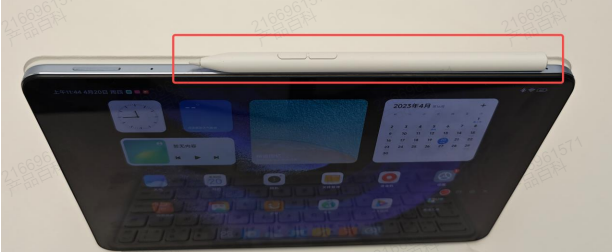
A:Turn on the Bluetooth on the tablet, and place the Xiaomi Smart Pen button face-up at the position with the greatest magnetic attraction. At this time, the Xiaomi Smart Pen will automatically connect to the tablet through Bluetooth, and a pen battery icon will pop up.
Note: When the Xiaomi Smart Pen is connected to one tablet, it needs to be switched to another tablet for use. Please disconnect the Xiaomi Smart Pen in the Bluetooth connection of the first tablet, and then place the pen in the magnetic position of the other tablet to pair again.
3.Q:How to upgrade the firmware version of Xiaomi Smart Pen via Xiaomi Smart Pen 2nd generation?
A:In Settings - Stylus and Keyboard - Stylus - Firmware Update, click Detect Updates to check if there is new firmware, if there is an update click Update to upgrade the pen's firmware to the latest version.
4.Q:Can Xiaomi Pad 6 use the first generation of Xiaomi Smart Pen?
A:Due to different product designers, Xiaomi Pad 6 cannot use the first generation of Xiaomi Smart Pen.
5.Q:Does Xiaomi Smart Pen 2nd generation work on Xiaomi Pad 5 series?
A:Xiaomi Smart Pen 2nd generation is supported on Xiaomi Pad 5 series, you need to upgrade your MIUI version to the latest one. In Settings - Stylus and Keyboard - Stylus - Firmware Update to check if there is a new Xiaomi Smart Pen firmware update, if there is, upgrade the pen's firmware to the latest version as well.
Note: If you are worried that the power level of the Xiaomi Smart Pen is not enough, you can remove the Xiaomi Smart Pen from the tablet and put it back in every once in a while, and the Xiaomi Smart Pen will be recharged again until it is fully charged.
Note: If you still want to use the Xiaomi Smart Pen in gaming scenarios, you can remove the corresponding game from the [Game Turbo] → [+ (Add Game)] → [Added Games] list. Activating the Xiaomi Smart Pen through this method may bring uncertain experience issues, and it is still recommended that you use the tablet under preset conditions.
9.Q:Why does the nib of Xiaomi Smart Pen 2nd generation wear out quickly when writing on paper-like film?
A:The hardness of the pen tip is softened for writing on the surface of the tablet screen or tempered film, the friction coefficient of the paper-like film is relatively large, and writing on the paper-like film of the Xiaomi Smart Pen will lead to rapid depletion of the pen tip, so it is recommended that you don't use the stylus on the paper-like film.
10.Q:Why does the Xiaomi Smart Pen 2nd generation not respond to writing when fully charged and placed in the magnetic position of the tablet?
A:Thank you for your feedback, please upgrade the firmware of Xiaomi Smart Pen to the latest version in Settings → Stylus and Keyboard → Stylus → Firmware Update, thank you.
12.Q:Does Xiaomi Smart Pen 2nd generation work on PCs with touch screen support such as Xiaomi Book Air 13?
A:Xiaomi Smart Pen 2nd generation is not supported to be used on PC with touch screen.
13.Q:How to check the SN of Xiaomi Smart Pen 2nd generation?
A:Xiaomi Smart Pen 2nd generation SN is laser engraved on the body of the pen, please tilt it to a certain angle in a bright environment.

A:When the tablet screen is on, long press the up key (screenshot key) to take a screenshot, long press the shorthand key (shorthand key) to quickly enter the note APP for writing.
2.Q:How do I connect the Xiaomi Smart Pen 2nd generation to the Xiaomi Pad 6?
A:Turn on the Bluetooth on the tablet, and place the Xiaomi Smart Pen button face-up at the position with the greatest magnetic attraction. At this time, the Xiaomi Smart Pen will automatically connect to the tablet through Bluetooth, and a pen battery icon will pop up.
Note: When the Xiaomi Smart Pen is connected to one tablet, it needs to be switched to another tablet for use. Please disconnect the Xiaomi Smart Pen in the Bluetooth connection of the first tablet, and then place the pen in the magnetic position of the other tablet to pair again.
3.Q:How to upgrade the firmware version of Xiaomi Smart Pen via Xiaomi Smart Pen 2nd generation?
A:In Settings - Stylus and Keyboard - Stylus - Firmware Update, click Detect Updates to check if there is new firmware, if there is an update click Update to upgrade the pen's firmware to the latest version.
4.Q:Can Xiaomi Pad 6 use the first generation of Xiaomi Smart Pen?
A:Due to different product designers, Xiaomi Pad 6 cannot use the first generation of Xiaomi Smart Pen.
5.Q:Does Xiaomi Smart Pen 2nd generation work on Xiaomi Pad 5 series?
A:Xiaomi Smart Pen 2nd generation is supported on Xiaomi Pad 5 series, you need to upgrade your MIUI version to the latest one. In Settings - Stylus and Keyboard - Stylus - Firmware Update to check if there is a new Xiaomi Smart Pen firmware update, if there is, upgrade the pen's firmware to the latest version as well.
6.Q:Why can't the 2nd generation of Xiaomi Smart Pen connect in some scenarios? Why the tablet can't display the power level of the Xiaomi Smart Pen after I put it on the magnetic pen charging position of the tablet?
A:When Xiaomi Smart Pen 2nd generation is connected to the tablet, the tablet will show the power level of Xiaomi Smart Pen. ①If the power indication does not appear after placing the Xiaomi Smart Pen to the magnetic pen charging position of the tablet, please do the following to troubleshoot.If the Xiaomi Smart Pen is not placed in the correct position on the tablet, it is recommended to remove the Xiaomi Smart Pen and place it in the position with the greatest magnetic attraction. After the pen body and the right side of the tablet centre frame fit correctly, the tablet will pop up the wireless charging tip of the pen, and it will show the current battery level of the pen. ②Xiaomi Smart Pen 2nd generation uses an internal battery, similar to mobile phone products with internal batteries. When the built-in battery is completely dead, the Xiaomi Smart Pen will not turn on and connect to the tablet. Only after charging the Xiaomi Smart Pen first can the Xiaomi Smart Pen connect to the tablet, and the current battery level of the Xiaomi Smart Pen will be displayed on the tablet only after the connection is successful. Therefore, you can put the Xiaomi Smart Pen on the right side of the tablet in the pen charging magnetic position to charge for 2-3 minutes before trying again.7.Q:Why is the Xiaomi Smart Pen 2nd generation not fully charged when I remove it after putting it on the pen suction position of the tablet for a long time?
A:In order to enhance the service life of the Xiaomi Smart Pen and not to cause float charging of the Xiaomi Smart Pen battery, we have designed an anti-float charging strategy. Once the Xiaomi Smart Pen is fully charged, the tablet will not continue to charge the Xiaomi Smart Pen until the Xiaomi Smart Pen's power is consumed to about 80% before it starts charging again until it is full. So there may be a situation that although the Xiaomi Smart Pen has been magnetically attached to the tablet, it is not fully charged when you take it off. In fact, you don't have to worry about it at all, 80% of the battery is enough for you to write continuously for about 80 hours, which is basically enough to meet your long-time writing needs.Note: If you are worried that the power level of the Xiaomi Smart Pen is not enough, you can remove the Xiaomi Smart Pen from the tablet and put it back in every once in a while, and the Xiaomi Smart Pen will be recharged again until it is fully charged.
8.Q:Why Xiaomi Smart Pen 2nd generation can't be used in the gaming scene of Xiaomi Pad 6?
A:To ensure your experience in gaming scenarios, Xiaomi Pad 6 disables the Xiaomi Smart Pen function to avoid interference with gaming. This is not a fault of the tablet or the Xiaomi Smart Pen.Note: If you still want to use the Xiaomi Smart Pen in gaming scenarios, you can remove the corresponding game from the [Game Turbo] → [+ (Add Game)] → [Added Games] list. Activating the Xiaomi Smart Pen through this method may bring uncertain experience issues, and it is still recommended that you use the tablet under preset conditions.
9.Q:Why does the nib of Xiaomi Smart Pen 2nd generation wear out quickly when writing on paper-like film?
A:The hardness of the pen tip is softened for writing on the surface of the tablet screen or tempered film, the friction coefficient of the paper-like film is relatively large, and writing on the paper-like film of the Xiaomi Smart Pen will lead to rapid depletion of the pen tip, so it is recommended that you don't use the stylus on the paper-like film.
10.Q:Why does the Xiaomi Smart Pen 2nd generation not respond to writing when fully charged and placed in the magnetic position of the tablet?
A:Thank you for your feedback, please upgrade the firmware of Xiaomi Smart Pen to the latest version in Settings → Stylus and Keyboard → Stylus → Firmware Update, thank you.
11.Q:Why does the tip of Xiaomi Smart Pen 2nd generation move up and down after rotating or pressing?
A:Xiaomi Smart Pen 2nd generation in order to make 4096 levels of pressure-sensitive writing more delicate, built-in pressure switch requires a certain amount of space, the tip of the pen rotates or moves up and down slightly, which is a normal phenomenon.12.Q:Does Xiaomi Smart Pen 2nd generation work on PCs with touch screen support such as Xiaomi Book Air 13?
A:Xiaomi Smart Pen 2nd generation is not supported to be used on PC with touch screen.
13.Q:How to check the SN of Xiaomi Smart Pen 2nd generation?
A:Xiaomi Smart Pen 2nd generation SN is laser engraved on the body of the pen, please tilt it to a certain angle in a bright environment.
Does it help?
Yes
No