

How to enter the Store Mode on the Xiaomi TV A 50 2025?
The Xiaomi TV A 50 2025 comes with the Store Mode feature, which is designed for in-shop display and feature introduction. It provides you with a more customized and optimized setting to ensure that the TV displays the best picture quality and color. This can help to attract people's eyes and make things more noticeable in the display area.
To enter the Store Mode on your TV, please refer to the following steps:
1. Navigate to [Settings];
2. Tap [All settings];
3. Scroll down and select [System];
4. Select [TV Mode];
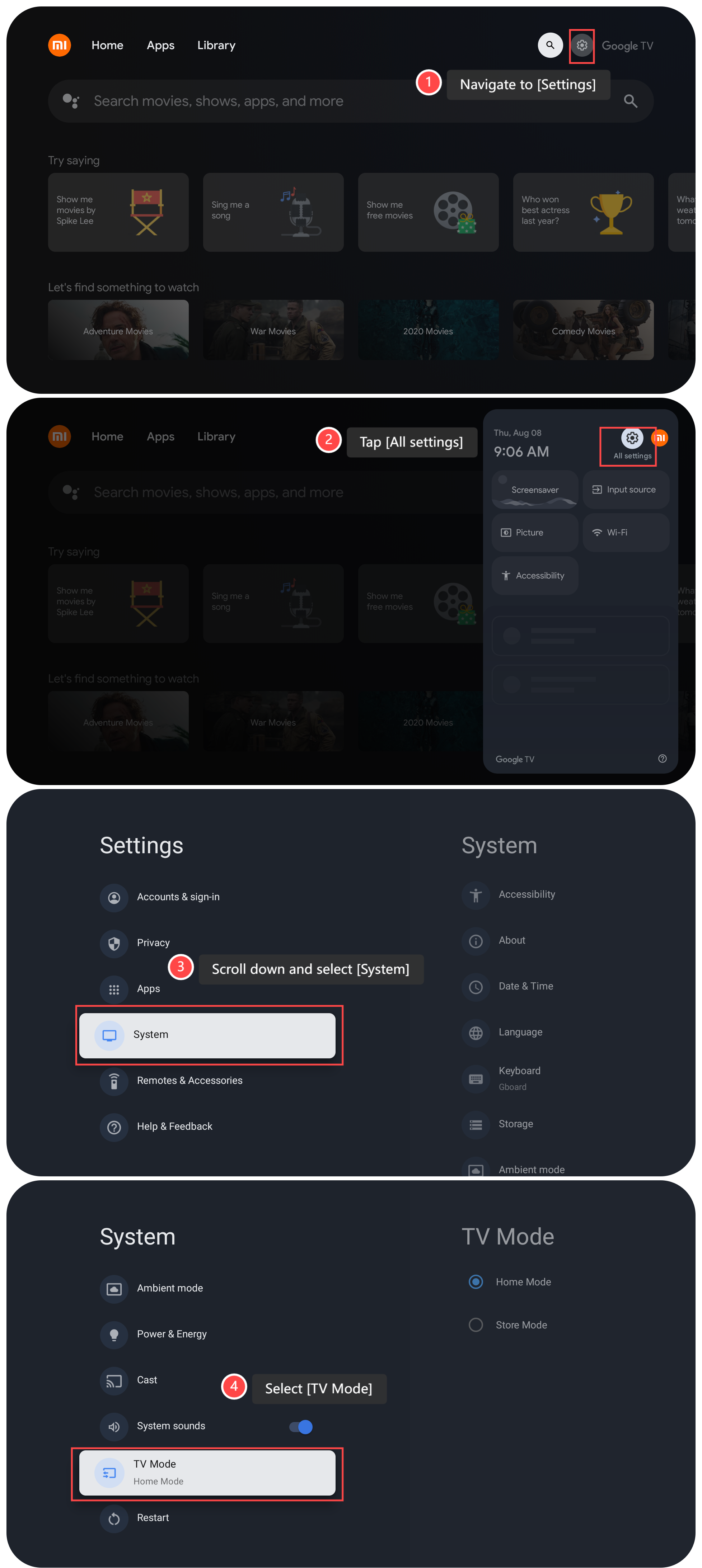
5. Switch to [Store Mode];
6. Tap [Yes];
7. Tap [OK] to confirm to open the Store Mode.

Note:
After you switch to the Store Mode, your TV will still work in this mode even if you restart the device.
To enter the Store Mode on your TV, please refer to the following steps:
1. Navigate to [Settings];
2. Tap [All settings];
3. Scroll down and select [System];
4. Select [TV Mode];
5. Switch to [Store Mode];
6. Tap [Yes];
7. Tap [OK] to confirm to open the Store Mode.
Note:
After you switch to the Store Mode, your TV will still work in this mode even if you restart the device.
Does it help?
Yes
No