

How to enter the Home Mode of the Xiaomi TV A Pro 75 2025?
The Xiaomi TV A Pro 75 2025's Home Mode is designed for families, providing personalized content recommendations and quick access features. You can create multiple profiles for a customized viewing experience, pin frequently used applications on the home screen, and quickly launch favorite shows and movies. Home Mode also supports family sharing, allowing multiple family members to share content and accounts, and set content restrictions and screen time management through the parental controls function to ensure that children's viewing content is appropriate.
To enter the Home Mode, you can refer to the following steps:
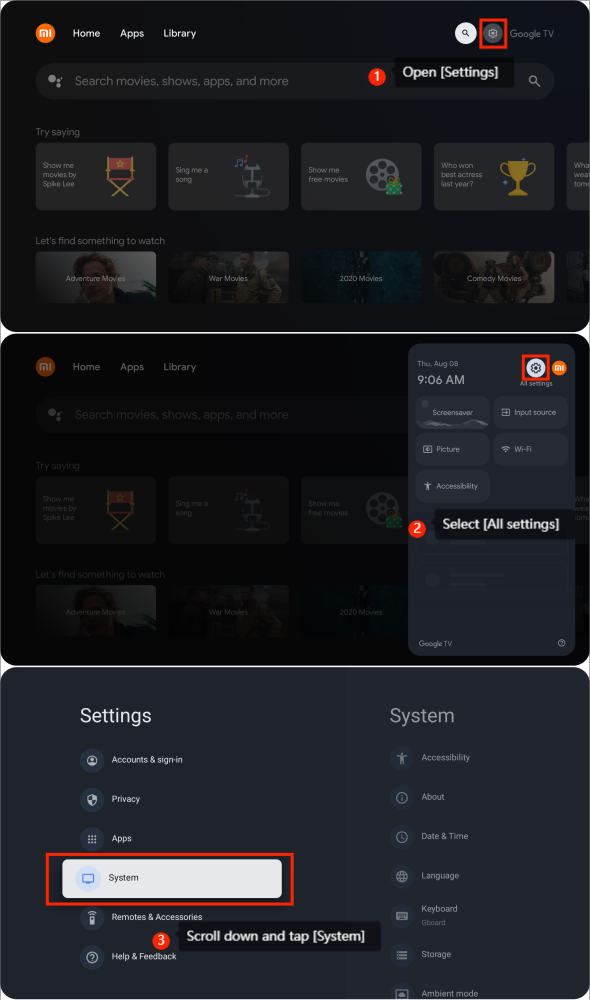
1. Open [Settings];
2. Select [All settings];
3. Scroll down and tap [System];
4. Scroll down and tap [TV Mode];
5. Select [Home mode];
6. Tap [Exit] to enter Home Mode.
To enter the Home Mode, you can refer to the following steps:
1. Open [Settings];
2. Select [All settings];
3. Scroll down and tap [System];
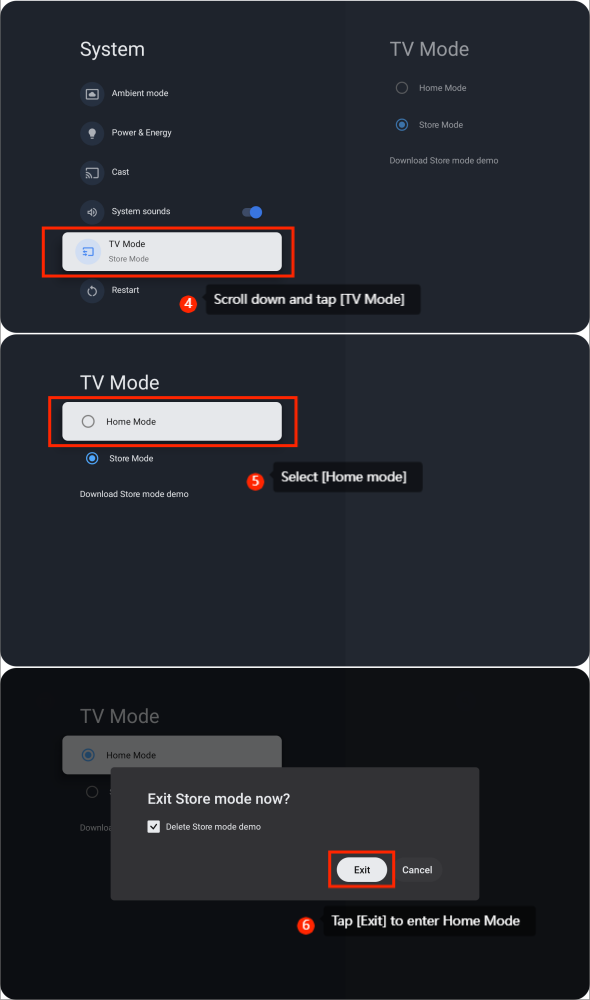
4. Scroll down and tap [TV Mode];
5. Select [Home mode];
6. Tap [Exit] to enter Home Mode.
Does it help?
Yes
No