

How to enter the Recovery Mode on the Xiaomi TV A 50 2025?
The Recovery Mode on the Xiaomi TV A 50 2025 is an important feature used to troubleshoot device failures, reset the device, or perform a system recovery.
For your reference, here are the steps to enter the Recovery Mode:
1. Make sure the TV is completely turned off, which includes turning off your TV and removing the cable from the electricity. Then please wait for about 10 seconds;
2. Simultaneously press and hold on the [OK] and [Back] buttons on the remote control;
3. While holding these buttons, put the TV cable back into the electricity. Continue to hold the buttons until the Recovery Mode interface appears;
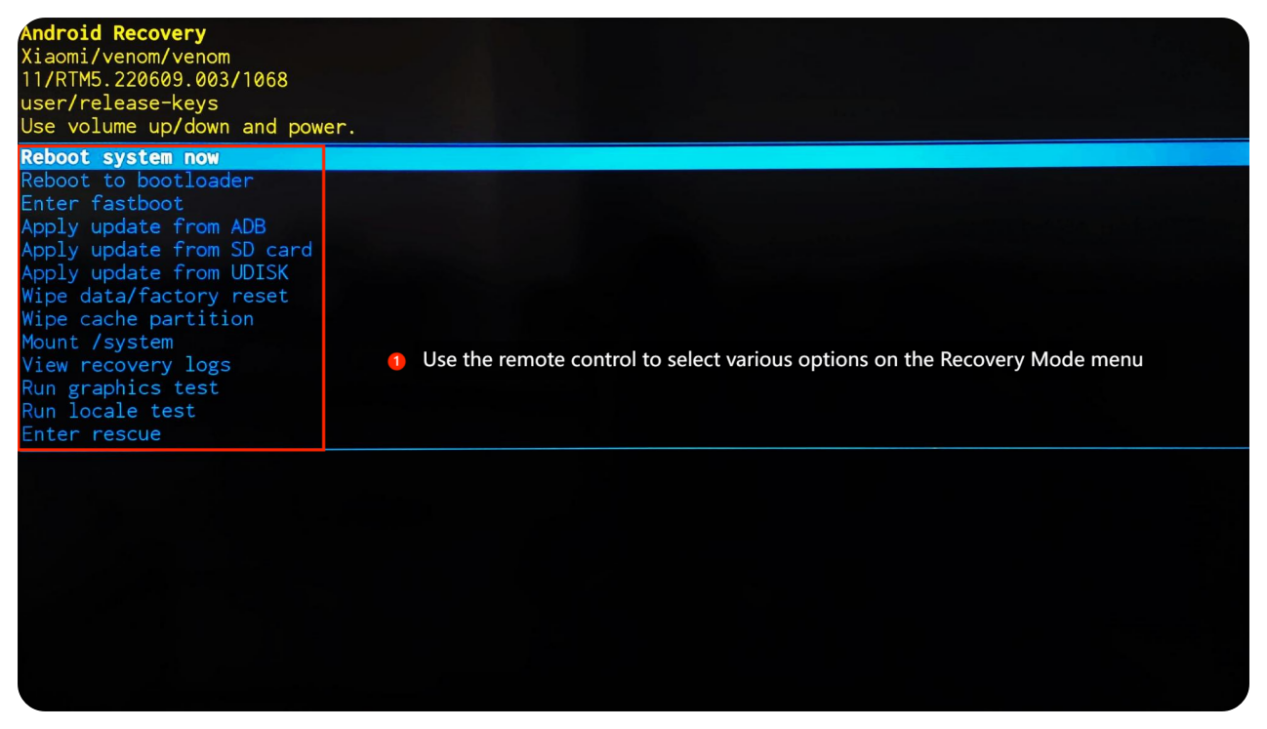
4. You can use the directional buttons on the remote control to select various options on the Recovery Mode menu;
5. Wait for seconds until the home screen is displayed, which means the process is completed.
For your reference, here are the steps to enter the Recovery Mode:
1. Make sure the TV is completely turned off, which includes turning off your TV and removing the cable from the electricity. Then please wait for about 10 seconds;
2. Simultaneously press and hold on the [OK] and [Back] buttons on the remote control;
3. While holding these buttons, put the TV cable back into the electricity. Continue to hold the buttons until the Recovery Mode interface appears;
4. You can use the directional buttons on the remote control to select various options on the Recovery Mode menu;
5. Wait for seconds until the home screen is displayed, which means the process is completed.
Does it help?
Yes
No