

How to download and install APPs on the Xiaomi TV A 55 2025?
The Xiaomi TV A 55 2025 has a large number of APPs for you to install and use, providing rich and diverse content, personalized viewing experience, convenient control methods, high-quality video and audio, and cross-platform compatibility. Through the Google Play Store, you can access thousands of APPs, including streaming services, music, games, news, and social media APPs. Mainstream streaming platforms such as Netflix, YouTube, Amazon Prime Video, Disney+, etc. can be used on the TV, providing a wide range of entertainment options.
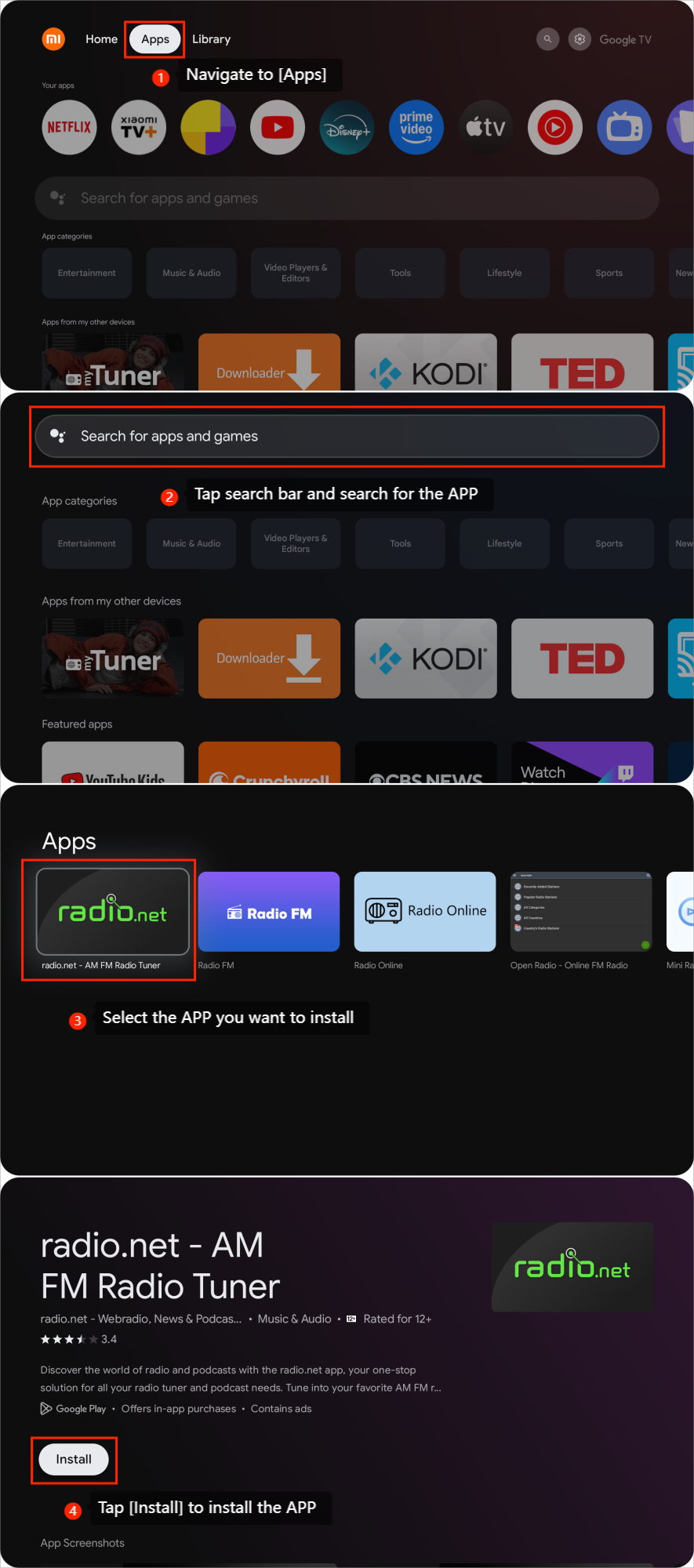
To download and install APPs, you can refer to the following steps:
1. Navigate to [Apps];
2. Tap the search bar and search for the APP;
3. Select the APP you want to install;
4. Tap [Install] to install the APP.
To download and install APPs, you can refer to the following steps:
1. Navigate to [Apps];
2. Tap the search bar and search for the APP;
3. Select the APP you want to install;
4. Tap [Install] to install the APP.
Does it help?
Yes
No