

How to connect the Xiaomi TV A Pro 75 2025 to a wired network?
The Xiaomi TV A Pro 75 2025 supports wired network connections, an important feature in scenarios that require a more stable and high-speed Internet connection. Wired network connections are more stable than wireless connections, reducing network interruption problems caused by signal interference or distance. Wired connections provide higher network speeds, which is especially important when smooth playback of high-quality video content is required. Additionally, wired network connections can significantly reduce latency and are suitable for application scenarios that require immediate response, such as online games.
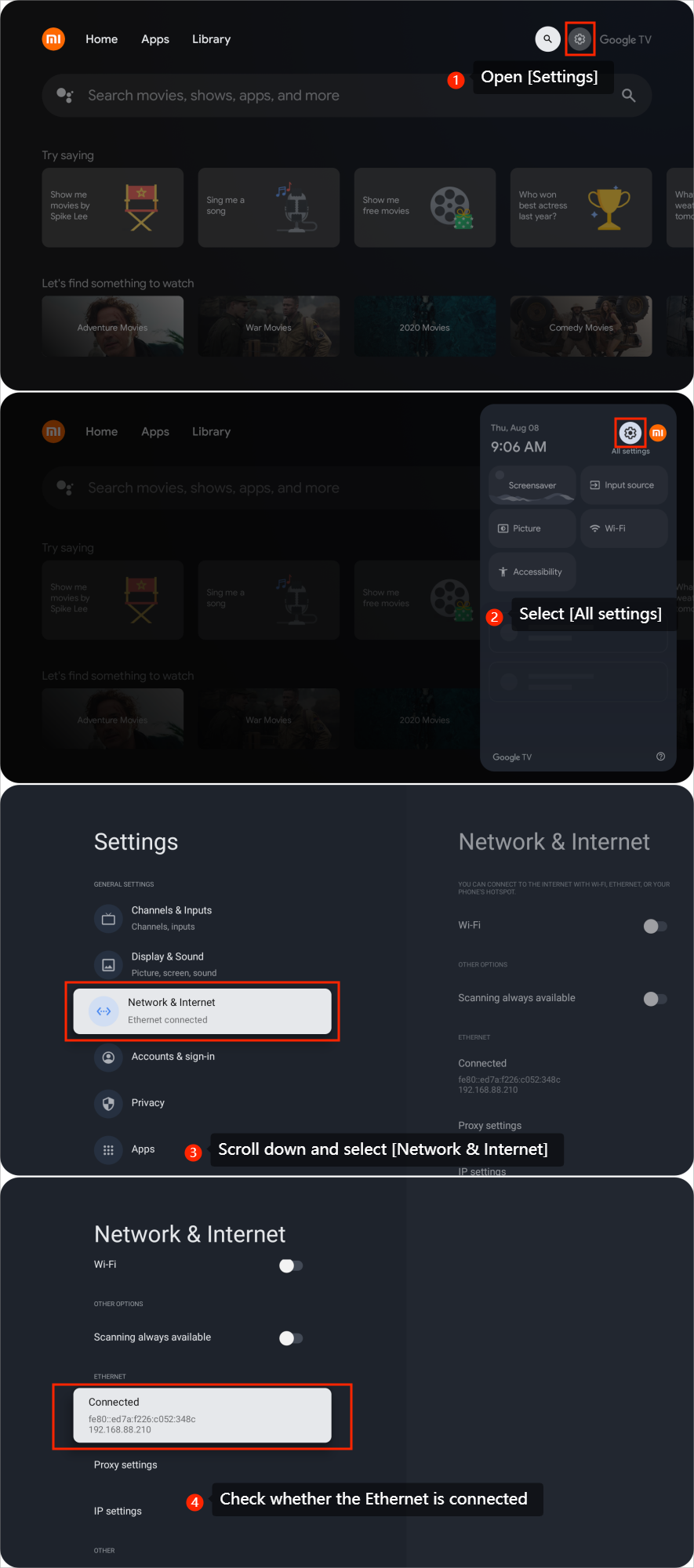
To connect the Xiaomi TV A Pro 75 2025 to a wired network, please plug the Ethernet cable into the Ethernet port on your TV and take the following steps:
1. Open [Settings];
2. Select [All settings];
3. Scroll down and select [Network & Internet];
4. Check whether the Ethernet is connected.
Note:
To connect to a wired network, you need to turn off Wi-Fi first.
To connect the Xiaomi TV A Pro 75 2025 to a wired network, please plug the Ethernet cable into the Ethernet port on your TV and take the following steps:
1. Open [Settings];
2. Select [All settings];
3. Scroll down and select [Network & Internet];
4. Check whether the Ethernet is connected.
Note:
To connect to a wired network, you need to turn off Wi-Fi first.
Does it help?
Yes
No