

How to adjust the frame rate of the videos on the POCO F6?
Frame rate, measured in frames per second (fps), determines how many images are displayed each second in a video. A higher frame rate, like 60 fps, results in smoother motion and clearer details, especially in fast-moving scenes. It also allows for effective slow-motion effects. Lower frame rates, such as 24 fps, provide a classic cinematic look. Frame rate impacts the overall viewing experience by influencing the fluidity and clarity of motion in the video.
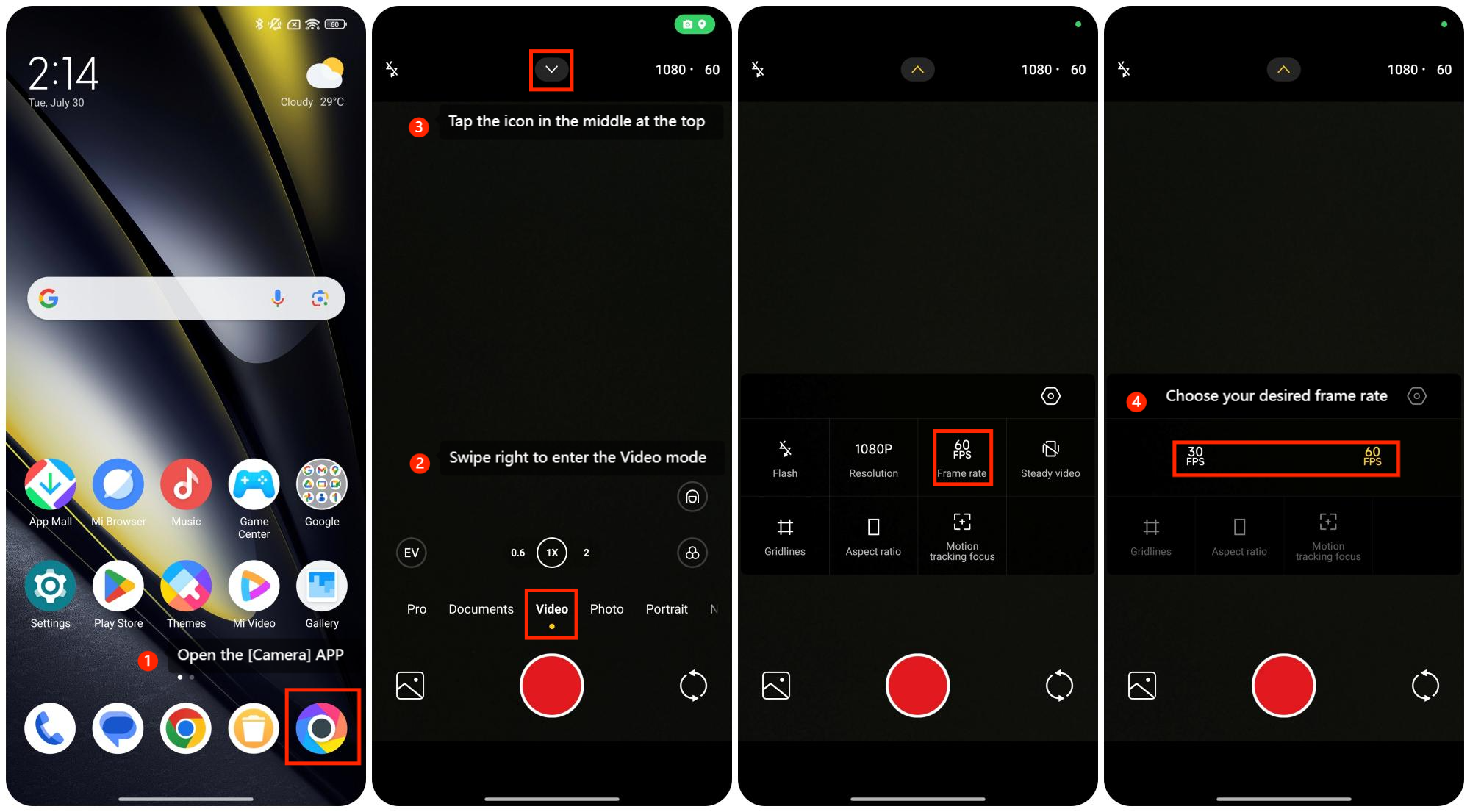
To adjust the frame rate of the videos on the POCO F6, please refer to the following steps:
1. Open the [Camera] APP;
2. Swipe right to enter the Video mode;
3. Tap the icon in the middle at the top;
4. Choose your desired frame rate: 30 FPS or 60 FPS and then you can fully enjoy this feature.
To adjust the frame rate of the videos on the POCO F6, please refer to the following steps:
1. Open the [Camera] APP;
2. Swipe right to enter the Video mode;
3. Tap the icon in the middle at the top;
4. Choose your desired frame rate: 30 FPS or 60 FPS and then you can fully enjoy this feature.
Does it help?
Yes
No